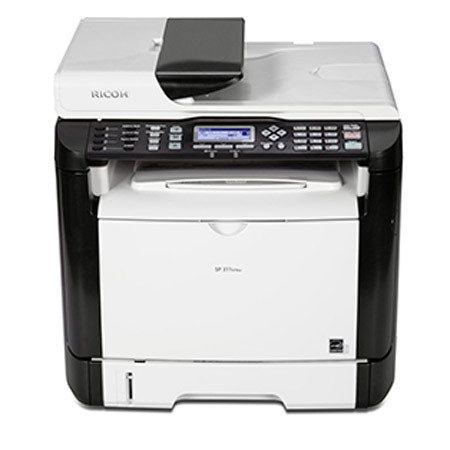
Ricoh Aficio SP 311SFNw B&W All-in-One Wireless Laser Printer, 30ppm Print Speed, 1200x600 dpi, 250-Sheet Paper Tray Capacity, USB 2.0 - Print, Copy, Scan, Fax
SKU: RC407240
This item is no longer available.
Share:
Overview
Compare
Learn
Specs
Protection
Reviews about this item
Review Summary
2015-02-13T19:00:00
Rated 5 out of 5
Excellent Home Printer
Have been using this since September 2014 without problems and with almost 1000 pages run. I scan frequently and have shortcuts in address book for emails and scanning to computer (Windows 8.1pro). A note to a previous reviewer who had difficulties printing and scanning -- It is a good practice when installing any printer to disable DHCP on the unit and create a static address. This eliminates the DHCP server from issuing new IP addresses and making the printer unreachable. Adding to this, when you are setting up scan to folder, you'll save yourself similar DHCP headaches by using the computer host name in the folder path instead of the IP address. This unit will handle SMB scanning perfectly with the proper operating system. Unfortunately any Windows Home version (this includes XP Home versions and Win 7 Home Versions) isn't robust enough to handle much beyond basic networking tasks. Upgrading to Windows Pro versions (or above)would solve this. I have not tried scanning to a regular Win8 or 8.1 computer so I cannot comment on issues there. I have used the fax numerous times with no issues. I am very satisfied with this Ricoh product and would highly recommend (especially at the discounted price).
BRYAN B.
2015-01-31T19:00:00
Rated 5 out of 5
A great deal if it's onsale
I bought this for home office use. It took 10 minutes to get up setup, connected to the wireless network and printing. I know a couple of the reviewers had trouble with the scanning function. I actually prefer to not install scanning software on my PC (it's often bloated and has lots of features I don't use). All I need is a simple and fast way to create PDF's. This machine does that. It can scan to a network or FTP location without the need of a PC. Press a shortcut destination on the machine, put my document in the feeder and hit start. That's all there is to it. (I did have to connect it to a shared network folder first though) It got one of the best web interfaces I've seen in a small printer. Much of the configuration can be done through it instead of the operation panel.
NATE H.
2015-01-21T19:00:00
Rated 1 out of 5
No Scanning Software
Great print quality, however 2 major problems! 1 printer does not update its ip address when router assigns it a new one, (that happens at least once a day) and then the printer appears offline, you need to manually enter correct ip either into printer or computer. 2 biggest problem is it does not come with scanning software, after trying really hard i was only able to get software that will operate the scanner but not the auto document feeder scanner, so if you scan multiple documents forget about it with this device.! if you just want a printer and will be connecting it wired its a great scanner.
David
2014-09-08T21:00:00
Rated 1 out of 5
The devil resides in this thing.
I thought this attractive and compact contraption would be just the ticket for a home office. Well, not so much. For starters, the machine cannot "push" a scan from itself across a Windows 7 Home Anything network because the system isn't sufficiently robust, apparently, to reconcile the permissions and what-not required (and you cannot manually set the permissions and what-not either - you can try, but it's hit or miss, and if you get it working today, tomorrow it won't work again). There's no software provided to "pull" a scan across the network, wirelessly, either - but I've had some luck with the thing tethered to the router via Ethernet, or tethered to a PC via USB - using the Windows7 embedded scan software. Then, the only difficulty is getting the PC to recognize the thing as a scanner (if it does-so today, it probably won't tomorrow - just do a restart and see.) Mine refuses to send or receive faxes - just discovered this - and, of course, there's no-one to call... just submit an e-mail to tech support and they'll get back to you (that is, if the "contact-us" page will even allow you to make a submission). It prints nicely - although if your router, for whatever reason, changes the machine's IP address, your PC won't find it. You'll have to find a listing of attached devices on your network, determine the printer from among them, and update its LAN address on your system and on any others connected to the network. Are we having fun yet? In summary, this is an IT guy's guarantee of perpetual employment. I've been fooling with PCs and networks for over thirty years, and this thing just confounds me. Slow support, sketchy software and drivers, and recalcitrant hardware... look elsewhere, folks...
Jeep g.
2014-04-21T21:00:00
Rated 5 out of 5
100% Happy with this Beautiful Printer
Looks good. Installation went well. Did not try fax yet but all other functions are superb. Printing quality is excellent. I think I made a right decision.
Rama
Ricoh SP 311SFNw Specifications
Related Articles & Videos
About Ricoh SP 311SFNw
Key Features
- Standard hardwired USB 2.0 High Speed & 10/100Base-TX Ethernet interfaces
- Standard IEEE 802.11 b/g/n Wireless LAN (Infrastructure & Ad Hoc modes)
- 600 x 600 dpi & 1200 x 600 dpi printing at 30-ppm
- PCL 6 + 80 PCL fonts
- USB & Network TWAIN/WIA Scanning at 1200 x 1200 optical dpi
- Scan-to-Email/Folder/FTP at 600 x 600 dpi
What's in the box:
- Ricoh Aficio SP 311SFNw B&W All-in-One Laser Printer
- Starter All-in-One Toner Cartridge (Yield: 1000 Pages)
- 250-Sheet Tray
- 50-Sheet Bypass Tray
- Automatic Document Feeder
- Power Cord
- Ricoh 1 Year Warranty