
This item is no longer available.
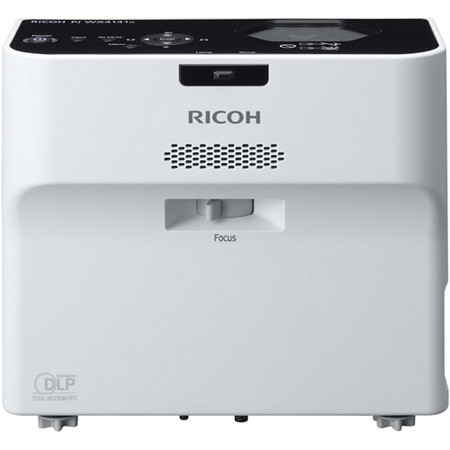
• Using innovative, free-form mirror technology, this projection system projects high-quality, high-definition images onto flat surfaces from only inches away (between 4.6" and 9.8")
• The PJ Wx4141N produces at least 3,300 lumens with 1280 x 800 WXGA resolution for exceptional clarity
• Its prism surface controls light reflection and delivers greater contrast for crisper images. And, its innovative audio system lets you choose from multiple sensory modes (standard/narration/music), so you can provide more comfortable audio performance to accommodate different types of presentations
• The PJ Wx4141N projector will automatically detect keystone distortion and balance images for clarity
• Presenters can manually adjust the colors of projected images in relation to the background color on the wall, whiteboard or blackboard
• In addition, its intuitive control panel and handheld remote control let you navigate menu screens and access other innovative features without missing a beat during the presentation
• The PJ Wx4141NI transforms conventional screens into interactive whiteboards with Ricoh PJ Interactive Software
• With Ricoh PJ Interactive Software, presenters can share screens remotely, add notes directly to presentations and tailor every presentation, even when presenting to multiple audiences in multiple locations
• For advanced interactive features, users can add Luidia eBeam software no external sensors or wires are necessary. Using DNLA, you can even project images from your smartphone or tablet as part of your presentation
• In addition, the PJ Wx4141NI is designed to support paperless meetings via Apple iPad-based conferences with Ricoh's Smart Presenter app and Ricoh's Conference Center on-site server
• Choose from LAN or wireless networking for easy configuration and operation
• The projection system will search for available networks automatically, so you can connect to any Macintosh or Windows computer and be running in moments
• Skip the PC altogether: Save files to a USB memory drive and take the presentation with you
• Use the HDMI port to play movies from DVD and Blue-ray players even those shot in 3D format
• Ricoh's Web Image Monitor and embedded utility software let you configure settings and control functions remotely
• Certified for use with Crestron RoomView and AMX NetLinx conference control systems for incredible control of the projection system from any browser
Precision and Performance, Up Close and Personal
When you're in the middle of a presentation, do you want your audience to notice the message or the projection system? The RICOH PJ Wx4141N/PJ Wx4141NI packs cutting edge innovations including network connectivity, remote management and optional interactive features into a space-saving footprint for more compelling, less distracting presentations. The ultra-short throw projector can be placed within inches of any flat, vertical surface in offices, classrooms and public spaces for bright, crisp displays up to 80 inches diagonal without shadows, noise or glare. Its compact, lightweight design simplifies transport or you can easily mount it on a wall or set it on a table for everyday convenience. Use it to replace traditional whiteboards and make every presentation more interactive and engaging.
Bring Clarity and Convenience Closer
Turn any space into a multimedia showroom with the Ricoh PJ Wx4141N/ PJ Wx4141NI. Using innovative, free-form mirror technology, the projection system projects high-quality, high-definition images onto flat surfaces from only inches away (between 4.6" and 9.8"). It produces at least 3,300 lumens with 1280 x 800 WXGA resolution for exceptional clarity. Its prism surface controls light reflection and delivers greater contrast for crisper images. And, its innovative audio system lets you choose from multiple sensory modes (standard/narration/music), so you can provide more comfortable audio performance to accommodate different types of presentations.
Easy to Make a Big Impact
The hard work should come before your next presentation not during it. Whether you set the Ricoh PJ Wx4141N/PJ Wx4141NI on the edge of a table or near a wall or have it permanently installed, simply plug it in and start the show. The projector will automatically detect keystone distortion and balance images for clarity. Presenters can manually adjust the colors of projected images in relation to the background color on the wall, whiteboard or blackboard. In addition, its intuitive control panel and handheld remote control let you navigate menu screens and access other innovative features without missing a beat during the presentation.
Interact effortlessly
Get your audience in on the action - and get traditional whiteboards and markers out of the way. The PJ Wx4141NI transforms conventional screens into interactive whiteboards with Ricoh PJ Interactive Software. With it, presenters can share screens remotely, add notes directly to presentations and tailor every presentation, even when presenting to multiple audiences in multiple locations. For advanced interactive features, users can add Luidia eBeam software no external sensors or wires are necessary. Using DNLA, you can even project images from your smartphone or tablet as part of your presentation. In addition, the PJ Wx4141N and PJ Wx4141NI are designed to support paperless meetings via Apple iPad -based conferences with Ricoh's Smart Presenter app and Ricoh's Conference Center on-site server.
Communicate More Effectively
The versatile Ricoh PJ Wx4141NI is designed specifically to reach more people in more places. Facilitate a productive multimedia meeting in boardrooms, offices and even hallways. Engage audiences with interactive instructional multimedia displays in classrooms, laboratories and other locations. Connect to audio-visual equipment and show movies, events and more on the big screen. Or, grab the attention of viewers with vibrant and customizable digital signage that can be programmed to power on or off at any time automatically. Combine it with Ricoh's UCS P3000 videoconference system to present to and interact with remote audiences in multiple locations.
Manage Conveniently
Make faster, stronger connections. Choose from LAN or wireless networking for easy configuration and operation. The projection system will search for available networks automatically, so you can connect to any Macintosh or Windows computer and be running in moments. Or, you can skip the PC altogether. Save files to a USB memory drive and take the presentation with you. Use the HDMI port to play movies from DVD and Blue-ray players even those shot in 3D format. Ricoh's Web Image Monitor and embedded utility software let you configure settings and control functions remotely. Plus, it's certified for use with Crestron RoomView and AMX NetLinx conference control systems for incredible control of the projection system from any browser.