
This item is no longer available.
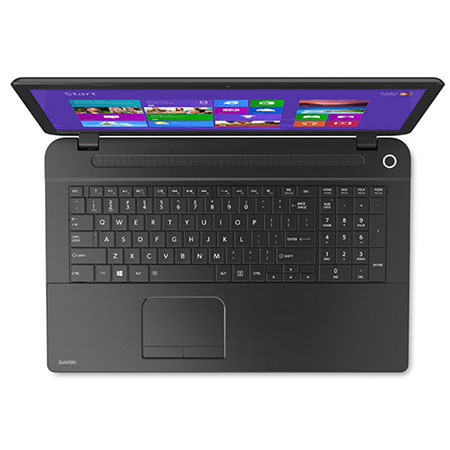
The Toshiba Satellite C75D-B7230 17.3" Notebook Computer from Toshiba features a textured resin design with a jet black finish. The 17.3" TruBrite LED-backlit display has a 16:9 aspect ratio and a HD+ 1600 x 900 native resolution, supported by integrated AMD Radeon R4 graphics. The screen can play 720p HD content without upscaling or letterboxing.
The system is powered by a quad-core 2.0 GHz AMD A6-6310 processor. It also has 6GB of 1333 MHz DDR3 RAM, a 750GB 5400 rpm hard drive, a SuperMulti DVD burner, a multi-format media card reader with support for SD, SDHC, SDXC and MMC (miniSD and microSD are also supported, but require an adapter), 10/100 Mbps Fast Ethernet, 802.11b/g/n Wi-Fi, an integrated webcam and a microphone. There are also built-in stereo speakers.
Windows 8.1 is the installed operating system. Windows 8.1 improves the user experience of Windows 8 with several additions and changes. The Start button returns, but has two limited core functions. A left click takes you to the redesigned Start screen featuring tiles that update in real-time. A right click brings up an advanced menu where you can access the Device Manager, Control Panel and more. You will also be able to boot directly to the traditional desktop screen instead of the Windows 8.1 Start screen. Windows 8.1 provides a unique user experience that differs from previous versions of Windows.
Toshiba Satellite C75D-B7230
Quad-Core AMD A6-6310 Performance
The Satellite C75D houses an AMD A6-6310 processor. Its quad cores can reach a stock speed of 2.0 GHz. The processor can also be overclocked up to 2.4 GHz, thanks to AMD Turbo Core technology. With a dedicated 2MB L2 cache and 6GB of 1333 MHz DDR3 RAM, you'll be able to multitask quickly and efficiently.
17.3" TruBrite LED-Backlit Display
The 17.3" TruBrite widescreen display is backlit with LED lights for lower power consumption and better energy efficiency than their CCFL counterparts. The screen has a 16:9 aspect ratio and a glossy coating for vibrant color. The HD+ 1600 x 900 native resolution is powered by integrated AMD Radeon R4 graphics, which can natively play 720p HD content without upscaling or letterboxing. You can also output to an external display via the HDMI port.
Stay Connected
The Toshiba Satellite C75D can connect to a home or public wireless network via 802.11b/g/n Wi-Fi. If you require a more reliable Internet connection, you can utilize the 10/100 Mbps Fast Ethernet RJ-45 LAN jack.
USB 3.0
USB 3.0 can provide data transfer speeds of up to 5 Gbps, which is 10 times faster than USB 2.0. USB 3.0 is also backwards compatible with USB 2.0 as well.
Resolution+
With Toshiba Resolution+ Upconvert Technology for Media Player, you'll be able to upscale standard definition DVD content to HD quality for sharper pictures and more vibrant colors. Please note that viewing enhancements may vary depending upon content quality, display device capability, functionality and settings.
Eco Utility
Quickly adjust the settings and power plan of your Toshiba Satellite C75D and monitor your ongoing power usage with just a click.
EPEAT Gold Registered
The Satellite C75D has an EPEAT Gold rating.
ENERGY STAR Qualified
The Satellite C75D is qualified with ENERGY STAR for energy efficiency.
Windows 8.1
The Return of the Start Button
After many requests from Windows users, the Start button makes its return in Windows 8.1. While it may not be exactly the same as its predecessor in Windows 7, the Start button has two core functions. A left click on the Start button will take you to the Windows 8.1 Start screen featuring live tiles. A right click on the Start button brings up an advanced menu where you can access the Device Manager, Control Panel, Network options and more.
Boot Directly to the Desktop
Windows 8.1 gives you the choice of booting to the Windows 8.1 Start screen with live tiles or booting to the familiar desktop screen of Windows 7. Users can also boot directly into an app or app view if they choose to.
To the Cloud
With Windows 8.1, when signed in using your Microsoft account, you'll have instant access to your personal Start screen, themes, language preferences, browsing history and browser favorites. You can also connect to services such as Microsoft Outlook, Facebook, Linkedin, Twitter and more.
Windows Store
In the Windows Store, you can search for or browse thousands of apps. Choose from the featured apps or grab one of the most frequently downloaded apps to see what all the hype is all about. You can also see how other people rate apps. For certain apps, you can try it out before you buy it, so you can make sure you absolutely want an app before you spend your hard-earned money on it.