
This item is no longer available.
Superstylish. Super powerful
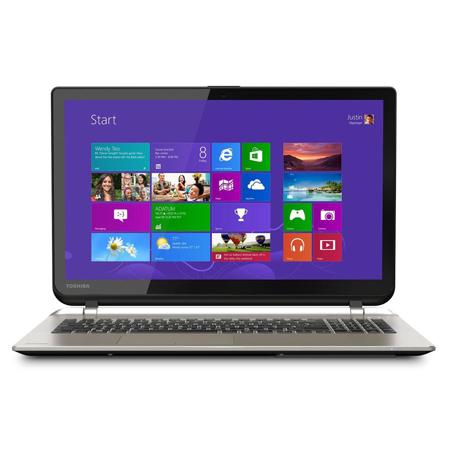
The 15.6" Satellite S50 laptop series is an all-purpose entertainment PC offering smart performance, design and technologies for those who want to step up from "mainstream" and enjoy superior multitasking, HD media and creativity.
LED Backlit Display
Last longer, use less power and warm up quicker with the unique LED backlit display.
It's all at your fingertips. Touchscreen displays
What makes the world go around It's right on the tip of your finger - or fingers - thanks to the touch-sensitive displays on most Toshiba PCs and tablets. Explore, discover, have fun, type away or just get things done by taking Windows 8 or Android technology for a joy ride. Romping across today's exciting digital landscape has never been so easy.
Tap
Tap once and open whatever you have your finger on, as you would with a left-click of the mouse. Hold for a few seconds and - like right-clicking - you might learn more about what interests you or reveal a menu specific to what you're doing.
Scroll
Easily sift through web pages, long lists, images and files with a natural swirling motion. You've never sorted things out quite so quickly.
Zoom in and out
Study the details of a picture. Read the fine print. Or simply punctuate your latest point. The touch screen display lets you zoom in and out with a simple two-finger motion.
Drag and Drop
Touch the image or file you want to select with a simple touch of a finger. Then simply drag and drop the file wherever you want it to go.
Rotate
Sometimes you want to adjust the onscreen image clockwise or counter-clockwise-for a presentation, a photo album or simply to enjoy better viewing. The touch screen makes it a cinch-using just the tip of your finger.
Webcam
The built-in webcam on this PC makes it easy to Skype and chat live with friends and family or videoconference with co-workers. You'll also be able to take and store still pictures.
Bluetooth
Sync your smart phone and other portables or expand your PC's entertainment potential with external speakers or headphones - all without cords.
Touch Pad with Multi-Touch Control
So you can more easily work with web pages, long documents and more, their laptops offer a touch pad with multi-touch control. Similar to what you see on today's most popular electronics, it lets you swipe, rotate, push, scroll or zoom in on the display screen with a simple brush of your fingers.
LED Backlit Keyboard
When the room's dim or the lights go down, you can keep right on typing thanks to a LED-backlit keyboard on your Toshiba Satellite laptop. Great for working on planes or in poorly lit cafes; it not only looks cool, but helps make the laptop more energy efficient too.
1GB Ethernet
Plug right in and get access to the Web or other networks to work, communicate and enjoy yourself.
Harman/Kardon speakers
harman kardon stereo speakers bring an added dimension to music, movies and gaming with rich, immersive audio. Enjoy deeper, richer lows, crisper highs and more lifelike.
Memory Card Reader
Transfer files easily from your digital camera, camcorder, MP3 player or smart phone, sharing home movies and playlists with SD cards, Memory Sticks and more.
USB 3.0
Have the need for speed Select Toshiba Satellite laptops have what it takes - thanks to new USB 3.0 technology. You'll get maximum performance when connecting the latest external devices, with blazing-fast transfer speeds. Unlike eSATA, your USB 3.0 devices won't require a separate power cable. Ultrafast and one less cable to manage -how great is that
USB Sleep-and-Charge
Simplifying your life Now Toshiba laptops can do it in their sleep, thanks to USB Sleep-and-Charge ports. It's the easiest way ever to charge your smart phone, MP3 player or other portable electronics, even when your laptop is turned off. Because, believe it or not, sometimes you won't want to boot your laptop all the way up or keep it all the way on.
Plug into a portable power station
Devices that are USB powered are so essential, yet so needy when it comes to power. But now you can keep them all happy, helpful and showing full bars with a Toshiba laptop that offers USB Sleep-and-Charge ports. And your notebook doesn't have to be awake to do it. Now that's convenience!
You're well connected
Select Toshiba laptops offer up to four convenient USB Sleep-and-Charge ports. So even if you've hooked up an external mouse and keyboard, you'll still have options for synching and charging your portable electronics-without the expense and hassle of adding an external USB hub.
Have ports, will travel
USB Sleep-and-Charge ports make traveling easier too. When you and your gadgets come back to the hotel room feeling a bit drained, just plug in and charge them right back up while you and your laptop are asleep. As for those bulky AC adapters that came with your gear, you can leave them back at home.
Eco Utility
Now, Toshiba laptops not only set you free, but put you on the road to greener computing. Laptops equipped with their power-saving eco utility, offer improved energy management. With a single click you can switch to a pre-configured power plan that will not only let you go green, but let you see the measurable savings too.
Measure up the power savings
Giving you the ability to easily click it on and off your laptop, the Toshiba eco utility helps you realize measurable energy savings with continuous use. It also activates a light showing you're in the Eco Mode (only on models with an eco- button).
Get greener over time
The Toshiba eco utility also makes it simple to monitor your power usage daily, weekly and monthly. So you can easily spot trends, seeing the times and situations where you're using the most energy or how much you've saved by putting your laptop in the Eco Mode.