DeskTop Video Editing
Editing Systems
Blackmagic Design BDLKDUO DeckLink Duo, 2 SDI Inputs
Blackmagic Design

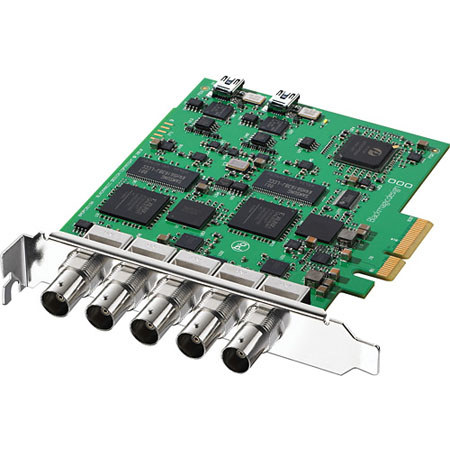
Blackmagic Design DeckLink Duo with 2 SDI Inputs and 2 SDI Outputs, Switchable Between SD and HD

SKU: VDBMDDUO MFR: BDLKDUO
Why Adorama?
Easy Returns, Fast Shipping, Trusted for over 35 years.

Need help? Call 800-223-2500 / 212-741-0052

Our Price

$470.25
Free shipping
Qty:

Add to Wishlist

About this item

Blackmagic Design DeckLink Duo is perfect for developers who need two completely independent capture and playback streams in and out of a computer, as both capture and playback channels are completely independent. There are two SDI inputs and two SDI outputs plus a common tri-sync/black burst reference. DeckLink Duo appears as two independent SDI cards to the computer, but only uses a single PCI Express slot. DeckLink Duo is perfect for servers where there are multiple streams or simultaneous capture and playback per system. DeckLink Duo is compatible with Windows, Mac OS X and Linux.

What's Included With This Item

  • Blackmagic Design DeckLink Duo
  • Software
  • Blackmagic Design 3 Years Limited Warranty

Key Features

  • Hardware Down Converter: This lets you use the main SD/HD-SDI output for HD, while simultaneously using the SD-SDI, S-Video and composite outputs for standard definition.
  • Two Capture Cards in One: The new DeckLink Duo is like having two DeckLink cards in one! DeckLink Duo is perfect for developers who need two completely independent capture and playback streams in and out of a computer, as both capture and playback channels are completely independent.
  • Incredible Analog Connections: DeckLink Studio includes enhanced analog connections to make it easy to connect to a wider range of analog broadcast equipment.
  • True Professional Quality Audio: DeckLink Studio features a massive 4 channels of balanced professional analog audio in and out, as well as 2 channels of AES/EBU digital audio in and out, for broadcast quality and sample accurate AV sync.
  • High Quality: For highest quality digital broadcast workflows, DeckLink cards include incredible 10 bit SD/HD-SDI video with low SDI jitter, combined with AES/EBU digital audio with a high performance linear phase digital filtered sample rate converter.
  • Mac OS X, Windows and now Linux: DeckLink cards are fully compatible with Mac OS X, Windows and now Linux! The new Media Express 2.0 is included, so you can capture and playback DPX, DVI and QuickTime media all platforms with full compatibility!
  • Connect to Anything: DeckLink Studio includes highest quality 10 bit SDI video combined with enhanced analog connections to support a massive range of video equipment.
  • Built in SD Keyer: When working in standard definition, DeckLink cards include the most amazing quality digital internal keyer that lets you key RGBA images over the video input.
  • Compatible with Popular Video Software: DeckLink cards are perfect for editing, broadcast graphics and digital effects work with built in support for your favorite video software such as Apple Final Cut Pro, Adobe Premiere Pro, Adobe After Effects, Adobe Photoshop, eyeon Fusion and many more.
  • Loads of Free Software Utilities: DeckLink cards include the Media Express deck control software which lets you control a deck remotely via RS-422 for capture and playback of DPX, AVI and QuickTime clips with timecode accuracy. Media Express is supported on Mac OS X, Windows and Linux.

Technical Specs

SDI Video Input 2 x 10 bit SD/HD independently switchable.
SDI Video Output 2 x 10 bit SD/HD independently switchable.
Analog Video Output None
HDMI Video Output None
SDI Audio Input 8 Channels per input, embedded in SD and HD.
SDI Audio Output 8 Channels per output, embedded in SD and HD.
Analog Audio Input None
Analog Audio Output None
HDMI Audio Input None
HDMI Audio Output None
AES/EBU Audio Input None
AES/EBU Audio Output None
Sync Input 1 x common sync input. Blackburst in SD, 720p50, 720p59.94, 1080i50 and 1080i59.94 formats or Tri-Sync in any HD format.
Device Control None
Computer Interface PCI Express 4 lane, compatible with 4, 8 and 16 lane PCIe slots.
HD Format Support 720p50, 720p59.94, 720p60, 1080PsF23.98, 1080p23.98, 1080PsF24, 1080p24, 1080PsF25, 1080p25, 1080PsF29.97, 1080p29.97, 1080PsF30, 1080p30, 1080i50, 1080i59.94 and 1080i60.
SD Format Support 625/25 PAL, 525/29.97 NTSC and 525/23.98 NTSC.
SDI Compliance SMPTE 259M and 292.
Multiple Rate support SDI video connections are switchable between standard definition and high definition. SDI switches between 270 Mb/s standard definition SDI and 1.5 Gb/s HD-SDI.
Video Sampling 4:2:2
Color Precision 10-bit
Color Space 4:2:2 YUV
SDI Metadata Support VITC read for 3:2 pulldown removal.
VANC capture and playback using up to 3 lines of video in file. HD RP188. Closed captioning.
Audio Sampling Television rate of 48kHz and 24 bit.
HDMI Configuration None
HDMI Resolution None
HDMI Color Precision None
Copy Protection For legal reasons HDMI input is unable to capture from copy protected HDMI sources. Always confirm copyright ownership before capture or distribution of content.
Colorspace Conversion Hardware based real time.
HD Down Conversion HD to SD on video capture or video playback.
HD Up Conversion SD to 720HD or 1080HD on video capture.
Cross Conversion 720HD to 1080HD on video capture.
Real Time Effects Apple Final Cut Pro internal effects in DV, DVCPRO HD, ProRes and uncompressed on Intel Mac OS X. Adobe Premiere Pro internal effects in DV, DVCPRO HD, MJPEG and uncompressed.
Software Included Media Express, Disk Speed Test, LiveKey, Blackmagic System Preferences and Blackmagic driver on Mac OS X. Media Express, Disk Speed Test, LiveKey, Blackmagic Control Panel and Blackmagic driver on Windows. Media Express, Blackmagic Control Panel and Blackmagic driver on Linux.
Firmware Upgrade Firmware built into software driver. Loaded at system start or via updater software.
Minimum System Requirements for Mac OS X Mac OS X 10.5 Leopard, Mac Pro Configuration
Mac OS X 10.5 Leopard, PowerMac G5 Configuration
Mac OS X 10.4 Tiger, Mac Pro Configuration
Mac OS X 10.4 Tiger, PowerMac G5 Configuration
Mac OS X 10.3 Panther, PowerMac G4 & G5 Configuration
Mac OS X 10.2 Jaguar, PowerMac G4 Configuration
Minimum System Requirements for Windows Microsoft Windows XP Professional with Service Pack 3.
Microsoft Windows XP Professional x64 Edition with Service Pack 2.
Microsoft Windows Vista Ultimate 32-bit with Service Pack 1
Microsoft Windows Vista Ultimate 64-bit with Service Pack 1
Windows 7 32-bit
Windows 7 64-bit