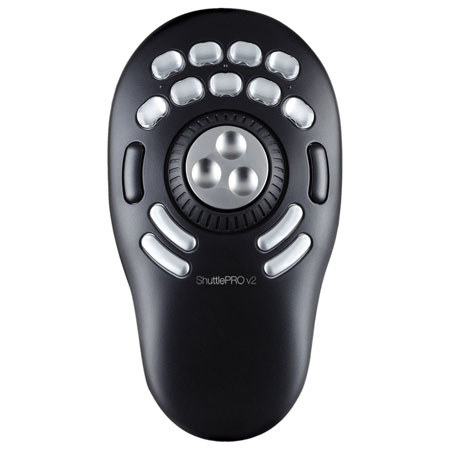
Contour Design Shuttle Pro Version 2.0, Multi-button Jog & Shuttle Control, for Mac & Windows. Black
SKU: VDCSPV2
This item is no longer available.
Share:
Overview
Compare
Learn
Specs
Protection
About Contour Design Shuttle Pro Version 2.0, Shuttle Co
Multi-button Jog & Shuttle Multimedia Control Surface.... Sleek innovative design, pre-configured for many of today's popular applications, advanced programmability, and ease of use... in short, the perfect marriage of form and function.
The ShuttlePRO V.2 is a powerful productivity enhancement tool for video and audio editors. The ShuttlePRO V.2 even comes pre-configured for many of the leading Audio and Video applications. You can also easily customize the ShuttlePRO V.2 for virtually any application.
The ShuttlePRO V.2 is designed for ergonomic integrity and maximizing productivity, allowing one-hand access to the fully programmable buttons and jog/shuttle knob. Nine (9) of the buttons have removable keycaps for easy labeling and referencing. The inner ring or 'jog' rotates through 360 degrees and provides precision frame by frame control.
The outer black ring or 'shuttle' is rubberized and spring-loaded. It facilitates fast forward and rewind. You can also use the jog and shuttle for many other purposes such as scrolling, volume control, and sequencing.
With Key Composer, users can now assign multiple keystroke combinations, or macros, to execute from a single button on the ShuttlePRO V.2. These macros can be executed either all at once, or step by step, giving ShuttlePRO V.2 users much more control over their applications. Key Composer provides users many productivity enhancements, including:
- rapid cycling through application tools and windows, - execution of complex multi-step tasks with the touch of one button, and - access to multi-key command shortcuts.
The ShuttlePRO V.2 is pre-programmed to make editing fast and easy right out of the box for many leading audio and video applications, providing productivity for users across their entire production workflow.
Supported applications include Apple Final Cut Pro® and Final Cut Express®, Avid Express DV®, Adobe Premiere Pro ® and Audition®, Cakewalk SONAR®, Digidesign ProTools®, Emagic Logic Audio®, MOTU Digital Performer®, Pinnacle Edition® and Commotion®, Sonic Foundry ACID®, Sound Forge® and Vegas Video®, Steinberg Cubase® and Nuendo®, and many more.
Through an intuitive control panel interface, the ShuttlePRO V.2 is easily programmed to work with virtually any application.
Contour Design Shuttle Pro Version 2.0, Shuttle Co Features
- Software Features Pre-configured for dozens of applications
- Monitors the application you are in and automatically switches settings
- Multiple settings per application
- Easily add/edit your own custom settings
- Hardware Features Fifteen (15) fully programmable buttons on ShuttlePRO V.2
- Thirteen (13) fully programmable buttons on ShuttlePRO
- Super smooth jog knob for frame by frame navigation and control - ShuttlePRO V.2 features new alloy knob for professional feel
- Spring-loaded and rubberized shuttle knob
- Comfortable, ergonomic shape and design