2018-09-07T04:07:37
The drive has been working perfectly. No dropped connections to my MacPro as I had experience with prior models from Lacie!
Worth a try, especially keeping in mind the excellent return policy Adorama has should you not like the drive.
JOHN B.
2018-08-08T16:06:52
Rated 3 out of 5
Slick but not very reliable
Works ok most of the time. But time and again, I would get a message Eject the drive before unplugging it. Wrong. It turned itself off on its own. Why? I have no idea.
DMITRY A.
2018-07-22T12:13:33
Rated 5 out of 5
Great Product, Easy To Set Up, Fast
I've been using LaCie drives for over 20 years as a graphics professional and professor. I just bought this 4 TB LaCie with a faster 7200 RPM to replace my other external LaCie Drive that had been working non-stop connected to my computer for over ten years. Easy to set up, and the 7200 RPM drive you'll notice quite a difference in file management with large graphic files. Great well designed product, great company.
ALLAN W.
2018-05-10T09:03:24
Rated 5 out of 5
Easy to setup as a backup harddruve
Easy setup. This is my second Lacie that I use with my Mac.
FRANCES S.
2018-04-20T06:02:47
Rated 5 out of 5
good product/service
good product/service I'm happy with the transaction.
John D.
2018-01-23T14:31:13
Rated 4 out of 5
Everything seems to be OK
Everything seems to be OK. I am positive at this time that I could have gotten a newer item (Larger and more modern) at a substantially lower price. This item is no longer manufactured and should have been discounted. It also took almost 2 weeks to get it via USPS. 30 miles. They also charged me sales tax from NY when I'm from NJ. (NOT COOL)! Because I have a PO Box I believe that Adorama decided to make me wait. Everything else is OK!
LOUIS M.
2018-01-10T16:45:49
Rated 5 out of 5
Get the job done!
I have two of these, first Gen and 2nd Gen. I choose to drag and drop to do back ups that way I don't leave HDD running all the time, and extending the life of the drive. !st Gen is about 4 years old. Thunderbolt is the ONLY way to go if your running an older MAC with Thunderbolt 2 ports.
Paul D.
2018-01-05T08:42:08
Rated 5 out of 5
Very Fast External Hard Drive
The Lacie d2 USB 3.0 (4 TB) is very fast and quiet. The read
speeds can reach up to about 220 MB/sec, and the write speeds reach about 210 MB/sec.
These speeds are faster than my older style d2 Quattro (2 TB).
The only negative is that the unit often goes into a "sleep" mode which requires a few second delay when first plugging it in, or when accessing it, after a period of non-use.
I think this can be corrected with the supplied software, which I haven't studied yet.
C. Petroski
.
Christopher P.
2017-12-06T09:10:01
Rated 4 out of 5
Fast enough to edit on
I've been filling up LaCie Thunderbolt drives for years now. Each time one gets full, I buy a new one and delegate the previous drive to archive. I back each drive up on a cheap USB drive. What I love about these drives is that they are fast enough to edit on. Whenever I need to pull up an archive project to make some revisions for a client, I just plug in the drive I need and go! I've never had one fail. I recently upgraded to a 4K camera, so have purchased the LaCie 6 Tb Thunderbolt RAID, and it's performing perfectly. I'll continue to buy LaCie drives as long as they keep making them!
Evan D.
2017-10-12T10:05:49
Rated 5 out of 5
Great drive!
Great drive! Awesome speed and easy to use.
PETER V.
2017-10-08T10:18:17
Rated 5 out of 5
Lacie d2 8TB thunderbolt 2
Great drive no issues!
Douglas G.
2017-10-02T00:25:05
Rated 5 out of 5
fantastic external hard drive!
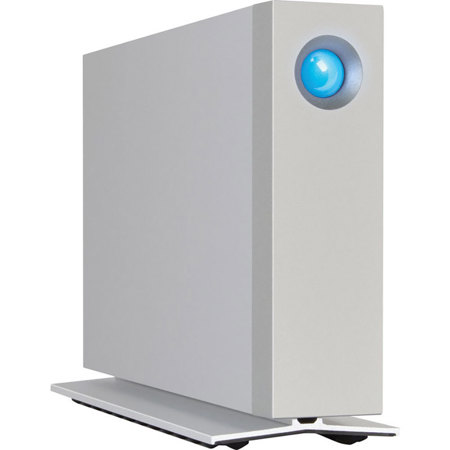
plug and play set up, and completely silent, very nice design and build quality
luc m.
2017-05-02T04:44:13
Rated 5 out of 5
Excellent, Fast Dependable
A perfect Thunderbolt companion to my iMac
RICHARD E.
2017-03-05T11:05:35
Rated 5 out of 5
Does what it's suppose to.
Purchased this as a secondary back up, was easy to partition and set up, after a few weeks working fine and is quite.
j
James A.
2017-01-18T14:03:09
Rated 5 out of 5
Perfect Addtion
As a photographer, this is a perfect addition as the repository for this year's photos. There was literally no setup time with my mac.
DAVID T.
2017-01-03T12:59:45
Rated 5 out of 5
LaCie d2 6TB Thunderbolt 2 Professional
Works great as a back up to my RAID drive.
Scott W.
2016-12-13T14:43:38
Rated 4 out of 5
Awesome disk
This disk is just awesome: latest plugs for an Apple computer, large storage and great buffer, quiet too. I actually partitioned it so I can run a separate OS with just editing softwares. Go for it!
GILLES A.
2016-12-13T11:42:53
Rated 5 out of 5
Perfect External Drive for Mac users
Sleek design. Works as advertised. Highly recommend. I have an older Mac so the fact that it is Thunderbolt 2 and not 3, did not impact my decision. No complaints with the transfer speeds.
Kevin B.
2016-12-12T07:31:45
Rated 5 out of 5
Best drive yet
My first Thunderbolt drive, it is fast and quiet. Never had a problem with Lacie drives. Easy to format software included for Mac.
CHARLES G.
2016-12-11T11:39:23
Rated 5 out of 5
LaCie d2 great buy
Happy and satisfied with this purchase .
EDWIN D.
2016-12-10T18:07:17
Rated 5 out of 5
Great speed and storage.
Perfect speed and performance for video editing. Works as promised. Reliable brand I trust.
Justin O.
2016-12-07T11:43:30
Rated 5 out of 5
Very Nice External Drive
Easy to install, very quiet, seems to perform well, haven't run a speed test yet though.
Albert A.
2016-11-09T09:15:34
Rated 5 out of 5
Quality product
Drive is as advertised. High quality construction. Very quiet and fast. Have not benchmarked it, yet, but it seems much faster than my previous drives. Setup was easy. No complaints so far. I've only been using it a couple of weeks so insufficient data to comment on reliability. My only negative is that giant, bright blue light. I really wish that they would have gone with a normal, tiny indicator light. I've covered it with a piece of aluminum tape for now.
MICHAEL T.
2016-09-08T09:33:38
Rated 3 out of 5
Nice build but overpriced.
There's no doubt Lacie has great industrial design, so the drive housing is sturdy, well built and beautiful. However, I bought this drive for the Thunderbolt 2 interface expecting to get twice the speed of my existing Thunderbolt 1 drive. I quickly discovered that's not how it works–you would have to have an SSD to take advantage of the Thunderbolt 2 speeds. The 7200rpm drive that this comes with is nearly exactly the same speed as my Thunderbolt 1, and only nominally faster than USB 3. So if I had to do it over again I would NOT buy this drive–I would buy either a Thunderbolt 1 or USB 3–same performance at half the cost.
STEVE S.
2016-08-16T11:46:32
Rated 5 out of 5
Great Desktop Back Up Unit
Completely as advertised. An easy to setup and go. Fast and the Intego Back Up Assistant works perfectly. Also using it with TimeMachine. Super Good Drive. There are cheaper ones but do you want to trust your precious photographs to an Econo drive. Not Me.
MICHAEL D.
2016-06-30T11:01:56
Rated 5 out of 5
Thunderbolt speed and extra storage
I was reaching the end of my storage space while editing a forty minute TV show, so I needed to extend the 4TB that I already had onboard. I really liked the two thunderbolt ports that allowed me to daisy chain my other Thunderbolt drive, thus leaving my iMac's second port available for importing video. I also appreciated the low price, all in all, I think this was a great purchase.
DSLRCinematographer.com D.
2016-05-16T09:54:22
Rated 5 out of 5
external drives
much easier to partition than western digital products
HENRY H.