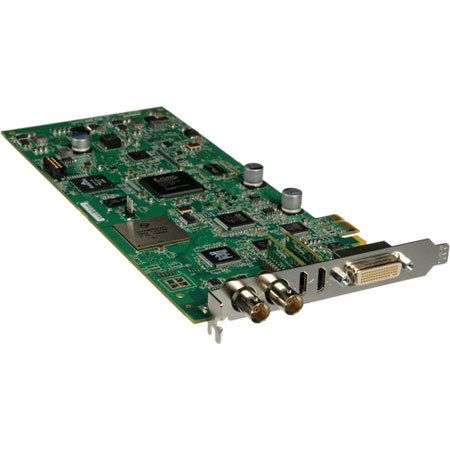
Lightning-Fast H.264 Encoding: Not only does Matrox Mojito MAX give you broadcast-quality input and output for your favorite editing app, it also turbo-charges your H.264 encoding for deliveries to the web, mobile devices and Blu-ray - in a single 3/4-length PCIe card
Editing: Adobe Premiere Pro, Final Cut Pro, Avid Media Composer, Boris Media 100
Content creation: Adobe After Effects, Adobe Photoshop, Apple Color, Apple Motion, Apple Soundtrack Pro, Eyeon Fusion, NewTek LightWave 3D
Streaming: Adobe Flash Media Live Encoder, Microsoft Expression, QuickTime Broadcaster, Telestream Wirecast
H.264 encoding: Adobe Encore, Adobe Media Encoder, Apple Compressor, Telestream Episode
Blu-ray authoring: Adobe Encore, Roxio Toast
All the I/O You Need: Matrox Mojito MAX gives you a full range of professional audio and video inputs and outputs, genlock, RS-422 machine control - plus 5.1/7.1 surround-sound monitoring on the HDMI output. See the Specifications for full details
Matrox RT Engine: The Matrox RT engine provides full-resolution, full-frame rate, full-quality, multi-layer, real-time video editing for Adobe Premiere Pro editors on the PC. It provides many of the benefits of GPU acceleration but works with any system, even laptops
Closed Captioning: Matrox Mojito MAX supports closed-captioning workflows with Final Cut Pro on the Mac and Adobe Premiere Pro on the PC
Stream from Any Camera, Anywhere: Matrox Mojito MAX is a convenient capture device for streaming live events. Choose your favorite app - Adobe Flash Media Live Encoder, Microsoft Expression, QuickTime Broadcaster, or Telestream Wirecast. Connect to any HD or SD video source via HDMI or analog
3D Production and Post: Matrox Mojito MAX can be used in a variety of scenarios to assist cost-conscious content creators in 3D stereo production and post
HD to SD Downscaling: Real-time HD to SD downscaling is performed with proper conversion of the HD color space to the SD color space. Proper aspect ratio conversion to anamorphic and letterbox are supported on Mac and PC. Center-cut is supported on the Mac
SD to HD Upscaling: Real-time SD to HD upscaling is performed with proper conversion of the SD color space to the HD color space. Footage with a 4:3 aspect ratio will be "pillarboxed", 16:9 SD footage will be scaled to full screen
Cross Conversion: Real-time cross conversion from 720 to 1080 and 1080 to 720 is supported. Real-time frame rate conversion is also supported with 2:3:2:3 and 2:3:3:2 cadences
Inexpensive HD Monitoring: Matrox Mojito MAX turns your HDMI monitor into a true-color video display you can trust, even for color grading. Thanks to the Matrox HDMI Calibration Utility, you won't need to buy expensive HD monitoring equipment
True 1:1 Pixel Representation: To accurately judge your video content, it is best to view it at its native resolution. However, some HDMI monitors scale the input signal by default. The Matrox HDMI Calibration Utility lets you easily identify if this is the case
White & Black Levels: The white level is the intensity at which the monitor will display the whitest pixel. The black level is the intensity at which a monitor will display a black pixel
White Point: The white point is the color of the white reference for a particular display. Rec 709 specifies 6500K as that reference which is equivalent to the color of a white sheet of paper when seen outdoors at noon when the sky is overcast
Gamma Response: The input-to-output response of a broadcast video monitor is a nonlinear power function called the gamma response. The Rec 709 specification defines the gamma response expected of broadcast monitors
Hue & Chroma: The Matrox HDMI Calibration Utility includes patterns that let you ensure that the intensity of the primary and secondary colors are accurate. External references such as a blue-only button or a blue gel filter are not required, provided your HDMI monitor supports 1:1 pixel mapping
Matrox Vetura Capture (Mac): Matrox Vetura Capture lets Adobe Premiere Pro, Apple Final Cut Pro and Avid Media Composer editors on the Mac quickly and easily capture to many of the QuickTime codecs that are installed on their system, without opening a complete NLE
Matrox Vetura Playback (Mac): The Matrox Vetura Playback application lets you quickly and easily play out any 1080, 720, PAL, NTSC, or smaller .mov file, including those captured with an iPhone, through your Matrox I/O device as long as you have the applicable codec installed on your system
Matrox A/V Tools (Windows): Matrox A/V Tools is a Windows application that lets you use your Matrox I/O device to quickly and easily capture and play back your audio/video assets without opening a complete NLE. It lets you capture video from your camera or VTR into AVI files on your computer
Matrox MAX H.264 Capture (Windows): H.264 is the technology common to video viewed on the web, mobile devices and Blu-ray discs. Matrox MAX H.264 Capture is a Windows application that lets you quickly capture directly to H.264 files from your camera or tapes using any Matrox I/O product with MAX
Matrox DirectShow Filters(Windows): Matrox provides source filters for Microsoft DirectShow for Windows. Applications such as Adobe Flash Media Live Encoder and VLC Player can make use of these filters. Matrox DirectShow source filters can also be used by programmers looking to write custom software