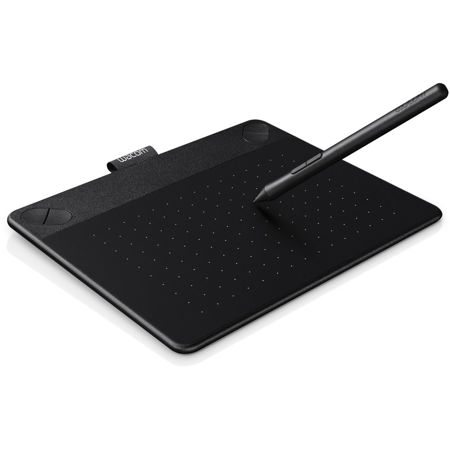
Wacom Intuos Art Pen and Touch Tablet, Small Black

SKU: WACTH490AK

This item is no longer available.

Overview
Compare
Specs
Protection

Reviews about this item

Review Summary

2018-01-23T17:30:09

Rated 3 out of 5

wacom

Good bu pen is small and not comfortable to hold.

IWONA Z.

2018-01-13T13:20:26

Rated 4 out of 5

Not all the items listed are included.

The pad worked fine with with a little bit stiff learning curve. The Shutterfly’s 8x8 photobook was not included contrary to the item description. Instead, Lynda.com’s 30 day free membership is included. I’d rather have the photobook than the membership.

PAUL S.

2017-11-14T14:55:38

Rated 5 out of 5

One of my best investments yet!

I had thought about getting one of these for quite sometime, but just didn't know if it would really make a difference. My only regret is waiting so long to finally get a Wacom tablet! It has made editing so much easier and faster. I couldn't get by without one now!

TIM T.

2017-04-07T10:19:03

Rated 5 out of 5

adult

Had a Bamboo years ago. This one is great. Would recommend it .

Don B.

2016-12-24T20:11:20

Rated 4 out of 5

Intuos

This seems like a great drawing tablet so far. My daughter loves it and we are looking forward to learning he different aspects of this!

Katrina E.

2016-11-28T05:28:45

Rated 5 out of 5

Slim, sleek, well-built simple tablet.

I bought this to replace a very old, discontinued "Bamboo Fun" tablet. This is an amazing upgrade from that. Small, sleek, and easy to customize. Love it!

GABRIELLA M.

2016-10-17T17:46:31

Rated 5 out of 5

Definitely a fun thing to have

I've really found my Wacom tablet to be handy in graphics production. It's fun, as well. Great not to have manhandle the mouse to get a graceful line or illustration. Very happy I purchased it!

Eddy B.

2016-09-06T15:54:34

Rated 5 out of 5

Tablet does all I require it to

Tablet does all I require it to. Do a lot of cartoon type characters.

KIRK O.

2015-12-15T06:45:40

Rated 4 out of 5

Touch and Pen works well when wired

I am a photographer and graphic designer, and I have an old Intuos 3 connected to my desktop that I love. I just upgraded my laptop and saw this Intuous tablet has a wireless adapter (sold separately). The price was right, so I bought both. The tablet came first, so I used it for a few days wired to my laptop with the included USB cable. It worked great. The touch and the pen work exactly as advertised and I love it. The only complaint I might have, if any, is the medium size is slightly larger than I was hoping, considering I plan to take it everywhere with laptop. It still squeezes into the iPad pocket on my laptop case (with zero room to spare), so it's not really a big deal. The reason I didn't give the tablet a full five stars is the wireless operations. When using this tablet with the wireless adapter (sold separately), it is best to forget about the touch aspect all together. When wireless and touch is turned on, the reliability of the pen and touch is very spotty. The response jerks around and using it becomes more of a hindrance than time saving. BUT, since I have turned off the touch option on the tablet, the pen works flawlessly while wireless. In conclusion, if you are going to hook the Intuos Art Pen and Touch to a desktop with the USB cable, I highly recommend it. If you plan on purchasing the wireless adapter, I would still recommend it, but just suggest you forget about the "touch" aspect all together.

PATRICK D.

Wacom Intuos Art Pen and Touch Specifications

About Wacom Intuos Art Pen and Touch

FEATURED REVIEWS

One of my best investments yet!

By TIM T.

I had thought about getting one of these for quite sometime, but just didn't know if it would really make a difference. My only regret is waiting so long to finally get a Wacom tablet! It has made editing so much easier and faster. I couldn't get by without one now!

adult

By Don B.

Had a Bamboo years ago. This one is great. Would recommend it .

Take Your Artwork To Another Level
So you've already got artistic skills? Show them off to the world with Intuos Art. Sketch, paint, design, and edit with a pressure-sensitive pen on a digital canvas. Create with a natural line in paint, pastels, ink, charcoal, and more. From concept to creation, Intuos Art is there for you.

• Paint, design, and create directly on your computer
• Replaces your mouse and turns your computer into a digital drawing canvas.
• Battery-free, pressure sensitive pen helps you to draw thicker and thinner lines depending on how hard you push on the pen
• Use your fingers to navigate, scroll, zoom your artwork with multi-touch gestures
• Comes with a free Art Pack including: Corel Painter Essentials drawing and painting software, online tutorials, a free 8x10 metal photo print, and a 8x8 Shutterfly Photo Album
• Four customizable ExpressKeys that put your favorite shortcuts like undo or copy/paste at your fingertips
• Connects to Mac or PC and works with any software program
• Small Compact size, 8.25-by-6.7 inches, is perfect for limited desktop areas and can be setup for both left and right handed use
• Made by the leaders in digital pen technology for over 30 years.

Everything You Need In One Creative Box
Whatever your artistic ambitions, Intuos Art can take you there. Find everything you need to get started in one package. Each Wacom quality pen tablet comes witha free creative package that includes downloadable creative software, services, and online tutorials too. And the simple setup means you'll be creating in no time.

Built For Art
The pressure sensitive pen, responsive tablet, intuitive multi-touch gestures, and customizable ExpressKeys put a whole new digital toolbox at your fingertips. With so many different views, styles, and tools, you won't want to stop creating.

What's in the box:

  • Wacom Intuos Art Pen and Touch Tablet
  • Battery-free Pressure Sensitive Pen
  • Wacom 1 Year Limited Warranty