
This item is no longer available.
Review Summary
2017-01-31T07:43:16
Could not imagine post processing without it !!! Have had several, including a 27" Cintique and they are among my most valued purchases.
ROBERT I.
2016-12-14T19:37:04
This thing is mission-critical to my workflow. I love it. I might tweak some very minor design concerns, but there is no doubt, gotta have this one item. When I shop, I never read the 5 star reviews, but this is one I am forced to write. My minor concerns: I would like to know how to clean it better and the remote feature (working away from connection on the internal battery) is a bit sketchy needs to have some connectivity/function/explanation.
HEYWARD M.
2016-12-12T08:33:24
Makes Lightroom and Photoshop much easier. Allows finer editing and improves workflow. Easily sets up and can be set up for a left hander which is great for me. Great capability which I'm still learning.
JOHN T.
2016-12-07T08:36:09
I could never go back to a mouse to retouch, this is my 4th upgrade!
John J.
2016-12-05T09:38:31
Was Much bigger than i had anticipated! But its great my workflow has increased and the details in my edit has increased.
Kareem M.
2016-11-26T04:48:59
this is a powerful tool
karl l.
2016-10-27T18:19:24
You really need this tool. Take the time to learn how to use it. You will not be disappointed. It does things the mouse can not do.
THOMAS S.
2016-10-07T23:06:19
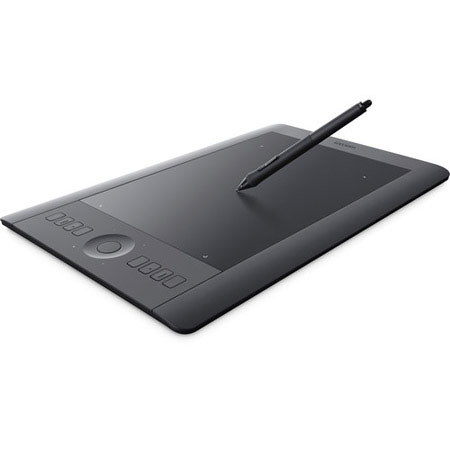
I've been using a wacom tablet for a long time. I thought it was about time to upgrade and jumped on a good deal on this one. Does everything great you've come to expect from Wacom. Only reason it loses a star is that the usable pen area isn't the full area displayed in the picture. Zoom in. See those tiny white dots? THAT is the usable pen area. That just pisses me off, why make that part of the tablet LOOK usable and NOT actually be usable? Otherwise a very solid product.
Benjamin L.
2016-09-15T17:03:47
Very few people have the dexterity to precisely navigate in a small area of the subject using a mouse. For detail work, a pen is necessary and the only way to achieve the results you want. Intuous Pro tablets have eight buttons and a control ring that can be programmed with shortcuts, as does the pen's two buttons. Once you use a pen, you'll never go back to a mouse for editing.
RALPH B.
2016-08-16T08:36:06
I have been using Photoshop for approximately 15 years. It has been a continuous learning curve due to the power that PS has. However, as I learned and used it more, using a mouse was not as precise as a pen and tablet. Initially I used a Wacom Bamboo and then a Pen and Touch (small). Although this was a step in the right direction, these products were still limited in their performance or options. Finally decided it was time to go with the Intuos. I did some online research and thought the medium size was correct for me (computer is 27"). Learning curve? Yes. If you are going to jump into this be prepared it is hard to adapt to coming from a mouse. If you are patient and practice with it, you will develop the skill that will allow you to use it comfortably. I like the hotkeys (configurable) on the tablet. Wireless is a nice feature (no lag) but I have it on my desktop with direct wired connection. If I had the option of doing it over, I would buy the small size. I don't do graphic design only small areas of photos at a time. This product will keep me happy although I would love to have a Cintiq. Just a dream though since I can't afford nor justify the price. It's a great tool if you are serious about retouching/graphics.
Paul G.
2016-05-25T15:17:06
Takes quite a while to customize but once set up, works great. It also takes quite a while to get used to the stylus vs a mouse. However, once mastered, you won't go back.
AARON S.
2015-12-20T11:34:25
Takes a little time to wean yourself off of a mouse. Only gave it 4 stars because there is a learning process. Check out youtube videos and be patient and this will ultimately become second nature. A great photo editing tool.
ROBERT V.
2015-12-09T08:56:04
this by far works better than the small Wacom I had before, its best to buy this one first.
James M.
2015-05-12T21:00:00
I have really enjoyed working with this device. It has effectively replaced my mouse completely. It does take some getting used to, and I strongly suggest spending some time reviewing tutorials on YouTube (one of the internet's greatest gifts) so you know what to expect. Since I was prepared, the transition was surprisingly quick and easy. Once you've used it with Lightroom or Photoshop, you'll never go back. One observation: larger is not necessarily better!
Bill S.
2015-03-24T21:00:00
Debated on 3 or 4 stars. This is my second tablet, the first one broke after several years. I need the tablet to avoid arm pain. The tablet occasionally starts to not respond or takes a long time to do things. I lift my hand off of the pad and that seems to calm it down. I've turned off all touch functions but it still happens. I orignially bought the wireless, I see now that it comes standard, very smart.
Graphic D.
2014-12-29T19:00:00
I own a photography company and use this Intuos Pro religiously. I mostly work with 32 bit composite images, and the level of accuracy is stunning. There is no way I could do what I do and produce the images that I do without Wacom!! This is without a doubt one of if not the most important tool to me!
Doug O.
2014-06-30T21:00:00
This is the first tablet I've had and after about two weeks I've gotten the feel for it and really enjoy using it. I have a photography business and use Lightroom and Photoshop a lot. It is making using those programs much more intuitive. I've also begun using it as a mouse substitute in Windows and other applications.
Claxton P.
2014-05-03T21:00:00
After taking a Photoshop class, the teacher asked as to please use the Wacom table...I am glad I listened. It is so much easier with just a little practice, you will see. I highly recommend this tool.
Fidel S.
2014-04-07T21:00:00
Even with the latest drivers, this unwieldy tablet crashed photoshop like that was its primary function. I wanted to like this, but just couldn't.
MELISSA G.
Burst with Creativity