



See Options
Need help? Ask our experts.
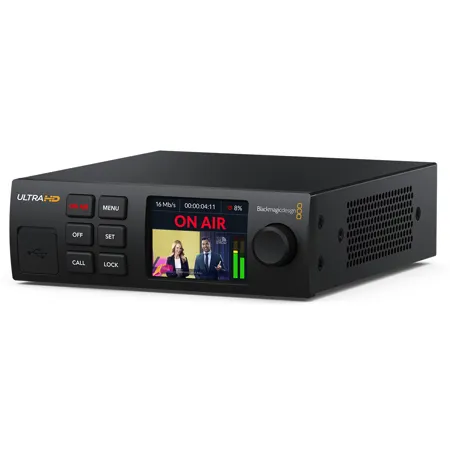
Blackmagic Streaming Encoder 4K is powerful self-contained streaming processor with H.264 and H.265 streaming in HD or Ultra HD via SRT or RTMP protocols. Stream directly to services such as YouTube, Facebook, X and more. Plus you can stream to the internet using Ethernet or connect a 5G or 4G phone to use mobile data. Includes USB webcam, standards converted 12G-SDI input and streaming monitoring output.
Blackmagic Streaming Processors - Live Stream to YouTube, Facebook, X and More!
The Blackmagic Streaming Encoder is a self-contained H.264 and H.265 hardware encoder for live streaming to YouTube, X, Facebook and more! You can also stream to Blackmagic Cloud's new streaming features! With a 12G-SDI input, you can stream HD and Ultra HD content up to 2160p60. You also get powerful features such as a built-in downconverter, USB-C webcam out, HDMI status monitoring, plus support for Ethernet or 4G and 5G mobile data network connections. If you need to create a broadcast streaming link, then you can use the Blackmagic Streaming Decoder! It will receive and convert a H.264 or H.265 stream to SDI video. It even supports tally, talkback and camera control back to the camera!
Blackmagic Streaming Encoder 4K
Streaming processor with H.264 and H.265 for streaming in HD or Ultra HD via SRT or RTMP protocols to services such as YouTube. Includes USB webcam, standards converted 12G-SDI input and monitoring.
Make Live Streaming Easy!
Blackmagic Streaming Encoder is a self-contained solution that features a powerful hardware encoder and utility software with a wide range of presets. This makes it incredibly easy to connect to most streaming platforms. That's a solution that doesn't require a computer running complicated streaming software with hundreds of settings. Everything you need is contained in a simple 1/3 rack width design! Simply connect an SDI video source from a live production switcher, then connect to the internet via the built-in Ethernet connection. Or plug in a smartphone to use mobile data! With built-in settings for popular streaming platforms, just enter a streaming key and press "on air "!
Live Stream to YouTube, Facebook and More!
Blackmagic Streaming Encoder supports the most popular streaming platforms. The built-in hardware streaming engine has been meticulously designed to deliver professional broadcast quality live streaming. That means you get a self contained solution for live streaming that works without dropped frames. Setup is easy, as the Blackmagic Streaming Utility software lets you select the streaming platform and update the streaming key. The utility works on Mac and Windows and connects directly via USB or remotely via Ethernet. If you're technically minded, you can also modify the presets which are stored in an XML file to change specific low level settings or to add new streaming platforms.
YouTube
YouTube, the world's leading live streaming platform, lets you use 2 streaming encoders for redundant primary and secondary streams. Simply create your channel, then Blackmagic Streaming Encoder will connect and stream to YouTube's servers. You also get support for closed captions!
Facebook
Facebook simplifies the process of sharing live streams with friends and professional networks. As you begin your live stream, the number of viewers can multiply exponentially, as each viewer can share your show with their own social networks. Viewer counts can keep increasing as you stream!
X
The X platform supports live streaming, allowing you to create and broadcast live events globally. You can use Blackmagic Streaming Encoder as the source input for your X video stream, then tweet out the link to your audience, and they can start watching.
Twitch
Twitch, the world's leading streaming video platform and community for gamers, boasts a massive daily viewership of millions. Blackmagic Streaming Encoder enables you to stream in exceptional quality for true broadcast quality on Twitch to share your gameplay and eSports events with fans globally!
Connect 5G or 4G Phones for Mobile Data
Connect to the internet using your phone's mobile data for maximum flexibility when streaming from a remote location or as a backup for your primary Ethernet connection! For convenience, both the front and rear panels feature USB-C connections that can be used for phone tethering. Plus it works with the latest high speed 5G phones, as well as 4G phones! If the internet fails, Blackmagic Streaming Encoder will automatically switch its internet connection to use a connected phone. You can also choose to prioritize either the Ethernet connection or the phone connection. Blackmagic Streaming Encoder is the perfect remote location streaming solution, using phone tethering and mobile data!
USB Webcam Output for Video Software
Blackmagic Streaming Encoder offers two USB-C connections that can be used as a webcam video output. That means you can plug into any computer and work with any video software. The software is tricked into thinking the Streaming Encoder is a common webcam, but it's really a broadcast quality SDI video source! That guarantees compatibility with any video software in full resolution 720p HD, 1080p HD or 2160p Ultra HD quality. Imagine connecting a Blackmagic Streaming Encoder to Microsoft Teams, Zoom or Webex, then calling your client in broadcast quality! Blackmagic Streaming Encoder works with a massive range of video software, and any software that works with a webcam will work!
Built-in Technical Monitoring
Traditional broadcast transmitters are super important for a TV station, but now the streaming server is just as crucial because millions of viewers can watch from all over the world! To help, Blackmagic Streaming Encoder incorporates a comprehensive technical monitoring output feature. The graphics-based monitoring output provides a video view, audio meters with accurate ballistics, trend graphs for codec data rates and cache fill, and a summary of streaming settings. It also includes detailed SDI technical information. Plus the technical monitoring outputs to both SDI and HDMI. That means you can use an SDI router to monitor throughout a facility, or simply connect a basic HDMI TV!
Streaming Status
There's a very large ON AIR indicator on the top left of the monitor output, so it's always clear when you are online and streaming! Plus all your current streaming settings are displayed clearly.
Video and Audio History
The audio and video technical displays also include a 6 second history display so you can see the recent video input history. This ensures you can instantly see what's been happening.
Video and Audio Meters
A large area is dedicated to the video input display and there's also a large multi segment audio meter with accurate ballistics. You can even change the type of audio meter from VU, PPM and more!
Video Input Status
The SDI input technical details are displayed, such as video standard and ancillary data. The bit activity indicators let you see the quality and bit depth of video before the H.264 or H.265 codec.
Audio Input Status
Audio is de-embedded from the SDI input and the channel status is displayed. The bit activity indicator lets you check for 16, 20 or 24 bit audio. You can even see which audio channels are present!
Trend Graphs
The trend graphs below the video display let you see the last 60 seconds of codec data rate and cache fill. Plus codec data rate is critical for ensuring you have enough internet speed from your ISP!
Includes Blackmagic Streaming Utility
The Blackmagic Streaming Utility software manages multiple streaming encoders and decoders so you can update settings and software. Simply plug the Blackmagic Streaming Encoder directly into the front of its USB connection, or connect it using Ethernet so you can configure it remotely, which is useful when managing multiple remote sites. The user-friendly menus and controls make it incredibly simple to set up a live event, so you can get started fast! Plus the front panel LCD menus have the same settings and controls! You can even load additional services for a Blackmagic Streaming Decoder. The Blackmagic Streaming Utility software is free to download and runs on both Mac and Windows.
12G-SDI Supports 720HD, 1080HD and 2160p Ultra HD!
Blackmagic Streaming Encoder includes a 12G-SDI input with support for all HD and Ultra HD formats up to 2160p60. A 12G-SDI loop output is included enabling you to loop video through more than one Streaming Encoder, so you can stream to multiple services. Blackmagic Streaming Encoder features Teranex conversion technology on the SDI input for incredibly clean looking video. That feature allows you to input any Ultra HD or HD SDI video and automatically convert it to the desired video standard for streaming. This enables you to perform live production at a higher quality than the intended streaming resolution. All this is completely automatic so you don't have to worry about settings.
Control and Color Balance Remote Cameras!
Most Blackmagic Design cameras support camera control, talkback and tally from an ATEM switcher via an SDI control protocol. Control is for all cameras and is embedded into the ATEM SDI outputs, and then you select the specific camera number on the camera. Imagine changing ISO, tint, iris, focus, zoom with tally and talkback all remotely! This also works for cameras with built-in streaming. To do this, you connect the Blackmagic Streaming Decoder's REF input to the ATEM switcher's SDI output.
https://www.blackmagicdesign.com/
408-954-0500







