2023-05-08T20:00:00
Rated 5 out of 5
Excellent Printer
This is the third Brother printer I have purchased. The first was a J6510 DW that was purchased about 10 years ago and is still being used by my spouse for printing, scanning and copying.
The second was a J6500 DW series printer we purchased for our son in Ottawa. It has the same functionality as our original 6510.
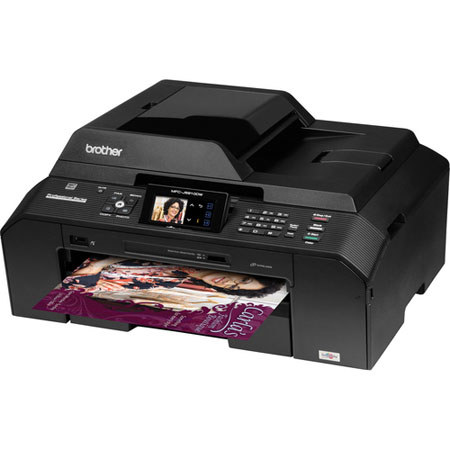
The J5910 DW was our latest purchase I am using. Again, the same functionality but I found the setup and operation much more intuitive.
The scanning footprint handles any size I require and auto document feeder for scanning is a great feature. The only drawback with the 6510 is how the double sided printing feature is actually accessed. The printed pages must be flipped manually and re-inserted in the paper cartridge. This was done automatically in the 6500 DW series printers.
I do prefer the paper loading on the 5910. I find it less 'fiddlely' than the 6500 series.
Printing speed, quality and cost per page are more than reasonable and I have never had a cartridge dry up on me like my experiences with Epson and HP.
Thr 5910 DW is an excellent printer at it's price point.
Macromagi
Originally posted at

2015-08-07T20:00:00
Rated 1 out of 5
I'm So Disappointed...
with this machine. Have owned it a little over 2 years and while it worked wonderfully at first, "things" began to happen. We had the infamous paper jam issue. We were told it was out of warranty, over 1 year at that time, and recommended to take it to an authorized service center. Did so and spent almost as much fixing it as it cost. Felt like an idiot but at least it worked. Now it won't accept cartridges. Called for the umpteenth time after buying one set of Brother inks and when they didn't work, bought a second set. Now service says maybe the sensor is bad and only suggestion is to take it again to be serviced. I don't think so. Maybe we had a fluke, BUT WE WILL NOT BUY another Brother product. Others seemed to have had paper jam issue as well.
frontporchphilosopher
Originally posted at
2014-08-17T20:00:00
Rated 2 out of 5
Disappointed!
The color on this printer is very disappointing.
It's rather drab and lack luster. I'm returning it.
DebAZ
Originally posted at
2014-07-27T20:00:00
Rated 5 out of 5
Excellent printer
Excellent printer with easy to understand instructions.
Home1492
Originally posted at
2014-07-26T20:00:00
Rated 5 out of 5
Early impressions
I have had the printer for a short period of time. Thus far, the machine has been working almost flawlessly. I don't often use it, but I do appreciate having the 11 x 17 printing capability available. The duplex printing I have used and find to be very desirable to cut my paper usage in half on longer documents. This printer is a great improvement over the previous Brother printer that I had owned for some six years before the printhead finally gave out. Overall, I've been very happy with Brother products.
bogenschutz
Originally posted at
2014-07-08T20:00:00
Called your staff for advise, ref printer requiring so many in cartridges, when I print few photos and only plain text messages.
opacliff
Originally posted at
2014-06-28T20:00:00
Rated 5 out of 5
Very good printer, easy to use.
I like this printer for the crisp pages it turns out even though it is a little noisy
maryelaine
Originally posted at
2014-05-28T20:00:00
the machine is horrible. I got about six replacemnts over the year. If this wa an example of what brothers products are we would never buy another product.
HOWEVER since i have MFC7860 machine and I love it. You also have the BEST customer service.
I will therefore assumme that MFC 5910 is just a bad model.
matisman
Originally posted at
2014-03-23T20:00:00
Rated 5 out of 5
Great Printer after Software update make it BETTER
I have had this printer for over 2 years now, and it has been a great printer thus far. The software was querky at first to maintain wireless connectivity. Since a recent update, I have had no problems maintaining connectivity. The print quality is excellent and the Duplex is a great addition. I highly recommend the high capacity cartridges if you do a lot of printing.
This is my fifth Brother printer and all have performed flawlessly. My first MFC model just died after 5 years of regular use. it died after a long distance move so I think the move was the culprit here. It only died after another year and a half of more usage. Brother makes a really good printer and the ink price is what makes them a great deal. They just keep on working.
WHCIII
Originally posted at
2014-03-16T20:00:00
Rated 1 out of 5
Most frustrating printer I have ever owned!
The roller went bad so we called Brother. They had us take it to a repair place. After they had our machine for 10 days, we got it back. Within two weeks, it stopped working again. We got a replacement machine and 6 weeks later the roller went bad. Go figure! Had to bring it in for repair just like the first one. They had our printer for TWO whole WEEKS. We now have it back and it is working fine. You may say, GREAT, BUT I am the one that had to do without my All in One Printer for 3 1/2 weeks and still try to run a successful business. Try running your business without your all in one printer. I will never buy a Brother Printer again!!!!
Flozers
Originally posted at
2014-03-09T20:00:00
Rated 5 out of 5
Great Replacement
I previously had a different model of the Brother All In One Inkjet printers and it failed on me. I trouble shooted using every step on Brother's website and ended up calling their support people. They tried too to get me up and running and were unable. Now for the good news - Brother told me they would replace my unit with an MFC J5910DW which was actually a step up from the model I had. They replaced it at NO CHARGE even though my warranty had already expired on my other printer. They were so wonderful about it. I didn't even have to pay shipping. Incredible customer service. I love my MFC J5910DW and it has performed so well. THANK YOU BROTHER! I've told all my friends about you folks and your incredible customer service.
Rosanne
Originally posted at
2014-02-19T19:00:00
Rated 3 out of 5
Not sure about the Ink Jet
For a busy office, the printer goes through too much ink. Given the nature of ink jets the ink can dry on the heads and then print poorly. We have found that we need to do a cleaning almost daily which really goes through the ink. I would love to see how a Laser printer would compare.
BusyOffice74
Originally posted at
2014-02-09T19:00:00
Rated 4 out of 5
Good value printer
Purchased this for home based business. Excellent value for all it does. Much quieter than our previous printer, holds good amount of paper as well. Only downside was we weren't able to find all ink cartridges in stock in a retail store, so we had to purchase on line. Just means we need to plan ahead due to shipping time since we can't simply run into a store to purchase. Good quality photo prints, although not the reason we purchase. We'd recommend it to small business owners.
esvbiz
Originally posted at
2014-02-04T19:00:00
Rated 2 out of 5
Constant Jamming
When I can get it to work its fine. It'll print fine until it needs new paper and then it's a gamble if it will feed it or not. I've spent two days working on it and an hour with Brother customer service. It's still not working and I have reports due - I should send Brother the printing bill from OfficeMax.
Do not buy, rent or go into the same room with one of these printers.
Yellowpillow
Originally posted at
2014-01-19T19:00:00
I love my Brother MFC-J8910DW Printer/Copier/Scanner.....I am a Realtor and it is very important to me to be able to scan a complete contract package, which can be up to 30 pages. This machine can do it and without any issues. I have owned Brother printers in the past and loved them too. It is a Great machine to have. The ink is not real expensive and it lasts along time, prints out really nice color, and is easy to use.
suz1117
Originally posted at
2013-10-20T20:00:00
Rated 1 out of 5
Don't buy
Don't buy this printer if you plan on printing anything on med or higher card stock. It doesn't except it. Wish I knew before purchasing.
Agilb
Originally posted at
2013-09-30T20:00:00
Rated 3 out of 5
Disappointed with printer
Frequent paper jams.
No instructions on how to increase speed of printing in black mode.
Not happy with purchase.
Great on ink use compared to HP
Bigell
Originally posted at
2013-09-29T20:00:00
Rated 5 out of 5
Love this printer!
Easy to install and set up. I love being able to print both sides of the page to save paper. So glad I got this printer.
KenW
Originally posted at
2013-09-27T20:00:00
Rated 5 out of 5
Best Purchase Ever
I love it! Best Printer I have ever bought! It does everything I need it to and more!
laguera7
Originally posted at
2013-09-26T20:00:00
I like the printer very much havn't used it much but the times I did it printed great and fast. I only thing I had a problem with was setting up.
1955
Originally posted at
2013-09-02T20:00:00
Rated 5 out of 5
MFC-J5910DW
I have owned other Brother's copiers in the past and have been pleased with the results, and the performance of each one of them. This is my 4th Brother's and I am learning what functions best serve my needs. I am a very pleased with the product and also the customer service they offer to
the product owners. I would highly recommend if considering a purchase, that Brothers' would be the way to go.
maggie
Originally posted at
2013-08-26T20:00:00
Rated 4 out of 5
Very Impressive
We've had 2 Brother printers, and when the one we just had for the past 3 years malfunctioned, Brother offered a swap of this model (refurbished, which has far more functions than the one replaced. We've just gotten it set up, and already it is very impressive--excellent ink quality and color. We are thrilled with the duplex capability. We are excited about trying the photo and scanning functions as well. A++ to Brother for their great customer service and rapid response!! We have been very satisfied with our Brother printers and expect this one to be the best one yet!
DebbaJ
Originally posted at
2013-08-12T20:00:00
Rated 5 out of 5
Very good decision I made!!
When I received my printer I immediately hooked it up (very simple) and started working all the features. Very easy to get to each one and easy directions to use. I really love my printer.
Penn
Originally posted at
2013-08-04T20:00:00
Rated 3 out of 5
Good Hardware Poor Software
I bought the printer because of its unbelievable price and impressive list of features. It was easy to install, and produces good print quality. However, ever since I installed this printer, I have started getting a message "Server Busy" when I start my Windows 7 PC. Initially I got scared thinking that my PC has been attacked by some virus. However, after reading various comments on web-sites found using Google search, it became clear that this problem is caused by Brother software. I installed this software upgrade hoping that this issue will go away, but it did not.
J5910
Originally posted at
2013-07-24T20:00:00
Rated 4 out of 5
Easy to use
Efficient printer that is easy to use. Does a really good job
tjay
Originally posted at
2013-07-04T20:00:00
Rated 5 out of 5
was an exchange
We love this printer and the one we had previously just broke and even though the warranty was expired Brother was kind enough and replaced it at no cost! Wonderful customer service!
Preacher
Originally posted at
2013-07-03T20:00:00
Rated 3 out of 5
when it worked I was impressed
Our electric suffered a lighting strike causing the gizzard of the printer to stop working. It was under warrantee, only 100 miles to the north or 100 miles to the west to a service center. Sent it north, took more 10 days for inspection and than 30 days to get the part. Had to purchase another printer. Happy with everything about the printer, its service that I question. I live in Lubbock, Tx. home of Texas Tech, 30,000 students. Brother should have a local warrantee center.
brian77
Originally posted at
2013-05-23T20:00:00
Rated 4 out of 5
Beautiful...
Fabulous printer...Have absolutely no problems with it. Well maybe one... At one time I was printing my cell phone user manual which was about 50 pages at once and it did jam and the whole process stopped. I did unjam the papers and everything went ok. That was the only problem I ever had, but I do not print that many pages at a time everyday...
VistaShipper
Originally posted at
2013-03-25T20:00:00
Rated 5 out of 5
My Printer
I like this printer and would recommend this to anyone. When I was looking for an all in one printer I also looked at cost of replacement ink cartridge's. These cartridge's are inexpensive. My last printer cartridge's where expensive.
Doc0
Originally posted at
2013-03-16T20:00:00
The machine was easy to set up, initially on one computer, then on a home network. Have had no problems and am quite happy with the print quality. I am concerned about the sturdiness- it seems prone to breakage. It hasn't broken yet, but the output support looks like any rough treatment would break it. Over all I'm satisfied with it.
Redhead
Originally posted at