
This item is no longer available.
Review Summary
2020-01-19T19:00:00
I bought this labeler because it has a qwerty keyboard and because it can also print multi-line labels, and supports several widths of labels. I also like that it has a backlight display and is very quiet. However, it is missing the underscore and ampersand characters and many characters are hiding in sub menus making them a pain to use. They could have made them directly accessible with alt-letter keys. I also find the size 12 narrow font to be too wide. I was expecting for the same narrow font from the Dymo RhinoPro 1000. The quality of print looks like my now-dead RhinoPro 1000, but I had hoped it would now be a bit higher resolution. I would be nice if it had a computer interface. It seemed like the version of this labeler I looked at a few years back did have a computer interface.
TomN

2019-11-17T19:00:00
I bought this to make cable wraps, label patch panels, label computers, and other things such as what it claims to be for. The naming convention for our PC's includes underscores. It was only after purchasing that I discovered that there is no underscore option... WHAT? Underscores are extremely common in IT where you would be making barcodes and cable wraps... how is there no underscore!? Beyond that, it can be very confusing on how to accomplish certain tasks. It comes with a little guide booklet that helps a bit, but nothing is ever really explained. It just says "to accomplish this, press this button, then that button, then this button." So if I have a task that isn't specifically detailed in that booklet, it's a mystery trying to figure out how to do it. I will agree with others that it does seem to jam a lot more often than I'm used to with label printers. Not sure if it's a design issue or what. Oh, one last thing. The print button and label cut switch are placed in such a manner that many times when I went to cut the label, I accidentally reprinted it. I just spent a lot of money on this considering it is a label maker, so I don't really want to buy a different one since this one isn't technically broken... I guess I'm just stuck with it for a while until I can get some ROI.
jaron
2018-10-24T20:00:00
I am a special education teacher and purchased this label maker (rhino 4200 to create name labels for my student folders (last name, first name). $80 machine and $20 for (off brand) labels to discover the label maker does not have a comma button. I emailed the manufaurer to verify this was correct. This machine may be “top of the line” but it cannot perform the one simple task I bought it for. Also, dymo customer support is poor. Email response took 8 days and “online chat support” is nonexistent. I tried multiple times over serveral days during business hours and “no customer service representatives were available to assist me.”
Julie R.
2017-02-06T19:00:00
well i have used this label maker for labeling all the wiring in my 1960 mfg sea cruiser and use it daily in my access control business now i start to use it and it jams i replace the cart. and it prints one label and then jams i do everything but take it apart what can i do billy
billyjobob76
2016-04-27T20:00:00
This is the worst label maker we've purchased. very limited and hard to navigate
SecurityQueen
2013-05-14T21:00:00
Using this product to label cables and instrument panels and found it works well and is easy to use. I bought this one because it can also accept the printable shrink tubing which is really cool and makes for a pro looking install. At this price, it's a good value too.
MATTHEW K.
2013-01-20T19:00:00
Well designed, much better than their industrial models. Unfortunately unit delivered had shorted power circuit board. Waiting for replacement.
MICHAEL B.

Accidents happen where life happens. Protect your favorite Adorama products and purchase a protection plan to stay covered from accidental damage, mechanical or electrical failure, and more.

If we can’t fix it, we’ll replace it at no additional cost.

Protect your product from drops, spills, and more.

Enjoy your gear without fear. We have you covered!

When regular use of your product over time results in mechanical or electrical failure.

We will never charge you a deductible after the purchase of a plan.

Our claims process is simple & easy and our customer service team is happy to help.
Adorama Protect powered by Extend is available for purchase to customers in the United States. Not available for purchase Internationally or in U.S. Territories.
Browse our FAQ
Portable
QWERTY / AZERTY / QWERTZ
Code 39, Code 128
Vinyl labels, permanent polyester tape, flexible nylon tape, self-laminating vinyl tape, shrink tube, non-adhesive tag
Min: 0.24in/0.60cm
Max: 0.75in/1.90cm
6
AA
1.7 lbs / 0.77 kg
071701059598
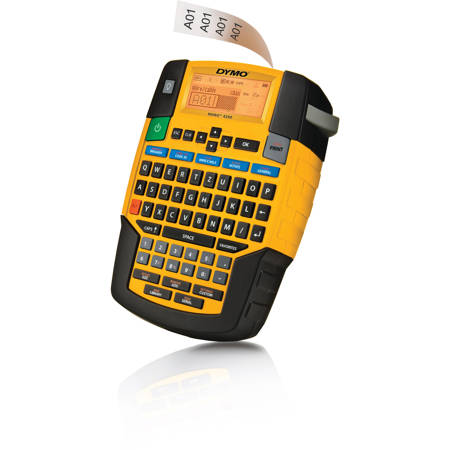
The DYMO Rhino 4200 gets labeling jobs done fast - and done right. Easily navigate the familiar QWERTY keyboard. Use one-touch "hot key" shortcuts to quickly create and format wire/cable wraps, flags, Code 39 and Code 128 barcodes, fixed-length labels, breaker labels and more.
Print labels up to 19 mm wide in flexible nylon, permanent polyester and durable vinyl materials - PLUS print directly on heat-shrink tubes. Save even more time with great more features - like the 'favorites' key which provides single-key access to commonly used labels, symbols and terms; and the 'custom' key which eliminates repeated steps by saving customized settings.