2016-06-22T20:00:00
Rated 5 out of 5
Works Awesome
I am not sure about the reviews that say does not works with windows 10. This machines works greats with windows 10 no Issues at all. Does it job very well.
patel
Originally posted at

2016-03-31T20:00:00
Rated 1 out of 5
Totally unusable with Windows 10
I've owned this printer for several months now, and it never works. USB connection from a device to the printer is unavailable, and the printer will not stay connected on the wireless LAN. Printing any document is a 30-minute affair, as the printer has to be re-connected to the LAN each time.
Brian
Originally posted at
2016-03-28T20:00:00
Rated 5 out of 5
Awesome Copier AND killer Wireless Laser Printer
This is the second ImageCLass Printer I have purchased - my first one was for my home. This one is for our church office.
I bought both printers for their copier capability but I bought the MF6160DW for its wireless printing functionality. We have several people connecting via MAC's and PCs. Six different people were able to print from their respective PCs in a matter of minutes. It is an awesome laser printer with auto duplexing capability, but where it really shines is as a fully functional copier - it easily does one sided to two sided copying, as well as two sided to two sided. It also reduces and enlarges the original document when needed.
SO MANY multi functional laser printers today are VERY BAD copiers. Canon has done an amazing job of preserving the "copier" functionality and merging it with a very capable laser printer that can sit on your wireless network for everyone to use. I highly recommend this COPIER / printer.
jott97035
Originally posted at
2016-01-10T14:03:04
Rated 5 out of 5
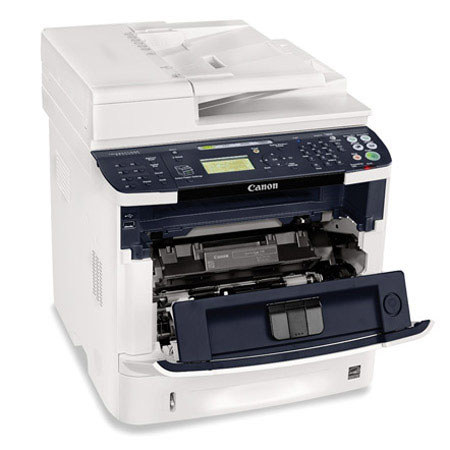
Canon MF6160dw Wireless Monochrome Laser Multifunction Printer
I am quiet happy with the product.
Elfrieda E.
2016-01-06T18:29:10
The left side hinge of the paper auto feeder is flimsy and it came damaged. Still trying to figure out what to do with it. Just came back from vacation. Right now I am reading the manual before I do anything else.
The cable that connects the lower part of the printer to the upper part looks bulky and unsightly. That cable should be inside the printer. Never seen such a cable on printers. Will have more comments after the auto feeder is fixed and have a chance to use it.
FAUZI T.
2015-12-28T09:20:41
Rated 5 out of 5
Excellent Machine
Works like a champ.
PATRICIA B.
2015-10-16T20:00:00
Rated 1 out of 5
Poor-quality scanner
I wanted a new laser printer and scanner at home. I don't do any heavy-duty printing but I wanted both to be decent quality. Well, my 6-year-old Canon Pixma ink jet printer and scanner is MUCH better than this one. The scan of a magazine cover has much more vivid colors and sharp detail on Pixma than on this scanner. I'm really torn about keeping it because I could just get a cheap laser printer instead and keep my old scanner.
Also, the drivers are a pain to install. Why do I have to install separate drivers for the printer and the scanner?
I'm a Canon fan when it comes to photography (7D, L lenses), so really didn't expect such poor quality.
SC-DC
Originally posted at
2015-05-29T20:00:00
Rated 5 out of 5
Great purchase!
I have had this printer about 1 1/2 years now. It replaced an older Canon printer which was really worn out! I have nothing bad to say about the performance of this printer. It has never failed me and to be honest, is more than I ever expected. The only difficult thing that I have is that changing to different size sheets / envelopes for the tray is difficult at times. Other than that I have no complaints! Great printer.
rwb2259
Originally posted at
2015-04-05T20:00:00
Rated 1 out of 5
Worst scanner ever
I bought this printer/scanner for the combined functions of a printer, scanner, and copier. The printing and copying are ok but the scanning function is not good at all. It will grab the pages, turning them slightly and "eat" up the sides of the document which are "source" documents from clients. I can't use the scanner with confidence unless I first copy the document, then scan the copy so it won't mutilate the client's paperwork. This causes double the work. We are a CPA firm and scanning documents is a main way of preparing taxes or other related tasks for our clients so that we then have a record of where our numbers and information came from. If I had known the machine wasn't going to handle the scanning function, I would never have purchased it. I use this machine at my desk for my convenience as we have multiple other scanners throughout the office; which I am now using because they are much more reliable. It's just the inconvenience that I dislike.
nothappy
Originally posted at
2015-03-30T20:00:00
Rated 1 out of 5
HORRIBLY ENGINEERED PRINTER
I set the paper tray that came with the printer with letter sized paper as the default.
Then, I set the Multi-purpose tray that came with the printer with legal sized paper as the default.
As long as I print ONLY letter or legal sized items, this is a nice and fast printer.
But, I regularly also print No. 10 envelopes and various Avery labels.
So, every time I print either an envelope or an Avery label, I must re-set the Multi-purpose tray to tell it I am printing either an envelope or an Avery label.
And, if it is a label, I must ALSO enter the exact dimensions of that label.
Then, after printing the envelope or Avery label, I must reset the Multi-purpose tray to legal paper.
I must do that over and over and over and over again every time I print an envelope or an Avery label.
This Canon MF6160dw does NOT allow you to save those "Custom" Settings so that I could just pick them the next time I wanted to print that item.
Keep in mind that these are STANDARD No. 10 envelopes and STANDARD Avery labels that are probably each printed millions of times per day by everyone.
I print envelopes and Avery labels often enough where this becomes a HUGE WASTE OF TIME to have to do this MANUALLY so often.
The printer that this Canon MF6160dw replaced was over 12 years old when it died.
But, even that old decrepit printer AUTOMATICALLY recognized what printer settings needed to be used when I printed No. 10 envelopes and Avery labels in Microsoft Word.
Now, I could buy another Canon Paper Tray to hold my legal paper so I would at least not have to constantly reset the Multi-purpose tray to legal paper after I printed an envelope or an Avery label.
But, the price of a 500 sheet Canon paper tray (they don't sell anything smaller) costs a WHOPPING 73% of what I paid for the entire printer.
You would think that in this age of technology, a printer that requires 'MANUALLY" changing settings should not even exist.
Steve
Originally posted at
2015-01-11T19:00:00
Rated 5 out of 5
Fantastic Device
After 8 years of traveling the world with us it was time to replace our MP830.
My wife; who is knows very little about all things technical, setup our new MS6160 all by herself. Generally the computer geeks in the family handle all things technical. This goes to show how simple the device is to set up, and on a network no less.
Simply put Canon makes great products. I have a Canon EOS D7 camera body and Canon EF lenses. My entire family own various Canon cameras. You cannot go wrong with Canon products.
People who report problems setting up this printer have other issues affecting their computer systems. The printer is simply a manifestation of those problems, where in reality nothing is wrong with the printer. Keep that in mind when reading negative comments.
Great product, thank you Canon for making my life and wife happy.
Kurtz
Originally posted at
2015-01-02T19:00:00
Rated 5 out of 5
Great for home office
I purchased the multifunction printer a month ago. It was very easy to hook it up to the wireless router. Within minutes it was up and running. However, it is a multifunction therefore, there are other setup requirements if the user wants to take advantage of all the functions.
trupador
Originally posted at
2014-09-03T20:00:00
Rated 5 out of 5
Great machine, with Google Cloud Printing
As usual, Canon produce another version of printers for home and small office use. I had 3 of 4880/4890 in the past; love them. I bought this 6160 only because I need to use the Google Cloud Printing service on it. After successfully connected the 6160 to my google cloud printing, the test page was not printed and error code is #82 (which means that the printing files is too big for the printer. In reality, it was just a few text line for testing.
I called the Canon USA tech support. Got transferred to the Network Department. Have some issues and back and forth with the networking department tech support. It was before the Labor holiday. After the labor day holiday, I realized that there was a new firmware released as Sep 1, 2014. I downloaded the new firmware and the google cloud printing worked on this new firmware version. I guess the tech support eventually identified issue on their firmware. That is ok; everyone can make mistake and I am glade that they worked so hard to get a new firmware released during the holiday.
Overall, a great machine and exciting new google cloud printing function does work on firmware released as of Sep 1, 2014.
I plan to buy a few more 6160 machines as I am moving away from Window PCs and replacing them with Google Chromeboxes.
Roger
Originally posted at