32% Off

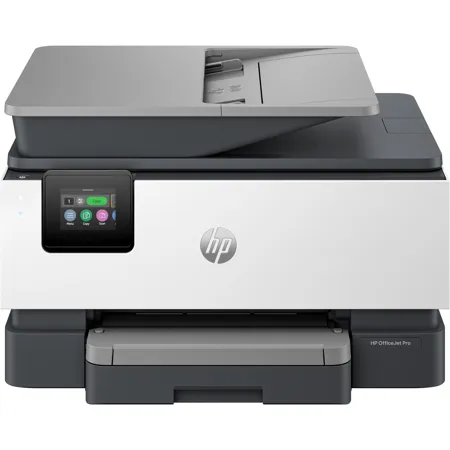
HP OfficeJet Pro 9125e Wireless Duplex All-In-One Color Thermal Inkjet Printer and HP+ 3 Months of Instant Ink

SKU: IHHPOJP9125E MFR: 403X0A
Earn VIP Reward Points

Key Features

  • Enjoy vibrant, professional color prints with the HP OfficeJet Pro 9125e inkjet printer.
  • Boost productivity with fast print speeds of up to 22 ppm for black and 18 ppm for color.
  • Reduce ink costs with HP+ and Instant Ink; get ink delivered when you need it most.
  • Seamless wireless connectivity lets you print from your smartphone, tablet, or computer.
  • Automatic duplex printing saves paper and reduces your environmental footprint effortlessly.
  • Easily manage print jobs using the intuitive 2.7" touchscreen display for quick navigation.
See More Product Details
Low Stock?
Free Expedited Shipping

See Options

1

Add Adorama Protect:

Available to U.S. customers only.

Need help? Ask our experts.

Overview
Compare
Specs
Protection
Q&A

Questions & Answers

FAQ

What is the printing speed of the OfficeJet Pro 9125e Wireless Duplex All-In-One Color Thermal Inkjet Printer?

The OfficeJet Pro 9125e has a fast printing speed of up to 22 pages per minute (PPM).

What are the benefits of the HP+ enabled feature in the OfficeJet Pro 9125e?

The HP+ enabled feature offers dynamic security measures and exclusive benefits when you use Original HP Ink cartridges. It requires an HP account and a consistent internet connection.

What is the capacity of the input tray in the OfficeJet Pro 9125e?

The OfficeJet Pro 9125e is equipped with a 250-page input tray.

Does the OfficeJet Pro 9125e offer Wi-Fi connectivity?

Yes, the OfficeJet Pro 9125e offers reliable dual-band, self-healing Wi-Fi connectivity that automatically reconnects.

What are the sustainability features of the OfficeJet Pro 9125e?

The OfficeJet Pro 9125e is made with at least 40% recycled plastic. Additionally, you can recycle your Original HP ink cartridges after use with the HP Planet Partners program.

Shopper : Why Did You Choose This?BATLA H : Good reliable printer

Reviews about this item

Review Summary

2026-01-11T19:00:00

Rated 3 out of 5

HP Office Jet Pro 9125e

I struggled to get the printer set up and keep it set up. I don't like that you cannot have it set up with both ether-net and wireless. I don't like that there was very little information in the package about how to set it up. That shows how cheap HP is getting.

Tim S.

2026-01-10T19:00:00

Rated 4 out of 5

My Initial Thoughts On My New HP OfficeJet Pro 9125e Printer

To the point - overall, my new OfficePro 9125e printer is a good replacement for my previous HP OfficeJet Pro 6978. On the whole, I am satisfied with it. I had one or two of my apps have some initial trouble properly connecting to the printer but with a little help from one of the AI apps, I was able to get this resolved. My biggest complaints deal with the front panel display and printing envelopes. Regarding the display, I have found typing in alphanumeric characters is a bit difficult because the characters are small and your finger position has to be fairly precise. This, however, is not a show stopper for me as I seldom have to do this. I am disappointed that HP does not allow some customization of the front panel functions through the computer app. Having this ability would allow me to have most-used functions where I can most easily get to them. Also, the printer only has one tray so when you want to print an envelope you have to swap out paper with an envelope. This is not a problem as I had to do this with my previous printer. What is a bit more cumbersome is that apparently even if you specify say a #10 envelope in the print settings on your software (such as Microsoft Word), you still have to tell the printer you are using a #10 envelope on the front panel and as I mentioned, the front panel is not customizable so you have to go 3 button presses down into the menu to select the #10 envelope then when you are finished, you have reverse this to return to normal pages. Again, this is not a show-stopper for me since I rarely have to print onto envelopes but I'm again disappointed that HP doesn't make printing envelopes a bit easier. Finally, I obviously cannot comment on long-term reliability as I have had this printer for less than two months but hopefully, with regular maintenance, it will perform as expected for several years.

kgrizzaffi

2026-01-09T19:00:00

Rated 5 out of 5

Office Jet Pro 9125e

S/N: TH58BM70YQ - Purchased Dec. 1st, - Delivered Dec. 2nd, 2025 - Installed with HP Tech. Dec. 5th. Excellent Service, Excellent Delivery, Excellent Tech. Support and Set up. I am very satisfied with my new printer and HP was there every step of the way in Customer Support. Thankyou. Rhonda D.

R D.

2026-01-06T19:00:00

Rated 3 out of 5

I'm having trouble with the software app on my tablet.

It took me a month to get the software app to work on my tablet. I had to program the printer with my cell phone.

Brent R.

2026-01-03T19:00:00

Rated 5 out of 5

printer

works great, east setup

Ken B.

2026-01-02T19:00:00

Rated 1 out of 5

Cartridge Issue

I have used this printer for 5 months with no problem and then last month it started displaying the message 'cartridge or account issue' and will not connect or print. I have contacted the chat line and then HP support and they have not been able to help. 1st time we were disconnected. 2nd time we reinstalled everything and then they sent me new cartridges but problem was not fixed. The 3rd time we went thru all solutions possible again and then they had me do a speed check and said the problem was with my upload speed of 39.48 mbps. It was to slow compared to my download speed of 866.75 and the problem was my internet provider. I contacted them and the upload speed is not the problem. When you google it 39.48 is actually pretty good. I thing the tech just wanted to get me off of the phone. I will contact support again today but it is just very time consuming and tiresome. Each call probably averages over an hour and a half or so. When you do get ahold of them they make you walk through all the steps all over again even though i have tickets written up everytime.

bt21

2025-12-31T19:00:00

Rated 4 out of 5

HP OJ Pro 9125e AIO 3 Mo In Ink

I have bought HP products for over 30 years starting with the HP 12C calculator, then PCs and printers. This new HP OJ Pro 9125e is OK but does not match the quality of our previous 8600 ink jet which failed after a reasonable number of years. After my Spectre PC's battery failed I bought a new Spectre PC which shows defects when I type emails and is inferior to the previous Spectre. I regret to write that HP products are decreasing in quality and reliability. This will be ok until it no longer is and long time clients like me migrate to other brands. HP used to be the gold standard.

Jean-Luc L.

2025-12-27T19:00:00

Rated 4 out of 5

9125e some good, some bad

I've had mostly good experience with HP printers however the earlier models (10 years back) were more solidly built and didn't use as much plastic. My previous HP 8025 and this current 9125e, the paper trays are very flimsy in my opinion... if not careful when pulling them to load paper, you could break the end of the tray which I did on my previous 8025 model. I also don't like the fact that there isn't a paper adjusting slider inside the tray in the front of both these models, only for the sides of the paper (not a plus). The biggest complaint about this 9125e model is how LOUD it is each time it's sits idle and when you're ready to print something... it goes thru it's automatic cartridge adjustment internally and is makes a very loud banging sound like there's something ready to go inside! Would be nice to have a "quiet" printer... this model by far is the loudest I've had but everything runs as it should, color quality is reasonable, digital display is a nice, visible size. I did refer to YouTube for help setting up this printer to my WiFi... found a good tutorial that was much easier to follow than the info from HP's website.

Bunkys1

2025-12-26T19:00:00

Rated 1 out of 5

Not happy with what I purchased

Printer is noisy and squeaks when pulling paper. I also purchased this printer because is specifically was recommended by HP Customer Service for printing card stock. Printer jams when trying to pull card stock from trey.

Scott C.

2025-12-15T19:00:00

Rated 3 out of 5

Good except for Scanning

The printer does very well on everything except scanning. The fact that HP hasn't integrated the Mac computers into their system, means you can use the document feed for scanning. What's worse, it takes a detective with a lot of experience to even find a way to scan at all. It's a reason for not buying HP printers, and it seems totally unnecessary. This wasn't the case back in the "good old days.

Tom A.

2025-12-14T19:00:00

Rated 5 out of 5

HP O/Jet Pro 9125e

Excellent and Easy Setup.

PRINTER M.

2025-12-03T19:00:00

Rated 3 out of 5

Good, but not great!

What I like about it is it will print double-sided documents without my having to get up and turn the paper. What I don't like is that it is slow to react, whether scanning or printing. Why I wouldn't give it more than 3 stars is that it was really hard to install because it came with outdated software and I needed HP help to make it work. That should not be! If HP is still selling an electronic product, it should come with a notice that it will require updating before it will work.

Linda S.

2025-11-28T19:00:00

Rated 4 out of 5

Setup

We rely on a printer to be available 24/7 which I doubt is an unusual requirement for home or home office.. Setting up the 9125e to meet this requirement was a task and required several trips to the internet. HP wake up! This should be your basic setup instructions- power on 24/7, WIFI connect 24/7, Infact these should be defaults. Also scans to USB should be PDF not JPEG or at least allow a way to reset the power on defaults (firmware?). Another question Why do we have to periodically turn the printer off and then on to get it to reconnect to the WIFI even even though the WIFI light is on?

leftylf

2025-11-24T19:00:00

Rated 5 out of 5

Easy to use.

Great printer. Easy to use . The learning curve is very quick.

Edgwine

2025-11-04T19:00:00

Rated 1 out of 5

Disappointed

works sometimes and sometimes it doesn't - no manual - so how does this printer work? When I print an email sometimes it prints all the folders on the side of the email - what gives I don't want that on my printed email. It will not print a marked passage-it will print the whole document out-gee what a pain. Where is the 24/7 phone number I was promised???

August1919

2025-10-18T20:00:00

Rated 4 out of 5

Review

This product is good for my home needs

W B.

2025-10-17T20:00:00

Rated 4 out of 5

Nice print quality, but...

This printer prints well but is very noisy. I am often printing newsletters while on the phone and it sits on the end of my desk and makes it difficult to hear. It prints much quicker than my last printer, which I like. I do a lot of enlarging and reducing of patterns in my work and you have to go through numerous screens to get to that option, which is frustrating when in a hurry.

Jan K.

2025-10-13T20:00:00

Rated 5 out of 5

New printer

So far this printer has exceeded my expectation

Cindy T.

2025-10-08T20:00:00

Rated 5 out of 5

The best products are hp . The 9125e is my 4 prin.

I really like it so much, but I did not install it , I keep it for back up printer,because of my others printers The 6700 pr. And 8710 pro. So in the future,sure I will install it, thanks.

Metsh

2025-10-06T20:00:00

Rated 5 out of 5

New Purchase

Wonderful!

Anna L.

2025-10-04T20:00:00

Rated 5 out of 5

Printer

Easy to install. Works fine. Very similar to my old printer, easy to use.

Sharon414

2025-10-01T20:00:00

Rated 5 out of 5

Easy set-up

Easy to set up.

Terry L.

2025-09-20T20:00:00

Rated 3 out of 5

Not impressed

PRINTER WORKS BUT TECH SUPPORT IS TERRIBLE, I CANNOT MAKE IT AIRPRINT

Robert B.

2025-09-06T20:00:00

Rated 1 out of 5

HP Office Ink Jet Pro 1025e

Worst printer I have ever purchased.

A R.

2025-08-28T20:00:00

Rated 3 out of 5

Printer is ok but HP customer service terrible.

Printer needed customer support due to poor directions but was nearly impossible to get a phone number and then was passed on to other phone numbers twice.

ecahn

2025-08-19T20:00:00

Rated 5 out of 5

Best tech support ever

very easy to set up. I called tech support because of what turned out to be an oversight on my part, and they get an A+, best tech support experience I've ever had. Printer has worked great ever since

clownnose

2025-08-15T20:00:00

Rated 5 out of 5

Great Product, Reasonable Price

Owned an older version, the "6978" for about 9 years and never had a problem with it. I recently purchased the "9125e" and thus far, I am very happy with its overall performance.

Luzmarina

2025-08-10T20:00:00

Rated 5 out of 5

Pleased With Purchase

Product is visually appealing. It was bigger than I thought but easy to handle. Setup was a problem due to virus protection not allowing the external setup. Thank goodness for Tech Support. It took Tech Support almost 2 hrs to get the printer to operate properly.The tech staff was excellent especially Olivia.

Broham L.

2025-08-09T20:00:00

Rated 1 out of 5

Unending Problems

It keeps disconnecting from my computer. IT IS AWFUL! I can never count on it to work. It works off my phone but not off my computer, probably because it was set up with my phone. I had a licensed computer specialist set it up for me.

Sad R.

2025-08-04T20:00:00

Rated 2 out of 5

No idea

I find that this printer makes a lot of noise when first open. But everything else is perfect.

No c.

Select a plan in the Add Protection section above and purchase with this product by clicking “Add to Cart”.

image-protection

TRUSTED PROTECTION PLANS, EXCEPTIONAL SERVICE.

Invest In Your Gear and Peace Of Mind!

Accidents happen where life happens. Protect your favorite Adorama products and purchase a protection plan to stay covered from accidental damage, mechanical or electrical failure, and more.

Repair or Replacement

Repair or Replacement

If we can’t fix it, we’ll replace it at no additional cost.

Accidental Damage

Accidental Damage

Protect your product from drops, spills, and more.

Peace of Mind

Peace of Mind

Enjoy your gear without fear. We have you covered!

Malfunction Protection

Malfunction Protection

When regular use of your product over time results in mechanical or electrical failure.

Zero Deductible

Zero Deductible

We will never charge you a deductible after the purchase of a plan.

Customer-Focused Support

Customer-Focused Support

Our claims process is simple & easy and our customer service team is happy to help.

Adorama Protect powered by Extend is available for purchase to customers in the United States. Not available for purchase Internationally or in U.S. Territories.

HP OfficeJet Pro 9125e Specifications

  • Functions

    Print, copy, scan, fax

  • Print Speed - Black

    Up to 22 ppm (ISO, laser comparable)

  • Print Speed - Color

    Up to 18 ppm (ISO, laser comparable)

  • Print Speed - Black (draft)

    Up to 32 ppm

  • Print Speed - Color (draft)

    Up to 32 ppm

  • Print Speed - Black (normal)

    Up to 22 ppm

  • Print speed - Color (normal)

    Up to 18 ppm

  • First page out (ready) black

    As fast as 10 sec

  • First page out (ready) color

    As fast as 11 sec

  • Resolution (black)

    1200 x 1200 rendered dpi

  • Resolution (color)

    Up to 4800 x 1200 optimized dpi on HP Advance Photo Paper 1200 x 1200 dpi input

  • Resolution technology

    HP Thermal Inkjet

  • Monthly duty cycle

    Up to 25,000 pagesDuty cycle is defined as the maximum number of pages per month of imaged output. This value provides a comparison of product robustness in relation to other HP Color InkJet devices.

  • Recommended monthly page volume

    Up to 1500

  • Print Technology

    HP Thermal Inkjet

  • Display

    2.7" (6.86cm) Capacitive Touchscreen CGD

  • Processor speed

    1.2 GHz

  • Number of print cartridges

    4 (1 each black, cyan, magenta, yellow)

  • Replacement cartridges

    HP 936 Black Original Ink Cartridge (-1,250 pages) 4S6V2LN, HP 936 Cyan Original Ink Cartridge (-800 pages) 4S6U9LN
    HP 936 Magenta Original Ink Cartridge (-800 pages) 4S6V0LN
    HP 936 Yellow Original Ink Cartridge (-800 pages) 4S6V1LN

  • Compatible ink types

    Pigment-based (black and color)

  • Print languages

    HP PCL3 GUI

  • Automatic paper sensor

    No

  • Paper trays, standard

    1

  • Paper trays, maximum

    1

  • Mobile Printing Capability

    Chrome OS
    HP Smart app
    Apple AirPrint
    Wi-Fi Direct Printing
    Mopria Certified

  • Connectivity, standard

    1x Ethernet
    1x Hi-Speed USB 2.0 (device)
    1x Hi-Speed USB 2.0 (host)
    1x Wi-Fi 802.11 a/b/g/n/ac (dual band)
    2x RJ-11 Fax/Modem port/phone line

  • Security management

    SSL/TLS (HTTPS)
    IPP over TLS
    WPA2-Enterprise
    WPA2-Personal
    WPA3
    Certificates configuration
    Password protect EWS
    Signed firmware

  • Memory, standard

    512MB

  • Printer management

    Embedded Web Server

  • Minimum system requirements

    Apple macOS v11 Big Sur, macOS v12 Monterey, macOS v13 Ventura, 2GB HD, Internet Required, Windows 11, 10: 32-bit or 64-bit, 2 GB available hard disk space, Internet connection, Internet Explorer

  • Compatible operating systems

    Windows 11
    Windows 10
    macOS 11 Big Sur
    macOS 12 Monterey
    macOS 13 Ventura
    Linux
    Windows Server
    Chrome OS

  • Supported network protocols

    Supported Network Protocols configurations (IPv4, IPv6)
    DHCPv4, DHCPv6
    DHCP options: 81/RFC4702/RFC4704, 12-Hostname
    SMTP client
    LLMNR
    Bonjour/mDNS
    LP/ APIPA (Auto IP)
    NetBIOS/WINS
    LPR/LPD
    Port9100
    DNS Resolver
    SNMPv1/v2
    Web Services Discovery
    Web Services Print
    Syslog
    Firewall
    SSL/TLS (HTTPS)

  • Supported network protocols (Contd.)

    Password-protected network Embedded Web server
    Enable/disable network ports & device features, 802.1x wireless authentication (EAP-TLS, LEAP, and PEAP) & 802.1 Wired

  • Paper handling input, standard

    250-sheet input tray
    35-sheet ADF

  • Paper handling output, standard

    60-sheet output tray

  • Duplex printing

    Automatic

  • Envelope input capacity

    Up to 30 envelopes

  • Borderless printing

    Yes, on photo paper only, up to 8.5 x 11 in (US letter), 210 x 297 mm (A4)

  • Finished output handling

    Sheet Feed

  • Media sizes supported

    Letter; Legal; Government Legal; Executive; Statement; 3 x 5"; 4 x 6"; 5 x 7"; 13 x 18cm; 8 x 10"; 10 x 15cm; L; Photo 2L; Envelope( #10, Monarch, 5.5 bar); Card (3 x 5", 4 x 6", 5 x 8")

  • Media sizes, custom

    Tray 1: 3 x 5 to 8.5 x 14
    5 x 8.3 to 8.5 x 14"

  • Media types

    Plain Paper, HP Photo Papers, HP Matte Brochure or Professional Paper, HP Matte Presentation Paper, HP Glossy Brochure or Professional Paper, Other Photo Inkjet Papers, Other Matte Inkjet Papers, Other Glossy Inkjet Papers, Thick Plain Paper, Light/Recycled Plain Paper, HP Tri-fold Brochure Paper, Glossy

  • Recommended media weight

    16 to 28 lbs (plain paper)
    60 to 75 lbs (photo)
    20 to 24 lbs (envelope)
    90 to 110 lbs (card)

  • Supported media weight

    16 to 28 lbs (plain paper)
    60 to 75 lbs (photo)
    20 to 24 lbs (envelope)
    90 to 110 lbs (card)

  • Scanner type

    Easy slide-off glass, dual pass 2-sided ADF

  • Scan file format

    JPG, BMP, TIFF, PDF, RTF, TXT, PNG

  • Scan resolution, hardware

    Up to 1200 x 1200 dpi

  • Scan resolution, optical

    Up to 1200 dpi

  • Scan size (flatbed), maximum

    8.5 x 11.7"

  • Scan size (ADF), maximum

    8.5 x 14"

  • ADF Capacity

    Standard, 35 sheets

  • Digital sending features

    Scan-to E-mail
    Scan to network folder
    scan to SharePoint
    Scan to thumb drive

  • Digital send file Formats

    PDF
    TIFF
    JPEG

  • Copy resolution (black text)

    Up to 600 dpi

  • Copy resolution

    Up to 600 dpi (color text and graphics)

  • Copy reduce / enlarge settings

    25 to 400%

  • Copies, maximum

    Up to 99 copies

  • Faxing

    Yes, color

  • Fax transmission speed

    4 sec per page

  • Fax memory

    Up to 100 pages

  • Fax resolution

    300 x 300 dpi

  • Speed dials, maximum number

    Not Supported

  • Broadcast locations

    20

  • Power

    Input voltage: 100 to 240 VAC (+/- 10%), 50/60 Hz

  • Power consumption

    5.06 watts (ready), 1.22 watts (sleep), 0.14 watts (manual-off)Power requirements are based on the country/region where the printer is sold. Do not convert operating voltages. This will damage the printer and void the product warranty.

  • Energy efficiency

    IT ECO Declaration
    EPEAT registered

  • Operating temperature range

    41 to 104 Degree F (5 to 40 degree C)

  • Operating humidity range

    25 to 75% RH

  • Software included

    HP Printer Software

  • Sustainability Impact

    Forest First product with HP+
    Recyclable through HP Planet Partners

  • Dimensions (W x D x H)

    17.3 x 13.48 x 10.94" (43.9 x 34.2 x 27.78cm) (Minimum Storage Mode)
    17.3 x 20.46 x 10.94" (43.9 x 51.9 x 27.7cm) (Output Tray Extend)

  • Weight

    20.48 lbs (9.28kg)

  • UPC Code

    196337284807

About HP OfficeJet Pro 9125e

FEATURED REVIEWS

Printer

By Sharon414

Easy to install. Works fine. Very similar to my old printer, easy to use.

printer

By Ken B.

works great, east setup

You can elevate your office productivity with the OfficeJet Pro 9125e Wireless Duplex All-In-One Color Thermal Inkjet Printer, a professional-grade color inkjet printer from HP, America's most trusted printer brand. Designed with small to medium businesses in mind, this printer is engineered to facilitate growth and minimize disruptions.

This printer is specifically designed to work with cartridges that have a new or reused HP chip, employing dynamic security measures to block non-HP chip cartridges. Regular firmware updates ensure the effectiveness of these security measures, maintaining the printer's performance and reliability.

As an HP+ enabled printer, the OfficeJet Pro 9125e offers a range of benefits when you choose HP+ at product setup. These benefits require an HP account, a consistent internet connection, and the exclusive use of Original HP Ink cartridges for the printer's lifespan.

Empower your team with this productivity powerhouse, always ready to handle high volumes with a 250-page input tray. The automatic document feeder enables double-sided scanning, eliminating the need to wait by the printer. With a printing speed of up to 22 pages per minute (PPM), this fast inkjet printer enhances your office efficiency.

Stay connected with the most reliable dual-band, self-healing Wi-Fi that automatically reconnects. With HP Wolf Pro Security, your network is protected from cyber threats, giving you peace of mind.

Never worry about running out of ink with the Instant Ink subscription. Get ink delivered directly to your door before you run out, saving up to 50% with Instant Ink. Starting at just $1.49 a month, you can enjoy the convenience of automatic ink delivery, with the flexibility to change plans or cancel anytime at no cost.

In line with HP's commitment to sustainability, this printer is made with at least 40% recycled plastic. Every page you print contributes to HP's efforts to protect, manage, and restore forests. After use, you can recycle your Original HP ink cartridges with the HP Planet Partners program.

In summary, the OfficeJet Pro 9125e is not just a printer; it's a comprehensive solution for your office needs, offering professional-grade printing, seamless connectivity, robust security, and a commitment to sustainability.

HP OfficeJet Pro 9125e Features

  • Supercharged performance for home or small business
  • Fast color print, copy, scan, fax, 2-sided prints, 2-sided scan, mobile/wireless/ethernet
  • Print up to 22 pages per minute
  • HP's most reliable Wi-Fi and HP Wolf Pro Security
  • Dynamic security enabled printer

Warranty Information

This product has a limited warranty of 12 months.

Key Features

  • Enjoy vibrant, professional color prints with the HP OfficeJet Pro 9125e inkjet printer.
  • Boost productivity with fast print speeds of up to 22 ppm for black and 18 ppm for color.
  • Reduce ink costs with HP+ and Instant Ink; get ink delivered when you need it most.
  • Seamless wireless connectivity lets you print from your smartphone, tablet, or computer.
  • Automatic duplex printing saves paper and reduces your environmental footprint effortlessly.
  • Easily manage print jobs using the intuitive 2.7" touchscreen display for quick navigation.

What's in the box:

  • HP OfficeJet Pro 9125e Wireless Duplex All-In-One Color Thermal Inkjet Printer
  • 936 Setup Black Ink Cartridge
  • 936 Setup Cyan Ink Cartridge
  • 936 Setup Magenta Ink Cartridge
  • 936 Setup Yellow Ink Cartridge
  • Power Cord
  • Setup Poster
  • User Manual
  • HP 1 Year Limited Warranty