
This item is no longer available.
Review Summary
2018-12-14T19:00:00
Works fine when it is happy. If it isn't happy this multi-purpose machine becomes a very large paperweight coughing up impossible to read error explanations and no way to override them to get to the other functions. If you can't figure out what is going on (ie like low or no ink in a tank) then you could be shut out. Right now I can not access the other functions because after demanding new tanks I am now getting a Missing or Failed Print Head error message and the machine has locked me out still. At first it was a Cartridge or Print Head Problem but in following HPs online instructions of disconnect power and then reboot. Disassembly of the machine will be required to reach the print head in order to wiggle it back and forth to see if the problem wasn't caused by not inserting perfectly aligned ink tanks and somehow knocking the head out of adjustment. (YouTube Tips) HP's online instructions to disconnect power and then reboot is a valid help tip. their second tip is if that doesn't work Call HP is condescending to say the least. So the only fix to get through the error message Cartridge or Print Head Problem or any number of vague error messages is to purchase new tanks, install and hoping the problems go away. Nice eh? Cha-Ching, there goes another $75 dollars. There is a lot of tank siphoning going on as well. Green ink everywhere .... Oh wait, Green isn't a choice is it. Somehow the Blue and Yellow inks are coming out and leaking into the area where the tanks dock. You can change tanks all you want thinking that the seal is leaking or something. Another problem with this machine is that one can not scan books or piles of paper thicker than about a quarter inch thick. The problem is the sensor on the scanner cover. If the scanner is open then it won't scan and the back hinges of the scanner do not allow for the lid to be spaced further off the bed surface. I see in the YouTube Videos that HP has moved on to a electable print head assembly so they have moved on from this problem. Don't know about the scanner lid problem. I will never buy a combination printer / scanner machine again if it displays error messages and blocks access to the remainder of the functions. Ditto for a machine that won't allow one to scan with the cover open.
gragor

2018-07-31T20:00:00
It was a great printer until the print-head began to malfunction - in this case it no longer was recognized. only solution provided by HP was to throw away and buy a new printer. this built-in self destruct is completely unacceptable!!
Jubal
2017-07-11T20:00:00
The All in One 6700 Printer is good and meets my expectations.
Sasson

2016-08-02T20:00:00
It is what the home user wants, you could fax, email, utilize cell phone to send and print whatever you want from your to your printer, and also you could scan and email what you have just,yet many more features....
DHA27
2014-09-04T20:00:00
My last printer was the HP All-in-One Officejet 6310 and it lasted forever. I used it for business and personal so it got a lot of workout. My new Officejet 6700 will get the same workout and so far it has met the challenge. I use the wireless feature as well as eprint which is fantastic. When the system says the print cartridges are empty it lies. I change them when I feel the print is degraded. If you take care of the machine and clean it regularly it will last a long time. I love it.
Michael57
2014-08-28T20:00:00
Quick to set up, has all the features that I needed. Works great.
jack44
2014-08-22T20:00:00
I really liked the printer, but then received an error message that the printhead is damaged. The printer is only 25 days out of the one year warranty...ridiculous. I have read many bad reviews for this printer on other web sites, most complaining of the same problem. I contacted HP tech support, they said it cannot be repaired, and want to sell me a new printer. I have owned six other HP printers and never had a problem. It is very disappointing that this printer seems to be of poor quality. HP needs to correct the problem. I am considering buying another brand.
kar55
2014-08-21T20:00:00
It was a great printer, copier, fax, scan until warranty ran out. Than error messages- can't fax and paper jam, but I could print from my computer. I tried to reinstall software and update, nothing worked. I changed my computer from Windows XP to Window 7 reinstalled software in new computer. Nothing worked. Bought new printer different brand.
BuddyC
2014-08-21T20:00:00
HP rolled out a great product with this printer. I needed a network printer (wired). Paper handling is flawless. I use office supply store brand paper, nothing fancy. Ink usage is very reasonable. I use the XL cartridges to last longer. 2-sided printing is seamless, and conserves paper. Software side of access to printer settings and features is great. Scanning software included is very functional. Flatbed scan feature was a must (for me). Touch screen control panel is highly visible and intuitive. I am a small business owner. (Just me!) This printer is a perfect fit.
CADD13
2014-07-28T20:00:00
Purchased this printer for home office use. Works great! Easy setup, easy use. I networked to my other computers and anyone on a mobile device connected to our network can use this printer from their phone, iPad, or tablet. I couldn't be happier with the quality and it even duplexes with ease! I wasn't expecting that for such a reasonable price! Love this printer!
Deb86
2014-07-13T20:00:00
This printer has been a total time suck. It didn't work at installation due to a glitch with the print cartridges. Then, after another glitch with the print cartridges later - I had to return the unit and get a refurbished unit. The replacement though was no better. Even after buying new HP print cartridges - it still insists that it needs new cartridges.
Greg295
2014-07-05T20:00:00
I have had the Officejet 6700 for about a year now. It prints at a very good quality but I do have some complaints about the prints and its software. I have noticed that it is rather difficult to do general maintenance on it (such as Firmware Updates, etc.)
Matt97
2014-06-29T20:00:00
worst part of this printer is paper tray. why switch to this the 6500 had great paper access and envelopes were simple. now have to remove paper center envelopes and reverse process when done. print is great except very loud. way too much stuff for the average guy ie the email and electronic hook up to phone etc ink way too expensive
chestnut
2014-06-03T20:00:00
Well, it was decent when I first set it up....Bought this printer just over a year ago on a recommendation from the local office products store and now it's nothing but a giant paperweight. Drinks ink despite limited use so you're constantly replacing cartridges. Paper drawer constantly miss-feeds and jams. Maintenance ink use is excessive. There is no paper guide in the drawer so any misalignment causes major havoc and constant jamming. Took my son 30 pages the other night to print a 10 page report because of all of the paper jams. Scanner works one day, then fails the next and even then scans are crooked. I'd steer clear of this machine.
VinInCT
2014-06-01T20:00:00
Another wonderful HP printer. I have been a fan and user of HP printers for over 20 years. They are well made and hold up to extended use.
Pigdog
2014-05-30T20:00:00
I was looking for the ink cartridges for my 6520 printer and saw the HP Officejet 6700 on sale.
VanG
2014-05-26T20:00:00
This printer combo is a replacement for my Officejet 6500. I use it extensively because I am largely homebound due to disabling illness-I make a lot of copies for insurance claims and fax a lot of info back and forth Also I volunteer for two organizations doing coordinating, and a good scanner/copier/printer/fax is invaluable. I THINK everything works great, but I've only used the fax feature once, and although my end says it was sent okay I've not heard back from the recipient. Fairly easy to set up; I have it connected to by desktop and plan to connect it wirelessly to our laptop "one of these days." I need a unit that will stand up to years of heavy use as a home printer and moderate use as an office unit.
SuzyBell625
2014-05-21T20:00:00
LOVE, love, love this all in one machine. Works like a charm. Only downfall is trying to download the included cd rom to install the wireless printer when it actually doesn't work for windows 8. Initial instructions make it seem like it works for XP or better. After reading manual, I had to go to the HP site to download compatible installation for my laptop, and then I was successful. I bought it mainly for scanning, and it definitely delivers there....beautiful crisp exact scanning of pictures as expected. Won't be doing much printing though. Researching prices for replacement ink cartridges shows it will cost me almost as much as the printer cost me... Ouch! Kudos on the shipping/delivery part. I paid a little more for expedited, next day delivery. Ordered at 10 a.m. Monday, and had it 25 hours later on Tuesday! Awesome for the "instant gratification" age we live in these days!
jdnews
2014-05-11T20:00:00
Liked the features and the new drivers help the offline message I got.
SandyS
2014-04-27T20:00:00
This WAS the best office printer I ever had. Unfortunately, it quit copy and scan 3 months after warranty expired. I am stuck buying another one just like it, however, because I have $300 invested in spare ink cartridges. Bought the extended warranty this time.
RiceandGravy
2014-04-03T20:00:00
I have owned this printer for about 1 week. The set up using a local network was easy and without complications. So far, the printing and faxing functions are working exactly as described and with no glitches or unexplained events. The shipping was even faster than promised with a normal delivery specified. I am very satisfied.
Dave3
2014-03-31T20:00:00
I have watched my family members struggle time after time with setting up printers much less just trying to print something. I feared this would continue with me when I received my Hewlett Packard Officejet 6700 Premium printer for my attendance at University. Upon moving in I put off setting up my printer until I absolutely needed it, fearing a nightmare with setup and operation. What I found was to the exact opposite; setup was a breeze and operations are a dream. Following onscreen prompts (in setup CD for primary printing computer) was no trouble, not even in the slightest, it was everything I was hoping for and the exact opposite of what technical horror I was expecting. I mean, I love this printer (this was even a Facebook status). The Officejet 6700 Premium printer is the printer to beat all printers. This 6700 has wonderful features. One of these exemplary features is in scanning. When you wish to scan a document or file, features go far beyond the color choices. Notable features include choosing to scan to flash drive or computer. When the flash drive option is selected, the printer automatically names and designates a folder called "HPSCANS" in that flash drive, of which all scans will be dumped. This is very helpful when you have a messy flash drive, you also have the ability to name the scans you create (favorite feature). This printer's features are not limited to scanning but also are exemplary in copying options. This printer can print 2 sided of the same document very fast and to an ecstatically pleasing degree. Moreover this printer is VERY reliable and prints exceptionally fast. I have not yet, nor do anticipate or expect problems printing high numbers of pages. The 6700 has the option of wireless with is very helpful and has the capability to print from mobile devices (super cool). This printer has printed papers and essays that upstage the others as every print made looks professional. This printer set the bar high. I encourage you to heavily consider this printer when in the market. It will suit even the pickiest people like me. I am no savant when it comes to any sort of technology. This printer helps people like me as it is very adept to handling complicated task but it still remains ever so easy to understand and operate.
Nathan1011
2014-03-14T20:00:00
Early failure at less than 2 years. Stranded with lots of expensive ink. I looked on the HP forum and no joy, but lots of complaints of early fails just out of warranty. The features are good when it worked. My wife is a teacher and used it to support her school needs frequently.
Dave1111
2014-03-13T20:00:00
This printer has everything I needed in a printer. Great print quality printing, copies nice. scans are nice and clear, I haven't used the fax yet but I'm sure it works fine too. I love being able to put so much paper in the tray.
melanie48
2014-03-11T20:00:00
It seems to work well, but is having trouble finding our wireless router.
BillyDoLittle
2014-03-09T20:00:00
I love this printer. It was easy to set up and it is wireless. I can print from my tablet, my phone, and my computer. Just remember when you use the wireless feature you will have to e-print even from your computer. The printer will assign an e-mail address for itself and that's how you print your documents. You can change this e-mail address to something you can remember. Read the directions and you should have no problems. Also, remember to set-up HP Connect.
JustLoveIt22
2014-03-09T20:00:00
As always I am pleased with the product from HP! I have always had HP printers since my second one. This printer is great, the item came in quickly, well packed and in great condition.
Robin55
2014-03-08T19:00:00
Great price (I got it on sale), Has every feature I need in a home office printer. I especially like the auto feed which my other HP printer did not have. So far it's great. I have had it for a month.... Easy to set up....
cbeck
2014-03-06T19:00:00
This product has been great since I bought it.It has all the features needed for me complete any task and I can recommend it to anyone at anytime.
Daramix
2014-02-26T19:00:00
My Officejet 6700 Premium was easy to set up. It worked great, but only for about 15 months. Then it stopped working and said the ink system failed. I did the suggested trouble shooting. No joy. I have about $150 in cartridges. So bummed that it is already dead and so lightly used. Seems like a lemon to me.
BHoff
New 6700
By JamesW
I just purchased the 6700 from HP.COM. Great shopping experience with them. Device arrived in 3 days using the free shipping method. Set up was easy. EPrint is great tool. It does have limitations regarding document type, but .pdf, tig, jpeg are some of the files. There is a host apps available to add to the printer. Wireless hook up was simple. Make sure you know the password to your router. B/W printing is fast. Have not tried color yet. FAX works well. Easy to to navigate and customize to ...
View full Review
A good value for the price
By Tom2
This printer has nice features for the price. For me, the multifunction design eliminated a flatbed scanner and copy machine, saving space. Having fax capabilities is a nice plus. I do not often have need for a fax and would not warrant my buying a dedicated fax machine, so it is nice to have one available with this printer when I do. The standard free shipping was quick. Three days, and I ordered on a weekend. Packing was adequate, the printer arrived in good condition. Initial setup was qu...
View full Review
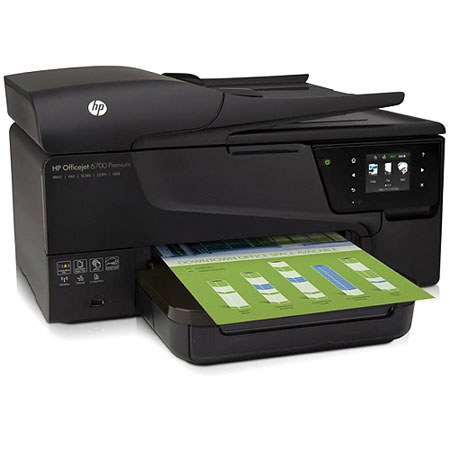
The HP Officejet 6700 Premium e-All-in-One Printer consistently print professional color documents for a great value. It creates durable prints that resist water, fading and highlighter-pen smearing.
Stay connected and productive and conveniently print from mobile devices. With HP ePrint, now you can print from virtually anywhere. Streamline workflow with apps on the touchscreen and share resources with wired and wireless networking.
Print at ISO speeds up to 16 ppm black and 9 ppm color and take advantage of intuitive copy, fax and scan solutions. Print directly at the e-All-in-One and create borderless brochures in a snap.
Conserve resources with this ENERGY STAR qualified product use up to 40 percent less energy with Schedule on and Schedule Off. Save paper with automatic two-sided printing and easily recycle your ink cartridges with HP Planet Partners.