
This item is no longer available.
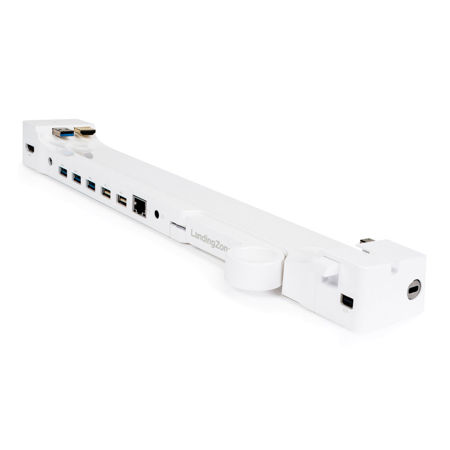
Your MacBook Pro with Retina display will soon be much more functional with this versatile docking station. Turn your MacBook Pro into a powerful desktop system with no need to plug in cables each time you connect. Just leave your cables plugged into the LandingZone DOCK. This quick loading DOCK brings you Gigabit Ethernet, a powered 5-port USB hub, an audio port, an HDMI port, plus a Kensington Security Slot to secure your MacBook Pro. Two sizes of the LandingZone DOCK are available, one for the 13" MacBook Pro with Retina display (Model A1425 and A1502) and one for the 15" MacBook Pro with Retina display (Model A1398).
Security Slot
Lock your valuable MacBook Pro with most standard Kensington Laptop Locks (ClickSafe Locks may not be compatible). A solid steel bar inside the LandingZone secures your computer, with the Release Level supporting up to 30 lbs. of weight. The Release Lever may break, but your MacBook will stay safely secured. Kensington Laptop Locks sold separately.
5 Port USB 3.0 2.0 Hub
With 3 USB 3.0 ports and 2 USB 2.0 ports, the built-in USB Hub allows you to connect printers, hard drives and other devices.
HDMI
Connect an HDMI display with a maximum resolution of 1< > . < > if using a DVI display.
Audio Port
Supports the docking of speakers and headsets. In addition, the audio port on the MacBook is still accessible.
Gigabit Ethernet port
Bring full Ethernet functionality to the MacBook Pro with Retina display.
Mini DisplayPort / Thunderbolt Passthrough
Connect an external monitor or Thunderbolt device. You can also daisy chain multiple Thunderbolt devices for more versatility.
MagSafe 2 Docking
A MagSafe 2 holder and clip allows docking of the MacBook power adapter.
Status Indicator Light
Shows if your MacBook Pro with Retina display is powered on without having to open the lid.
Care and Cleaning
Clean with a soft cloth. Do not use water or cleaning solutions to clean LandingZone. When traveling, use the supplied Travel Clip to keep the lever closed.
Disposal
Applicable laws may limit how you can dispose of this product. Accordingly, please make sure you follow your local, state, federal and country ordinances, laws, regulations or other guidelines to properly dispose of this product and the accompanying packaging materials.
· Supports Apple Thunderbolt Display (model A1407) and other non-Thunderbolt monitors
· Built-in Security Slot compatible with all the Kensington Laptop Locks (sold separately) to secure your MacBook Air
· Supports high-speed charging of iPhone, iPad and iPod
· On/Off LED Status Indicator Lights
· Lever lock Travel Clip