2020-02-17T19:00:00
Rated 4 out of 5
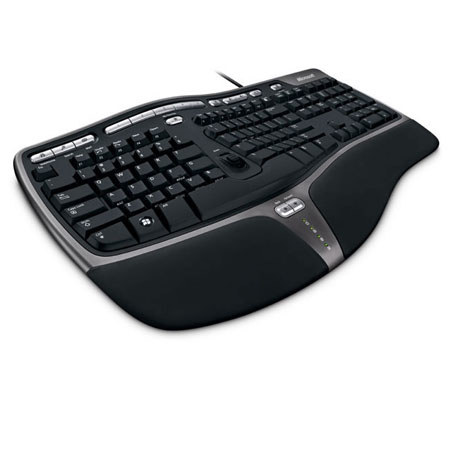
Microsoft Natural Ergonomic 4000 USB Keyboard
Keyboard works great; mainly got it because spouse likes split keyboard best. Only issue is I can't find any documentation from Microsoft nor Dell on how to setup or use the special function keys.
roho433
Originally posted at

2020-01-30T19:00:00
Rated 5 out of 5
Great Keyboard
Good keyboard Great price. Been using this keyboard for years. This is my second one.
ccargo
Originally posted at
2020-01-07T19:00:00
Rated 5 out of 5
Great keyboard
Have owned one of these for years and really like them. My only complaint is that after about two years the lettering on the keys starts to wear out.
llorracj
Originally posted at
2019-11-28T19:00:00
Rated 5 out of 5
Pain free keyboard
This is a great keyboard for one that had carpal tunnel.
Linda
Originally posted at
2019-11-23T19:00:00
Rated 3 out of 5
Natural Ergonomic 4000 USB Keyboard - For Business
I did not realize the left hand - right had set of keys were made at a angle with such a wide space between. I misunderstood the ergonomic part. The layout will take getting use to. Not saying that's a bad thing. Lots of extra keys, but the keyboard did not come with a user guide or instructions on where to download one. I have not searched online for a guide, but I hope there is one online.
Mary
Originally posted at
2019-11-21T19:00:00
Rated 5 out of 5
Great buy for the price.
Love this keyboard. I have one at work and one at home. Its very comfortable to use with some well worth it special use keys. There is no need to spend more money on a keyboard that what this one costs.
Mike L.
Originally posted at
2019-08-27T20:00:00
Rated 5 out of 5
Great Keyboard!!!!!
i wasn't sure about this keyboard when i ordered it but after it came in and i played with it for a while, it is awesome!! the extra buttons make it easy to open things like the calculator, volume, quick save key and many many more. yes the keys are in a odd position but once you get the hang of it its is easer to use. well worth the money.
tumbleweed
Originally posted at
2019-07-17T20:00:00
Rated 4 out of 5
Long lasting keyboard.
I use this keyboard hard because i am a online gamer too and it last a very long time. You will wear the paint off the keys eventually and the only thing it does not do is the F1 and F2 keys for checking your computer (boot options etc.) but i keep another keyboard just for that. Yes...its a great value.
Theeeagle
Originally posted at
2018-09-04T20:00:00
Rated 5 out of 5
Fantastic Keyboard Just Buy It!
This is my second one and I am very very happy with it. Does everything I need it to do and more. Great for my wrists. Hand surgery on one wrist long ago and this is the answer to not having it again.
spapatti
Originally posted at
2018-04-11T09:24:25
Rated 5 out of 5
keyboard ergonomic and comfortable
shipped and goob product
julio p.
2018-01-18T07:23:46
Rated 4 out of 5
Nice Keyboard , wrong version
Keyboard is nice, comfortable, accurate. The problem, and I suspected this would happen, is the wrong version. The business version is advertised with the letters on the top left of the keys, a longer cord, and no back riser. I had read on other websites where the incorrect version was sent, and I trusted Adorama to send the correct version since I do photo business with them occasionally. Unfortunately they followed suit and sent the consumer version in the business version box. It could be a packing issue at the factory as it seems to be happening with multiple vendors, and may not be Adoramas fault. Going to return if they can provide the correct version.
Ronald W.