

Computers With Thunderbolt Ports
Thunderbolt technology has rapidly become a defining feature for those seeking peak performance and versatility in their computing experience. As the weather shifts from warm summer days to the cooler months of fall, many professionals and enthusiasts find themselves reevaluating their workspaces and digital setups—whether it’s preparing for a new academic year, upgrading home offices, or simply seeking smoother creative workflows. Computers equipped with Thunderbolt ports, including the latest Thunderbolt 4 and Thunderbolt 5 standards, offer a level of connectivity and speed that transforms how users interact with their devices. With up to 40 Gbps or even 80 Gbps of bandwidth, Thunderbolt ports enable seamless multi-display configurations, ultra-fast file transfers, and the ability to connect high-speed external storage, all from a single, compact port. This capability is a game-changer for photographers managing large RAW files, videographers editing 4K or 8K footage, and musicians working with multi-track audio sessions. Thunderbolt’s support for daisy-chaining multiple devices—such as monitors, audio interfaces, and external drives—makes it an essential feature for anyone who values a clean, efficient workspace without sacrificing power or flexibility.
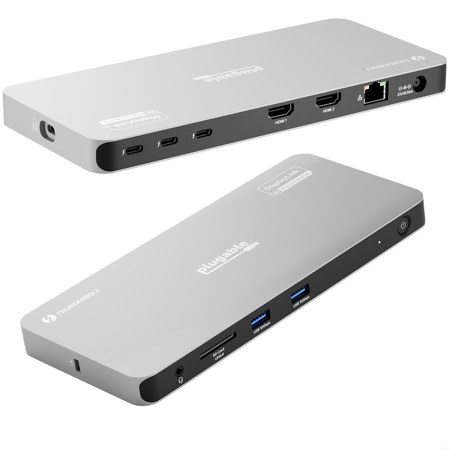
For those considering a computer with Thunderbolt connectivity, it’s worth reflecting on both current and future needs. Students heading back to campus in the fall might appreciate the ability to dock their laptop with a single cable, instantly connecting to monitors, keyboards, and external drives in a dorm or study lounge. Creative professionals often rely on Thunderbolt’s massive bandwidth for real-time collaboration, whether that means plugging into an external GPU for demanding rendering tasks or transferring hundreds of gigabytes of project data in minutes. Even remote workers and business travelers benefit from Thunderbolt’s versatility—imagine arriving at a co-working space or client site and connecting to a full desktop setup with just one cord. Thunderbolt-enabled computers also make thoughtful gifts for recent graduates, tech-savvy family members, or anyone embarking on a new project or career path, offering a future-proof platform that can adapt as their needs evolve. The ability to expand a system’s capabilities through Thunderbolt docks, high-speed SSDs, or multi-monitor setups means these computers stay relevant and powerful for years to come.
Thunderbolt ports aren’t limited to high-end laptops; they’re increasingly found on compact mini PCs, robust desktop workstations, and even enthusiast-level motherboards for custom PC builds. This means that whether you’re outfitting a minimalist home office, building a powerhouse editing rig, or seeking a portable solution for on-the-go productivity, there’s a Thunderbolt-equipped computer to match your vision. The flexibility to connect external monitors—daisy-chaining two 4K displays or powering an 8K screen with Thunderbolt 4/5—makes these systems especially appealing for multitaskers and creators who thrive on visual real estate. For those interested in exploring more portable options, our curated list of Laptops With Thunderbolt 4 offers additional inspiration and guidance. As technology continues to advance, investing in a computer with Thunderbolt ports ensures you’re ready to take advantage of the latest peripherals, displays, and storage solutions—empowering you to work smarter, create more freely, and stay connected no matter where the season takes you.
For those considering a computer with Thunderbolt connectivity, it’s worth reflecting on both current and future needs. Students heading back to campus in the fall might appreciate the ability to dock their laptop with a single cable, instantly connecting to monitors, keyboards, and external drives in a dorm or study lounge. Creative professionals often rely on Thunderbolt’s massive bandwidth for real-time collaboration, whether that means plugging into an external GPU for demanding rendering tasks or transferring hundreds of gigabytes of project data in minutes. Even remote workers and business travelers benefit from Thunderbolt’s versatility—imagine arriving at a co-working space or client site and connecting to a full desktop setup with just one cord. Thunderbolt-enabled computers also make thoughtful gifts for recent graduates, tech-savvy family members, or anyone embarking on a new project or career path, offering a future-proof platform that can adapt as their needs evolve. The ability to expand a system’s capabilities through Thunderbolt docks, high-speed SSDs, or multi-monitor setups means these computers stay relevant and powerful for years to come.
Thunderbolt ports aren’t limited to high-end laptops; they’re increasingly found on compact mini PCs, robust desktop workstations, and even enthusiast-level motherboards for custom PC builds. This means that whether you’re outfitting a minimalist home office, building a powerhouse editing rig, or seeking a portable solution for on-the-go productivity, there’s a Thunderbolt-equipped computer to match your vision. The flexibility to connect external monitors—daisy-chaining two 4K displays or powering an 8K screen with Thunderbolt 4/5—makes these systems especially appealing for multitaskers and creators who thrive on visual real estate. For those interested in exploring more portable options, our curated list of Laptops With Thunderbolt 4 offers additional inspiration and guidance. As technology continues to advance, investing in a computer with Thunderbolt ports ensures you’re ready to take advantage of the latest peripherals, displays, and storage solutions—empowering you to work smarter, create more freely, and stay connected no matter where the season takes you.