Adobe Photoshop Elements 18 Software, DVD

SKU: AC65281995

This item is no longer available.

Overview
Compare
Specs
Protection

Reviews about this item

Review Summary

2018-08-08T16:14:10

Rated 5 out of 5

Fabulous software. Very powerful.

Fabulous software. Very powerful.

MR S.

2018-07-06T04:20:11

Rated 5 out of 5

Nice choices

My initial impression was how nicely the software recognizes the user's level of expertise and responds with the appropriate interface. It offers ease of use for beginners and hobbyists and encourages stepping up to more precise and sophisticated controls. It also conforms to the user's available time to complete an editing project along the scale of quick fix to painstaking, meticulous photo restoration or artwork. These comments were made based on my limited experience with CS5.

Edward O.

2018-06-15T13:33:30

Rated 5 out of 5

It’s great!

If you don’t need deep editing tools from full version of Photoshop, get this!

RON P.

2018-06-01T16:26:50

Rated 2 out of 5

Poor improvement

This new version of PSE is horrible. I work a lot with layers, and when trying to move one (of maybe 80), it randomly grabs a different layer than the one selected. Every.time.I.try. It no longer allows movement of multiple layers at the same time. It doesn't move a selected layer unless everything "below" it is locked. What's the point of promoting use of layers when you can't use one at a time? Basically, it's ridiculous. I have uninstalled it and put my older version back in. It was wasting way too much of my time and it caused frustration beyond belief. Not to mention there is no manual and no good support articles from Adobe. Forums are hit or miss and consume a lot of time. Really sorry I caved and bought this.

Barbara R.

2018-05-24T08:29:29

Rated 3 out of 5

mIGHT AS WELL GET LIGHTROOM.

It is as complex as lightroom. so why not just use lightroom.

KAT B.

2018-05-22T18:42:47

Rated 5 out of 5

Great editing

The haze removal is the greatest thing, and the presets are great

Elmer D.

2018-05-13T10:40:25

Rated 4 out of 5

the update has me a little dizzy...

I have been working with Photoshop Elements 6 for a number of years. The update does so many new things that I find myself just trying to find out how to do what I'm used to doing (if I make myself clear...). But ti seems to work flawlessly, and I'm sure younger people than I am (84) will find the adaptation far easier!

David S.

2018-05-13T10:03:40

Rated 5 out of 5

Take the Elements and Look Good

I have been using Elements for years. I have Photoshop, but find it too busy. I need my work done fast, and done right. Taking Elements makes it easy, and it makes me look good.

DEAN P.

2018-05-04T12:31:48

Rated 4 out of 5

Photoshop Elements 18 no raw Fuji support

The raw file support is great for every Nikon that I have ever had. On the other hand, Fujifilm raw format is another story. Thankfully Fujifilm provides a great raw file format editor and PSE can handle the jpeg output.

Stephen A.

2018-02-07T20:56:19

Rated 3 out of 5

Not "real" Photoshop but has some useful features

I'm used to Photoshop CC, but bought this at a discount with my new a6500 so I could put it on my notebook computer for a trip to NZ and AU. It has useful editing features, but often not where I was used to them and not as complete as I was accustomed to. But it still let me edit some pix for display on the cruise, so I was glad I had it on my computer.

James G.

2018-01-04T06:10:37

Rated 5 out of 5

Awesome product

I recently purchased this software and at first I was a little disappointed because of the different set up, but once I started using it I was pleasantly surprised at how easy it was and the tutorials are fantastic. I love the new additions that have been added, and I look forward to editing the many photos I will take this year!

karen l.

2017-12-19T11:54:15

Rated 4 out of 5

Photoshop 18 Elements Review

Easy to use, plus it has most of the features of photoshop.

ROBERT M.

2017-12-12T09:55:31

Rated 3 out of 5

Okay - but prior versions were easier

I do recommend this software - but with the warning that if you had any earlier version, you may find that this one is not as intuitive to use as past upgrades have been. I ordered this from Adorama at a special price on the spur of the moment - on a weekend. After ordering I read some reviews, downloaded the free trial and realized it was not what I was hoping for. I called the next morning - as soon as the phone lines opened - and was told it was too late to cancel the order as it was already on the loading dock. I suggest you download the free trial and see if you are happy with it prior to purchasing this software.

Gene B.

Adobe Elements 18 Specifications

About Adobe Elements 18

Being creative with your photos has never been easier.

Get the new release to automatically organize your photos, make them look amazing with intelligent photo editing options, turn them into stunning creations, and easily share your memories.

Effortless organization

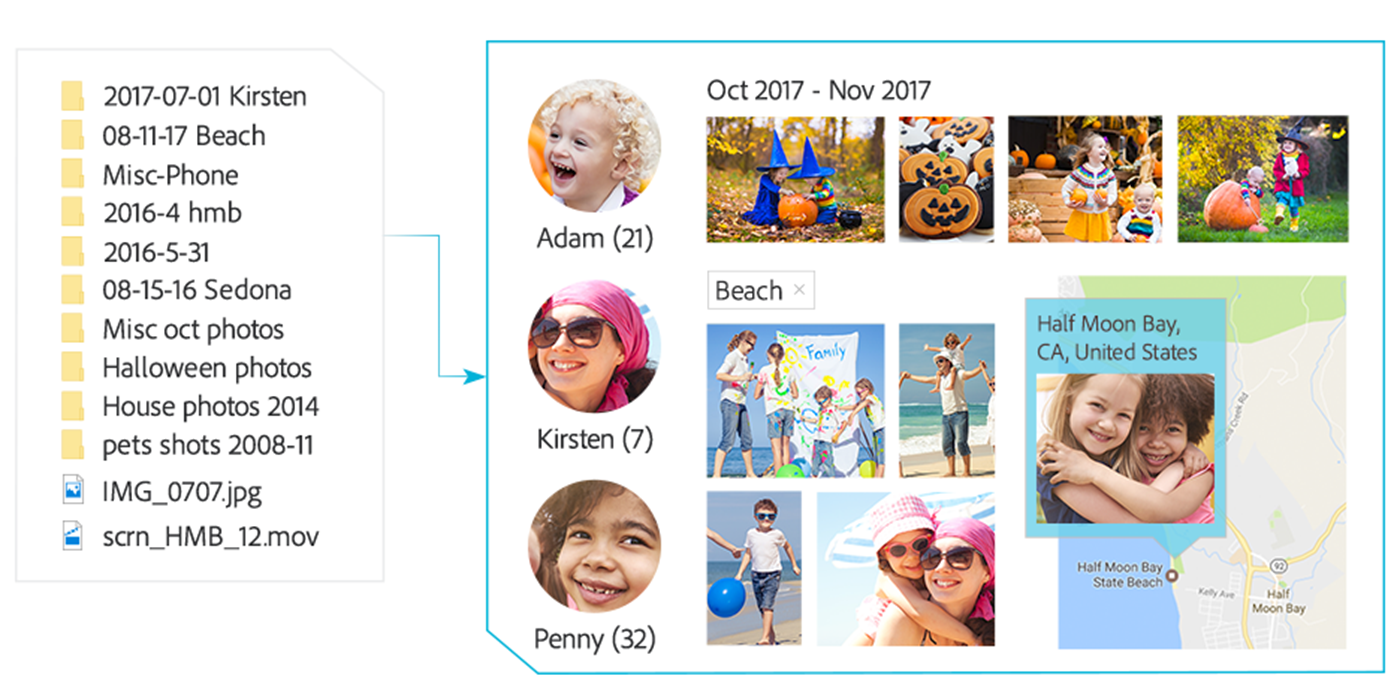
Go from hundreds of mystery folders to a visual view — automatically. See your best photos auto-curated based on quality, faces, subjects, and more. Auto-organize by date, subject, people, and places.
Effortless organization

Intelligent editing

Intelligent editing allows you to enjoy more time to be creative with automated photo editing. Open closed eyes like magic and make selections effortlessly. Get step-by-step help with creative techniques and effects.

Intelligent editing

Stunning creations

Totally reimagined slideshows bring together curated photos and short clips with one click. Make printed artwork, collages, and gifts. Create calendars, scrapbook pages, and cards to print at home.

Stunning creations

Shareable memories

Easily print photos to display and share. Quickly share photos on Facebook, Twitter, and more.* Share slideshows and video clips on YouTube and Vimeo.*

* This product may integrate with or allow access to certain Adobe or third-party hosted online services (“Online Services”). Online Services are available only to users 13 and older and require agreement to additional terms of use and the Adobe Privacy Policy (see www.adobe.com/go/terms). Online Services are not available in all countries or languages, may require user registration and may be discontinued or modified in whole or in part without notice. Additional fees or subscription charges may apply.

Shareable memories

Go from hundreds of mystery folders to a visual view of your photos automatically sorted by date, subject, people and places in the photo Organizer. See your best photos auto-curated based on quality, faces, subjects and more. Open closed eyes like magic and make precise selections effortlessly with easy photo editing options. Get step-by-step help changing backgrounds, adding artistic overlays and creating double exposures and watercolors. And turn your best photos and video clips into new dynamic slideshows with one click.

Effortless organization
Finally-a photo Organizer that makes it effortless. Go from hundreds of mystery folders scattered across your computer to a visual view of your photos automatically sorted by date, subject, people and places. See your best photos auto-curated based on quality, faces, subjects and more.

Intelligent editing
Automated photo editing so you have more time to be creative. Open closed eyes like magic, make precise selections effortlessly and get step-by-step help with artistic techniques and creative effects.

Stunning creations
Create beautiful printed artwork, New dynamic slideshows, photo collages and gifts for friends and family. Make calendars, scrapbook pages and cards you can print at home.

Shareable memories
Share with friends and family any way you like-via print, slideshows, Facebook, YouTube, Vimeo, Twitter and more.

New Auto Curate
Your photos are automatically curated based on quality, faces, subjects, Smart Tags and more, so you don't have to search for the standouts.

New Totally reimagined slideshows
Slideshows are a fun way to showcase your photo and video memories. With one click, they automatically pick your best photos and bring them together with short video clips to create a stylish, animated slideshow that you can easily customize with different photos and clips as well as great-looking themes.

New Open closed eyes like magic
Did someone blink? Photoshop Elements automatically copies the open eyes from one photo and blends them into another to create the perfect shot.

New Auto Selection
Making precise selections has never been easier-just drag and it's done.

Enhanced Guided Edits for fantastic results
Ready to try more creative techniques and effects with your photos? Get step-by-step photo editing help with 49 Guided Edits.

New Guided Edit replaces backgrounds in seconds
Select the subject of a photo and place it on a background that's more interesting. This Guided Edit makes it a snap.

New Guided Edit adds artistic overlay effects
Embellish any photo with a shape overlay and one-click effects that make it a work of art. This Guided Edit is great for scrapbook pages and photo crafts.

New Guided Edit makes amazing watercolors
Get help turning any photo into a beautiful, textured watercolor-and even finish it off with text.

New Guided Edit creates double exposures
Bring one photo to life within another to create a surreal effect. Photoshop Elements walks you through the steps.