
Orders placed during Passover Holiday (Wed 4/1 after 4PM ET – Thurs 4/9) will ship Fri 4/10. View our holiday shipping schedule.
This item is no longer available.
Review Summary
2019-01-15T09:23:15
Excellent, as expected.
ANA T.
2018-12-13T15:47:30
I have only had it a week, but I really enjoy it thus far!
Bekah R.
2018-12-13T07:43:22
Great overall machine as always
C A.
2018-11-24T03:57:05
LOVE MY NEW MAC PRO
ADAM R.
2017-09-19T13:13:19
Great value for a wonderful product. Love it! Although the feeling of pressing down the keys takes some time to get used to, other than that I have no complain :)
Wei L.
2017-08-28T17:50:03
Overall this is a great computer, with a slim size and weight and a nice performance boost from a 2014 model. The touch bar is cool, but I don't use it very often. Much of what appears there already has a keyboard shortcut, which is faster, and other things like spelling corrections and emojis I will probably never use. But it's a great concept and I'm curious to see what else app developers can do with it. Trading all the ports for Thunderbolt 3 ports held back my purchase for a while, but after working out the most cost-effective combination of adapters and new peripherals (hard drives) I'd need to buy, I'm happy with the new setup. The only downsides are the change to the arrow keys and the enormous trackpad. For the arrow keys, I can no longer locate them by feel with my pinkie, which apparently I was doing unconsciously about 100 times an hour. Now I'm having to relearn how to find those without looking. And the trackpad is so large that it's impossible to type without touching it, or even click with my right hand while my left hand touches it. This isn't usually a functional problem because the palm detection works pretty well, but it is an unnerving distraction to feel it moving below my left hand while my right hand clicks or feel both hands grazing it while I type. Since I can't see any benefit to such a gigantic click area, this seems like a clear design error. But I'm hoping I'll just get used to these two changes.
Arlo L.
2017-08-28T10:45:18
We are very happy with this laptop. It was just what we needed for on-site edits and media transferring on location.
Robert J.
2017-08-08T11:42:15
Entry level with large screen.
Jose E.
2017-08-01T10:57:42
I'm a digital influencer and professional photgrapher/graphic designer, so I've been using it to create digital art to share on my social platforms and so far it has been great for me.
Jacob P.
2017-07-11T14:21:15
Works great, beautiful machine. -1 star for no real ports.
DAVID S.
2017-06-29T11:54:45
I went from an avid Windows user to a first-time Mac user. I love my Mac. It's sleek, beautiful, fast, user friendly and meets all of my needs. I'm using it for web development and I couldn't be happier.
Brittany B.
2017-05-15T14:43:58
It's crazy how thin this is, yet feels incredibly solidly built. Performance is great so far, despite being the base model of the 15" line.
Jeffrey C.
2017-05-12T11:37:59
Apple has never done me wrong. Yes, they are pricy for what you get, but Adorama has this model priced right in the sweet spot. I mainly use the laptop for daily web browsing, lightroom, and final cut with no hiccups (4K runs fine in FCPX).I updated Mac OSX as soon as I opened it and experienced no battery issues. Overall, I am extremely happy with my purchase.
Donald P.
2017-05-11T11:45:09
I have always resisted getting Apple products. I set up a home recording studio with an Apollo 8 interface and run Pro Tools. For production and arts, everyone said go Mac. After a few hours of use and setup. It crashed twice and had an insufficient processor capacity error. That was on a 3 track song inserting a delay plugin on one track. If I would have bought a pc, I would blame these glitches on the pc and wish that I would have gotten a Mac. Also, I promptly had to go buy $ worth of thunderbolt cables and adapters. I think that I will really like it, but it's not magic
NATHAN W.
2017-04-14T05:44:45
Fantastic machine. Works great with architecture software.
CELIO S.
2017-04-06T12:12:08
Using it for a month. Still UP!!!
Rajendra V.
2017-04-04T12:45:23
The touch bar is fun but I have not used it at all, Adorama had this laptop at a great price. I would not pay full retail and taxes for it.
Orlando J.
2017-04-02T01:21:57
I used my MacBook Pro from 2009 and it lasted until now. This was a huge jump and I love the computer. I feel like my productivity has greatly increased from it. Adorama ensured the product was delivered in great shape and on time.
daniel c.
2017-03-28T08:41:22
It was a graduation gift, and she loves it. As a family, we have had a number of Macs, and they are perfect for every user knowledge level. Other than desire, there is no real need to purchase another for a really long time. The OS is always current and relevant
CHRISTINE W.
2017-03-22T10:42:00
I found Adorama's website easy to use. I got a great price and the shipping was fast. I will use Adorama again in the future.
Walter E.
2017-03-17T10:47:20
A classic Mac.
Dan A.
2017-03-08T08:09:38
Upgraded from a Macbook Air to the Pro with Touch Bar... no regrets. Amazingly fast machine. Looking forward to many years of use.
Juan V.
2017-03-01T11:33:15
I have enjoyed using my new MacBook.
Mario R.
2017-02-28T16:43:59
The best experience was shopping from adorama. Everything was perfect, starting from delivery timeline to beautiful product packaging and not to mention there is no tax with free shipping on top of Appinsider discont.
Narayan D.
2017-02-28T07:40:00
Very thin, works great, lightweight laptop that is powerful. Sure to have it for a few years. Like it better than my surface book pro that I now have for sale on CL. Get one!
Christopher D.
2017-02-28T07:37:45
Chrome crashes frequently with unknown reason. The first time I charged it after receiving it, it froze on me with dark screen. You can hear the hard drive running but screen is dark. I had to force restart the computer after waiting for more than half an hour.
Yan C.
2017-02-25T10:44:32
Overall I am really enjoying my Macbook pro, the keyboard required a little getting used to at first but once you get a few hours typing on it you will start to enjoy it. Also make sure to invest in some dongles because you will find out that all your present peripherals will not work with USB type C. Aside from that the Mac is very well performing and I have been getting around 6 to 7 hours of battery, of course this area could be better but it is enough for my needs and it does charge quickly. Finally the cost is higher than it should be considering the specs but the experience is worth and I was able to get a good deal from Adorama which was the cheapest I could find online and made it a little more affordable to me i still would have preferred to get the 512GB model Macbook pro 15 instead of the 256GB but I was at my budget limit, however space does tend to fill out quickly so if you have the money get the higher storage option the 2gb GPU is enough for my needs since I am not too much into video editing.
Fadi S.
2017-02-17T05:20:01
Admittedly, I was in crisis mode when I ordered this laptop due to a fatal crash of my current Mac Book Pro. There are no USB ports, cd drive or ethernet ports. You will need adapters for all your current devices. There were quite a few freezes in the beginning but I was able to solve that problem with online forums. Apparently others were having the same issue(s). But... besides all of that, once it was running it is fast and works as well or better than expected.
Sandy G.
2017-02-11T08:01:25
Love the computer!!
Dale S.
2017-02-11T05:21:10
If you're looking for the best bang for your money, this is not it. You can some other Windows laptop. If you're looking for a laptop with the latest technology, again this is not it. If you're looking for something reliable, and gets the job done, this is it. Is it pricey? Yes. But again, it's reliable and gets the job done. This is my 3rd Mac that I've used (previously I used a 13" MBA from '13, and a 15" MBP from '15. While the 15" MBP's aren't as compact as the 13" MBA, what I get in return, larger display, the ability to have multiple external monitors more than makes up for it. As far as the touchbar goes, it's still early. I don't use Safari much, and can't wait for some of the other third parties to start using it. The fingerprint reader is nice and convient. Having only USB-C ports, will take some getting used to, but there are some external dongle solutions, while things transition to use it more. A big disappointment is no SDHC card slot. I'm also disappointed that there isn't a built in magsafe solution. The third party one doesn't provide enough power for the 15" MBP. Finally, pay attention to the USB-C cable provided. It supports PD, so can deliver high wattages, but data transfer is at USB2.0 speeds. Minor nit for the large bezels. All in all, I do not regret the purchase.
MATT C.
Touch Bar with integrated Touch ID sensor
15.4" (diagonal) LED-backlit display with IPS technology; 2880-by-1800 native resolution at 220 pixels per inch with support for millions of colors
Supported scaled resolutions:
1920 by 1200
1680 by 1050
1280 by 800
1024 by 640
500 nits brightness
Wide color (P3)
2.8GHz quad-core Intel Core i7, Turbo Boost up to 3.8GHz, with 6MB shared L3 cache
1TB PCIe-based onboard SSD
16GB of 2133MHz LPDDR3 onboard memory
Radeon Pro 555 with 2GB of GDDR5 memory and automatic graphics switching
Intel HD Graphics 630
Four Thunderbolt 3 (USB-C) ports with support for:
Charging
DisplayPort
Thunderbolt (up to 40 Gbps)
USB 3.1 Gen 2 (up to 10 Gbps)
Full-size backlit keyboard with:
64 (U.S.) or 65 (ISO) keys including 4 arrow keys
Touch Bar with integrated Touch ID sensor
Ambient light sensor
Force Touch trackpad for precise cursor control and pressure-sensing capabilities; enables Force clicks, accelerators, pressure-sensitive drawing, and Multi-Touch gestures
Wi-Fi: 802.11ac Wi-Fi wireless networking; IEEE 802.11a/b/g/n compatible
Bluetooth: Bluetooth 4.2 wireless technology
720p FaceTime HD camera
Simultaneously supports full native resolution on the built-in display at millions of colors and:
Up to two displays with 5120-by-2880 resolution at 60Hz at over a billion colors
Up to four displays with 4096-by-2304 resolution at 60Hz at millions of colors
Up to four displays with 3840-by-2160 resolution at 60Hz at over a billion colors
Thunderbolt 3 digital video output
Native DisplayPort output over USB-C
VGA, HDMI, and Thunderbolt 2 output supported using adapters
Stereo speakers with high dynamic range
Three microphones
3.5 mm headphone jack
Up to 10 hours wireless web
Up to 10 hours iTunes movie playback
Up to 30 days of standby time
Built-in 76.0-watt-hour lithium-polymer battery
87W USB-C Power Adapter
100-240V AC
50Hz to 60Hz
50 to 95 deg. F (10 to 35 deg. C)
-13 to 113 deg. F (-25 to 45 deg. C)
0% to 90% noncondensing
Tested up to 10000' (3048.04m)
15,000'
macOS Sierra:
macOS
Accessibility features help people with disabilities get the most out of their new MacBook Pro. With built-in support for vision, hearing, physical and motor skills, and learning and literacy, you can create and do amazing things
Features include:
VoiceOver
Zoom
Increase Contrast
Reduce Motion
Siri and Dictation
Switch Control
Closed Captions
Text to Speech
Photos
iMovie
GarageBand
Pages
Numbers
Keynote
Siri
Safari
Mail
FaceTime
Messages
Maps
Notes
Calendar
Contacts
Reminders
Photo Booth
Preview
iTunes
iBooks
App Store
Time Machine
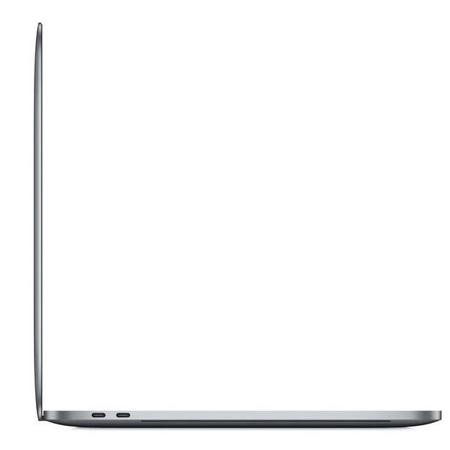
0.71 x 14.13 x 9.73" (1.80 x 35.89 x 24.71cm)
4.49 lbs (2.04kg)


Excellent!
By Jeffrey C.
It's crazy how thin this is, yet feels incredibly solidly built. Performance is great so far, despite being the base model of the 15" line.
Excelect for entry level
By Jose E.
Entry level with large screen.
A touch of genius
It's razor thin, feather light and even faster and more powerful than before. It has the brightest, most colorful Mac notebook display ever. And it features the Touch Bar - a Multi-Touch enabled strip of glass built into the keyboard for instant access to the tools you want, right when you want them. MacBook Pro is built on groundbreaking ideas. And it's ready for yours.
Touch Bar and Touch ID
A revolutionary new way to use your Mac
The Touch Bar replaces the function keys that have long occupied the top of your keyboard with something much more versatile and capable. It changes automatically based on what you're doing to show you relevant tools you already know how to use - system controls like volume and brightness, interactive ways to adjust or browse through content, intelligent typing features like emoji and predictive text and more. And now Touch ID is available on a Mac, enabling instant access to logins and fast, secure online purchases with Apple Pay.
Photos
Select a photo from your library, rotate images and add a filter.
Final Cut Pro
Navigate through your project with an interactive display of your entire timeline.
Mail
Pick from your favorite emoji to add the perfect feeling to any email. Or type a message faster with predictive text.
Safari
Breeze through your open Safari tabs or touch a Favorite to view a saved site.
Keynote
Adjust the color of text and move through thumbnails in full screen.
Customization
In some apps, you can customize the Touch Bar with the commands that work best for you.
Even more ways the Touch Bar gives you quick access to commands
Expand, contract and customize system controls to reveal volume, brightness and more
Answer your iPhone or a FaceTime call from the keyboard without moving your cursor
Select a palette and tap to choose a color for text or objects in Pages, Keynote and more
Get quick access to text suggestions and emoji in apps like Messages and Mail
Access the function keys by holding down the Fn key on the keyboard
Touch ID arrives on Mac
Now you can unlock your Mac in an instant. Use Apple Pay to make secure online purchases. Quickly access system settings and locked notes. And even switch between users - all with the touch of a finger.
Your favorite apps. Now with Touch Bar
The Touch Bar can change how you experience the apps you use every day - like Photoshop, Microsoft Office, DaVinci Resolve, Logic Pro X and others. Key tools and features appear right on the Touch Bar, so they're easier to discover and use. It's a dynamic canvas that developers can use to add a new dimension of interactivity to current and future apps.
Photoshop
Adjust your layers, pick a hue, control brush size and so much more.
Microsoft Office
Create and edit documents with Microsoft Word, Excel and PowerPoint.
DaVinci Resolve
Edit, color correct, add effects and deliver projects from start to finish.
Logic Pro X
Jump to a location, fine-tune sounds or turn your Touch Bar into a drum or piano.
Performance
Speed-of-the-art
MacBook Pro elevates the notebook to a whole new level of performance and portability. Wherever your ideas take you, you'll get there faster than ever with cutting-edge graphics, high-performance processors, whip-smart storage and more.
Eye-opening graphics performance
The 15-inch MacBook Pro features a powerful Radeon Pro discrete GPU in every configuration. Manufactured with a 14 nm process, Radeon Pro graphics combine outstanding power with outstanding power efficiency. And now 4GB of GDDR5 (This Model has 2GB of GDDR5) memory comes standard on the top configuration, giving you fluid, real-time performance for pro tasks like rendering 3D titles in Final Cut Pro X.
Video Editing
Edit multicam projects in Final Cut Pro X with up to three streams of full-resolution 4K video on the 15-inch MacBook Pro.
3D Graphics
Experience smooth real-time performance when rendering 3D models in Autodesk Maya 2017.
Gaming
Play a graphics-intensive game like Grid 2 Reloaded Edition and enjoy responsive performance, satisfying playability and vivid detail.
Speedy SSD storage. Snap to everything
MacBook Pro includes a solid-state drive that's blazing fast, with sequential read speeds up to 3.2GB/s. The 15-inch model is available with up to a 2TB SSD (This Model has 1TB SSD) - enough space to take even your biggest projects with you, without having to take an external drive. And its memory is both high speed and power efficient. It all works together to help you boot up, launch multiple apps or import huge files in a flash.
Processors that provide incredible power. And use incredibly little
With seventh-generation Intel Core processors, MacBook Pro delivers amazing performance, with Turbo Boost frequencies up to 3.8GHz. So you can move fast - even when powering through pro-level processing jobs like rendering 3D models and encoding video. At the same time, it can conserve energy when taking on lighter tasks, like browsing the web and checking email. And 10-bit HEVC hardware acceleration comes standard on MacBook Pro, which will let you take even more advantage of the boosts in 4K video compression and streaming performance coming in macOS High Sierra.
Impressive all-day battery life
MacBook Pro packs more performance into a thin design, yet still provides all-day battery life - up to 10 hours for both the 13-inch and 15-inch models. So you're free to keep watching, gaming and editing from wherever you are.
The coolest thing you'll never see
The thinner the notebook, the less space for cooling. So MacBook Pro incorporates innovations throughout the system that efficiently eliminate heat - increasing airflow during intensive tasks like editing video, playing graphics-heavy games and transferring huge files. On the 15-inch MacBook Pro, an innovative split blade design allows for more blades and delivers increased airflow. The asymmetrical layout of the fan blades reduces noise.
Retina Display
The brightest, most colorful Mac notebook display ever
The display in the MacBook Pro is the best ever in a Mac notebook. It features bright LED backlighting and a high contrast ratio, delivering deep blacks and bright whites. Its large pixel aperture and variable refresh rate make it power efficient. And it supports wide color for even more vibrant greens and reds than with sRGB. This makes for more true-to-life pictures with realistically vivid details - essential for graphic design, color grading and editing. MacBook Pro features P3 color, which makes 25 percent more colors available than standard RGB - revealing a much broader range of greens and reds.
Audio
Speakers that speak for themselves. Loudly
Enjoy beautifully balanced, high-fidelity sound that takes listening to new levels with wide dynamic range and more bass for maximum boom. The speakers are connected directly to system power, enabling greater peak amplification. So they make MacBook Pro the perfect choice for mixing a track on the fly, editing video on location or enjoying a movie on the go.
Keyboard and Trackpad
More responsive keyboard. More expansive trackpad
Interacting with MacBook Pro is a smooth experience all around. The keyboard features our second-generation butterfly mechanism - providing four times more key stability than a traditional scissor mechanism, along with greater comfort and responsiveness. And the spacious Force Touch trackpad gives your fingers plenty of room to gesture and click.
Thunderbolt 3
The most powerful and versatile port ever
Thunderbolt 3 combines ultra-high bandwidth with the ultra-versatility of the USB-C industry standard to create one revved-up universal port. It integrates data transfer, charging and video output in a single connector, delivering up to 40Gb/s of throughput for twice the bandwidth of Thunderbolt 2. Both sizes of MacBook Pro are available with four ports, so you can do all that from either side. Existing devices are easily connected with a cable or adapter. And Thunderbolt 3 is reversible, so no matter how you plug in, it's always right side up. Simultaneously connect two 5K displays and two RAID systems to a 15-inch MacBook Pro with four Thunderbolt 3 ports to create a powerful workstation.
macOS
It's why there's nothing else like a Mac
macOS is the operating system that powers every Mac. It's engineered to take full advantage of the hardware and designed to be as easy to use as it is beautiful to look at. macOS includes an amazing collection of apps you'll use - and love - every day. It also features iCloud and other innovative ways for your Mac, iOS devices and Apple Watch to work together.