



This item is no longer available.
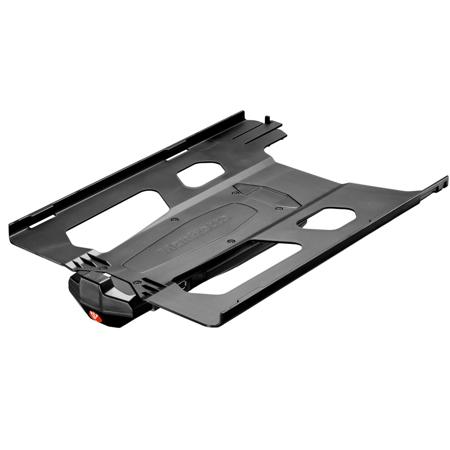
Digital Director ensures a reliable USB cabled connection between camera and iPad and through its free dedicated App allows to monitor the shoot and control camera settings. It works with selected Canon and Nikon DSLRs and iPad Pro 12.9".
• Easily control your camera remotely
• Quick and easy time lapse and intervalometer set up
• Intuitive focus control
• Live view monitoring
• View, organize, edit and share your pictures
• Digital Director unlocks the power of your camera with the simplicity of your iPad
• Connect your iPad and make your camera easier to use - in a single gesture
• Thanks to Digital Director and its free dedicated app, you're ready to control your camera and share your images directly from your iPad
• Now, capturing, editing and sharing all your moments is as intuitive as using your iPad
• Digital Director is the only Apple certified (MFi - Made for iPad Certification) electronic device that connects your camera and iPad
• Quick and easy intervalometer and time lapse set up
• Digital Director is supplied with AC adapter and plugs and 1m USB cable
The Dedicated Digital Director App Enables
• Remote control of camera parameters
• All the DSLR's key parameters can be monitored and dynamically modified (Exposure, ISO, Shutter Speed, Aperture, Manual Focus, WB, Image Quality, Focus/Camera/Drive Modes)
Remote Control of LED Lights
Individual or group of Manfrotto LYKOS and Litepanels ASTRA LEDs (up to 13 lights) can be remotely controlled via Bluetooth (turn on/off, adjust dimming level and color temperature, set up groups and configure/save multiple scenes).
Remote Shooting via iPad Retina Display
Effective real time "Live View" monitoring through a certified cable connection. This ensures a stable connection between devices. Dynamic histogram and audio level display allows greater control when shooting.
Interactive Focus & Focus Peaking
Interactive Focus can be used to select the focus point anyway on the screen together with the digital zoom that magnifies the selected focus point. The on screen focus peaking indicator ensures crisp accurate focus.
Zebra Filter
Zebra filter uses striped patterns to indicate the overexposed and/or underexposed areas of the image.
Download the Images onto the iPad
Download RAW and JPEG images onto iPad. Rate and assign keywords to them. Check all details of the JPEG images you're shooting by viewing the downloaded file, using standard iPad "gestures".
Intuitive Image Adjustment
Put the finishing touches on your work in the same App: check the JPEG image's general information, histogram, crop free or with proportion, rotate, set exposure, saturation, contrast, light, blur and save your image.
Simple Management of the Shoot
Organize your albums and images, filter by rating and keywords.
Content Distribution
Choose from many ways to share your images:
• Via your preferred social network App
• Via Wi-Fi web server
• Direct to FTP
• By e-mail
With the Manfrotto Digital Director plug-in for Adobe Lightroom for desktop, you can import the additional Digital Director metadata of pictures you've shared from Digital Director - via Wi-Fi web server, e-mail and FTP - into Adobe Lightroom for desktop.
Digital Director features a dedicated CPU (micro-processor ARM Cortex-A8) that together with its dedicated App, provides an interface between iPad and camera, which enables the iPad to understand and control the camera protocols:
• All the key shooting parameters can be controlled starting from different camera protocols
• The video streaming between devices is smooth, consistent and presenting extremely low latency at the same time
• The download of the high quality images into the iPad is very fast