Closeout

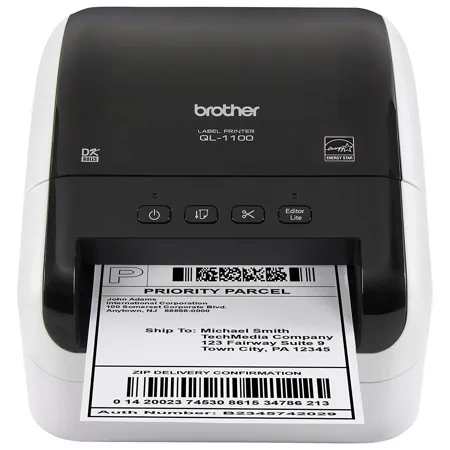
Brother QL1100 Wide Format Professional Label Printer, 4.09" Label Width, 69 Labels Per Min Print Speed, 300x300 dpi Resolution, Black & White

SKU: BRQL1100 MFR: QL1100
Earn VIP Reward Points

Key Features

  • Create professional labels with 300x300 dpi resolution for crisp, clear printing.
  • Print labels at a swift 69 labels per minute, boosting your office efficiency.
  • Enjoy versatile connectivity with USB host and standard USB interface types.
  • Use with Windows, Mac OS, and mobile devices via Brother iPrint&Label app.
  • Automatic cutter ensures precise label cuts, supporting both die-cut & continuous.
  • Print wide format labels up to 4.09" for shipping, signage, and more!
See More Product Details
Ships from Manufacturer?
Free Shipping

See Options

1

Need help? Ask our experts.

Overview
Compare
Learn
Specs
Protection

Reviews about this item

Review Summary

2026-03-17T20:00:00

Rated 5 out of 5

Most Complete Stand Alone Labeler Ever

Best Labeler that I have ever used and I currently own 4, 3 Brothers and a Rhino. This machine can handle all size tapes made and creating labels with the cord attached keyboard is very intuitive but because it can do so much you will need to refer to the manual at times. The cutter is great. Easy to remove the backing from the label. I know that there are labelers that can be used with my computer but I wanted a free standing unit to keep in my garage and this is perfect.

TAC 8.

2025-10-28T20:00:00

Rated 1 out of 5

Compatibility Issue with QL-820NWB Label Printer

I purchased this item based on the Main Features listing, which stated it was compatible with the Brother QL-820NWB. Unfortunately, that's not the case-it shows as the wrong type and does not work with the printer. Brother should double-check compatibility claims to ensure they're 100% accurate. I've also experienced a long wait time trying to reach customer service, which has added to the frustration. Very disappointed with this purchase.

JMora

2025-05-05T20:00:00

Rated 5 out of 5

GREAT PRODUCT - GREAT SERVICE

For someone like myself that is not very knowleghable of the computer - printer world I found the website for purchasing a little confusing! BUT when I called in for help the lady could not have been any better help. Knowlegable, freindly, courtious AND patient. I placed the order and I think it was here either the next day or 2 days! Cannot have asked for anty better customer service! AND I LOVE MY PRINTER

Bill S.

2024-09-17T20:00:00

Rated 5 out of 5

So Happy!

Smartest purchase I've made in a long time. Easy to set up and use. Free downloadable software that works great, you don't need other software or questionable apps.

Coolmommy

2024-09-16T20:00:00

Rated 3 out of 5

Disappointed in tech sup't recv'd on HL-L8360prntr

I'm disappointed in the tech support I received on my Brother HL-L8360CDW printer. I initially purchased four "Genuine Brother" TN436 Ultra High Yield Toner Cartridges on AMAZON only to find out that they were NOT Genuine Brother toner cartridges. My printer was printing way too much blue on photos regardless of whether I printed from my PC, iPad or iPhone. When I reached out to Brother, they confirmed my newly purchased toner cartridges from AMAZON were NOT Genuine Brother toner cartridges. I then purchased a set of four TN436 Ultra High Yield Toner Cartridges directly from Brother. But, the printer continued to print way too much blue (even when there was no blue in the picture) on photos. After multiple phone calls with Brother tech support, trying multiple diagnostics, Brother determined that my printer was about 1 year out of warranty and told me to pursue a Brother certified service center to try and resolve my printer problem as they could not determine what was wrong. In my second to final call tech support said they would replace my printer. But, in my final call they determined my printer was out of warranty and I was on my own. I was disappointed that Brother didn't stand more behind their product, even though the warranty period had expired. I was also VERY DISAPPOINTED that AMAZON advertised the original set of TN436 Ultra High Yield Toner Cartridges as "Genuine Brother" toner cartridges; clearly a LACK of Truth in Advertising on Amazon's part. I would think that this is something Brother would be concerned about.

Fred P.

2024-03-13T20:00:00

Rated 1 out of 5

Very UNFRIENDLY policy

I would give this zero stars if possible. I replaced an empty toner cartridge with a new one out of the Brother box. Followed the instructions. Repeated the procedure a few times. Spent time with chat-support and phone support. Bottom line is that all they can do is to replace the cartridge under warranty. Wait! I bought mine to have it on my shelf when it would be needed. Hence, it is not under warranty which is 90 days. All they could offer is that I gamble $100 with the possibility that the problem is a defective cartridge. Bottom line: poor policy AND do not buy this product in advance. And, expect crappy support (no reset, nor bypass to their buy-Brother hardware) that makes it hard to keep a printer running.

unhappyx2

2023-11-09T19:00:00

Rated 4 out of 5

Good labeller

Good mail labeller, does what it is supposed to do.

Bill

2023-11-02T20:00:00

Rated 1 out of 5

Brother Eats Toner... always.

Toner usage scam. I have had to replace my toner more than any other toner for a copier. Brother tried troubleshooting the printer and issued a completely new printer, but the toner continued to be depleted more than regular use. I will be using secondary toner until we can find a new copier that isn't a Brother product.

LM V.

2023-10-26T20:00:00

Rated 5 out of 5

Outstanding

We spent more on a copier machine but these cartridges last us 2 years. We love the quality, the amount of pages it will print and the cost for the cartridges make it the best price and quality.

BoomerSooner

2023-09-21T20:00:00

Rated 5 out of 5

Very Happy

Love the QL-1100. When I bought it and it did take a hot minute to figure it out. I am very pleased with this product. Hasn't skipped a beat. Clear print every time.

Misty

2023-07-17T20:00:00

Rated 5 out of 5

Brother products are really good. I would buy it.

Shipped on time and great products. The Lazer printer is the best

Eric

2023-06-20T20:00:00

Rated 1 out of 5

Labels work with brother label maker

These labels work with the brother brand label maker. The colors are red and black rimmed in this particular package. The brother brand offers an assortment of other colors for the label maker as well which can be used to label many things.

fashionshell22

2023-05-01T20:00:00

Rated 1 out of 5

Only Received 30% of what we paid for

Had to throw out after only 30% was used, due to leak.

Dave

2023-04-26T20:00:00

Rated 5 out of 5

High quality labels

I recieved these Brother Genuine DK-1234 Die-Cut Name Badge Labels a few weeks ago I am very satisfied with the quality and appearance. I would highly recommend these badge lables to anyone who is looking for a professional badge label.

sja711

2023-04-24T20:00:00

Rated 5 out of 5

easy to use!

As someone who frequently attends conferences and networking events, having professional-looking name badges is a must. That's why I turned to the Brother Genuine DK-1234 Die-Cut Name Badge Labels, and I couldn't be happier with my purchase. These labels are incredibly easy to use - simply load them into a compatible Brother label printer and print out your customized badges. The die-cut design ensures that each badge looks crisp and professional, with no jagged edges or misaligned cuts. What I love most about these name badge labels is the quality of the adhesive. The labels stay securely in place on clothing, without any risk of falling off or leaving a sticky residue behind. This is especially important for all-day events where attendees are constantly moving and interacting with others. The Brother Genuine DK-1234 Die-Cut Name Badge Labels are also versatile - they come in a variety of sizes to suit your needs, and the white background allows for customization with logos or graphics. Plus, the labels are compatible with both Windows and Mac operating systems, so you can easily print from your computer. Overall, I highly recommend the Brother Genuine DK-1234 Die-Cut Name Badge Labels. They are high-quality, easy to use, and offer a professional look that is essential for any networking event or conference. If you want to make a great impression, these labels are a must-have!

lonestar92s

2023-03-23T20:00:00

Rated 5 out of 5

Work Great

Brother DK-1234 Die-Cut Name Badge Labels work great with my Brother QL label printer. These white labels are 2.3 in x 3.4 in & come in a roll of 260 labels. They fit right into the printer and have plenty of room to print logos and names for all of your events. Great for all labeling projects!

PattiL

2023-03-22T20:00:00

Rated 5 out of 5

No smudging!

I love these labels, they work great with my Brother QL-820NWBC Ultra. The label maker printers quickly on these labels and they do not smudge as i have experienced from other labels. The ink looks really good on these labels. Am very happy with these.

rossy505

2023-03-19T20:00:00

Rated 5 out of 5

Another great product from Brother!

Brother products are always top of the line. So true are the Brother Genuine DK-1234 Die-Cut Name Badge Labels. These labels fit perfectly into my QL-820NWBC printer. Each label I printed was perfectly cut to size by the printer and stuck to the objects I adhered them to securely. I highly recommend the DK-1234 Die-Cut Name Badge Labels for your compatible Brother printer.

TheDarkGnat

2023-03-16T20:00:00

Rated 5 out of 5

Perfect labels

These are good size labels, great quality, thick and don't rip easily. They work very well with the label maker. I like to use these for my employees and for when we have social events. They print well and the color is nice and vibrant. Good quality. I'm

Ericasb11

2023-03-14T20:00:00

Rated 5 out of 5

Works with label printer

These labels are for use with the Brother label printer. They are sturdy and remove from their backing easily. The print is crisp and clear, and does not smear. This is only one of a variety of labels that are made for the compact printer.

Rebel1661

2023-03-13T20:00:00

Rated 5 out of 5

Nice and big

I really like these labels! They are big enough so you can see the address clearly, and the printer does a decent job of making them look nice. I didn't see any smudges on them like some labels do when you apply them to an envelope. I've been able to use them on envelopes and even on other surfaces like shelves to clearly identify what I'm looking for. I really like them!

NolaF

2023-03-13T20:00:00

Rated 5 out of 5

Looks great

I love using brother products because they always turn out absolutely amazing. I use the labels to label the products I sell and they always look so amazing. There's no smudges, it's large enough to read, and it's easy to apply.

Squirrelmom1

2023-02-05T19:00:00

Rated 1 out of 5

Not worth it, too much hassle.

Can't get it to load properly on my computer, even though I have had techs remote in to try and fix it. Would prefer a refund. Much to expensive for the lack of work it does. You are better off just using a regular printer with 2 labels per page.

Sandy D.

2022-09-25T20:00:00

Rated 2 out of 5

Labels are way too expensive

Great printer, but the labels are too overly high quality and I don't want to pay the premium for a short lived shipping label that only has a life need of 10 days. There needs to be a cheaper option for shipping needs.

Brother

2022-09-15T20:00:00

Rated 5 out of 5

Lazer Fast Printing

This printer just shoots labels out. I use mostly for printing shipping labels. It is extremely easy to refill. Requires no ink which is great.

Andbu710

2022-06-02T20:00:00

Rated 5 out of 5

High Capacity = WORTH EVERY PENNY

High capacity cartridge will give you the best value and best performance

dstom

2022-04-21T20:00:00

Rated 5 out of 5

This a #1 winner

This printer is a real winner,it works really good

Gerard T.

2022-02-18T19:00:00

Rated 4 out of 5

Brother QL-1100

Would have given it a 5 star if it was easier to shut the lid

Dorothy

2022-02-12T19:00:00

Rated 2 out of 5

Frustrating

Most of the time it will not print offline, which is often the case at cinference and meeting venues.

Kmac

2022-02-05T19:00:00

Rated 4 out of 5

Great product

Works great for what I use it for, shipping and labeling items

DAN T.

Select a plan in the Add Protection section above and purchase with this product by clicking “Add to Cart”.

image-protection

TRUSTED PROTECTION PLANS, EXCEPTIONAL SERVICE.

Invest In Your Gear and Peace Of Mind!

Accidents happen where life happens. Protect your favorite Adorama products and purchase a protection plan to stay covered from accidental damage, mechanical or electrical failure, and more.

Repair or Replacement

Repair or Replacement

If we can’t fix it, we’ll replace it at no additional cost.

Accidental Damage

Accidental Damage

Protect your product from drops, spills, and more.

Peace of Mind

Peace of Mind

Enjoy your gear without fear. We have you covered!

Malfunction Protection

Malfunction Protection

When regular use of your product over time results in mechanical or electrical failure.

Zero Deductible

Zero Deductible

We will never charge you a deductible after the purchase of a plan.

Customer-Focused Support

Customer-Focused Support

Our claims process is simple & easy and our customer service team is happy to help.

Adorama Protect powered by Extend is available for purchase to customers in the United States. Not available for purchase Internationally or in U.S. Territories.

Brother US Specifications

Hardware

Hardware

Jump to...
  • Built-in Plug & Label Software

    Yes

  • Cutter Life

    up to 300,000 (die-cut labels) 150,000 (continuous labels)

  • Cutter Type

    Automatic

  • Housing Color

    White / Black

  • Interface Types

    USB Host, USB

  • LCD Display

    None

  • Maximum Label Length

    9.8 Feet (USB) 3 feet (Serial)

  • Maximum Label Width

    4.09" (10.3cm)

  • Maximum Print Resolution

    300 x 300 dpi

  • Maximum Print Speed

    69 (labels per min.)

  • Maximum Print Width

    4" (10.1cm)

  • Number of Templates

    99 (for Transfer Data)

  • Operation Modes

    PC Connected, Stand Alone (ESC/P or P-touch Template)

  • Printer Emulation

    Raster, Template 2.0 , ESC P

  • Printer Memory

    7.8 MB

  • Printer Technology

    Direct Thermal

  • Standard Memory

    7 MB

  • Tape Sizes

    Die-Cut, Continuous

  • ENERGY STAR Certified

    Yes

  • Power Source

    110-120 V AC 50 / 60 Hz

Software

Jump to...
  • Bar Code Types: PC Connected

    CODE39, IMb, CODE128, UCC/EAN128(GS1-128), ITF(I-2/5), CODABAR(NW-7), UPC-A, UPC-E, EAN13, EAN8, ISBN-2(EAN13 AddOn2), ISBN-5(EAN13 AddOn5), Laser Barcode, POSTNET, RSS(RSS14 Standard, RSS14 Truncated, RSS14 Stacked, RSS14 Stacked Omni, RSS Limited, RSS Expanded, RSS Expanded Stacked)

  • Bar Code Types: PC Connected (Contd.)

    PDF417(Standard, Truncate, Micro), QR code(Model1, Model2, Micro), Data Matrix(ECC Square, ECC Rectangular), MaxiCode(Model2, Model3, Model4, Model5), GS1 Databar Composite, Aztec Barcode

  • Bar Code Types: Stand Alone

    CODE39, CODE93, UPCEETENTION, CODE128, UCC/EAN128(GS1-128), ITF(I-2/5), CODABAR(NW-7), UPC-A, UPC-E, EAN13, EAN8, RSS(RSS14 Standard, RSS14 Truncated, RSS14 Stacked, RSS14 Stacked Omni, RSS Limited, RSS Expanded, RSS Expanded Stacked), PDF417(Standard, Truncate, Micro), Data Matrix(ECC Square, ECC Rectangular), MaxiCode(Model2, Model3, Model4, Model5)

  • Database File Compatibility

    CSV, Microsoft SQL Server Database (Windows), TXT, MDB, XLS

  • Font Style

    True Type

  • Labeler Features

    DatabasePrinting via Excel, Auto Numbering, Date/Time Stamp, Rotate Printing, Auto Power Off, Vertical Printing, Mirror Printing

  • Maximum Number of Print Copies

    9999

  • Microsoft Word/Outlook/Excel Add-ins

    Yes

  • Mirror Printing

    Yes

  • Mobile Device Compatibility

    Brother iPrint&Label with USB to Go cable

  • Mobile Device Printing App

    Yes

  • Multi-copy Print

    Up to 9999 copies

  • Operating System Compatibility

    Mac OS X 10.11.x, Windows Server 2012, Mac OS X 10.12.x, Mac OS X 10.13.x, Windows Vista, Windows 7, Windows 8/8.1, Windows 10, Windows Server 2008

  • Rotate Printing

    Yes

  • Symbols for Windows (Clipart in editor)

    1379

  • Time/Date Stamp

    PC Generated

  • Vertical Printing

    Yes

System Requirement

Jump to...
  • SDK Support

    Yes

  • Software Included

    P-touch Editor 5.2 for Windows, P-touch Address Book 1.2 for Windows, P-touch Editor 5.2 for Mac, P-touch Update Software (Windows & Mac)

Physical

Jump to...
  • Dimensions (W x D x H)

    6.7 x 8.7 x 5.9" (17 x 22 x 15cm)

  • Weight

    3.65 lb (1.6kg)

  • UPC Code

    012502648932

Related Articles & Videos

Best Video Tripods in 2024
NAMM 2020: Mackie Debuts Host of New Products, Including Microphones, Headphones & More

NAMM 2020: Mackie Debuts Host of New Products, Including Microphones, Headphones & More

New from Mackie for NAMM 2020 is a whole range of new products, including the very special EM-89D Dynamic Vocal Microphone, EM-91C Large-Diaphragm Condenser Microphone, MC-350 Professional Closed-Back Headphones, MC-450 Professional Open-back Headphones, MP-BTA Bluetooth Adapter, and EM-USB USB Cond...
Read more

About Brother US

The Brother QL-1100 is a high-speed label printer engineered to print up to 4" wide labels. This business-quality label printer lets you create cost-effective paper labels for packages, envelopes, postage and more. The automatic crop function lets on-line sellers easily print product and other barcode labels from A4/Letter size label sheet templates (Windows only).

The Brother QL-1100 delivers fast, printing up to 69 standard address labels per minute with black text at 300dpi. USB Host interface offers additional functionality. Auto cutter allows for printing 1 or multiple labels at a time, eliminating wasted label sheets.

The Brother QL-1100 permits users to create and print custom labels easily. Simply connect to your computer to design and print customized labels. You can also download the free Brother iPrint&Label app to design labels with your Android device with the purchase of a USBtoGO cable connection (additional purchase required).

The Brother QL-1100 series label printers utilize direct thermal printing, meaning that there are no expensive inks, toners, or ribbons to replace. Changing Brother DK rolls is simple - just drop them in and they fit easily. It is important to understand that using non-genuine Brother replacement labels may damage the Brother QL-1100 label printer and may not be covered under warranty.

The Brother QL-1100 is compatible with Windows and Mac and integrates with Microsoft Word, Excel, and Outlook. The Brother "Plug & Label" feature requires no software installation for Windows PCs. Simply print high-quality labels from Microsoft Word, Excel, and Outlook. This product is covered by a two-year limited warranty and exchange service by Brother.

Brother US Features

  • Prints on labels up to 4" wide, capable of printing shipping postage labels for packages
  • Automatic Crop function lets on-line sellers easily print product and other barcode labels from A4/Letter size label sheet templates (Windows only)
  • Fast, printing up to 69 standard address labels per minute with black text at 300dpi
  • Prints Brother DK pre-sized, easy-peel labels and continuous-length paper and film tapes. Auto cutter enables banners and signs up to 3 ft. long
  • Also offers a USB Host interface - for use with a peripheral such as a scanner
  • "Plug & Label" feature lets you create and print labels without installing software
  • Easy to integrate and manage on a network using Brother's network management tools and free software development kits. SDKs are available for Windows, iOS and Android operating systems
  • Windows, Linux, and Mac compatible
  • Convenient, drop in tape rolls. No ink or toner needed
  • Up to 300 x 300 dpi print resolution, for crisp text and graphics

Warranty Information

This product has a limited warranty of 24 months.

Key Features

  • Create professional labels with 300x300 dpi resolution for crisp, clear printing.
  • Print labels at a swift 69 labels per minute, boosting your office efficiency.
  • Enjoy versatile connectivity with USB host and standard USB interface types.
  • Use with Windows, Mac OS, and mobile devices via Brother iPrint&Label app.
  • Automatic cutter ensures precise label cuts, supporting both die-cut & continuous.
  • Print wide format labels up to 4.09" for shipping, signage, and more!

What's in the box:

  • Brother QL1100 Wide Format Professional Label Printer
  • Software
  • USB Cable
  • AC Adapter
  • Documentation
  • Starter Rolls: DK-1247 Die-Cut Large Shipping Labels (41 Labels)
  • Plus DK-2205 2.4 " (62mm) Continuous Length Black on White Paper Tape 26.2' (8m)
  • Quick Setup Guide
  • Brother 2 Year Limited Warranty