


This item is no longer available.
LinkStation 210 provides fast shared storage and backup for all PC and Mac computers, tablets and smartphones on your home network. Simply connect it to your wireless router for access anywhere in your home or on-the-go. Enjoy your movies, music, photos and more.
• Consolidate storage and back up your PC and Mac computers
• Create a free personal cloud for access to your files anytime, anywhere over the internet
• Access files from your tablet and smartphone devices
• Intuitive user interface and easy-to-use setup wizard
• DLNA Certified, iTunes and PS3 media server functionality
• Built-in BitTorrent client for simplified file downloading and management
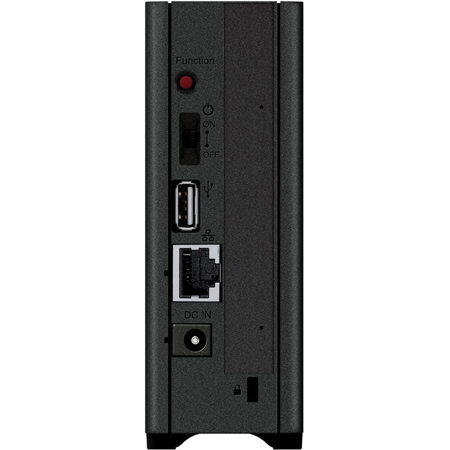
• USB port for backup or printer sharing
Buffalo's LinkStation 210 is an affordable and intuitive 1-drive network storage device that comes equipped with a whole host of features, perfect for storing, sharing, serving and protecting your most important data. Back up multiple PCs and Mac computers simultaneously and enjoy uninterrupted access to terabytes of storage on your network and even over the Internet while away from home.
Shared Central Storage
With terabytes of storage, LinkStation 210 provides a reliable, central location to store and protect all data from every PC and Mac computer, tablet and smartphone in your home or small office. Store, access and share files from anywhere over your wireless network at speeds up to twice as fast as a standard USB hard drive.
Easy Scheduled Backup for PC and Mac
LinkStation 210 features five licenses of NovaBACKUP Workstation - Buffalo Edition and Time Machine support for multiple Mac computers for whole home data backup and protection. Disaster and hard drive failures happen unexpectedly; don't leave your important files and treasured memories in the hands of chance. Set up regular backups for every computer in your house and easily protect all of your data, down to the very last byte.
Free Personal Cloud Service
While on the go, Buffalo's free WebAccess service allows you to create a personal cloud for easy remote access and file sharing with anyone, anywhere over the Internet. Your data remains securely stored in one place on your home or small office network, but you can access it quickly from any computer, tablet or smartphone device over the Web. For enhanced access on your iPhone, iPod touch, iPad and Android devices, download Buffalo's free WebAccess mobile apps.
• WebAccess i for iPhone and iPod touch
• WebAccess i HD for iPad
• WebAccess A for Android
Stream Your Favorite Media
LinkStation 210 is DLNA Certified and it can be used as an iTunes server to stream all of your favorite music, movies and shows to multiple devices simultaneously. Now you can relax and watch movies on your big screen TV while music is pumped outdoors by the pool. Centralize your media files for simple sharing and streaming.
USB Expansion
The LinkStation 210 comes equipped with a USB port, allowing users to increase storage capacity or backup to another device for an extra level of data protection.
Linkstation NAS System
LinkStation 210 runs on Buffalo's LinkStation NAS System, providing a host of useful features from network file sharing and security to RAID management (on multi-drive units), remote access and more. Included on all Buffalo LinkStation devices, LinkStation NAS System simplifies your everyday data needs.

