2020-02-27T19:00:00
Errir messages about non thubderbolt port, even thogh Dell recommended, loose fit into usb port, comes off, overheats, now will not turn on.
George W.
Originally posted at

2020-02-26T19:00:00
Rated 1 out of 5
Terrible Product
Loses connectivity to my wireless keyboard every few minutes and frequently loses signal to my 2nd monitor. Extremely frustrating
Bob
Originally posted at
2020-02-23T19:00:00
Rated 4 out of 5
Terrific with a HUGE power cord
I did not realize when I bought it that it would eliminate an extra power cord for the computer. With a single power cord into the dock I can channel two monitors, wireless mouse and keyboard and other thumb drive into the dock. Only critique is that the power cord adapter is really huge.
Midwestscholarship
Originally posted at
2020-02-21T19:00:00
Rated 1 out of 5
Thunderbolt Dock made for PC's
Great for PC world, but this didn't work for me on my MacBook.
John
Originally posted at
2020-02-17T19:00:00
Rated 1 out of 5
Worst Computer Product I have ever purchased
I have used this dock for about 3 years. it has caused my business more downtime than any other computer over the past 25 years. The inconvenience has cost thousands of dollars in lost work. Dell should be embarrassed by this product. The only thing worse has been their support techs. The experience has made me decide to never purchase another Dell product
3dcl
Originally posted at
2020-02-16T19:00:00
Rated 1 out of 5
Great when it works
I am on my 4th docking station. 2 were warranty returns. 1 was an initial purchase, 1 was a replacement purchase out of warranty (I enjoy getting passed around support 10 times before finding someone that can even pull up my serial number by the way. They just die. If you want to break it, just unplug it quickly from the laptop. Poor cable length. Sometimes I must do a full power down for all components to make it work again after some situations. Recommend buying a warranty extension if possible, don't buy if not.
Lucky L.
Originally posted at
2020-02-16T19:00:00
Rated 4 out of 5
Almost perfect....
I'd give it 5 stars except it took Dell an hour and a 1/2 to make it work correctly with my system. I had it working except at log on time. They made it work at logon time too!
MrBrahms
Originally posted at
2020-02-12T19:00:00
Rated 2 out of 5
Mixed Feelings...
This dock has every port that you could ever imagine possible. Also, It charges the laptop via USB C. My problem is there is new firwmware update, that I was unable to patch. Also, the cable that connects to the laptop is super short. I did not want to try with an extension, as I though could create some problems.
IGNACIO
Originally posted at
2020-02-11T19:00:00
Rated 4 out of 5
Good Device; Bad Installation Instructions
Performance is fine and allows me to connect all of the peripheral devices that I need.
Installation instructions are sketchy and need to emphasize immediate downloading of several device drivers before attempting to use the Dock.
Al P.
Originally posted at
2020-02-09T19:00:00
Rated 1 out of 5
Was not well with XPS 7390 2-in-1
Did not support XPS 7390 2-in-1 connection to Dell monitor with high resolution and kept dropping other paired devices (mouse, keyboard, drive ...). Trying a different dock...
DellUser
Originally posted at
2020-02-05T19:00:00
My old laptop and dock we were replaced with a new Latitude and this Thunderbolt dock. The new setup would routinely fail to recognize two monitors, or get them swapped and the only cure was to unplug and replug. After about 3 or 4 months of doing this, the Thunderbolt connector only plugs in one way and now my mouse and internet are starting to flake out.
DontBuyThis
Originally posted at
2020-02-04T19:00:00
Rated 3 out of 5
Good, but shows some errors
Good, but my laptop gives me warnings sometimes that I need to connect to a different charger that puts out at least 60w. Seems odd because this dock should be capable of 180w
Nick
Originally posted at
2020-02-02T19:00:00
Rated 3 out of 5
Flaky thunderbolt dock
Thunderbolt connector seems flaky. Any slight movement of the laptop causes the external monitor to go blank and I have to wait for it to recover. I got 2 docks which are each connected to different laptops and see the issue in both cases.
M2004
Originally posted at
2020-01-31T19:00:00
Rated 3 out of 5
Thunderbolt dock
Works as advertised. However it is heavy bulky and takes up way too much real estate on the desktop area. The ports are not convenient or well positioned.
Rita
Originally posted at
2020-01-28T19:00:00
Rated 5 out of 5
Perfect for multiple screens and peripherals!
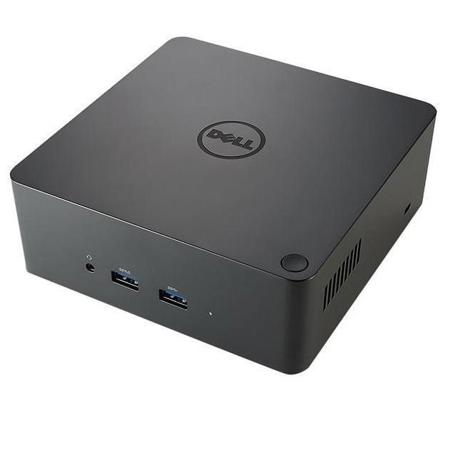
The thunderbolt dock is sleek and compact. With multiple video and input connection types it is perfect for multiple screens and peripherals. I have a closed lid laptop on my desk supporting two 24" screens with one cable from the laptop to the box. I think I'm in love!
Lord B.
Originally posted at
2020-01-28T19:00:00
Rated 2 out of 5
Thunderbolt Docks have inconsistent performance
Thunderbolt docks are not consistent. Sometimes you plug them in and they refuse to reconnect. I waste a lot of time supporting these docks. Unfortunately they are the only option.
RoadRunnerBeepBeep
Originally posted at
2020-01-26T19:00:00
Rated 5 out of 5
Thunderbolt review
Works flawlessly and easier than old docking stations. Love all the ports
Dr D.
Originally posted at
2020-01-23T19:00:00
Rated 5 out of 5
Works well with XPS 9570
I use this dock with a Dell XPS 9570 and have no issues with its performance.
Qatarcajun
Originally posted at
2020-01-23T19:00:00
Rated 3 out of 5
Connectivity Issues
I have had a lot of issues with this device maintaining connectivity. Once driver issues were totally addressed, it worked marginally better.
Chris F.
Originally posted at
2020-01-22T19:00:00
Rated 1 out of 5
Expectations not met
Whatever moving parts are in it, make a noticeable whining sound. Also, I expected the push button to act like my docking station where a push would goto sleep; but no I need to shutdown every time. Could not find any docs on how to set this up like I want. Sorry I hate to write bad reviews, but that box is annoying me right now.
Big E.
Originally posted at
2020-01-20T19:00:00
Rated 5 out of 5
My new super power
This dock keeps all of my wires in one place and allows me to plug in just one wire when I get to the office. It makes my set-up faster, makes my desk more organized and makes me happier. It's like having a super power. :)
Les G.
Originally posted at
2020-01-20T19:00:00
Rated 5 out of 5
Great XPS workspace
Works great with my XPS 13. I even put my laptop on top of the dock and use it as a raising pad.
Stephanie S.
Originally posted at
2020-01-19T19:00:00
Rated 1 out of 5
Poor Design
This is poorly designed. The primary plug on the new Dell XPS laptop computer is on the left side and the corresponding plug for the dock is on the left side. The cord is so short that it makes this just about impossible to work properly. I expected better for the price.
Long C.
Originally posted at
2020-01-15T19:00:00
Rated 1 out of 5
Disappointed
Very finncky. Barely works half the time. Doesn’t compare with other docks in similar price point
Jay p.
Originally posted at
2020-01-14T19:00:00
Rated 5 out of 5
Three machines in one.
Turns a simple laptop into a full service work station. Whenever there’s a need to print or scan, simply connect the laptop and it’s off to work I go. Best part is all older equipment still works so no need to replace everything.
Sandy P.
Originally posted at
2020-01-13T19:00:00
Rated 4 out of 5
Home Business User
My only wish is that the Dock would provide "lift" for the laptop to provide better ventilation. No product complaints.
Dell U.
Originally posted at
2020-01-09T19:00:00
Rated 4 out of 5
Dell TB16 Thunderbolt Dock... it's getting there.
It's "getting there". Have been using the TB16 docks since 2017 for our precision mobile workstations models above 5000. The first one was pretty buggy, would lock up, had display issues when connected to multiple monitors, and would not charge the workstations through the Thunderbolt connection. New firmware has resolved many of these issues, and the docks are now shipping with these updates/fixes installed. Just got another 4x of them into the office, and so far, they've performed flawlessly ...EXCEPT for a firmware update released on 12/30/19 for Thunderbolt 3 which fails to install every time.
Peloton I.
Originally posted at
2020-01-09T19:00:00
Rated 4 out of 5
Excellent dock.....poor Dell support
Excellent dock. The problem was Dell support did not know how to use the dock to support two 24" monitors. My sales person knew the dock would support this configuration. Dell support is uneducated.
David
Originally posted at
2020-01-09T19:00:00
Rated 1 out of 5
SUPER DISAPPOINTED
Did not work with my xps13. Spent over 1 hour trying to fix myself. then 90 minutes with tech support. still it does not update the latest bios. How can you sell something not compatible with your best selling laptop
Jeffrey C.
Originally posted at
2020-01-05T19:00:00
Rated 2 out of 5
Loud high pitch fan whine
The good: Zero problems docking/undocking with a dual monitor setup on an XPS 13. Love the expansion and the fact that I only have to connect one cable.
The bad: The dock contains a fan which runs 24/7 and whines so loudly it's distracting. Also, my laptop refuses to sleep when docked- it will stay on forever unless its shutdown manually.
XPS13 U.
Originally posted at