
This item is no longer available.
Review Summary
2018-07-24T20:00:00
Industrial-grade in terms on speed, quality, and capacity. You really do get the colour ppm and first page out time that they advertise. Volume is very good.
nigelhenry

2015-05-05T20:00:00
Good machine, great color quality. Only problem is you have to manual turn paper for 2nd side printing, somehow miss that part on this printer and there is no changing it.
vjames
2015-04-27T20:00:00
My experience with HP laser printers over the past 35 years has been excellent. Unfortunately this printer has been a big disappointment. The page looks smeared when it prints I will definitely look at other brands for my next purchase
kopi
2015-04-27T20:00:00
My first "business" class HP printer purchase and couldn't be happier. Have owned for 3 months now and 2800 prints... no issues so far and running great, toner lasts a very long time and winning feature for me is that the printer lets you keep printing even when software says its empty (other than the OSD displaying a warning the printer doesn't force you to acknowledge/override the warning to keep printing) Will definitely look to HP for future printing needs
boltman
2015-04-27T20:00:00
This printer is fast and has very good print quality. We use it regularly, but not constantly, to print file copies of color photographs and documents with our letterhead. This printer is a perfect balance of good speed and quality for a reasonable cost.
Mark2
2014-06-21T20:00:00
This printer is excellent. It installed cleanly without any issues as a network printer on windows 8.1 and mac 10.6.8 and 10.7. The enclosed software disk was not necessary. We use it to produce draft copies for some art projects as well as a general office printer. It is not a fine art photography printer, but for less demanding projects - collage, mixed media,etc it is often more than adequate and really fast. It has worked well on a variety of paper media. The standard windows 8.1 drivers seem to be slightly better than the ones which come with the Photoshop Version I am using (especially for customizing for odd dimensions of paper), but there may be better drivers available; I haven't checked. This evaluation is based on 3 weeks of working experience with this printer.
4536
2014-01-12T19:00:00
This printer is fast and produces an excellent image. Network installation went fairly smoothly. I was able to install on one computer and share on the network, but would prefer the printer be a completely "network" computer, so that only the server needs to be on for anyone to use it. Perhaps I missed something during install.
katahdin
2013-12-31T19:00:00
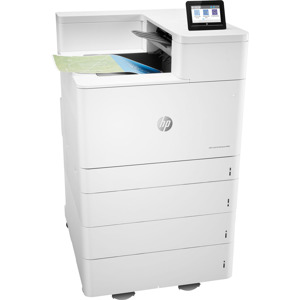
This is the third or fourth laser jet I've owned, and the second or third HP laser jet. My previous printer was an HP-2200 and I was very happy with that printer. I also own an HP Photosmart All-In-One printer. I've owned this particular M551 printer for over a year. This is by far the least reliable HP printer I've had. It has lots of Tray 1 lifting errors for no apparent reason. I have to open the tray, jiggle everything, and hope the error goes away. There are jamming problems with tray 2. There is some error of this sort at least 20% of the time I try to print or even power-on. For now I think my plan is to limp along with this printer until one of the toner cartridges runs out and then scrap it. if it weren't for the reliability issue I would like this printer. My other comment is that I bought this printer on-line from HP and did not realize how big it is. For an enterprise environment the size is fine, but for a home office it's big. I had to buy a large printer pedestal. Next time I'll look for a smaller form factor.
edf63
2013-10-17T20:00:00
I purchased this printer based upon the duty cycle specs. I was replacing an older HP on one of my Secretary's desks. This printer in massive and heavy. 82 pounds, give or take a little. Make sure you look at the physical dimensions when purchasing this unit. Otherwise, it feels and sounds like it should have excellent durability and longevity.
NorthlandAtty
2013-09-03T20:00:00
Fast easy setup using instructions found online from HP site. The instructions sent with the unit were scetchy. The printer may not be appropriate for a print shop but for a busy small business it is quiet, fast and very reliable.
JonInLA
2013-07-16T20:00:00
For the last five years, I've used an HP 3600n Color Laser Jet Printer and was very satisfied with it. I upgrade every few years just to keep current on technology features, and this is the best printer yet! It is very quiet compared to my previous printer, prints much faster, and has been failure free. Set-up with both a Windows 7 machine and a Windows 8 machine was effortless and immediate. Even my iPad finds it on my home network and prints to it without any set-up at all. The toners have more page printing capacity than my previous printer. The HP LaserJet Enterprise 500 color Printer M551n is definitely worth the upgrade.
ProfessionalConsultant
2013-02-04T19:00:00
We use this printer for a small church to make the bulletins for each Sunday. Outstanding quality and easy to use even for a beginner.
JERRY B.
2011-12-29T19:00:00
I've never written a review but I was frustrated when I set out to get a new printer, and the newest printers didn't have many reviews. (This one had 4.) For starters, I'm a Mac user. I've owned 3 HP LaserJet B&W printers over the years, all solid performers (3P, 6P, 2300). I also own an Okidata color laser printer that I purchased just before Apple came out with OSX. Color print quality is fantastic but Okidata was slow and incomplete in developing Mac printer drivers. It's always had paper feeder issues so I don't rely on it for regular use. I purchased and returned a Canon Color Laser MFP a year ago because the color quality was awful. I purchased this new HP for home and some business use, and it's probably more printer than I need but I don't like the flimsiness of the lower end HP Laser printers. And inkjet? Not a chance. I ordered the printer from Staples who delivered it free of shipping charges the next day. Setup took about 8 seconds for basic functionality. For Mac Lion OS 10.7, you don't use the enclosed CD; to get the printer driver you have to plug the printer directly to computer with a USB printer cable (not included and BTW no one includes them), and then update your Apple software. THEN, disconnect the USB cable and use an ethernet cable (CAT5) to connect the printer to wireless router (I use Airport Extreme). Worked perfectly. As an alternative, I tried connecting the printer to my Airport Extreme by USB cable, and it was much slower AND you can't use the HP ePrint feature for iPhone/iPad printing. The computer needs an IP address. At any rate, the print quality in B&W and color are flawless. The color match with the computer screen is dead-on. The printer noise isn't the issue some reviews have noted. It's no louder than any printer I've used. I probably wouldn't want to sit next to it if it was printing a thousand copies but that's true of any printer. That's what wireless networks are for. In Ready mode (vs. Sleep mode), it's perfectly quiet. (My Okidata color laser printer in Ready mode, for example, is very loud even when it isn't printing.) Replacement toner is off-the-charts expensive, but it is what it is. I've found this to be true of all color laser printers. Anyway, I'm a fan. I highly recommend this printer.
EmeraldBayUser
2011-11-29T19:00:00
Good color, crisp black and white. Setup using a Network connection was simple using the Win7 operating system on my home network. I got some Photo paper with matte finish to try and it really makes photos look quite good compared to normal paper, which looks adequate. I do like the 1200 DPI print output better than the 600 dpi so consider that if you are looking for good resolution color prints. I like the first page out immediately with the fast first page setting. I need to look into the power save options a bit more since it seems to stay on by default, that part of the screen menus was not super clear. Printer has a color LCD screen so that is nice. I got this model because I was tired of buying injet ink and having it dry out after a few pages when the printer sits idle. Overall so far I am satisfied and would recommend the HP Color laserjet for general purpose printing in color or monochrome.
DenverAl
2011-11-24T19:00:00
Color is little off comparing other product. It was not natural. Little darker than image on the monitor. Fan noise is very annoying. Printing speed is fast but not fast enough for complex images(multiple images on one page). Black and white image is good at details. Best so far from any Hp printers I have. I have ten HP B&W and color laser printers. The ePrint is good but no AirPrint features. Disappointed. I like fast B&W print and quality. Paper handling is good. Color menu LCD is somewhat too small for the sophisticated menu. I had to use web interface. The power connector is located on the side, so printer placement could be limited. The side extra paper tray limits the location of printer next to other instrument. The sum of four ink cartridge costs more the printer. Should I buy another printer or cartridges? PLEASE BE REASONABLE. Lower your cartridge price, and give incentives for returning your used one.
Implant2th
2011-11-14T19:00:00
If you're planning on using this printer in-house to print brochures or flyers I would definitely save your money. When I bought this printer there were no reviews available because it was a new product. I wish I had waiting for published reviews before purchasing this printer. There are several problems with this printer. 1st-this printer smears colored ink when you print more than 10 pieces at a time if you're using a lot of graphics. This means if you're printing 100 flyers you need to print about 10 at a time so the printer can clean itself in-between jobs?unless you want ink smeared all over your flyer. 2nd -the printer does not come with very many standard card sizes and envelopes already installed. So, if you're going to print on any type of standard card or envelope like an A7 you're going to have to create a custom size and then hope the printer takes the envelope in the direction you insert it. 3rd-for a new printer I would expect that it would be quieter than the one we bought several years back, but it is not. This is probably the loudest and worst printer (color or non) I have bought in the last 10 years. So if you're planning on putting this someplace where people are speaking on the phone or with each other then this isn't the printer for you. I would not recommend this printer to anyone for any reason.
printguru
2011-11-11T19:00:00
After six years happily using an HP LaserJet Color 3550, I replaced it with this M551n printer. Set up of the printer was very easy and very quick. The CD that came with the printer provided the proper driver for my Windows 7 64 bit operating system. My computer immeditatley recognized it and away we began printing. It prints both black and color documents very quickly, holds lots of paper, and goes to sleep fairly quickly, at which time it is silent. After printing, it makes a few knocking sounds, then goes into a rest mode. The knocking is initially unsettling, but it doesn't seem to affect the quality of the print or the overall performance of the printer. I've had it for about three weeks and think it is a great printer. I would certainly recommend this printer to someone that wants trouble-free printing of both black and white and color documents.
RIFTOX
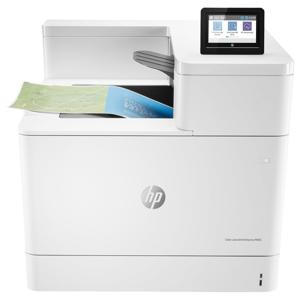
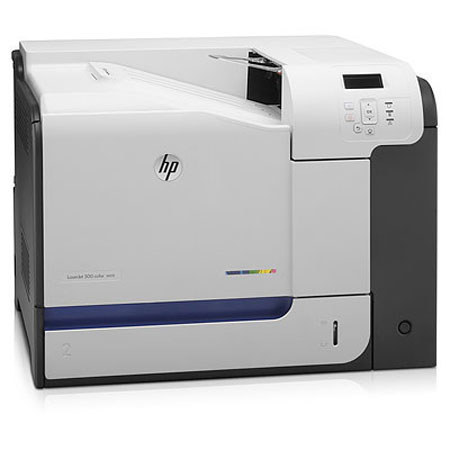
The HP 500 M551n is a swift and efficient LaserJet Enterprise Color Printer that can print fast, making the workflow smoother and the workload smaller. The HP 500 M551n LaserJet Enterprise Color Printer can print with up to 1200 x 1200 dpi resolution. The unit prints very fast at a speed of up to 33 ppm. The unit is also network-ready, meaning it can be easily controlled by computers connected to the same network as the printer. The HP 500 M551n LaserJet Enterprise Color Printer has a 800MHz processor and a 1GB memory that ensures seamless print operations and tasks queuing.