
Orders placed during Passover Holiday (Wed 4/1 after 4PM ET – Thurs 4/9) will ship Fri 4/10. View our holiday shipping schedule.
This item is no longer available.
Review Summary
2015-12-08T07:45:55
I bought this model recently and found it has display problem. The screen will flash and flicker when I move the laptop. I complained this with the customer service and they can not provide replacement for this defective item. And now I have to spend time with lenovo and do not know when I can use my new laptop. This is really a bad experience. I should read the return policy before I make any purchase on this website!!!
Jason
2014-03-06T19:00:00
I use mine mainly when working with Excel and so I can have 30 tabs open at once. I had a thinkpad before this one another x series. I love the nub! Some Lenovo models exclude that. The touchscreen is responsive and fast. I needed some Youtube help to get started but now it's all easy. The keyboard is so awesome! To me it beats all the competitors because it ticks. Some people say Lenovo keys bounces. Other laptops have flat buttons. Typing on Lenovo is easy to tell the difference try at a local store! The camera is decent, most say it is too shoddy for the price, I don't know. It gets the job done for my needs on Skype. Some people complain about the display and usually those people are really tech savvy, I am an average person, is it as "crystal" clear as Apple? No. I've had this for 4 months. No problems. I did get a scare two weeks after I got it. The blue screen of "death" showed up but it was a one time thing. Props for Adorama because this came brand new. The Lenovo sealed box was inside another Adorama box. A bit comical but I think that made a difference to protect my laptop. Oh of course the weight is amazing. Some reviews say the non touch is even lighter but I don't care because this is lighter than a one subject notebook. The build is solid. The rubberish outer coating makes it easy to grip to and from buildings but don't mistake it as water resistant hahaha. I can hold this with one hand. If you use Skype a lot with this it has to be on a hard surface. If its on cloth like bed spread or couch you need a mic and headset otherwise the other person will not hear you. The sound quality is another "could be better" but its not bad. The battery life is not great. I always need to reduce brightness or powersave within 3-4 hours but I use this constantly! It does follow the claim of having a fast 30 min supercharge to 80% (and beyond). One of the main reasons I bought this laptop was os it would not do the annoying fan sound during class. Money was well spent avoiding that issue. My old laptop embarrassed me many times panting randomly or overheating. The machine can get hot after 1-2 hours depending on what you use it for. Actually right now I'm sitting in my car for 20 min typing this and its still cool.
TOAN N.
2013-12-02T19:00:00
The look, the feel and, of course, the performance of the Thinkpad X1 Carbon exceeded my expectations. Have been buying computers and peripherals since the early 1980s and do not recall ever having received - pound for pound, dollar for dollar - more satisfaction.
mjohn s.
Intel Core i7-4600U Dual-Core 2.10GHz
Maximum Turbo Speed: 3.30GHz
Cache: 4MB
Direct Media Interface: 5 GT/s
64-bit Processing: Yes
Hyper-Threading: Yes
Chipset Manufacturer: Intel
Intel HD Graphics 4400
Graphics Memory Technology DDR3L SDRAM
Graphics Memory Accessibility: Shared
Standard Memory: 8GB
Memory Technology: DDR3L SDRAM
Memory Standard: DDR3L-1600/PC3-12800
Solid State Drive Capacity: 180GB
Solid State Drive Interface: M.2
Solid State Drive Configuration: 1 x 180GB
Screen Size: 14"
Display Screen Type: Active Matrix TFT Color LCD
Display Screen Technology: In-plane Switching (IPS) Technology
Aspect Ratio: 16:9
Screen Mode: WQHD
Screen Resolution: 2560 x 1440
Backlight Technology: LED
Touchscreen: Yes
Multi-touch Screen: Yes
1 x HDMI
2 x USB 3.0
1 x Mini DisplayPort
1 x Headphone/Microphone Combo Port
Windows 7 Professional Upgradable to Windows 10 Pro
Operating System Architecture: 64-bit
Keyboard: Yes
Keyboard Backlight: Yes
Pointing Device Type: TouchPad
Pointing Device Type: Trackpoint
TouchPad Features: Multi-touch Gesture
Webcam: Yes 720p Video
Microphone: Yes
Finger Print Reader: Yes
Speakers: Yes
Yes
Bluetooth 4.0 supported by WLAN module
Number of Cells: 8-cell
Battery Chemistry: Lithium Polymer (Li-Polymer)
Battery Energy: 45 Wh
Maximum Battery Run Time: 9 Hour
Yes
Green Compliance Certificate/Authority: ENERGY STAR 6.0, RoHS, EPEAT Gold
13.0 x 0.7 x 8.9" (33.0 x 1.8 x 22.6cm)
3.18 lbs (1.44kg)
889561262849


Absolutely pleased. And then some.
By mjohn s.
The look, the feel and, of course, the performance of the Thinkpad X1 Carbon exceeded my expectations. Have been buying computers and peripherals since the early 1980s and do not recall ever having received - pound for pound, dollar for dollar - more satisfaction.
A Smarter Way to Work
Introducing the New x1 Carbon - the second iteration of the popular Carbon Series incorporates feedback from users - like you. Lenovo has taken the best of the past, and incorporated essential technologies of today to bring you a system with legendary usability and uncompromising performance.
Thin, Light & Durable Carbon-Fiber Construction
Multitouch & Premium Display
Long Battery Life Plus RapidCharge Technology
Faster & More Efficient Storage Options
Robust Business & Security Features
Go Lighter
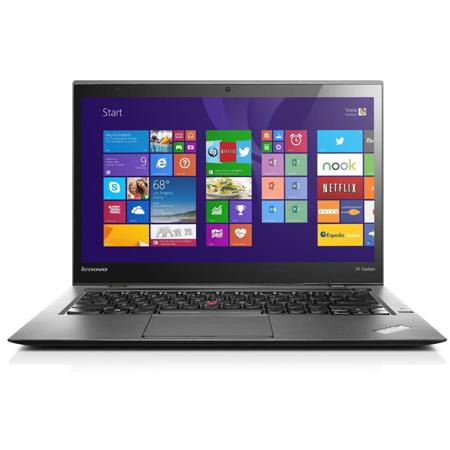
Without saying too much, it's simply the thinnest ThinkPad ever built. But don't let its ultra-slim profile fool you - the ThinkPad x1 Carbon is one of the most powerful fighters in its lightweight class.
Go Brighter
With the New x1 Carbon, you're getting a stunning QHD display featuring practical anti-glare technology for crisper text and brighter images - so you can work longer, and focus better, without the eye strain. And, with multitouch technology, you'll discover new and more intuitive ways to interact with your device.
Go Longer
You don't have time to stop for a charge between all those back-to-back meetings, and we've kicked up the battery life on this year's model to help make sure you don't have to. But when you do finally run low, those pit stops will be brief with the x1 Carbon's exclusive RapidCharge battery technology.
Go Stronger
From plane to car, bike to office - let's just say that however you get around, the x1 Carbon was built to withstand the rigors of even the most strenuous travel plans, and fit where you need it.
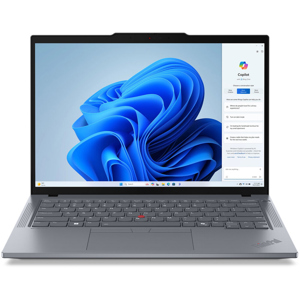
14" IPS Antiglare LED-Backlit Touchscreen
The 14" widescreen display features LED backlight technology, which is more eco-friendly than CCFL lights. The screen has a 16:9 aspect ratio and a 2560 x 1440 native resolution. It's powered by integrated Intel HD Graphics 4400, which can deliver crystal clear images, deeper black levels and vibrant color for a visually immersive experience. The display is also a touchscreen that allows you to take full advantage of the integrated multi-touch gestures of Windows 7 Pro. The screen features in-plane switching (IPS) technology for wider viewing angles while the matte screen provides an antiglare finish for brightly lit environments. You can also connect to an external display via the Mini DisplayPort or the HDMI port.
Ultrathin and Ultraportable Design
The ThinkPad x1 Carbon can be placed in a backpack or tote bag without adding any unnecessary bulk. Take it to the office or on the road without breaking a sweat. The simple, uncluttered design not only looks good, but enhances your everyday computing experience.
USB 3.0 - 10x Faster than USB 2.0
This Lenovo Ultrabook has two USB 3.0 ports, which are ten times faster than USB 2.0. USB 3.0 is also backwards compatible with USB 2.0 devices so you don't have to worry about losing access to your older peripherals. One of the USB 3.0 ports is powered, or always on, allowing you to charge portable devices, such as an MP3 player or mobile phone, even if the computer is turned off.