Orders placed during Passover Holiday (Wed 4/1 after 4PM ET – Thurs 4/9) will ship Fri 4/10. View our holiday shipping schedule.
This item is no longer available.
Review Summary
2018-03-25T16:13:34
It makes my pre USB 3 machine fly with USB 3 external drives. What would take hours now takes minutes. Plug and play.
STEPHEN E.
2018-01-04T10:56:04
Works perfectly! Solves all connection issues!
Pat H.
2017-07-20T18:04:55
I work on the laptop, and multiple locations, and I am constantly having to unplug and go. The other docs I've tried one Porter another died after the second or third unplug and re-plugged in. This one is working better than all of the others I've tried! I highly recommend it!
georgianne g.
2017-06-09T19:19:50
Good product. Could not get two external monitors to work with Macbook air 2015 .
Nikhil J.
2017-02-08T07:29:12
Not enough power for all my external hard drives
JOHN S.
2016-10-20T16:54:49
Easy setup (Just plug and go)
Gerald H.
2016-09-26T08:35:46
Transparent and easy way to add what apple prematurely decided not to continue. much better size and function than the Belkin and it includes cable. Second one I bought so far.
William Y.
2016-06-22T13:35:32
I use this product on set as a DIT and I find this to be an excellent product that is capable of handling multiple drives and card readers at the same time. While I don't have any issues with the current setup, having an eSata port would be an added benefit.
LOGAN M.
2016-05-26T09:04:28
Hard to find a Thunderbolt dock that includes a Firewire port. Mostly they only put in USB ports, which are also important, but I still have several legacy Firewire drives that I still depend on. With the receipt of a new MacBook (fewer ports than ever) I really needed something that gave me a lot of extra ports including the Firewire. It has worked great so far and I am very happy.
Michael M.
2016-05-15T08:58:59
The 12 port Thunderbolt 2 Dock gives you every connection you need in one well designed unit. It is especially useful for all the USB 2 & 3 devices from printers to drive. I recommend this as an essential add-on to any Mac.
GARY C.
2015-12-09T09:00:23
Awesome build and great array of interface components. OWC comes through again. So far, there's nothing I can't hookup to my new iMac.
JIM S.
OS: OS X 10.9.5 or later
Driver: Driver required for charging iPad 1, 2, 3 and also Apple SuperDrive support.
Minimum: Mac featuring Thunderbolt interface
Recommended (Best performance)
Mac featuring Thunderbolt 2 interface
Thunderbolt, FireWire and Ethernet on all Thunderbolt equipped Macs
USB 3.0 ports on mid-2013 and later Macs
2x Thunderbolt 20Gb/s
3x USB 3.0 Standard-A
2x USB 3.0 Standard-A high power
1x FireWire 800 1x HDMI 1.4b
1x Gigabit Ethernet
1x 3.5mm Mono Audio Input
1x 3.5mm Stereo Audio Output
DisplayPort 1.2 with support for up to 4K/60Hz
HDMI 1.4b with support for up to 4K/30Hz
External UL-listed, universal auto-switching
AC input: 100 approx. 240V, 50-60Hz DC output: 12V, 6.0A
Adapter plugs for international use sold separately
32 to 95 deg. F / 0 to 35 deg. C
-40 to 149 deg. F / -40 to 65 deg. C
1 x 9.1 x 3.5" / 2.54 x 23.11 x 8.89cm
13.6oz / 385.55g (without accessories)
812437020793


Swiss army knife of adapters
By William Y.
Transparent and easy way to add what apple prematurely decided not to continue. much better size and function than the Belkin and it includes cable. Second one I bought so far.
Just what I needed
By Michael M.
Hard to find a Thunderbolt dock that includes a Firewire port. Mostly they only put in USB ports, which are also important, but I still have several legacy Firewire drives that I still depend on. With the receipt of a new MacBook (fewer ports than ever) I really needed something that gave me a lot of extra ports including the Firewire. It has worked great so far and I am very happy.
The Amazing Performance of Thunderbolt 2
Capable of an astounding 20Gb/s of throughput, the OWC / Other World Computing Thunderbolt 2 Dock utilizes this phenomenal bandwidth to eliminate data bottlenecks and effortlessly supports direct connection of up to ten devices, as well as daisy-chaining five additional Thunderbolt devices.
Finally, a Thunderbolt Dock Done Right
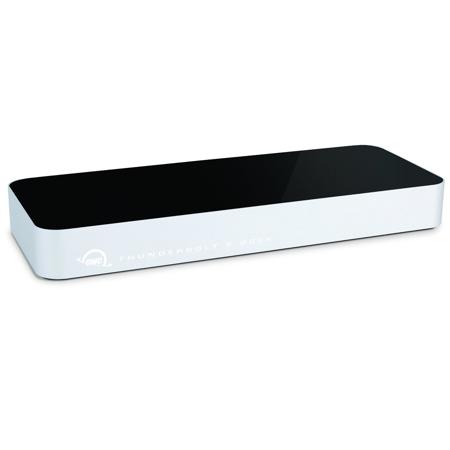
12 ports of phenomenal flexibility. Up to 78 devices connected to your Mac. All united with just one lightning-fast Thunderbolt 2 cable. OWC Thunderbolt 2 Dock is the new foundation for your perfect workspace. Awesome performance meets incredible connectivity, the OWC Thunderbolt 2 Dock offers the ultimate in convenience and flexibility to streamline any workflow.
Connect More Displays
Configure the ultimate display setup to meet the needs of your workflow. Add a dazzling ultra HD 4K display, two high definition displays or one 4K display and one high definition display. Even connect a VGA, DVI or DisplayPort monitor utilizing the Thunderbolt 2 Dock's built-in HDMI and Thunderbolt ports.
More Power to Work
The Thunderbolt 2 Dock features 5 fully-powered USB 3.0 ports for powering hard drives, SSDs or optical drives, including 2 side-mounted, high-powered ports providing up to 1.5 Amps of power - perfect for charging iPhone, iPad, tablets, smartphones and other USB-charged devices.
Everything You Need in a Dock. And More
The OWC Thunderbolt 2 Dock is the unmatched expansion platform for your Thunderbolt-equipped Mac, heralding a new era of flexibility, connectivity and dependable performance. Whether adding USB 3.0 to an older Mac, Gigabit Ethernet to a newer MacBook Pro or ensuring backwards compatibility with your existing FireWire 800 peripherals, the Thunderbolt 2 Dock keeps you connected.