+2
more
more

This item is no longer available.
Review Summary
2019-04-02T20:00:00
I bought this less than a year ago thinking “why would I buy a $1000 Mac when Samsung is just as good” WRONG about two months into having this notebook it wouldn’t let me connect to any WiFi and I had to send it off to get fixed (thank god for the one year warranty) and it was working great for a few months but now yet again it won’t connect to the WiFi and if it does it’ll disconnect from it a few minutes later. I’m a college student I need something reliable and this isn’t it there’s been times I’ve had to do assignments through my phone (Apple) because this notebook is trash.
AnnoyedStudent

2019-01-31T19:00:00
Bought this device for school and it exceeded my expectations on what it was capable of, Great price for the options .
NDN B.
2018-12-05T19:00:00
I was really excited to get this product. I loved that it came with the pen and the keyboard right in the box. I also loved the use of Windows 10 for my computer needs. On the tablet side I haven't been as happy. While yes, you can write on the screen and pull back the keyboard, the Windows store was not all that great with the apps and games. I figured I would be able to access many of the games that are on my Galaxy Phone and that wasn't true. Then, I was trying to download some PC games, couldn't do that either. So now I have a Galaxy Phone, Watch, Tablet, and Computer so that I could suit all of my needs. I just wish the Galaxy Book had the integration of a true Galaxy Tablet as well.
TianaATL
2018-12-03T19:00:00
When conducting my research on this product, I only reviewed the low ratings. After reviewing the negative remarks and realizing none were considered deal breakers I decided to purchase. Once I received the Galaxy Book I can tell you it exceeded my expectations and then some! I mostly use if for taking notes, checking emails, and creating spreadsheets while volunteering at a none for profit organization. Its compact, easy to use, and have the feel of a true laptop. Only wish I could down load my Texture subscription on it! :-
Jay J.
2018-07-22T20:00:00
it's like the company forgot they offer this product and need to keep it up and update and develop it.....
Dani_notsatisfied
2018-05-20T20:00:00
This is a solid tablet. The build quality is excellent. The unusually small size is still quite functional as a laptop. It performs better than I expected. The screen looks great. The battery lasts a long time. Windows 10 works as well as a laptop as it does as a tablet operating system, and Samsung's enhancements are high-quality and well thought out. The keyboard cover seems ingenious, but I did not see a place to stow the S-Pen. I bought a cheap USB-C hub for keyboard, mouse, video and power. It did not keep the computer charged, so I had to buy the Samsung-branded USB-C hub for it. It works great now.
JimRaynor
2018-03-11T20:00:00
Purchased device on 2/7/18 and received a week later. As of 3/11/18 it is not working because it won't properly load Microsoft and getting blue screen of death. I tried doing the suggested troubleshooting and still won't work. I specifically purchased directly from Samsung and also paid for the 2 year extended warranty to avoid hassles should the device star having issues. Was told that my only option is to send it in for repairs and will be without device for 11 days. If not able fix then will send me replacement device. Why do I have to deal with this runaround? What is the point of buying the extended care? This will be my last Samsung purchase.
Nadith
2018-01-06T19:00:00
I have used the Samsung Note 10 2014 for years now. I've never really seen anything that I want to replace it with. Then I saw the Samsung Galaxy Book. For the price, I thought I could give it a try. And I'm very glad I did. It replaces the Note and adds Windows which makes it much mor compatible for my work. It's not a replacement for the laptop but a great small tool to carry around for meetings and quick work.
Worker123
2017-12-11T19:00:00
High quality and performance for the price.. awesome keyboard and Spen.. thats included not a extra cost..
BrennanAz12
2017-09-17T20:00:00
I'm really loving the Galaxy Book. The screen is a good size and is really vivid. The keyboard is highly responsive although it has taken me a bit to get used to the smaller size. I bought an adapter so that I'm able to add a mouse instead of using the touch pad as it is more what i'm used to. I do wish that it had 2 usb c ports so that I could leave it charged in while at home at my desk. But, that's not a deal breaker as the battery life has been pretty good. I love how quiet the system is instead of how a laptop is noisy when the fan runs. I was able to add Microsoft Office Home and Student 2007 and haven't seen any issues with that. I'm looking forward to taking this with me when I travel as it is very thin and lightweight so that it will easily fit in my backpack and will be nice to have an actual computer instead of just a tablet. I've noticed that facebook tends to not load pictures for me for some reason. Both in the app and on the website. Not sure why that is. But searching the web seems to work rather quickly otherwise. I still have other features that I need to test but overall this is a great replacement for my aging laptop. Although it doesn't have a lot of storage space. But, I plan on using a external drive when I need to save things.
vglassner05
2017-09-17T20:00:00
The Samsung Galaxy Book is fantastic. The 10.6" size makes it compact enough to fit in my purse and allows it to be handy whenever I need it. Its light weight, so carrying it everyday is not an issue. The island style keyboard was very easy to use, my hands rested comfortably on the keys and its so easy to switch from tablet to laptop! The battery life is also a plus! I was able to use my tablet for 8+ hours at work to write up some Word Docs, & use Adobe illustrator. The S Pen also makes it convenient to take quick notes as my day progresses. I would definitely recommend this to a friend, I would not hesitate to show them the amazing abilities of this tablet.
liltina119
2017-09-17T20:00:00
When I got it I was so excited. Just opening you could tell how well the product is by the weight of it. The charging which is USB-C is compatible with the Samsung Galaxy S8. Others tablet or laptop have difference charging port, it is why I mention it. The speed of the laptop/tablet is very fast. I was amazed that I could open different windows and open as fast as the first one. The internet very fast as well I pay for 50Mbps Verizon Fios and I got Download 79.74 Mbps Upload 100.47 Mbps. Is that amazing or what for Wi-Fi. The screen looks spectacular, just finish watching a movie and look so clear it was just awesome. For me is one of the best things I have right now,
abiyuriko
2017-09-17T20:00:00
I am very surprised with the speed of this tablet. It is able to handle multiple windows opened in chrome running video as well as facebook being open at the same time. Other computers with similar processor have difficulties. As others have mentioned the keyboard is not suited for being on a lap. I have been having some keyboard responsiveness problems, even as I write this review. It could be me not being used to it yet. The other problem I have been having is the keyboard falling over by its self on the dinning room table, also while I am typing this review. The pen is awesome. no lag noticed at all. I will update my problems as familiarity with the system grows. Thus far other than what I have mentioned, I think this is a good system.
gr8surgeon
2017-09-17T20:00:00
I really like the tablet aspect of this and it works great. The laptop idea still needs more to satisfy my needs. I like the pen but even back in the day the palm pilot had a slot to slide it into the actual unit. This pen has a small sticker to hold it. made it difficult when trying to slide it into my bag. Pen would get caught on other stuff. Again old school palm pilot even had a slot to keep it safe and with the unit. Any good laptop has at least one usb port. with this you have to buy an adapter. ugh another item to carry around with it. The unit had a few issues when i first got it. I went to best buy and the Samsung desk couldn't help. The windows desk guy helped update and alter a few settings to get it up and running properly. I like that there are "auto" detect options but some were a little hard to find to adjust to my preferences. The weight is great. Not to heavy. The 10.6" was a good size and the keyboard was easy to use. clear screen and efficient for what I was looking for size wise. If i just needed a tablet with a keyboard it would have been fine but this needed a few more features to be enough laptop for me.
hsabuni
2017-09-17T20:00:00
I've had the Galaxy Book for about a week now and I'm starting to enjoy it more and more each day. It's taken me a little more time as I was used to another type of tablet for many years. I was very impressed with the packaging when it arrived. It's nice and clean, packed very well. The look and size of it are amazing. It's very easy to change from tablet mode to desktop mode. I'm still working out the kinks with the Samsung Flow app as that does not seem to be working right as I keep getting an error message. I have not used the included smart pen yet but have watched some of the help videos and it looks pretty cool. The battery life is ok. Don't plan on using it as a stand alone to play music. I would recommend connecting to a blue tooth speaker as the stock speakers are not very good. So far it's easy to use and set up. This is my first experience with Windows 10 so I'm still learning. So far so good! More to come!
mizzo75
2017-09-17T20:00:00
Upon opening the box for the Galaxy Book, I'm struck by how compact everything is. The screen is extremely lightweight, but still has a dense, premium feel. I really appreciate that the keyboard is fully attached to the screen through magnets, as opposed to some tablets which are propped up in their keyboard holsters, depriving you of workspace. I also was surprised how responsive the keyboard is, while still maintaining an impossibly slim profile; satisfyingly springy. The s pen is fun to use, and zips across the screen effortlessly. I didn't find myself needing it much, but it was nice when I did. But all of this plays second fiddle to the screen. It really is a stunner. Rich saturated colors and high pixel density marry for a truly captivating screen. Sharp is an understatement, lines have an almost surgical precision. This really allows the screen to display beyond what you might expect in 10.6 inches. All in all, its a harmonious pc/tablet. Easily the best in its class.
joysnagel
2017-09-17T20:00:00
I have been testing the 10.6 inch 128GB Samsung Galaxy Book. I am a power user when it comes to computers. I work in the IT field and game in my free time. My needs for computing tend to be high end and specialized. I thought this model would fit my need for a small but powerful on-the-go Windows capable system, and to a degree it has. I have used it to work on spreadsheets and documents while away from my home and work office, as well as for some entertainment, and even as a remote connection to perform some system tasks. I have found it to be under-powered compared to other market entries. I especially had problems related to battery life and charging. Unless using the provided AC-USB adapter it would not charge and operate simultaneously without the battery charge quickly going down. For it's size it has it's place, many low end users would probably find it sufficient for their needs, but these same users would probably find the charging requirements frustrating, and could probably find cheaper options to meet their requirements. Others who need more power and features would probably find their needs better met by a slightly larger, more powerful system with expanded interface options. The lack of any interface port besides the one USB-C was disappointing. There is almost no expand-ability. I used a Samsung 256GB Evo Micro SD but found it to be far too slow to install additional applications or rely upon for any type of data transfer that requires speediness. In my research I could not find any indication of a way to upgrade the internal SSD without voiding warranty I think the price point and features of this particular model may be spot on to meet the needs of a very narrow set of the user market, but see many other options that cater to a broader set of users for just a slightly higher price tag. Pro's- Small, relatively light Great Display OK performance Included keyboard/Pen Cons- Battery life/charging Lack of interface ports Small amount of RAM Little expandability Price Hope my opinion helps, Warren K.
whasamatau
2017-09-17T20:00:00
After using this product for several weeks now, I have come to the conclusion that it's going to work great for some, however probably not quite for the average user quite yet. I don't know if the unit I received was just a somewhat buggy device (which after reading other reviews seems it was just mine) but the pen wouldn't work very well throughout the entire user experience. The Good.... Very portable, and the keyboard was quite accurate. I like the size and the feel of the product. I love that it comes WITH the pen and keyboard and doesn't require the customer to purchase their own. I loved the windows 10 interface, though it could be more efficient. Overall I did enjoy the product, but in my recommendation definitely go with the 12 inch version. The Bad.... I realize I only have the 10.6 inch 64gb version, so it's not going to be the powerhouse like the bigger 12 inch, but even knowing that I was a little disappointed in the overall power of the device. I was also somewhat disappointed in the screen quality. I know the smaller version doesn't have the incredible new screen of the 12 inch but I was still expecting a decent screen and I feel it didn't measure up to my expectations. Overall I'll state again, I feel the product is good for some, but not for the overall average user yet to fully replace the laptop.
quynnallsup
2017-08-30T20:00:00
I went into this using this tablet with a some trepidation. I have used multiple tablets in lieu of a laptop in the past and always found them lacking in some way. The Galaxy Book however has left me satisfied in almost every way. Since it runs a full version of windows you never find yourself running into the issues you do with other android only systems. The keyboard is the perfect size and it's very easy to take notes and type with during meetings. There are only a few small issues I have noticed that are outlined in the Pro's and Con's section below. Pros: -Great Keyboard/case -Quick and Responsive -Pen is great when you can use it -Due to it running windows it doesn't integrate Google Apps as well as other tablets. -Battery Life seems great, able to use it , close the cover and forget about it for days then still have power when I go to use it for the next meeting. During constant use it seems to last about 5 hours with full display. -Screen Quality seems really good. Compared to past tablets I was surprised with the clarity of picture and image. I haven't used it much for watching Media, but it's great for reviewing and approving marketing material. Cons - The track pad is difficult to use at times, a mouse is needed for some fine work. - Samsung Flow needs work and will hopefully improve over time. -Neither of the Pen software (microsofts or samsungs) seems very intuitive, I often found myself deleting work that I needed. -Wifi seems awfully finicky compared to other devices Overall I would have no trouble recommending this table to a friend looking for a laptop alternative. Depending on desired use the larger tablet may be a better choice for some. *Edited to add more info.
robert458
2017-08-28T20:00:00
This is a great device and very portable. The battery life is excellent and pairing devices to it is no problem. This is perfect for anyone who wants a Windows 10 tablet on the go. It keeps track of software updates accordingly and the use of it is self explanatory. The resolution and connectivity is awesome. I love how you can wireless connect to another screen like my Samsung Qled Curve. The sync on the TV and tablet is seamless. No connection is lost either wirelessly or Bluetooth. One of the cons is that like many others there is no place to store the S pen, so you may misplace it. For the basic and intermediate user this is a great device to use for business and leisurely use. I'd give it a B+.
Hammonkl4
2017-08-27T20:00:00
I pre-purchased this for June release. Unit failed to boot within 2 months. Sent in for repair. I got one email from Samsung about device. Not repairable and still waiting for replacement. Has very little value to me at present.
1nceAfan
2017-08-24T20:00:00
If you are looking for a tablet/laptop combo, then the Samsung book is for you. I got the 10.6 size, 256 GB version and am mostly satisfied with the end product. It doesn't have the full AMOLED display its 12 inch brother uses but colors and picture quality is quite vibrant for what it offers. It also uses an older low-power Core m3 so don't expect to play high end games on this device. This is definitely not meant for that, but for casual browsing, school or work related projects, or just watching Netflix, this one will hit the mark. This is also very sleek and portable. No problems just packing it into your book bag. The included keyboard and pen are bonuses. The keyboard is okay, I felt the back could prop the tablet up more. The touchpad button was a little too finicky for me. There were times where with a gentle press, the button would get stuck for a second. I have no complaints about the pen. I actually like it. Otherwise, this is a good entry level tablet/keyboard hybrid. If you've got the extra cash, I say go for the 12 inch Book (that comes with AMOLED display, backlit keyboard lights, and an additional camera on the back). For my needs, I think this 10.6 is perfect but your mileage may vary. It all depends on what you need it for and what you plan to use it for. I'll give this a 4 star review.
vcosnj
2017-08-24T20:00:00
Seems like Samsung has another winner! A lovely smooth design linked to a seamless user interface. Unlike a traditional laptop, the Galaxy Book is more versatile. For myself, the 128GB 10.6" is perfect & very engaging. Loaded with features such as a 5mp front facing camera, keyboard which doubles as a stand & Samsung Flow. Samsung Flow lets you manage content between the galaxy book & a connected device. A definite plus is being able to see new notifications on screen without having to reach for your device! When it comes to the battery ill say its fair. You will be able to do ALOT in a single charge such as watching movies or getting work done on its sharp brilliant display (which if I may say is very crisp). Alas I will say this, whether taking notes & drawing to surfing the web & watching videos, the Galaxy Book will consistently deliver what I deem a worthwhile experience. Pros: -Lightweight -Portable -Fast -Easy to setup -Expandable memory via SD Card -Beautiful screen resolution -Quick connectivity -Great battery life Cons: -S Pen holster seems flimsy but does holds -No Backlit keyboard for this model (just an option i'd like) -Does not include adapter for usb (sold separately)
3dge
2017-08-24T20:00:00
The Galaxy book is an extremely versatile device. I have used this for work (word & excel) while traveling, pool side web browsing, and even gaming. I could view the screen well in bright light, pair with Bluetooth headphones & mouse. All tasks performed extremely well. The keyboard is very comfortable and allows for multiple adjustments to accommodate sitting on the couch, at a desk, or on a plane. Because I found myself using the keyboard for work I do wish that it was a little sturdier, but that was the only slight improvement I would want for this device. After using this device I would definitely want to upgrade to the larger screen for the amount of use I was getting out it, and I don't feel that would impact the portability as this is a very light tablet. Finally the battery life was more then capable of lasting multiple days on a single charge.
PeterGIII
2017-08-23T20:00:00
The graphics on the galaxy book are wonderful. The words and pictures are crisp and clean, leaving a detailed display. The unit runs on windows 10 giving it all the aspects of a laptop. From the ease of the attachable keyboard for easy typing. To all the window functions! The intel core m3 processor makes this a extremely fast and light machine. Whether using as a laptop or tablet. The keyboard connects simply to the tablet and s-pen not only gave access to a whole new world in drawing and notes but has a small button that when pressed deletes what it is touched against. I opened up the Microsoft word program to write this review which could not have happened on my other tablet. This actually looks and feels like a small tablet, however it has the speed and convenience of a laptop. My favorite pre loaded apps. are: 1-Paid wi-fi and cellular- no more being stuck offline 2-connect desktop 2ps009- this is wireless connectivity to your devices 3-Tips- walked me thru and questions i had 4-Samsung notes- this works with your s-pen also, you can write and have it at your fingertips anytime you want it 5-Paint 3d- this also works with your s-pen, bring out your inner artist and have fun, this is where i really noticed the graphics 6-preloaded mail program- made getting my mail from all accounts simple. I just opened the program and did what it said I had no problem operating anything on this device. This is everything i need in and on one device
bonboy
2017-08-21T20:00:00
We got to try out the Galaxy Book 10.6" 128GB. Our business laptop had crashed, and we were looking for something to replace it. This is it. Super fast, crystal clear display, and the ease of switching from tablet mode to laptop mode is my favorite. I can save all the files I need like a regular laptop, but carrying it around like a tablet. The best of both worlds. I have to say after using this I don't see us going back to a laptop or desktop very soon. Ease of use, portability, crystal clear screen, great battery life. 5 stars all the way around. And don't forget how easy it is to link with your phone!
Skranwinkel
2017-08-21T20:00:00
I have been using Samsung Galaxy Book 10.6 for about a month now. I carried it with me for two business trips, and so far I like it. It is very light weight, and good enough performance to handle most of my works during the trips. One very useful feature is the capability of pairing with my Galaxy S8+ phone via NFC (Must install Samsung Flow app). All notifications are sync'd up, and is very convenient. It is, though, not the perfect device; Here are the pros and cons: Pros - Quiet; did not notice any fan running; no overheat. - Very light, Compact, Slim design. - Using same charger with my phone; Galaxy S8+ - Seamless connection with Galaxy S8+ via NFC on the keyboard - Automatic switch between tablet and desktop mode - Pen integration is great; very smooth operation - Sharp screen; vibrant color Cons - Only one USB-C port; need a adapter that charges and connects other USB devices; which can be quite pricey - Battery life is OK (around 5-6 hours), but could be better - Keyboard can be bit more sturdy - Keyboard stand design is clever, but only two level adjustments.
mystermo
2017-08-11T20:00:00
This product was a bit of a disappointment. After having it for a day, I realized that it does not sync with other Galaxy products and you CAN'T use any apps from the Play Store. You have to use apps from the Windows store, which has little to no actual apps for use. I could not even download work apps that are presently on my Samsung Galaxy 7 Edge. The only reason I purchased a Samsung was so that I could sync my devices. I can do this on the TAB3, but not on this Galaxy book. I am so disappointed and returning this product immediately.
Indiangrad
2017-08-10T20:00:00
I have been using my Galaxy Book for about one month now and I'll have to say, it is totally addictive! I have other computers, but nothing is nearly as fun to use. I find my self finding excuses to use it. The display is beautiful and there is something quite special about the touch screen capability, especially while still in desktop mode. I feel the only omission I suffer from is the lack of a USB port for external storage, which has me considering upgrading my cloud storage. The phone connectivity to my smart phone is very nice, and overall, it is a super pleasant experience. The pen feature is very nice and great for art and such. I've seen tablets for sale, laptops, and art specific tablets, and this is kind of like an all in one!
NoTalk
2017-08-05T20:00:00
Got this to replace an aging tablet and it ended up replacing my laptop. Between work and school, I found it hard luging around a laptop all the time but the power and battery life of this device is amazing. I can get through my work day and six hours of taking notes and writing papers. The ability to multitask and get through school work without distractions from my phone as I get notifications right on the same screen. Samsung flow works great for making shopping lists and transferring them straight to my Galaxy S8+. The screen on it is amazing watching movies, playing games, it really looks and feels amazing. The S Pen is great the ability to write and have it converted to text. The Galaxy book is an amazing and powerful device unlike anything else. The camera allows for excellent quality skype calls; the sound quality is great thanks to the dual speakers. The detachable keyboard is perfect for when you go to tablet mode. It works great with Windows 10 Pro I never could enjoy Windows 10, and since this, it makes everything a lot nicer and functions so much better. Overall perfect for students, working professional, or even the average user much better than just a regular computer I would hands down purchase again if I was in the market for a computer.
jbmeerbott
Introducing the new Galaxy Book
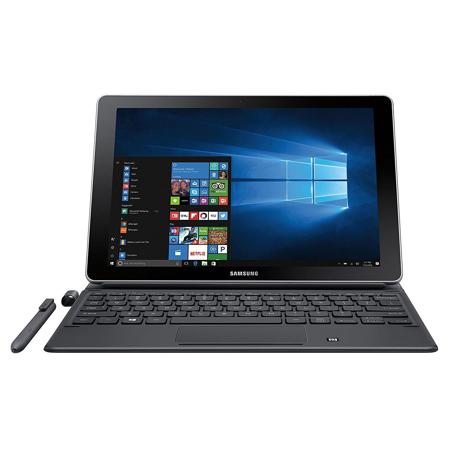
Powered by Windows 10 and a 7th Gen Intel Core m3 Processor, the Samsung Galaxy Book is the ultimate PC replacement, featuring a revolutionary S Pen and keyboard for productivity on the go. Seamlessly connect your 2-in-1 to your Samsung Galaxy smartphone through Samsung Flow. The Galaxy Book gives you the full power of a laptop in a thin, lightweight design.
Built for performance
Featuring Windows 10, the Samsung Galaxy Book is equipped with 4GB RAM, 128GB of storage and a USB-C port for connecting all your devices and the latest 7th Gen Intel Core m3 Processor.
Seamlessly connected
Samsung Flow connects the Galaxy Book and your Samsung smartphone with a touch. Share files wirelessly, even without Wi-Fi. Plus, receive and respond to notifications from third party and native apps.
More ways to do more
Switch from touch to type with a keyboard that connects on contact. The precise, pressure-responsive S Pen creates and navigates with ease. Both are included with your Galaxy Book and never need charging.
Lightning quick
Power through up to 9 hours of video playback on a single charge. Then get back up to a full charge with less than three hours of Adaptive Fast Charging.
Enjoy the big picture
Watch everything come to life on the stunning 10" Full HD Display, whether you're browsing, streaming videos or looking at photos.