+2
more
more

This item is no longer available.
Review Summary
2019-03-26T20:00:00
I bought mine on October 16, 2017, in July 2018 I had to send it in for repairs needing a new battery. Now today I was using my computer and it completely shut down. I have been charging and it will not charge. According to the warranty it expired on August 31, 2018 - no 1 year warranty. I use this computer for school and currently I have no way to access my school assignments.
WantReliability

2019-03-03T19:00:00
I bought this one off eb its a very nice combo device for the price i got mine for its good for a miint used product i got the verzion one its works really good i havent really timed the battery life but if you put it on battery favor part on windows 10 i think you get about 11 hours maybe 12 just all depends what you using it for as for the settings you using and all that bc that's how they measure the battery so if you gonna use it heavy and at max proformance its gonna eat up the battery thats would be about 6 to 8 hours if you running it hard as for light use you can sqeeze about 10 or 11 just make sure your battery settings is at favors battery more and then thats how you get more battery out of it to get the max i can use mine good in my bed on my laptop with the keyboard cover with battery saver mode on im getting about 6 but its a used device so thats what i am getting i rpoably will get a new battery intalled on mine soon to help it but as for all the featurees this offers its worth but not worth the high price tag look online for a used one and you will get a good deal
badazznc
2018-12-08T19:00:00
The battery life on this machine is awful. Buy anything else.
Ragingeyore
2018-11-12T19:00:00
I bought this product for 2 reasons. 1 I wanted to reward myself for my promotion and, have been in desperate need of a decent computer for a long time. 2- My work does not have a computer system setup yet (new construction. This has been the absolute BEST purchase decision i have made. I have not utilized it that much for personal use just yet as I am using it on a daily bases, 11 hours a day to get my property setup and running. This machine is soo versatile and, can for see it taking away my pen and paper habit (usually a notepad kind of person, never really caught on tothe pen, even with my note8). However, with this machines functionality, I can totally see being dependent on this, especially since I have it with my Verizon service. Runs flawlessly, as other mentioned, battery life is so-so. Probably would be better if I spent a little more time setting it up and customizing it. However, that said, I have been using it straight out of the box with factory setting since purchase. Great product, even though it is a little on the expensive end and, you can purchase an apple for the same price, the price and performance is definitely justified, especially from such a compact machine. You definitely get what you pay for.
mszurk
2018-10-23T20:00:00
Beyond underwhelmed with the lack of quality control coming from Samsung these days.
daveb123
2018-10-21T20:00:00
Works amazing! I used to carry my 4+ year old laptop to do "computer stuff" and I carried my tablet to write on (since I'm a math major I like to have my notes online). With the Galaxy Book, it's all I need. The screen + pen writes beautifully. My only complaint is the RAM on this. This is more of a tablet that turned into a laptop so I guess the low RAM is understandable. If I use way too many things at once I can differently hear the fan whirling.
jocelyn0r
2018-09-22T20:00:00
I have had this pc for about six months and I put my desktop in the closet. It is tablet sized but does everything a laptop can. I take it to meetings, conduct presentations and just about everything with it. The battery life is okay, but because it uses the same charger as my phone I never really have to worry about having a charger handy. This is one of the best products that I have purchased.
TopKnotLibrarian
2018-09-17T20:00:00
I am BEYOND angry with this. The ridiculous design of the flipfolio collapsed in on itself and smashed my screen and samsung will not do anything!!! On top of it the tip of the pen broke on the first use. Absolutely garbage! So so angry and will never buy another samsung product as long as I live!!!!!!
cethorne
2018-06-21T20:00:00
I have used this computer for two months and find it a great computer to use when away from my office. I wanted a small, light device to use at scores of meetings at various locations. I tried an iPad as a replacement for an aging laptop, It proved woefully under-powered and incapable of much more than reading mail and running One Note. This Galaxy Book has proven ideal for my portable computing needs. It runs Office applications effortlessly. It has no problem with specialty applications like Bizagi business modelling software. The old MS mapping applications, Streets & Trips (US) and Autoroute (Europe) run with no delays. AND because the Galaxy Book has cellular capability, I am online when no Wi-Fi is available. Surface cannot do that!
MikeBDC
2018-06-03T20:00:00
Battery is lasting 2 to maximum 3 hours. During the update or download, battery is still leaking although device is connected with charger to the power supply. Very week USB-C slots causing on each Book 12 movement that connected external device (drive loosing connection. Poor performances of S-Pen. Difficult to open Air Command, perform Smart Select or navigate inside the windows page.
TMbook
2018-06-02T20:00:00
I used the USB C adapter provided by Samsung to connect my USB hard drives. Nothing happens when I connect any flash drive to Portable HDD drive. So no I can't read any of my USB hard drives. I have to continue using my old PC. Searching th einternet I couldn't find any solution to my problem. My recommendation, wait until USB Type C connections are reliable and by a laptop with traditional USB connectors, Avoid the Galaxy Book if you have many USB drives.
brlweb
2018-02-12T19:00:00
I am new at this type as i always had pc desk top.but this has certainly converted me.It was easy to set up and i think i learned everything in a single day.I will never go back to a desk top
newbiehere
2017-11-21T19:00:00
This is an awesome product! It has a beautiful screen that no other company can compete with. It features a light up keyboard and an i5 processor. I have really enjoyed this product thoroughly. it's extremely better than the last year's model and a musy buy. The only thing I would recommend is buy the model that has 6 gigs of RAM. Check out my first impressions and unboxing of this beauty here https://youtu.be/O3v0Nrvqjdo
flakeyjhurt
2017-09-17T20:00:00
This tablet books size is perfect. screen size and clarity is great. I find that the included pen and cover/keyboard will rival other similar form factor tablets. They keyboard is great...very clicky. no problems with the size. I do occasionally bump into the trackpad and my cursor jumps. Backlit keyboard is great for dim typing. The adjustable cover has 3 settings for different angles. I didnt find it difficult to use the unit on my laptop. its not rigid enough with the soft cover. The tablet alone is a bit heavy for viewing ebooks, youtube videos...etc. wont not really recommend that for more than few mins. Speakers are mono, but they are loud enough and clear. The display is crisp and battery life is great. This thing is quite...no fans. The additional extra slot for microsd card is a nice addition. I would have love for this to have a full usb slot. I also wanted system that has more than 4gb of ram for running more taxing programs. overall its a great design and a real contender other similar form factor pc/tablet.
oneeight4
2017-09-17T20:00:00
This Laplet (Laptop/Tablet) first and foremost feels solid and substantial but definitely not heavy. Secondly the display is beautiful. The magnetic snap-on keyboard/case is OK and keeps the portability good - the magnetic adjustment/folding as a stand works OK but not great. I love the portability that the Galaxy Book offers with all the power of a full laptop. I have found that it is great for taking to meetings for notes and such. The Galaxy Book is not perfect. For connectivity you only have 2 USB-C ports which are multipurpose and used for charging or connections - not much. As far as charging, be aware that a standard USB (or even earlier Samsung AFC) charging will not keep up with the drain, just slow it a bit. It is convenient to charge by the USB-C ports though (charger is compact so one less bulky item to pack when traveling). Overall excellent product. Pricy but impressive. Limited physical connectivity.
doug2014
2017-09-17T20:00:00
I have been using the same gaming laptop for the past six years, so I came back to the computer purchasing scene with somewhat outdated opinions. At first I was skeptical of the tablet style replacement laptops, but after some research I chose the Samsung Galaxy Book and I'm glad I did. Pros Portability and convenience: My laptop which weighed around 8 pounds, so the slim form factor and weight of the Galaxy Book is a welcome relief. I can fit in a messenger bag with a lot of other materials instead of a dedicated bag that I hate carrying around. Processing Power: So far, I haven't managed to throw anything at this computer that it can't handle. I am a regular Photoshop and Maya user so performance is a key factor for me. Display: The resolution and colors of the AMOLED display are amazing. Pen: Very responsive and a great new tool that I look forward to finding ways to incorporate into my workflows. Micro SD card: I love that I am able to add more storage to this tablet, or even switch out SD cards in the future as I need if a project requires a lot of dedicated space. Minor Cons: Pen: Really wish it had a second button. "Laptop" Use: The keyboard is a little too flexible and the folio kickstand isn't great for use on a bare lap. Battery: I would say under normal use I get 6-8 hours out of the battery, instead of the promoted 11 hours. Summary The Samsung Galaxy Book is a well-made computer that can handle anything you need a PC to do, with the bonus that it has the form factor and portability of a tablet. I would definitely recommend this to anyone seeking to purchase a new laptop.
jlequire
2017-09-17T20:00:00
Great computer/tablet combo. The Samsung Galaxy Book's design is convenient and portable. It is lightweight and the keyboard cover provides good protection. The set up had quick and easy walk through instructions. I watch a lot of videos on YouTube. The Samsung galaxy book streams videos quickly. The 12" screen is great for watching videos. The clarity, color, and sharpness parallels any hi definition TV. It also has great sound and battery life is good. This is my first experience using Windows 10. I have found it easy to adapt to. The keyboard size is great to use, however I do miss having a keypad . Overall, I think this is a great device.
lmbopp
2017-09-17T20:00:00
I have had this laptop \ tablet for about a month and I can't find anything wrong with it. It has an amazing screen and incredible speakers for a tablet. It is very light weight and has a battery that lasts about 11 hours of straight usage. If you let is sleep it will last days. The only thing that would make it better is if it was compatible with android apps. There are a great amount of applications available, but the really good ones are pricey. Overall it is a pleasant device to work on for everyday bills and Web browsing. Movies seem to be very nice high definition. Pretty close to my Samsung TV. The S Pen is the coolest part of the whole thing. It allows you to crop, cut, edit, make notes, and so much more. Mine came with an awesome keyboard / case. This is automatically turned on when you touch it, it has lit up keys and never needs to be charged. The keyboard case attaches magnetically and gives you different heights you can have the screen supported upright to use as laptop. I've really enjoyed being able to connect it to my Galaxy S7 Edge through bluetooth. It allows me to work on the Galaxy Book and receive and respond to text messages without leaving the work I was doing. This device really is the all in one device, especially that it also has a front and rear camera that take great photos.
swundrack
2017-09-17T20:00:00
Samsung Galaxy Book delivers on performance, battery life and price. With a Core i5, 4GB of RAM and 128GB storage i did not expect it to do much but handled all i threw at it. i used it as daily driver for web browsing, spreadsheets, video conferencing, and word processing. It was smooth even underload. The price for what you get in the box is also great considering other 2-in-1's do not come with a stylus and a keyboard that are both useable and great. The screen is beautiful and bright. i never had to set the brightness above 60 percent. Its a great product and Samsung did well to cover all the bases.
eugeneadu
2017-09-17T20:00:00
Received my Samsung Galaxy Book 12 128 GB three days ago. The first thing I noticed was the compact size of the Samsung Galaxy Book 12. It is comparable to a paper 8 ½” X 11 notepad. I’m used to carrying a standard 15” laptop in a backpack, this Book is going to be really nice! The Book is as comfortable to carrying as a paper notepad. I charged up the Book, turned it on, and was amazed by the display’s brilliant colors. I own a Samsung S6 phone and Samsung always has the best displays. The Book is a touch screen and responds naturally to touch. Playing around with it a few minutes, I found that you tap with one finger to select an item (like left mouse click), two fingers to bring up the menu (like left mouse click). The battery life seemed to be pretty good. Played with it late afternoon, into the evening, and the charge lasted about four to five hours and I had charging limited to 85% of max, which Samsung says will extend the battery lifespan. When I travel, I’ll try bumping this setting to 100% and see how must longer that will really give me. Haven’t loaded any of my own apps yet, but the laptop out-of-the-box is fast. Windows 10 comes right up, scrolling on docs or web pages, connecting to sites, this Book makes things really pop. The Book naturally changed my habit of how I scroll. Instead of using the touch pad, I now just touch the screen. Nice! Next, I pulled the monitor out of the keyboard, and a popup asked “Do you want to switch to tablet mode?”. Clicked “Yes” and now I have a tablet. The Book comes with the keyboard and a screen pen.
jkeese01
2017-09-17T20:00:00
First of all, I would like to mention that I’m writing my opinion based on few weeks of extensive usage of Samsung Galaxy Book 12” 128GB. I was a little bit worried before I’ve purchased this product that it might be slow. SPEED - I used to have an Asus Atom based netbook, that was extremely slow running windows 7. After just few minutes with this tablet I realized that it’s way faster than my 2 year old laptop. This small piece of hardware is running on Intel i5 and has an SSD drive. Combination of both and a decent amount of ram makes it so fast. DISPLAY - If you ever had newer Samsung cellphone you know that they make great displays, same applies to Galaxy Book – built it AMOLED screen with high resolution makes it stand out. It’s not only great with office applications but also watching movies. Color representation and contrast is phenomenal. True blacks without any visible light makes it stands out comparing to typical backlit LED’s. Did I mention it’s touch screen? KEYBOARD & TOUCHPAD – Great addition to the tablet. It wouldn’t be a complete package without a backlit keyboard – great for typing at low light environments. Keys are spaced out like on a normal size keyboard without a numeric pad on the right. Touchpad works with touch gestures (pinch, double finger, etc Although I find it hard to use when the keyboard is not on a hard and flat surface – it bends a little and right click not always works. Keyboard is linked to a magnetic back stand that has few configurations. It detaches easily and attaches itself thanks to the magnets, no need for pressing additional latches. STYLUS – That wouldn’t be a true tablet if it didn’t have a stylus. Luckily, it’s there. I wish there was an option to hide it in the device itself, but that’s just my opinion. BATTERY – It’s good for such a small device. You can change few options in the software to help it last longer. SOFTWARE – I won’t go into the details about the Windows 10 itself, best windows ever – you should know that by now. Samsung included few applications for making notes (especially useful for stylus) but overall, it’s a basic installation. Cons: -Keyboard is not stiff enough (mouse pad seems to be unresponsive while holding “in the air”) -Front facing camera is not Windows Halo compatible -I wish one of the USB ports was on the left Pros: -Backlight keyboard -Included stylus is great addition -Bluetooth and NFC -Fact that it is a fully functional PC in such a small package is mind blowing
rusyfikator
2017-09-17T20:00:00
I am truly impressed with the Samsung Galaxy tablet. I opened several applications and web pages at the same time and the tablet didn’t skip a beat. The I-5 processor is truly amazing and could handle everything i threw at it. Connecting to the web was effortless. Some apps are still in development I guess as I couldn’t find them in the google play store. Surfing social media (Facebook, Twitter, Instagram, Etc.) was a breeze. The screen resolution is absolutely fantastic. As I have never used Samsung flow, this did present a challenge. But after I inserted my SD card from my Samsung Galaxy phone into the tablet, all my photos uploaded. I connected several Bluetooth devices to the tablet with ease. More to come....
tinagrrtt
2017-09-12T20:00:00
The first thing I noticed about Samsung Galaxy Book 12” was the slim and sleek design. Setting it up was super easy. The tablet clings to the folio cover (keyboard/cover) with strong magnets. Galaxy Book does easily and quickly dock into the cover and is easy to take out and use without the keyboard case. The case does offer the ability to prop up the screen like most folio cases, but unless you're on a flat surface or a slight elevated surface the tablet will just tip over, so that is one negative of the case/cover. The Display on this tablet is awesome, 12" screen is a nice size and is large enough for comfortable viewing. The Super AMOLED feature is something that I love on Samsung devices. It's easy to see why they're at the top in the screen market. Picture quality is vibrant. The pen is amazing, responsive and comfortable, it's very sensitive and works really well. The pen is lightweight and feels great. It also writes perfectly on the screen making it perfect for annotating and drawing applications. The backlight keyboard auto timed, it would turn off when not in use, and would turn on once you start typing. The design is very elegant and sleek. Battery life is very good comparing to laptop of the same class. I wish they would include black colored charging cable and power adapter for the black Samsung Galaxy Book instead of white color. Overall this is one of the best tablet/laptops on the market currently and I highly recommend it.
elenarus
2017-08-30T20:00:00
Machine seems like such a weird word to describe a computer but that's what the Samsung galaxy book is! I have been impressed immediately after opening the box.....even the box it came in was super cool. I have to admit I am not as tech savvy as most people but the Samsung makes me want to be. I love that the book is so light as I bring it camping a lot and hate the bulk it's of my other laptop. I also connect to my hotspot and even though I am surrounded by massive trees I can connect rather easily. I like the keyboard although I was worried because I am used to a solid one...no issues though! After I figured out that it lit up. It has the power and speed of my brand new laptop...which now serves as a really expensive coaster
nbriggsw
2017-08-29T20:00:00
Well, where to begin? The Galaxy Book is a lifesaver for me, its indeed light enough to take with me on trips and avoid having to take a heavy laptop. The screen is fantastic, between working and watching movies it does it all. The I5 processor is a stunner too, plenty of power to do everything I need and more. The battery lasted so long that I never went below 25%, what is this magic?! For the most part I used the on screen keyboard with SPen which I have used before in the past and I loved it, very accurate and so easy to use. The wireless worked flawlessly throughout my home connecting to a Samsung Home Mesh access points. This is definitely a home run! Now I will need to get another since my wife fell in love with this one! Keep em coming Samsung!
jason2084
2017-08-28T20:00:00
We acquired this Galaxy Book to test it as a replacement for a Samsung i5 touch screen laptop. The big question was could it pass the test. What test you ask, read to the end to see. The first impression was that this was a great package from Samsung. From a look, touch and feel it appeared to be a winner. Initial startup was easy and painless, with the exception that our USB mouse would not work with the USB C ports. Simple solution was a USB C to USB 3 adapter. That did the trick and all was well. The AMOLED screen on the Galaxy Book is stunning. We have watched a lot of 4k YouTube downloads and they are fantastic. They are sharper and clearer than my 24” Samsung monitor connected on a different laptop. Color rendition is fantastic and the clarity is absolutely stellar. Initially I wondered if the keyboard was going to present any issues. I have used docked keyboards with other tablets in the past, ASUS and others, and I was not satisfied. The tablet on this tablet is superior. Very close to the same experience of using a laptop keyboard. To date we have not used the S Pen, may do so this coming year. Battery life has been awesome, we have not been off power enough to fully run the battery down, but have used it standalone for several hours with no issues. Another key question was the wireless capability of the Galaxy Book. Our old Samsung had sporadic connectivity issues, even after we added an extender to our Wi-Fi. The Galaxy Book has been far superior to the other laptop. No issues whatsoever. Storage has not been an issue, the 128G of internal storage is fine to date, we also have another 128G on the micro SD. I don’t see this as an issue going forward. So what could be improved? A full size USB port would have been nice as would an HDMI interface. Other than that, we are very satisfied. So does it pass the test? The test is being a hassle free, solid performing, easy to understand device that my non-technical wife is comfortable with. It passes with flying colors. I used to get called in several times a week to fix one issue or another. Now, all is well and the Galaxy Book is doing an excellent job. If we had it to do again, we’d still go with the Galaxy Book.
nicholjf
2017-08-28T20:00:00
Overall, this is a great option for anyone who needs a powerful yet compact device to bring with them on the go. As a college student, it's the perfect size for my smaller backpack, and also pretty light. I'll definitely be bringing my Galaxy Book to class instead of my laptop. The combination of a touchscreen tablet with the detachable keyboard makes it ideal for nearly all situations. While it definitely doesn't run applications like Excel as well as my laptop, its definitely enough for basic computing in class. The screen is gorgeous and well lit; I love watching videos and looking at pictures on this device because of the great resolution and depth of color. The the audio sounds a bit tinny and thin, but let's be honest we all use headphones anyway. The one minor downside that I've experienced so far in that the keyboard is a lot worse than my laptop's. The keys don't travel too far, and the width is a bit small since it's a 12 inch device. It will probably take me a bit longer to get used to the keyboard, but once I do I can easily see this Galaxy Book becoming my go-to device for most computing needs.
nathanding123
2017-08-24T20:00:00
Honestly I love it. It is lightweight, well protected by the case, pen is comfortable, keys are easy to use and well spaced out. It comes with the fast charger and it does just that you don't have to sit around all day for it to fully charge. I used the Galaxy book during this softball season for my sister to keep stats on each game. it was easy to switch from laptop to tablet and the pen is very accurate! Its compact and easy to take on the go. the battery lasts better than most devices especially if you are multitasking like I normally do. I can't wait to use it to keep track of my three soccer teams this season for game plays and stats! The only down side is that it does use the new Samsung cable so you will have to purchase new adapters to connect your USB accessories, HDMI and/or Micro SD cards.
Mpena1
2017-08-23T20:00:00
The Galaxy Book is a remarkable 2-in-1 like no other. With its elegant and thin design, the Galaxy Book exceeded my expectations on portability, comfort, and presentation. With my colleagues, friends, family, and acquaintances the Galaxy Book is always a topic of conversation because of its amazingly stunning presentation and performance. With no special gimmicks, it's simply a powerful tablet that will take on any task and execute them efficiently. Its connectivity ability, I can transfer important files and receive and reply to messages from my phone in one device so I don't have to step away from my task. Also, the Galaxy Book can run software like photoshop and stream content on the highest quality outstandingly while displaying it gorgeously on its OLED screen. Included with this amazing tablet are the keyboard and S-Pen. On Photoshop the S-Pen is the perfect tool to make precise editing for hours and immerse yourself in your work without the worry to charge it or pair it. Moreover, the Galaxy Book comes with amazing battery life. Although my day consists of heavy work, communication, tasking, and entertainment the Galaxy Book's battery life keeps up with all my needs. When it's time to charge the fast-charging feature will get me back and running in minutes to continue with my busy schedule. Overall, the Galaxy Book is the 2-in-1 the device that fits the needs of the person that wants it all in one device it provides efficient multi tasking, beautiful design/display, and no limitations.
raf8761
2017-08-21T20:00:00
I was really quite impressed with the Samsung Galaxy Book 12" Tablet. Initially, I thought there is now way this little guy would replace my laptop, but after using it for a short while I may never go back to my laptop. The Samsung Galaxy Book Tablet is lightweight, weighing in at an impressive 1.66lbs. With the included keyboard, the typing is smooth and easy, and a good feel, which I can't say for most other tablet keyboards I have ever tried. When you want to use it exclusively as a tablet, you can remove the keyboard and use it just with the included stylus pen. Battery life was excellent, the I-5 processor with the SSD hard drive makes the tablet very quick to boot and use for most applications. The included quick charger which uses a USB-C connection is also a nice feature which provides quick charging to the tablet. I was also quite pleased with the Super AMOLED Display which provides bright and crisp images again much better than most tablets I have seen on the market.
equipe9
Introducing the new Galaxy Book
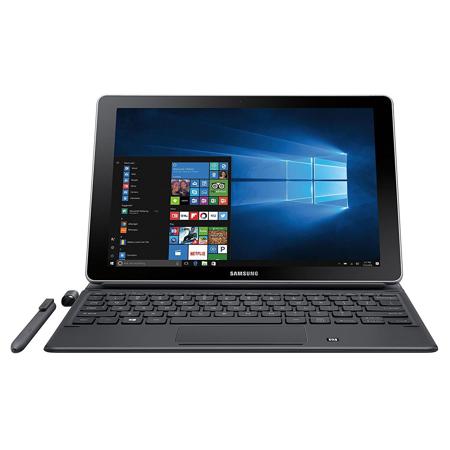
Powered by Windows 10 and a 7th Gen Intel Core i5 Processor, the Samsung Galaxy Book is the ultimate productivity machine, featuring Samsung Flow, which seamlessly connects your 2-in-1 to your Samsung Galaxy smartphone. Get the full power of a laptop in a thin, lightweight design.
Engineered for performance
Featuring Windows 10, the Samsung Galaxy Book is equipped with 4GB RAM, a 128GB solid-state drive, two USB-C ports for connecting all your devices and the latest 7th Gen Intel Core i5 Processor.
Seamlessly connected
Samsung Flow connects the Galaxy Book and your Samsung smartphone with a touch. Share files wirelessly, even without Wi-Fi. Plus, receive and respond to notifications from third party and native apps.
More ways to do more
Switch from touch to type with a keyboard that connects on contact. The precise, pressure-responsive S Pen creates and navigates with ease. Both are included with your Galaxy Book and never need charging.
Power and brilliance
The Galaxy Book delivers cinematic vividness, detail and deep contrast on a screen that fits in your hands. See it all in High Dynamic Range on a Super AMOLED display.
Lightning quick
Power through up to 11 hours of video playback on a single charge. Then get back up to a full charge with less than three hours of Adaptive Fast Charging.