


This item is no longer available.
Review Summary
2023-11-04T20:00:00
Finally, i can use 3 monitors, laptop integrated monitor + 2 external monitor, easy to install, just install driver, restart, plug the adapter to the computar and monitor, just awesome!!!!
PedroF2004

2023-02-19T19:00:00
I had an issue with after updating my OS with this product as it wasn't recognizing my second monitor. Quickly got on with LiveChat and they were able to assist me in all of 2 steps. Works great, customer supports even better.
DualScreen

2021-07-15T20:00:00
I bought this to add a third screen to my office computer. It works great, I just plugged it in and it worked immediately, without me having to install drivers. I think this is one of the best products in the market for converting HDMI to USB 3.
Pedro

2020-12-02T19:00:00
I bought a cheaper brand and had all sorts of problems. The display blinked and generally misbehaved. I had used StarTech before so I ordered one of these. It arrived right away. I plugged it in and it started working. The display appears and refreshes exactly as it should. Don't be fooled by cheap imitations! This is the real thing!
SoldOnStarTech

2020-04-29T20:00:00
Great product work well to have an second screen Excellent tech support would recommend
Kez25

2020-03-26T20:00:00
Initially had a issue with connection on my MacBook. The same day the item arrived I contacted the support desk and they resolved it in minutes and my system is running on macOS Catalina 10.15.3.
S1ngh

2018-02-02T19:00:00
This product was easy to set up and the web video simplified it completely and provided confidence to a novice.
Peterson2418

2017-12-14T19:00:00
I bought a star tech hdmi to usb 2 adapter to add a 3rd monitor to my iMac. Works great!
Rickreet

2017-01-22T19:00:00
I have a Macbook pro mid 2012 and I have two screens connected one with Thunderbolt and the other one using this adapter. The quality is amazing. You just need to make sure to use the driver online and not the outdated in the cd
rubenc1939

2016-10-10T20:00:00
Issues with the new Mac OSX 10.12 Sierra. Startech does seem to have a beta driver released currently but it only partially fixes the video issues. While moving windows across screens the window will turn black (or white) in most cases with some video screen tearing within the window which also seems to crash Safari. They did fix the choppy mouse cursor though which is good but the windows are still a mess. An ETA on when this would be fixed would be great. Just to mention the adapter worked flawlessly before the Mac OSX update and still works well on Windows 10 and below.
Tech_80

Accidents happen where life happens. Protect your favorite Adorama products and purchase a protection plan to stay covered from accidental damage, mechanical or electrical failure, and more.
If we can’t fix it, we’ll replace it at no additional cost.
Protect your product from drops, spills, and more.
Enjoy your gear without fear. We have you covered!
When regular use of your product over time results in mechanical or electrical failure.
We will never charge you a deductible after the purchase of a plan.
Our claims process is simple & easy and our customer service team is happy to help.
Adorama Protect powered by Extend is available for purchase to customers in the United States. Not available for purchase Internationally or in U.S. Territories.
Browse our FAQ
DisplayLInk - DL3500
512MB DDR II
HDMI
No
5.1-Channel Surround (48Khz)
1920x1200 / 1080p
Widescreen(16/32 bit): 1920x1200, 1920x1080, 1680x1050, 1600x900, 1440x900, 1360x768, 1280x800, 1280x768, 1280x720
Standard(16/32 bit): 1600x1200, 1400x1050, 1280x1024, 1280x960, 1152x864, 1024x768, 800x600
Yes
1x USB Type-A (9 pin) USB 3.0 Male
1x HDMI (19 pin) Female
Windows 10 (32/64) 8/8.1 (32/64), 7 (32/64bit), Vista(32/64), XP(32/64), 2000 (Aero 3D interface supported)
Apple OSX El Capitan (10.11), Yosemite (10.10), Mavericks (10.9) Mountain Lion (10.8), Lion (10.7), Snow Leopard (10.6)
1-2 USB Displays
Office Application:
CPU: i3 Dual core 2.8GHz
RAM: 2GB or higher
Full HD Video:
CPU: Quad Core 2.4GHz or Higher (i5 recommended)
RAM: 4GB or higher
USB-Powered
Plastic
RoHS Compliant
CE
FC
20 to 80 deg. C / 68 to 176 deg. F
0 to 35 deg. C / 32 to 95 deg. F
-5 to 40 deg. C / 23 to 104 deg. F
3'
0.8 x 3.5 x 2.2" / 2.03 x 8.89 x 5.59cm
2.1oz / 59.53g
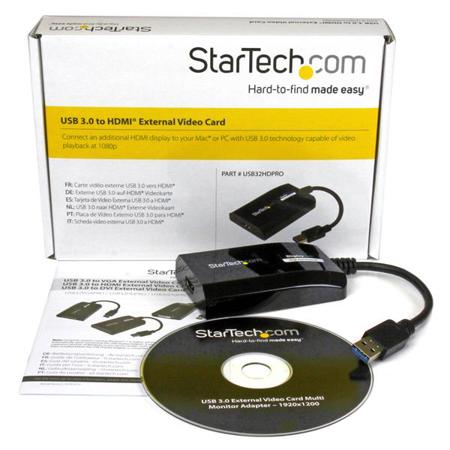
The USB32HDPRO USB 3.0 to HDMI Adapter lets you add an HDMI display to your computer through a USB 3.0 port, providing a cost-effective and convenient way to expand the video capabilities of your Mac or PC computer system.
USB 3.0 host connection provides maximum bandwidth for superior performance
Increase productivity by mirroring or extending your desktop onto another display
DisplayLink 4K Plug-and-Display certified - automatic driver installation and updates
Works with Mac & PC
USB-powered - No external power adapter required
Supports 5.1 channel audio
Supports video resolutions up to 1920x1200 / 1080p
Backward compatible with USB 2.0
USB 3.0 Bandwidth, High Definition Performance
With USB 3.0 support, this external video adapter delivers the bandwidth needed for accelerated High-Definition video performance, capable of outputting video resolutions up to 1920x1200 / 1080p. Even if your current computer doesn't have a USB 3.0 port available, the USB32HDPRO is backward compatible with USB 2.0, so you'll be able to connect your HDMI monitor to your computer and be ready for when you upgrade to a USB 3.0- equipped system.
Easier Multitasking, More Productivity
Add the screen space you need to simplify multitasking and maximize productivity, without even opening your computer case. Some computer systems, including MacBook and Ultrabook laptops and small form-factor desktops, are too compact to install an internal video card. A USB display adapter offers an easy workaround, performing as an external video card that only requires an available USB port to mirror or extend your desktop onto another display.
DisplayLink Plug-and-Display Certified
Installation has never been easier. When you connect this DisplayLink Plug and Display certified adapter to a web-enabled Windows 10, Windows 8 or Windows 7 computer, it automatically downloads and installs the most up-to-date drivers for you, so you won't have to manually download or install any software. The USB32HDPRO is backed by a StarTech 2-year warranty and free lifetime technical support.
Recommended System Requirements
CPU: Quad Core 2.4GHz or Higher (i5 recommended)
RAM: 4GB or higher
Applications
Add a secondary DisplayPort display and extend your desktop, without taking apart your computer to install a new video card
Add multi-monitor capability to a single computer, to enhance multimedia presentations
Great for researchers and writers, offering the ability to have reference material on one display while working on a separate document on another
Increase productivity by running multiple applications on different screens - check your email on one display and search the web on the other
View large or several spreadsheets across multiple displays
A compact, lightweight solution for traveling business associates using USB 3.0-capable laptop PCs, enabling connection to a secondary display/projector
Add an additional video output to computer systems with no room for expansion, such as laptops, ultra books, MacBooks and compact form factor desktops (point of sale workstations)






