+2
more
more

This item is no longer available.
Photoshop Elements 2023
Edit with the power of AI. Add motion to photos. View via web and mobile.
Most Popular Edits
Whether you want to fine-tune the details or give your photos a whole new look, start with these popular edits.
AI & Automation
Adobe Sensei AI technology and automated options do the heavy lifting so you can focus on the fun stuff.
Guided Edits
Build your skills with 61 Guided Edits. Just follow the steps to make basic adjustments, artistic creations, visual effects, and more.
Templates
Showcase your favorite pics in beautiful new collage and slideshow templates, add text to photos and enjoy new modern backgrounds and patterns.
Go beyond your desktop
Access, view and share your photos on-the-go with the new web and mobile companion apps.
Effortless organization
Keep things clutter-free and quickly find the the photos you're looking for with automated options.
Take a photo. Make it move.
Create an element of surprise by adding motion to select areas of your still photos. Choose the direction and speed of the motion, and then share your photo as an MP4 or GIF to wow people on social.
Create depth with a peek-through overlay.
Frame your photo subjects with overlays like flowers and leaves to add depth and dimension. Resize, get the blur just right, and even add a vignette for the perfect result.
New modern content for fresh looks.
Showcase your photos and videos in all-new collage and slideshow templates, and try new backgrounds, skies, and patterns in your favorite Guided Edits.
Quickly search and explore Guided Edit options.
Easily find what you want to do or discover new things to try by searching on familiar terms, using keyword tags, or choosing from popular options.
Experience better performance and stability.
Enjoy under-the-hood improvements that deliver up to 35% faster installation and launch times, and 45% smaller app size. If you're on a mac, you'll experience 70% faster launch times and performance on Apple M1 systems.
Go beyond your desktop
Access, view, and share your photos on-the-go with web and mobile companion apps. Create collages and slideshows on the web. And get ongoing app updates and 2GB of cloud storage.
Feature
Get started with popular favorites
Whether you want to fine-tune the details or give your photos a whole new look, start with these popular edits.
Erase distractions with ease
Put the focus on your subject by removing power lines, pedestrians, and other distractions with the swipe of a brush.
One-click subject selection
Automatically select the subject of your photo with a single click. Then, easily make isolated edits to the subject or the background.
Replace backgrounds in seconds
Select the subject of a photo and place it on a different background to make your pic even more amazing. Updated with new modern background presets.
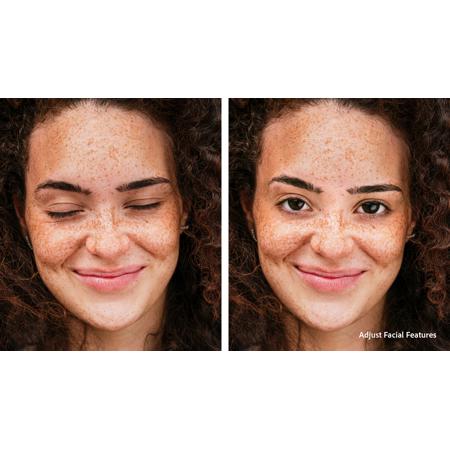
Quickly touch up facial features
Get the perfect shot every time by automatically opening closed eyes, turning frowns upside down, fine-tuning face tilt, automatically smoothing skin, and more.
New photo collage templates
Create collages with just a few clicks. Choose from new modern templates and add text for a personal touch.
Add fun filters and effects
Transform your photos with dozens of filters and effects that let you create blurs, painterly looks, distortions, textures, stylized text, and more.
Easily build your skills with Guided Edits
Just follow along to make basic adjustments, artistic creations, visual effects, and more with 61 step-by-step Guided Edits.
Extend photo backgrounds
Create a stunning landscape or reposition your subject for the perfect social post by easily extending your photo's background. The magic of Content-Aware Fill technology makes it all possible.
Move, scale, and duplicate objects
With step-by-step help, it's easier than ever to select an object and change its position, size, and more - meaning you can make your creation look exactly how you want.
Automated editing makes it easy
Adobe Sensei AI technology and automated options do the heavy lifting so you can focus on the fun stuff.
Select an area & make it move
Bring a touch of movie magic to any photo by selecting an area and adding motion. Choose the direction, adjust the speed, and then save your photo as an MP4 or GIF to share on social.
Layer on some animation
Add moving overlays like snowflakes and sparkles, and create fun animated frames. Then save your photos as MP4s to share on social and more.
Add a sense of camera motion
With one click, transform your favorite shots into moving photos-fun animated MP4s and GIFs with 2D and 3D camera motion. It's easy and perfect for sharing on social media.
Instantly turn photos into art
In one click, transform your photos with effects inspired by famous works of art or popular art styles. Apply an effect to all or part of your photo, and easily adjust the results for exactly the look you want.
Erase distractions with ease
Put the focus on your subject by removing power lines, pedestrians, and other distractions with the swipe of a brush.
One-click subject selection
Automatically select the subject of your photo with a single click. Then, easily make isolated edits to the subject or the background.
Perfect your landscapes
Easily replace skies, remove haze, and erase unwanted objects to create epic outdoor scenes. With this easy Guided Edit, you're sure to create the perfect adventure photo every time. Updated with new sky options.
Warp photos to fit any shape
Place one photo inside another by wrapping it around an object like a coffee mug or fitting it inside shapes like the lenses of your subject's sunglasses.
Quickly touch up facial features
Get the perfect shot every time by automatically opening closed eyes, turning frowns upside down, fine-tuning face tilt, automatically smoothing skin, and more.
Automatically colorize photos
Give black-and-whites new life or change up the colors in your pics with automatic colorization.
Get step-by-step guidance
Build your skills with 61 Guided Edits. Just follow the steps to make basic adjustments, artistic creations, visual effects, and more.
Add peek-through overlays
Create the illusion of depth in any photo by framing your subject with natural and realistic overlays such as flowers, leaves, grass, and more. Easily resize, adjust blur, or add a vignette to get just the look you want.
Quickly search Guided Edit options
Easily find what you want to do or discover new things to try by searching on familiar terms, using keyword tags, or choosing from popular options.
Replace backgrounds in seconds
Select the subject of a photo and place it on a different background to make your pic even more amazing. Updated with new background presets.
Brush on creative patterns
Give any photo a little something extra by brushing on a fun pattern - like hearts or stars. Experiment with 20 all-new patterns to see which ones you like best.
Perfect your landscapes
Easily replace skies, remove haze, and erase unwanted objects to create epic outdoor scenes. With this easy Guided Edit, you're sure to create the perfect adventure photo every time. Updated with new sky options.
Create perfect pet pics
Make your furry and feathered friends look their best. Frame them up just right, adjust color and lighting, select and refine detailed edges like fur, fix pet-eye, and remove collars, and leashes in a few simple steps.
Extend photo backgrounds
Create a stunning landscape or reposition your subject for the perfect social post by easily extending your photo's background. The magic of Content-Aware Fill technology makes it all possible.
Move, scale, and duplicate objects
With step-by-step help, it's easier than ever to select an object and change its position, size, and more - meaning you can make your creation look exactly how you want.
Create cool double exposures
Turn two photos into one work of art with a captivating double exposure effect.
Create modern duotones
Apply cool, custom duotone effects to your photos for a beautiful two-color creation using this simple Guided Edit. Choose from custom preset social sizes, add a gradient, and more!
Add a pop of color to B&W pics
Highlight a single color or a specific object, then turn the rest black-and-white for a dramatic effect.
Get up and running with templates
Showcase your favorite pics in beautiful new collage and slideshow templates, add text to photos and enjoy new modern backgrounds and patterns.
New photo collage templates
Choose from stylish new templates, and add text for a personal touch.
New slideshow templates
With one click, your best photos and video clips are brought together to create an animated, customizable slideshow. Now with new modern templates.
Add text with easy-to-use templates
Make shareable Quote Graphics - great for social media - by adding inspiring or personalized messages to your pics with pre-set templates, tons of customization, and cool animation options.
Create a collage of effects
Get artistic by adding multiple effects to a single photo. Photoshop Elements walks you through it and gives you templates and themes to choose from.