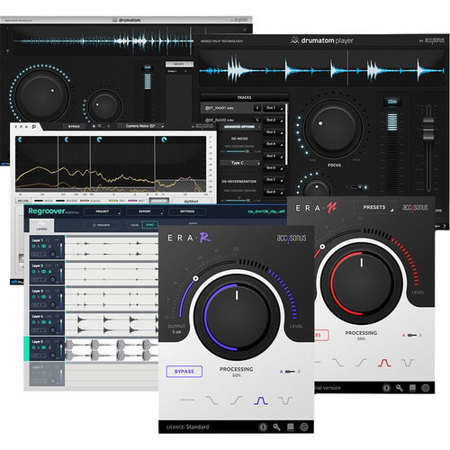
Accusonus All Bundle Music Production and Audio Restoration Plug-Ins, Electronic Download
SKU: AC1035923
This item is no longer available.
Share:
Overview
Compare
Specs
Protection
About Accusonus All Bundle Plug-Ins, Electronic Download
- Drumatom2 -
Sophisticated Drum Mixing, Simply
Reduce or completely eliminate drum bleed. Not only during pauses, but on exact drum hits as well. Control Hi-Hat bleed on your Snare track, tighten up your close mics and free up headroom for the rest of your tracks. Fix poorly recorded drums and experiment with your mixing tools (EQs, Compressors, etc) without drum bleed. Drumatom2 is a standalone application. With every purchase, you get Drumatom2 Player, a companion Virtual Instrument Plug-In that allows playback and drum bleed adjustment of Drumatom2 processed groups (.dls) inside DAWs, for free.
- Drumatom Player -
Drumatom player expands on the standalone application's functionality, by allowing you to tweak the suppression controls in the context of a mix. The most important thing to remember is that drumatom player works as a companion to the drumatom application. Use the latter to load and analyze your recorded drums.
- ERA-D -
Best-in-class joint denoise and dereverberation for audio repair professionals. ERA-D is your only choice when you want to analyze and remove noise and reverberation at the same time. If focuses on those two things and does them exceptionally well. Are you a post production engineer, a professional videographer or a dialogue editor Are you in need of deep and sophisticated denoise and dereverberation processing Meet ERA-D: the secret weapon of post production professionals! Get world class results, faster than ever!
- ERA-N -
It's a knobrainer. High-Quality Noise Removal in seconds. Background noise is the most common problem in audio and video recordings. Use the ERA Noise Remover to easily reduce or completely remove unwanted background noise such as computer fans, air-conditioners, electric hum & hiss or other sonic artifacts, simply with the turn of a simple dial. The ERA Noise Remover is a multi-patented, single knob denoise plugin that allows you to clean up your noisy recordings faster and easier than ever.
For more in-depth noise suppression, we've added 5 buttons that allow you to focus processing on a specific part of the frequency spectrum: (i) all-frequencies, (ii) high-frequencies, (iii) low-frequencies, (iv) high & low frequencies and (v) mid frequencies. Whether you are:
• A podcaster looking for a fast and easy way to improve the audio quality of your podcast
• A videographer that is regularly required to fix audio but doesn't want to touch a parametric equalizer ever again
• A bedroom producer recording in non ideal conditions using budget recording equipment
• A post production engineer struggling to meet deadlines
The ERA Noise Remover will help you get hassle-free high-quality results! The ERA Noise Remover is designed to reduce not just noise, but most importantly the effort and time required to get your audio right!
- ERA-R -
It's a knobrainer. High-Quality Reverb Removal in seconds. Unless you own a professional studio or feel comfortable recording in your wardrobe, it's almost impossible to completely isolate your voice and get reverb-free audio results. Reverb is the unavoidable result of room acoustics.. It can make your audio sound distant, "echoey" or hollow. Get the first ever single-knob ERA Reverb Remover to quickly reduce excessive reverb and bring your sound into focus. Add clarity, clean up your dialogue or tighten up your musical performance simply by turning a knob. Note that even a small amount of reverberation suppression will make a big difference in the audio quality of your final result.
For more control over reverb suppression, we've added 5 buttons that allow you to focus processing on a specific part of the frequency spectrum: (i) all-frequencies, (ii) high-frequencies, (iii) low-frequencies, (iv) high & low frequencies and (v) mid frequencies. Whether you are:
• A podcaster looking for an easy way to improve the production value of your podcast
• A videographer that is regularly required to fix audio but doesn't want to spend a ton of time in tedious audio editing
• A bedroom producer recording in non ideal conditions
• A post production engineer struggling to meet deadlines
The ERA Reverb Remover will help you get hassle-free quality results! Practice with the ERA Reverb Remover and learn how to use de-reverberation in an intense reverberation scenario.
Regroover Pro -
Your Samples, Reimagined
Extract stems from your audio loops and enable new beat-making workflows. Use Regroover's Artificial-Intelligence engine and get previously-unreachable sounds from inside your audio samples. Craft the isolated beat elements to create your personal drum kits. Instantly remix your loops and create your own loop variations.
Split Engine
• Split (unmix) audio loops into distinct layers
• Refine split results with custom annotations
Layer's Tab
• Instant Layer remixing using snap-to-grid and loop markers
• Trigger your layers via MIDI and re-arrange your loops
• Adjust volume, pan, EQ, Gate, Compressor, Stereo Enhancer to any layer
• Load and play expansion kits
• Extract any sample or loop via simple drag and drop
• Extract your beat variations (patterns) as audio files
• Use multiple pattern lengths to create new straight beats or polyrhythms
• Unique Transient Shaper optimized for beat processing
• Analog-inspired saturator for all layers
• Apply external effects with multi-channel output
Editor's Tab
• Extract sounds from Layers and drag them to their own trigger pads
• Edit extracted sounds via the expansion kit mixer and effects
• Load external sounds to enrich your expansion kit
• Save expansion kits and create self-contained Regroover project
Accusonus All Bundle Plug-Ins, Electronic Download Features
- Drumatom2:
- Fix poorly recorded drums
- Create headroom for the rest of your mix
- Preserve low-level signals, such as ghost notes in a Snare
- Polish your sound with isolated drum processing
- Achieve authentic mix results
- Build your unique sound signature
- Import drum recordings (WAV, AIFF, CAF)
- Organize drum tracks into groups
- Automatic name-identification of drum tracks
- Drum group analysis using Machine Learning
- Multiple groups batch analysis
- Drum tracks waveform display and audio preview
- Adjust drum bleed using the "Focus" knob
- Make fine adjustments with the "Fine Tune" knob
- Export processed tracks to WAV / AIFF files
- Save / Open drumatom2 processed groups (.dls) files
- ERA-D:
- Multi-patented algorithms for noise and reverberation suppression
- Intelligent joint processing: this mode takes into account the natural noise and reverb counter-interaction. This enables you to get higher quality sonic results
- Dual Channel mode that allows you to use a secondary microphone to improve the audio repair quality on you primary microphone
- Spectral-base control of noise and reverberation reduction
- Advanced parameters panel, for deeper enhancement options
- Intuitive and human-friendly interface
- ERA-N:
- Single knob operation
- Simple and streamlined user interface
- Automatic noise suppression
- Precision-grade audio repair functionality
- Uncompromised sound quality
- Minimal CPU usage
- Low latency
- Resizable UI
- ERA-R:
- Single knob operation
- Simple and streamlined user interface
- Automatic dereverberation
- Precision-grade audio repair functionality
- Uncompromised sound quality
- Minimal CPU usage
- Resizable UI
- Regroover Pro:
- Unmix your loops and create new drum kits from isolated beat elements
- Export and save the isolated beat elements and layers as WAV / AIFF audio files
- Independently adjust the volume, panning and add effects on separated sound layers
- Create and remix new patterns from separated sound layers of your audio files