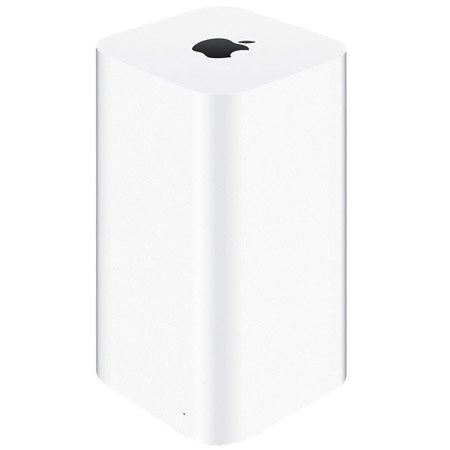

Apple 2TB AirPort Time Capsule, 5th Gen

SKU: ACME177LLA

This item is no longer available.

Overview
Compare
Specs
Protection

Reviews about this item

Review Summary

2019-11-08T11:55:03

Rated 5 out of 5

Great Company

Excellent to deal with and fast delivery.

Scott P.

2019-06-06T08:19:20

Rated 5 out of 5

Perfect for backing up

My iMac hasn't had working USB ports for years. Now I have finally been able to back up my computer because this harddrive is wireless.

Olivia T.

2019-03-28T10:00:49

Rated 5 out of 5

Best Product Ever Discontinued

Great product sorry to se it go.

Michael E.

2019-03-25T04:20:12

Rated 4 out of 5

Awesome

Great Item at a Great Price.

Shane P.

2017-12-04T08:52:02

Rated 5 out of 5

Apple Product

Served my purpose of large capacity for time machine back-up and better coverage of WIFI throughout three levels of my home

NAFISA Z.

2017-06-02T09:59:32

Rated 5 out of 5

I needed this

I absolutely had to have this so I could upgrade my Mac OSX operating system which I put off for far too long. Happy to be wireless also and going online is faster than being tethered to the wall. Easy to set up.

Renee D.

2017-03-28T12:28:16

Rated 5 out of 5

Great for mac owners

The convenience of having great wireless and easy backup was why i purchased it.

EDWARD R.

2017-01-02T13:00:39

Rated 5 out of 5

Router and Back-up Solution, Easy and Handsome

I love Apple Time Capsules. Setup is almost automatic. Range is great. It's proof that capable routers don't have to look like a giant tarantula. That plus I never think about back-ups. I just know they're done. That's how it should be. Back-ups should be your. computer's job. Not yours. Get one while Apple still makes them!

Rex K.

2016-02-04T05:42:31

Rated 5 out of 5

User Friendly

Easy install and setup. Replaced my old one. Recommended.

LISA S.

Select a plan in the Add Protection section above and purchase with this product by clicking “Add to Cart”.

image-protection

TRUSTED PROTECTION PLANS, EXCEPTIONAL SERVICE.

Invest In Your Gear and Peace Of Mind!

Accidents happen where life happens. Protect your favorite Adorama products and purchase a protection plan to stay covered from accidental damage, mechanical or electrical failure, and more.

Repair or Replacement

Repair or Replacement

If we can’t fix it, we’ll replace it at no additional cost.

Accidental Damage

Accidental Damage

Protect your product from drops, spills, and more.

Peace of Mind

Peace of Mind

Enjoy your gear without fear. We have you covered!

Malfunction Protection

Malfunction Protection

When regular use of your product over time results in mechanical or electrical failure.

Zero Deductible

Zero Deductible

We will never charge you a deductible after the purchase of a plan.

Customer-Focused Support

Customer-Focused Support

Our claims process is simple & easy and our customer service team is happy to help.

Adorama Protect powered by Extend is available for purchase to customers in the United States. Not available for purchase Internationally or in U.S. Territories.

Apple Airport Time Capsule Specifications

  • Storage

    2TB hard drive

  • Wireless

    IEEE 802.11a/b/g/n/ac

  • Antenna

    Six-element beamforming antenna array

  • Bands

    Simultaneous dual-band 2.4GHz and 5GHz

  • Power

    Radio output power: 32.5 dBm maximum (varies by country)

  • Channels

    Channels 1-11, 36-48, and 149-165 approved for use in the United States and Canada

    Channels 1-13, 36-64, and 100-140 approved for use in Europe and Japan

    Channels 1-13, 36-64, and 149-165 approved for use in Australia, Hong Kong, and New Zealand

  • Compatibility

    Interoperable with 802.11a, 802.11b, 802.11g, 802.11n, and 802.11ac-enabled Mac computers, iOS devices, Apple TV, Windows-based PCs, and other Wi-Fi devices

    NAT, DHCP, PPPoE, VPN Passthrough (IPSec, PPTP, and L2TP), DNS Proxy, IPv6 (6to4 and manual tunnels)

  • Security

    Wi-Fi Protected Access (WPA/WPA2)
    WPA/WPA2 Enterprise
    MAC address filtering
    NAT firewall
    802.1X, PEAP, LEAP, TTLS, TLS, FAST
    Time-based access control

  • Software and Documentation

    Printed documentation included
    AirPort Utility for Mac available for free download
    AirPort Utility for iOS available for free download
    Bonjour for Windows available for free download

  • Interfaces

    Simultaneous dual-band 802.11ac wireless
    Gigabit Ethernet WAN port for connecting a DSL modem, cable modem, or Ethernet network
    USB 2 port for connecting a USB printer or hard drive
    Three Gigabit Ethernet LAN ports for connecting a computer, Ethernet hub, or networked printer
    Built-in power supply

  • Number of Users

    50

  • Power Requirements

    100-240V AC, 50-60Hz; input current: 1.5 amp

  • Environmental

    Operating temperature: 32½ to 95½ F (0½ to 35½ C)
    Storage temperature: -13½ to 140½ F (-25½ to 60½ C)
    Relative humidity (operating): 20% to 80%, noncondensing
    Maximum operating altitude: 10,000 feet
    Maximum storage altitude: 15,000 feet

  • Setup and Administration

    iPhone, iPad, or iPod touch with iOS 5 or later and AirPort Utility 1.3
    Mac with OS X Lion v10.7.5 or later and AirPort Utility 6.3

  • Wireless Device Access

    Any Wi-Fi-enabled device that uses the 802.11a/b/g/n/ac specification

  • Shared Printing with a USB Printer

    USB printer
    Mac with OS X v10.2.7 or later
    PC with Windows XP (SP3), Windows Vista (SP2), Windows 7 (SP1), or Windows 8

  • Shared USB Hard Drive

    Mac with OS X v10.4.8 or later
    PC with Windows XP (SP3), Windows Vista (SP2), Windows 7 (SP1), or Windows 8

  • Backup using Time Machine

    Mac with OS X v10.5.7 or later

  • System Requirements Mac

    Operating System: Mac OS X 10.5.7 for configuration; Mac OS X 10.2.7 for USB printing; Mac OS X 10.4.8 for AirPort Disk access; Mac OS X 10.5.7 for Time Machine backup
    Hardware: Ethernet or AirPort interface

  • System Requirements Windows

    Operating System: Windows XP SP3 or Vista SP1 for configuration, USB printing and AirPort Disk access
    Hardware: 802.11a/b/g/n Wi-Fi or Ethernet

  • Dimensions

    3.85 x 3.85 x 6.6" (98 x 98 x 168mm)

  • Weight

    3.26 lbs (1.48kg)

  • UPC Code

    885909707683

About Apple Airport Time Capsule

With Apple AirPort Time Capsule, you get a superfast Wi-Fi base station and an easy-to-use backup device all in one. And backing up your data couldn't be simpler. Just set it up once and AirPort Time Capsule does the rest. It works with Time Machine in OS X to back up your Mac automatically and wirelessly, so you never have to worry about losing anything important again. Every photo. Every file. Every song. Even your apps and OS X settings are saved. AirPort Time Capsule stores it all - up to 2TB or 3TB of data.

AirPort Time Capsule is designed to partner seamlessly with Time Machine to protect your data. They work together smartly so that after the initial backup, only the files you've changed are backed up automatically, wirelessly, and in the background. Since Time Machine continuously makes a copy of everything on your Mac and saves multiple versions you can easily access and restore previous versions of a single file, a folder, or even your entire Mac. And with an all-new design and ultrafast 802.11ac Wi-Fi, backing up to AirPort Time Capsule is up to 50 percent faster than before.

Have multiple Mac computers in your home or office? AirPort Time Capsule can back up and store files for each Mac on your wireless network. No longer do you have to attach an external drive to each Mac every time you want to back up. AirPort Time Capsule spares you the work. Your computers are always backed up automatically and wirelessly. AirPort Time Capsule is your one place for backing up everything. Its massive 2TB hard drive gives you all the capacity and safety you need. So whether you have 250 songs or 250,000 songs to back up, room is the last thing you'll run out of.

More than just a wireless hard drive, AirPort Time Capsule is also a full-featured Wi-Fi base station with the latest three-stream 802.11ac technology. Now you can reach data rates of up to 1.3 Gbps, triple the previous 802.11n standard. Which means up to three times faster Wi-Fi.4 You also get double the channel bandwidth, with 80MHz-wide channels providing more room for more data to flow faster than ever. And if you have 802.11a/b/g/n devices, AirPort Time Capsule maximizes that connection as well. What you do with all that extra speed is up to you.

AirPort Time Capsule features simultaneous dual-band 802.11ac Wi-Fi. That means it transmits at both the 2.4GHz and 5GHz frequencies at the same time. So no matter which band your wireless devices use, they'll automatically connect to the best available band for the fastest possible performance. With 802.11ac technology comes the intelligent, powerful beamforming antenna array. Most base station antennas emit an equal and constant Wi-Fi signal in all directions. But the beamforming antenna array is smarter it knows where an 802.11ac device is on the network. Then AirPort Time Capsule targets its signal to that device. So your Wi-Fi signal is stronger, clearer, and faster.

For the all-new design of AirPort Time Capsule, we took an approach that centered around performance. We made it taller and put the antennas at the top, creating a higher platform for dispersing the signal. We also increased the number of antennas. There are now six of them three for the 2.4GHz band and three for the 5GHz band. Together with 802.11ac wireless technology, they let you connect faster, farther, and with more power than ever before. The bar for Wi-Fi base stations has been raised. In every way.

The new vertical design not only improves Wi-Fi performance, it also saves you valuable desk space. At less than 4 inches square, the footprint of AirPort Time Capsule is 75 percent smaller than its predecessor. And to keep everything tidy, even the power supply is built in. Which means AirPort Time Capsule takes up no more space than it should. With AirPort Time Capsule, getting your new Wi-Fi network up and running takes less time and less effort than making a cup of coffee. That's because a setup assistant is built into iOS and into AirPort Utility for OS X. As soon as you plug in your AirPort Time Capsule and connect it to your DSL or cable modem, you can follow the simple instructions on your Mac or iOS device. There are no complicated steps to follow and no obscure terminology to learn. The setup assistant does all the work, so you don't have to.


Apple Airport Time Capsule Features

  • Manage your Wi-Fi network from your iOS device or Mac: Once your network is set up, AirPort Utility for iOS lets you manage and monitor it from your iPad, iPhone, iPod touch, or Mac. Your AirPort Time Capsule appears graphically onscreen, so you can see your settings at a glance, make changes, apply updates, and more.
  • Share another hard drive, Securely: In addition to the 2TB of storage in AirPort Time Capsule, you can turn any external USB hard drive into another secure drive to share across your Wi-Fi network and access securely over the Internet. All the documents, videos, photos, and other files instantly become available to anyone on the network.
  • Print without wires: The USB 2 port in AirPort Time Capsule is also great for sharing a printer across your wireless network. Just plug it in and everyone on your network can take advantage of one centrally available printer. Wirelessly, of course.
  • Get online safely and securely: AirPort Time Capsule includes a built-in firewall that creates a barrier between your network and the Internet, protecting your data from malicious attacks. When you set up AirPort Time Capsule, the firewall is automatically turned on, so you don't have to do a thing.
  • Put out the Wi-Fi welcome mat for guests: With the guest networking feature, you can set up a separate Wi-Fi network just for guests. Use a different password or no password at all. A guest network allows access only to the Internet, so your primary network including any external hard drive, printer, or other LAN-attached device remains secure.
  • Connect to Wi-Fi from any device: Mac. PC. iPhone. iPad. Apple TV. Really, any Wi-Fi-enabled device you have will work with AirPort Time Capsule. That's because it's compatible with devices using the 802.11a, 802.11b, 802.11g, 802.11n, and 802.11ac specifications.
  • Go the wired route if you want: AirPort Time Capsule includes three Gigabit Ethernet LAN ports for fast wired connectivity with a desktop computer, network drive, DVR, or other device.

Key Features

  • Manage your Wi-Fi network from iOS device or Mac
  • Share another hard drive, Securely
  • Print without wires
  • Get online safely and securely
  • Put out the Wi-Fi welcome mat for guests
  • Connect to Wi-Fi from any device

What's in the box:

  • Apple Airport Time Capsule
  • Printed Documentation
  • Power Cord
  • Apple 1 Year Warranty




