


This item is no longer available.
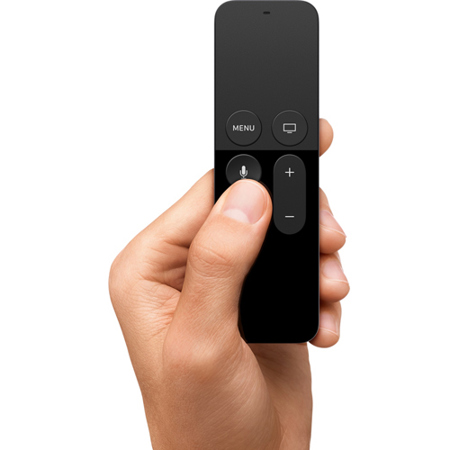
Apple Siri Remote
The fastest way to find what you're looking for? Ask Siri.
Siri takes the work out of watching TV. Simply say what movie or show you want to watch, and Siri finds it for you. It's that easy. Dual microphones allow Siri to hear your commands clearly, even if there's background noise. Tell Siri you want to watch a Hulu show. Or ask it to find Nemo. Siri knows exactly what you're talking about. The days of wading through page after page of choices to track down your favorite show - or using a remote to type in every letter of a movie title - are thankfully over.
Siri does the digging. So you don't have to.
Searching for a movie used to take almost as long as actually watching the movie. With Siri, you can quickly search for a movie or TV show across popular services, including content apps such as iTunes and Netflix. All your viewing options are displayed on the screen, so you can see where a movie or show can be found. You'll also see if it's available to rent, buy, or watch with a subscription (if you don't already have one).
Refine your search. Siri is smart enough to keep up.
With Siri, you can make follow-up commands during your search until you find exactly what you want. For example, tell Siri you want to see science fiction movies released in the '70s. Siri will find them. Then narrow your search further by saying "Only the good ones." Siri uses Rotten Tomatoes reviews to present only the critically acclaimed ones. And because you're talking just as you normally would, it all feels completely natural.
Siri does more than just search.
Sure, Siri can find movies and TV shows. But that's just the beginning. Ask Siri to show you sports scores, control playback, pull up the weather, access your settings, and even check your stocks. Tell Siri to turn on Enhanced Speech, which boosts dialogue and softens music and sound effects, so you don't wake up the whole house when you're watching a late-night movie. Or if you can't understand a line from a show, ask "What did he just say?" Siri will skip back and temporarily turn on closed captioning, so you can see what you missed.
TV was controlled by buttons. Now it's controlled by Touch.
The Siri Remote has a precise Touch surface. So you can use your thumb to swipe, scroll, select, and easily navigate around your screen. Which means no more endless clicking of arrow buttons to find what you want. And scrubbing forward or backward is more exact than ever. Instead of using clunky fast-forward or rewind buttons where you always overshoot your target and have to settle for "close enough" now you just swipe across the timeline and use the preview frames to pinpoint where you want to go. Every move you make on the remote's Touch surface is mirrored on your television screen. It's so natural, you'll wonder how you ever watched TV without it.
Multidirectional navigation
Move your thumb in any direction and the action is mirrored on your TV screen.
Click anywhere
Simply click anywhere on the glass Touch surface to make your selection.
Precise time-scrubbing
Swipe quickly with a sweeping motion to fast-forward and rewind across large amounts of time. Or swipe with smaller, more precise movements to go almost frame by frame.
The only remote you'll need.
Navigating your TV with Touch is such a pleasure, you won't want to put the remote down. And you don't really have to. That's because the Siri Remote can control the volume on your TV or A/V receiver as well as turn it on or off. Which means no more juggling multiple remote controls. And thanks to Bluetooth, you don't have to worry about where you point the remote. The new Apple TV picks up your commands from anywhere in the room.