
This item is no longer available.
Meet Symphony I/O Mk II
Intuitive touchscreen. Future-proof modularity. Flagship sound quality.
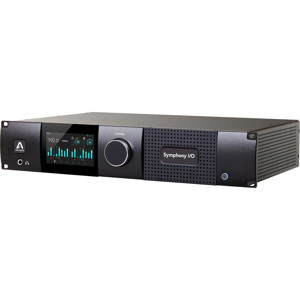
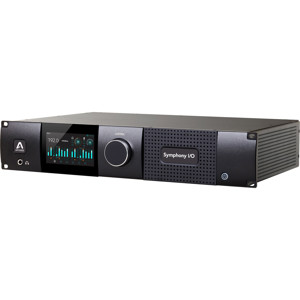
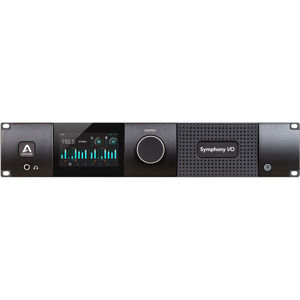
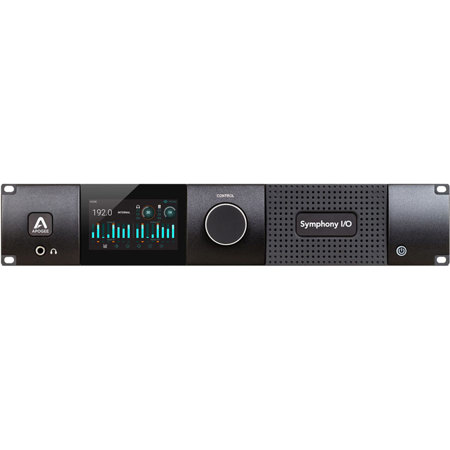
Symphony I/O Mk II is a multi-channel audio interface featuring Apogee's newest flagship AD/DA conversion, modular I/O (up to 32 inputs and outputs), intuitive touchscreen display and optional world-class microphone preamps. Designed to deliver professional sound quality for audio recording, mixing and mastering, Symphony I/O Mk II is the ultimate music production centerpiece for any modern studio.
The new Symphony I/O Mk II comes with direct connectivity to one of three different platforms - Thunderbolt, Pro Tools HD or Waves SoundGrid network.
• All new symphony control software
• Multi-unit support for up to 64 channels of I/O
• Apogee control hardware remote compatibility
• True standalone mode functionality
Input and Output Flexibility
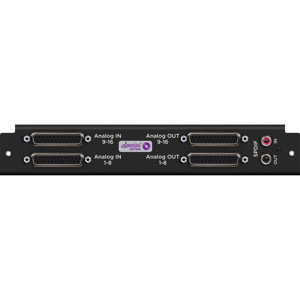
There is a Symphony I/O Mk II solution for everyone; the home studio, project studio, commercial recording studio and scoring stage. Choose from four base I/O configurations, 2 x6, 8 x8, 16 x16, or 8 x8 with 8 mic preamps and easily expand as your studio grows. With two module slots and the capacity for up to 32 inputs and outputs of A/D & D/A conversion per unit, Symphony I/O Mk II offers the best per-channel value of any interface in its category.
Legendary Sound Quality
Apogee engineers have made it their passion to improve every new flagship product by using the latest in electrical components and designing optimized circuitry that often exceeds the expectations of the component manufacturer. This is the Apogee Advantage. Symphony I/O Mk II is the culmination of this 30 year commitment and raises the bar on all Apogee products before it with even better audio clarity and sonic transparency.
In fact, when equipped with either the new 8 x8 or 16 x16 Mk II I/O modules, Symphony I/O Mk II outperforms all other multi-channel audio interfaces available for Pro Tools HD or Thunderbolt based systems, making it the flagship audio interface for the entire professional audio industry and the obvious choice for countless GRAMMY winning artists, producers, songwriters and engineers.
Pro Tools HD
For connecting to an existing Pro Tools HD Accel, HD Native or HDX system. Up to 1 Symphony I/O Mk II unit connected to each HD port (max. 32 x32 per unit).
The Magic is in the Modules
The I/O Modules are the sound and soul of Symphony I/O Mk II, and represent over 30 years of Apogee R&D and design excellence. These powerful Modules deliver Apogee's core competency: superior sounding digital audio recording. With 3 available I/O Modules and an 8 channel mic preamp module, you can choose from base configurations or expand to grow your studio's capabilities.
Symphony's I/O modules are designed to future-proof your investment in flagship Apogee sound quality. If you own an original Symphony I/O, the Symphony I/O Mk II chassis can increase the longevity of your system by offering backwards compatibility with first generation 2 x6, 8 x8, 16 x16 and 8 channel mic preamp I/O modules.
Option Card Slot for Future Connectivity Options
Symphony I/O Mk II's new option card feature will future proof your investment and your studio. Working in Pro Tools HD now Thinking about going Native with Thunderbolt or setting up an audio over ethernet network The Option card slot offers flexibility for the present and the future, as new platforms develop and audio recording workflows evolve.
More Intuitive. More Control
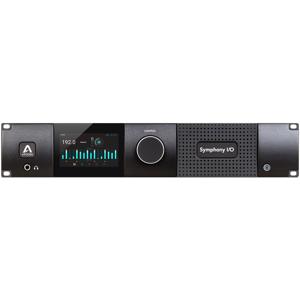
Front Panel Touchscreen with Comprehensive Control
All of Symphony I/O Mk II's essential input and output settings can be accessed from the front panel touchscreen. Change your input selection, monitoring levels, mic pre gain or calibrate your Symphony I/O Mk II to match the levels of the other analog gear in your system.
A high-resolution TFT display delivers all the visual feedback critical for recording and monitoring. Without looking at your computer, Symphony I/O Mk II lets you see metering for up to 64 channels of I/O, 32 IN x 32 OUT - signal levels, polarity, muting, phantom power and Soft Limit.
Dynamic Temperature Control
Symphony I/O Mk II features advanced controls to keep the unit running at an ideal temperature, ensuring the highest level of performance and reliability. The new temperature controls are complemented by an improved fan and chassis ventilation design, which allows adequate component cooling to occur quietly.
Introducing the all new Symphony Control
Symphony Control Software
Symphony Control software for Mac, is designed specifically for Symphony I/O Mk II audio interfaces. Symphony Control has been built from the ground up and replaces Apogee's Maestro software for Symphony I/O Mk II users. Symphony Control delivers all the functionality of Maestro in a new, highly customizable user interface along with innovative new features like Talkback functionality, the simplified "Essentials" control window and an FX Send mixer feature, recently introduced as part of the Element Control software.
- Symphony I/O Mk II Sound Grid -
Ultimate Sound Quality Meets Powerful DSP Enabled Networking
With a simple ethernet connection, Symphony I/O Mk II's industry-leading sound quality can be easily connected to your computer, shared between multiple rooms, multiple computers and supercharged with almost infinite real-time DSP power via Waves SoundGrid servers. Symphony I/O Mk II SoundGrid integrates seamlessly with all DAWs, providing endless possibilities for setups of every size for studio, live and post production workflows.
Easy Collaboration
Collaboration is easy with a SoundGrid equipped Symphony I/O Mk II at the center of your studio. Simply connect any additional computers via ethernet cable to effortlessly route audio digitally between multiple computers and your main Symphony I/O, using any combination of DAWs.
Let's say you have a great drum beat started in Logic Pro X and a collaborator comes to your studio with their laptop and Ableton Live. You can simply connect the laptop to your host computer with an ethernet cable, download the Waves SoundGrid connect audio driver on your guest's computer and you're ready to collaborate. Transport controls will be synced between the two computers and you can play all tracks through your Symphony I/O Mk II.
Record with Real-Time Plugins. Mix with Unlimited Power.
Add a Waves SoundGrid server to your Symphony I/O Mk II to supercharge your workstation and be able to record with plugins, with near zero latency. The SoundGrid Server handles plugin processing so your computer can handle other demanding tasks while mixing or editing. Use more plugins than ever by spreading the load between your computer and the server. When you are away from your studio, these plugins can continue to run natively on whatever computer you're on - no hardware or dongle required.
Take Apogee and Waves from the Studio to the Stage
Your audience expects the concert to sound just like the record. Symphony I/O Mk II and Waves eMotion LV1 digital software mixer makes this possible for any size touring band. Waves' plugins and Apogee AD/DA conversion are industry standards in the recording studio. For the first time, you can combine them with arena-sized mixing power in a compact package you can easily travel with to deliver incredible sound quality for any performance.
Waves' LV1 provides the quick and convenient workflow needed in demanding live environments. Adjust Symphony I/O Mk II's mic preamp gain and 48 volt phantom power right from the LV-1 channel strip or open the SoundGrid Setup page for advanced hardware control.
Looking to provide a comprehensive audio solution for your house of worship or venue Symphony I/O Mk II and SoundGrid offer front of house mixing, multitrack audio recording and multi-room distribution in one integrated system.
Features
• Connect Symphony I/O Mk II via Ethernet cable to computer(s) and/or SoundGrid compatible devices
• Sync audio between multiple computers, DAWs & rooms (Mac or PC)
• Near-zero latency recording with any SoundGrid compatible plugins
• Mix with near unlimited plugin power
• Up to 32 channels of modular analog I/O with optional 8 mic preamps per Symphony
• Best per-channel value of any interface in its category
• Setup and advanced control with Waves SoundGrid Studio application
• Available as free download from Waves
• Ideal for studio facilities, live sound, broadcast and post-production