
This item is no longer available.
Introducing The Akai Professional Fire
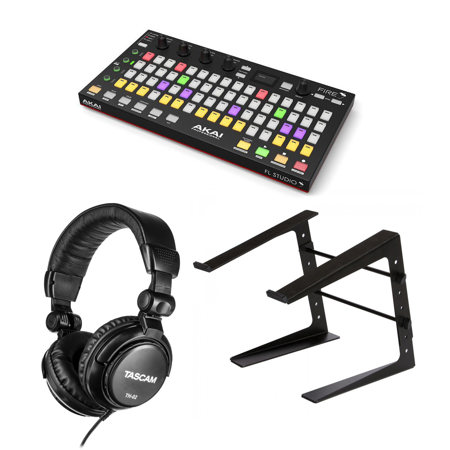
The new Akai Professional Fire represents the first of its kind, a dedicated hardware controller for the FL Studio Digital Audio Workstation (DAW) platform. Created in close partnership with Image-Line, Fire is a high-performance tool designed to enhance the workflow and music-creating experience for all FL Studio producers.
Discover Fire
Browse, Audition
Fire features a dedicated browser function to navigate, audition and load your audio samples, recall project files and open plugins. Simply select browser and use the Select rotary encoder to preview and load content and devices within FL Studio. The graphical OLED display makes for easy browsing and controlling the various files, menus and parameters within your session a breeze.
Step Sequence
Featuring plug-and-play integration, within seconds you'll be creating patterns and building tracks using Fire's 4 x 16 velocity-sensitive RGB pad matrix, designed for immediate interaction with FL Studio's celebrated step sequencer.
At the touch of a finger
Get hands-on with your production with everything you need to control FL Studio's channels and patterns. With direct hardware control over your session, you can easily mute and solo channels, expand the grid matrix, select new channels, navigate through patterns and much more without touching a mouse.
Modes of Everything
Note Mode
From searing synth leads to lush pads, Fire's Note mode provides the ultimate platform to add melody and harmony to your production. Simply push the Note button and Fire's RGB pads switch-up to a MIDI keyboard giving you three octaves of note data, perfect for playing all of your instruments hosted in FL Studio.
Drum Mode
Fire's pad matrix features an MPC-style 16-pad layout for seamless integration with FPC and SliceX. This is great for FL Studio producers who want a traditional beat-making experience or want to use their finger-drumming chops on the track.
Performance Mode
Whether you're a studio producer refining an arrangement or live performer looking to take your sessions to the stage, Fire's Performance mode provides the ideal platform to remix and reimagine your tracks. Simply select Performance mode and launch MIDI clips and audio directly from Fire's RGB pad matrix for a truly inspiring live production experience.
Total Integration
Transporting
Fire also provides immediate access to transport controls straight from the hardware. Record, Stop, Play, as well as a button to instantly switch between Pattern and Song mode are intuitively placed for mouse-free control of FL Studio. Plus, these all double up with secondary controls providing access to Loop Record, Countdown, Wait and Metronome.
All in the mix
Bringing a tactile, mouse-free mixing solution to the FL Studio environment, Fire includes 4 banks of 4 touch-capacitive knobs that enable the user to instantly see and adjust parameter values. Providing control over channel, mixer and user-assignable parameters, this enables a more intuitive and enjoyable workflow. From tweaking volume and pan within FL Studio's mixer to adjusting filter controls within the selected channel and recording automation, you'll spend less time clicking and more time executing.
Multi-device Mode
Speed is power. Up to four Fire devices can be connected at once, enabling unprecedented hardware control over the FL Studio mixing and production workflow. Expand channels or make more in the sequencer accessible by selecting Multi-Device Mode from the OLED display. Instantly expand the 4 x16 matrix of one Fire unit to an 8 x 32 workflow.
Please note: The more powerful your CPU, the more instruments and FX you can run.