Share:
New Arrival
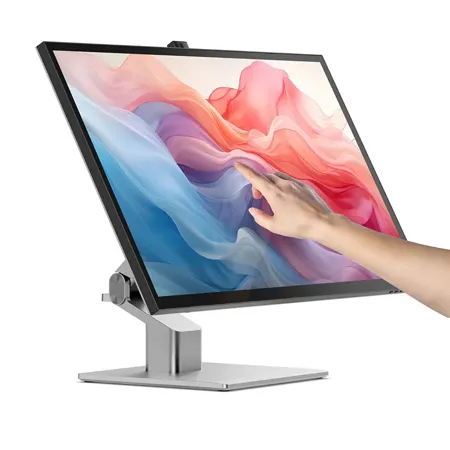
Alogic Clarity Fold 32" 16:9 4K Ultra HD Touchscreen VA Gloss LED HDR Monitor, Silver
SKU: AL32C4KPDTF MFR: 32C4KPDTF
Earn VIP Reward PointsKey Features
- Experience stunning visuals on the 32" 4K Ultra HD display, perfect for creative professionals.
- The responsive 10-point multitouch screen enhances productivity for interactive tasks and design work.
- Enjoy seamless connectivity with multiple ports, including USB-C, HDMI, and DisplayPort for all your devices.
- Immerse yourself in vibrant colors with 98% sRGB and HDR 400, ideal for photo and video editing.
- Benefit from a comfortable viewing experience with the VA panel and 60Hz refresh rate for everyday use.
- Unleash your creativity with MPP 2.0 stylus compatibility, offering precise control for digital artistry.
New Item?Request assistance or get notified
Free Shipping
See Options
1

Add Adorama Protect:
Available to U.S. customers only.
Need help? Ask our experts.
Overview
Compare
Specs
Protection







About Alogic Clarity Fold Touch
The World's Leading 32" 4K Touchscreen Monitor for Mac and Windows
Get Hands On With Your Work
From graphic designers to document signers, professionals around the world rely on Clarity Touch's precision 4K touchscreen to simplify their workflow. With intuitive multitouch gestures and precision stylus support, Clarity Touch empowers you to use your Mac or Windows computer like a 32" iPad.
• 3840x2160: Resolution
• 16:9: Aspect Ratio
• 320 nits: Max Brightness
• 60Hz: Refresh Rate
• 178 Degree : Viewing Angle
• 98%: sRGB
Touch Designed for Professionals
Legal
Clarity Touch allows judges, attorneys, and witnesses to easily navigate, annotate and sign documents and other evidence, streamlining trial preparation and enhancing presentations.
Architects
With the Clarity Active Stylus, architects can easily create, modify and mark up digital blueprints and plans, while multitouch makes it easy to review and present designs to stakeholders.
Healthcare
Clarity's intuitive multitouch makes it painless to review X-rays with patients, while the Clarity Active Stylus allows doctors to quickly mark up images and sign key documents.
Manufacturing
Clarity Touch lets engineers get hands on with their designs in the preproduction phase, then use the precision stylus to mark-up required changes for the next revision.
Bright and Color Accurate
Clarity's glossy screen delivers sharp, vibrant and accurate colors, perfect for use in bright home offices, with 98% sRGB and Adobe RGB coverage and an Avg. DeltaE well below 1.
See the Fine Details in 4K
Clarity Max Fold's glorious 32" 4K (3840x2160) screen gives you plenty of screen space for multitasking with two windows side by side, or examine the finest details of your latest creation.
Works with Mac and Windows
Whether you rely on Mac or Windows to get things done, rest assured knowing Clarity's intuitive multitouch gestures and pressure-sensitive stylus support are fully supported by your favorite applications.
Mark-up, Sign & Design
When paired with the snap-on Clarity Active Stylus (sold separately), Clarity Touch becomes the perfect drawing board for your next big idea, or a convenient way to annotate or sign documents your business requires.
4096 levels of pressure sensitivity and tilt-support make our stylus ideal for use in Photoshop, Illustrator and other apps that artists love, while everyone can appreciate its months-long battery life and pairing-free connectivity.
Hybrid Stand Built for Touch
Clarity Max Fold's ergonomic stand folds down in seconds into a sturdy, supportive surface for hours of comfortable stylus use. When you've finished with the stylus, it's easy to raise the monitor up to a comfortable eyeline for everyday work.
See Yourself on the Big Screen
Clarity Max Touch's smart pop-up webcam is perfectly positioned to capture your best angle. When the call is over, the webcam automatically slides down into the monitor, protecting your privacy.
Laptop Charging USB-C Hub
The robust USB-C hub integrated into every Clarity monitor takes the complexity out of connectivity by recharging your laptop and linking it to two USB devices.
Alogic Clarity Fold Touch Features
- 32" 4K Ultra HD touchscreen with multitouch and stylus support for Mac and Windows
- 3840x2160 resolution glossy display with accurate color 98 percent sRGB
- Designed for professionals ideal for legal healthcare architecture and design
- Works with 4096 pressure level stylus for marking up sketching and signing
- Fold down ergonomic stand plus pop up webcam and USB-C hub with laptop charging