This item is no longer available.
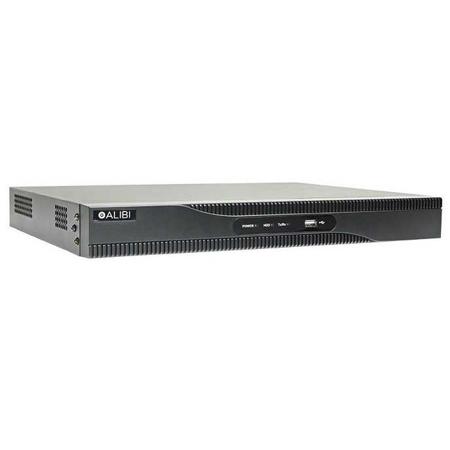
This Alibi 3000 Series 8-channel SwitchBox NVR delivers an IP network recording solution-without the complexity. The NVR features an integrated 8-port PoE (Power over Ethernet) network switch to power the IP network cameras directly through the network cable-eliminating the need to purchase a separate network switch. The Alibi 3000 Series network video recorder supports compatible IP network cameras (up to 6.0 megapixel resolution) for seamless and simple plug-and-play installation-simply plug the compatible cameras into the integrated network switch and the cameras are automatically detected, displayed and configured to the NVR. The NVR records video at up to 480 fps at 60 fps per channel.
· Plug and play support for compatible IP cameras (Up to 6.0 megapixel resolution)
· Supports up to 6.0 megapixel recording resolution
· 8 independent PoE network ports with integrated network switch, automatically detects and displays compatible cameras plugged into the switch
· Central Management Software (CMS) - Manage up to 256 devices across multiple locations from a single platform
· PoE switch (802.3af and 802.3at)
· Linux embedded operating system
· VGA and HDMI local display video outputs
· Supports H.264 video compression
· Supports up to 6TB per hard drive bay (up to 2x 6TB hard drives)
· Multiple selectable recording modes (schedule, continuous, motion detection, alarm, POS, VCA and event)
· Recording features: event search, event log and email and event notification
· Free iOS/Android app for remote viewing of live and recorded video
· Features Alibi Power Tools, a collection of powerful utilities designed to streamline and simplify the installation, set-up and management of your Alibi surveillance system.
The remote configurable network recorder features a Linux embedded operating system and supports H.264 video compression to maximize recording time and hard drive space. The NVR offers multiple selectable recording modes (schedule, continuous, motion detection, alarm, POS, VCA and event) to meet your application and video recording needs. This NVR works with Point-of-Sale (POS) transaction data, with the ability to overlay information on a camera screen related to the transaction. This provides a visual indicator that ties the transaction to the recording and allows for keyword searching, enabling you to quickly find video related to specific transaction data.
Alibi Central Management Software (CMS) is a professional monitoring platform that enables you to centrally manage multiple devices, at multiple locations, from a single interface. The CMS enables you to view up to 64 live cameras on a single screen and supports up to 256 devices (such as cameras and recorders) with a maximum of 1,024 channels. The user-friendly central management software is loaded with powerful features to enhance your management and viewing experience, including: drag-and-drop system and camera selection, customizable displays, device grouping, alarms and notifications, remote system management and many more.
The NVR supports H.264 video streams to reduce your file size, maximize recording time and save valuable hard drive space. The NVR supports up to 12TB of internal storage (up to 2x 6TB hard drives maximum) for storing your video. A free Witness iOS/Android mobile app provides convenient remote viewing of video so you can monitor your cameras from anywhere. The SwitchBox NVR also features VGA and HDMI video outputs, 2x USB ports (1x USB 2.0 and 1x USB 3.0) and it operates on 48 Vdc at 10 Watts (without hard disk or PoE used). The device also has a 120 Watts max PoE output.
Power Tools
Alibi Power Tools is a collection of powerful, time-saving utilities for use with Alibi surveillance systems. These utilities are designed to streamline and simplify the installation, set-up and management of your network, your Alibi cameras and recorders and your recorded video evidence.
Alibi Power Tools includes the following:
· Remote Backup
· Discovery Tool
· Local Playback
· Batch Upgrading
· Bandwidth Calculator
· Disk Calculator
· Focus Assistant
· Batch Configuration
Note:
Alibi Power Tools is Windows OSX 7-10 compatible.
Hard drive not include
Select 'Add a hard drive' to add a security grade hard drive to your order. Please note: Customer installed components (including hard drives) may damage your NVR and result in non-warranty repair costs. Alibi recommend purchasing a security-grade hard drive from them which it will be installed at no extra cost.
Key Features and Capabilities
SwitchBox PoE - Simplify installation
The SwitchBox NVR delivers an IP network recording solution-without the complexity. It features an integrated 4-port PoE (Power over Ethernet) network switch to power the IP network cameras directly through the network cable-eliminating the need to purchase a separate network switch.
Selectable Recording Modes - Maximize recording
The NVR offers multiple selectable recording options including continuous recording, motion detection and schedule to maximize your video recording and hard drive storage. Note: Certain recording features and capabilities of NVRs, such as multiple codecs and motion detection, are dependent upon IP camera compatibility.
H.264 Compression - Record high resolution video and save storage space
H.264 compression can greatly reduce the size of your digital video files without compromising image quality (compared to M-JPEG and MPEG-4). It's a stable, proven and widely used compression technology, offering unbeatable recording picture quality and a small compression ratio that saves valuable hard drive storage space.
FREE Mobile App
Access your NVR remotely from anywhere with the free Witness iOS/Android mobile app.
Technology Agnostic - Support for multiple technologies
Alibi CMS is engineered to support all Alibi analog, HD Analog and IP recording solutions - delivering unparalleled flexibility today and as your surveillance needs evolve.
Alibi Discovery Protocol (ADP) - Discover devices on your network
Auto-discovers all Alibi recorders and cameras on your LAN. (You don't need to know the specific IP address for each device.)
View Multiple Cameras - View all allotted cameras on one screen
Conveniently view up to 64 live cameras on a single screen.
Extensive Device Support - Get support for hundreds of devices
Provides support for up to 256 devices with a maximum of 1024 channels.
Customizable Screen Views - Create a custom view
Customize viewing layouts and groups - mixing and matching cameras from multiple systems and multiple locations.
Import Mapping - Create a map of your location
Import a location map and add devices with visual icons to the map. Set up alerts for each device on the map and receive notifications via email.
Full Calendar Search - Search your video fast
Quickly narrow down your search criteria, selecting weeks or days - to one-minute segments, filtering by user-defined events.
Smart Search - Define a search area
Define an area within your image and search for motion only within that area - to quickly locate video of traffic through a doorway, activity near an object or other events in a specific location.
Video Tagging - Tag an area of interest
Create video tags that represent events of interest (such as "shoplifting") and search your video library to quickly access all tagged events at a later time.
Instant Replay - Replay intervals of video
Choose 30 seconds to 10-minute intervals of instant playback of recorded video. Choose your time interval and watch playback in the same pane without having to switch between live and playback screen.
Two-Way Audio - Communicate back-and-forth
Hear audio and communicate between two devices at two separate locations. No need to get on the phone!
Alarm Control - Receive an alert
Create notification alerts when physical alarms connected to the system are triggered by motion, an alarm input or video exceptions such as hard drive failures.
Account Management - Manage users and permissions
Create up to 50 users for the CMS and create and manage different types of users and permission. Restrict access and grant permissions to which cameras users at various locations can and cannot see, for a customized view by user.
Full Calendar Search - Quickly narrow down your search criteria
Search by calendar, selecting weeks or days, within specific time segments - down to one-minute segments. You can also search by events within a specified date or time segment.
· Smart Search - Define an area within your image
· Video Tagging - Create video tags
· Instant Replay - Instantly switch to playback on a single camera
· Two-Way Audio - Hear audio and communicate between two devices at two separate locations
· Alarm Control - Create alerts
· Event Management - Manage events and take action
· Account Management - Manage user roles and permissions
Note:
1. This Alibi NVR is video content analytics (VCA) capable, supporting Alibi IP cameras with VCA.
2. Certain recording features and capabilities of NVRs, including motion detection recording, are dependent upon IP camera compatibility.