


This item is no longer available.
Desktop audio, solved
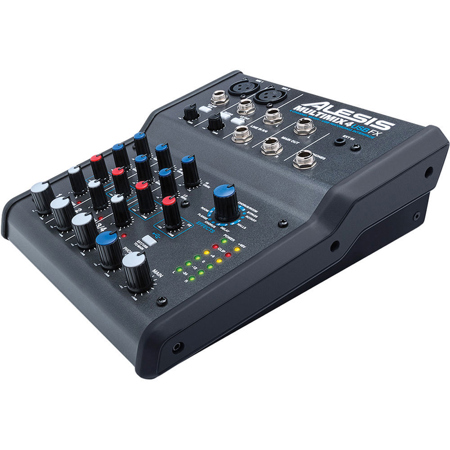
MultiMix 4 USB FX is a four-channel desktop mixer with a USB digital audio interface that lets you mix live, in the home studio and record audio directly to a computer. This compact mixer is perfect for using in computer-recording setups, intimate live-sound environments, video-editing and production studios and portable podcasting setups. It outputs line-level analog audio and stereo 16-bit, 44.1/48 kHz digital audio over USB for recording low-noise, CD-quality mixes directly to your Mac or PC.
Plug it in
The MultiMix 4 USB FX mixer has four input channels, all of which can accept a 1/4" line input. You can plug XLR microphones into channels one and two, including condensers thanks to the selectable 48V-phantom power supply. You can also plug a guitar or bass directly into channel one's switchable high-impedance input. A stereo, 1/4" headphone output has its own level control for private monitoring.
Get In The Mix
Ideal for live sound engineering or home recording, MultiMix 4 USB FX features onboard volume, pan and EQ controls for making quick, accurate adjustments to your mix. The MultiMix 4 USB FX mixer has a two-channel, five-stage, multicolor LED meter for visual monitoring the main output level. Channels one and two offer switchable high-pass filtering at 75Hz to reduce low-frequency rumble, handling and wind noise. Channels one and two provide high- and low-shelving EQs, independent gain trims and have independent pan controls. For convenient stereo mixing and recording, channels three and four are configured as a stereo pair at the level and pan controls.
Record Via USB
MultiMix 4 USB FX contains a complete USB recording interface. Plug the MultiMix 4 USB FX's class-compliant USB connection into your Mac or PC without the need for software drivers and enjoy a digital-direct stereo connection with virtually any audio software application. The MultiMix 4 USB FX enables bidirectional stereo playback, so you can record the stereo Main output into your computer and listen back using the mixer as an interface from software to headphones and monitoring loudspeakers.
Cubase LE comes bundled with MultiMix 4 USB FX and gives you a powerful software environment to record, edit and bounce down your mixes. Plus, you can record stereo audio directly to your iPad with the Apple iPad Camera Connection Kit (sold separately).
Built-in Effects
MultiMix 4 USB FX comes with high-quality Alesis DSP effects that include spacious reverbs, delays, phasers and much more. For lush mixes, the internal effects processors enables you to add extra depth to live sound--say, a long delay on the vocalist's channel--or beef up dry recordings with some extra ambiance. Now, you can use professional audio effects with your mixer whether you're out mixing the live gig or at home recording at your desktop.






