
This item is no longer available.
Review Summary
2020-09-21T20:00:00
tttttttttttttttttttt
tt

2020-08-30T20:00:00
I was able to hook up the camera and it is working with my current system. The picture is really impressive.
Shawn H.

2020-04-21T20:00:00
The Amcrest 4MP IP Camera WiFi UltraHD is very easy to set up with an iphone. Downloading Amcrest IP Config software makes set up much easier. Great camera, Live Video is very good. Camera is approx. 20 ft. from my router.
Donald G.

2020-02-25T19:00:00
Picture is wonderful. Motion detection is very spotty and takes a lot of tinkering with to get right. Cloud website works but can be very clunky at times.
Matt B.

2020-01-23T19:00:00
Cameras work well . Easy install
Randy W.

2019-11-13T19:00:00
Had no problems getting the camera going. Fun to use too.
John S.

2019-06-15T20:00:00
This is the second Amcrest IP camera I have purchased, and I am very pleased with it, but only after a few bumps in the road. I bought it first directly from Amcrest. It was defective, missing the SD card holder. Amcrest's process for replacement is arduous. First you email back and forth with their rep. He wanted a picture. After he approves it he sends your request to a committee for approval. They don't work on weekends. After they approve it they send you an RMA, but they won't send you a replacement until they receive the defective camera back. The whole process can take more than a week. So I ended up sending it back and asking for a refund, and while waiting for the refund I bought the same camera from Amazon, which arrived the next day. Installation was a nightmare. Wifi installation did not work, so I installed with an ethernet connection to my network. Then I could see the camera on my android phone, but not on my desktop! Support was not available on weekends, but when I finally got hold of them they were GREAT! I've had several contacts with support, and each time they were prompt, knowledgeable, and patient. The camera is excellent, very good resolution, plenty of options, and a several ways to access the camera. I prefer Amcrest Web View on my Win 7 desktop (use IE, Web View does not like Chrome!). Web View has a very intuitive UI. I use Amcrest View Pro on my android phone. But you also can use Amcrest Surveillance Pro for your desktop and may need Amcrest IP config on your desktop to configure the camera. You can see why Tech Support is needed to help sort things out. When everything works and you know how to access it, the camera is a pleasure to use with great resolution, a wide field of view, a sensitive configurable motion detector, and plenty of storage options.
David H.

2019-06-08T20:00:00
Cameras work like they are suppose to. it would be nice if the software gave you snapshots of events instead of yellow lines.
igo96047

2019-06-08T20:00:00
Cameras work like they are suppose to. it would be nice if the software gave you snapshots of events instead of yellow lines.
Steve R.

2019-05-29T20:00:00
I have had this camera ( Amcrest 4MP IP Camera WiFi Ultra HD Wireless ) for 1 week and now that I have it dailed in, IU like it even more. It has great video & Photos. It was very easy to setup and install. I need 3 to 4 more cameras and I will be getting all wifi Amcrest camera be go up to the 4k. I am also looking forward to Amcrest coming out with the door bell camera, I will be getting one of these also. Thanks for making a great product.
Scott T.

2019-05-29T20:00:00
I have had this camera ( Amcrest 4MP IP Camera WiFi Ultra HD Wireless ) for 1 week and now that I have it dailed in, IU like it even more. It has great video & Photos. It was very easy to setup and install. I need 3 to 4 more cameras and I will be getting all wifi Amcrest camera be go up to the 4k. I am also looking forward to Amcrest coming out with the door bell camera, I will be getting one of these also. Thanks for making a great product.
dstraider

2018-12-04T19:00:00
Nice camera great image
rick r.

2018-10-17T20:00:00
The camera is really good and easy to setup. Con the recording to Icloud is not that easy and sometimes does not record. At least I have had trouble with more than one camera. Also, I am having trouble not getting text messages everytime there is motion.
Jerrod P.

2018-09-12T20:00:00
This camera works great for the price. Would like to see 5ghz added. Will purchase again.
Steve S.

2018-06-29T20:00:00
this is my 9th Amcrest camera. This one is still in the box. I haven't even set it up yet, and you want me to review it. Send this reminder in 3 months.
Jack K.

2018-06-19T20:00:00
Replaced lightning damaged 2 year old Amcrest cam with this one. Far better resolution and wider angle. Now running on shielded ethernet vs wifi and of course better response time. I’m slowly converting most of 16 cameras to ethernet where safer from lightning and indoors for speed.
Jack H.

2018-06-19T20:00:00
Replaced lightning damaged 2 year old Amcrest cam with this one. Far better resolution and wider angle. Now running on shielded ethernet vs wifi and of course better response time. I’m slowly converting most of 16 cameras to ethernet where safer from lightning and indoors for speed.
Jack

2018-06-19T20:00:00
Replaced lightning damaged 2 year old Amcrest cam with this one. Far better resolution and wider angle. Now running on shielded ethernet vs wifi and of course better response time. I’m slowly converting most of 16 cameras to ethernet where safer from lightning and indoors for speed.
Guest

2018-05-17T20:00:00
We use Amcrest for all our video security needs, as their product(s) are great, works well, had no problem replacing a defective product and when needed their tech support is great and gets you up and running. Can you buy cheaper, sure but it is not worth the hassle when this one company does the lot and you have peace of mind.
Michael B.

2018-05-02T20:00:00
with all the neighborhood activity this camera was perfect for our security, very well made, great video quality, and easy to setup. thank you
Mark G.

2018-05-02T20:00:00
Great camera and easy to set up. I have 4 cameras from Amcrest and they all have been GREAT!
Tim K.

2018-04-18T20:00:00
After installing the 4 cameras using wireless, I found that 2 of the 4 cameras worked intermittantly over the first 7 days. The wifi connection would go it and out. I then ran ethernet cables to these two cameras and they worked much better. Support personnel helped me on 3 occassions by logging into my computer and helped with set up. I had difficulty understanding the Indian dialect. Also I recommend the support techs to help teach me on setting up vs taking over the system and doing it themselves. I'd rather learn what they are doing so that I can do it myself in the future. Still having problems with my remote computer getting access to my camera system. I will call tech support again on this. The phone app is working good, except for an occassional problem connecting to all 4 cameras.
JOHN Z.

2018-02-05T19:00:00
Just received the ProHD Bullet camera and the picture is excellent. The only issue is that it can not pick up the wifi signal over 60-ish ft. I purchased it to monitor my front gate at the end of my driveway so this was a problem. The wifi signal only lasted about 10 minutes at the current distance from the router. . I reinstalled 5 times with no success. I was going to send the camera back but was disappointed because the picture was so clear and excellent compared to other IP cameras I have purchased. I decided to try it in my backyard and it works perfectly. I spoke to support at Amcrest and they said it was their best camera and that I could get a wifi extender to install the camera in the front of my yard. I decided to keep the camera in my backyard and purchase an additional camera for the front. The picture is so phenomenal I am happy to now have surveillance in both the front and back of my home.
Michael G.

2018-01-03T19:00:00
Product works, lots of of configuration options. Two apps are required if you use a smart phone. Amcrest Cloud app (if you use the cloud) and Amcrest Pro app. The should really get it down to only one app. If you buy direct from Amcrest (I have twice) you might have the same experience I had. Which is eager to sell you their product but you have to beg to be sent an order confirmation email and s shipping notification. Both times I ordered the product had already shipped and no notice was given by Amcrest. In my experience they are behind the times in customer service professionalism on the sales side.
Marc S.

2017-12-12T19:00:00
LG4M
Guest

2017-12-10T19:00:00
Quality is superb, setup is easy and if you have any issues support will help you! I've been working with Amcrest Cameras and NVR's for years, I've gone though several companies and have finally found one that is reliable cost effective and has the support should I need it.
Michael I.

2017-11-07T19:00:00
This camera is a great addition to the other Amcrest Cameras I own and has even better video quality than the previous models. Only complaint is compatibility with my Blue Iris software, the camera times out every 2 minutes or so and haven't been able to fix this yet.
Wayne S.

2017-11-01T20:00:00
Great value, crisp picture, easy setup
Jacek M.

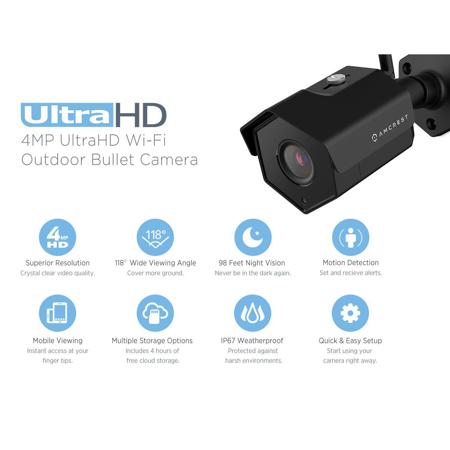
The Amcrest ProHD 4MP Wi-Fi bullet video camera helps you stay in touch with what you love anytime, anywhere. With its quick mobile setup process, you will have secure access to your camera's video stream in no time. Stream live and playback recorded video of your home, your kids, your pets, or your business on the go with the Amcrest View app. Amcrest Cloud offers optional cloud recording with free live viewing and 4 hours of free video storage accessible from any device including Apple Mac, Windows PC, iPhone, iPad or Android devices.
Amcrest cameras also record and upload to an FTP as well as record to any Amcrest (or ONVIF compliant) Network Video Recorder (NVR) (not included). Each Amcrest camera features night vision, enhanced digital zoom, a wide 118 degree viewing angle, smart motion alerts, email alerts and snapshots, advanced recording options, and secure SSL/HTTPS connection. With the Amcrest ProHD, you'll never be out of the loop again. Amcrest cameras are compatible together with Foscam cameras only when using AmcrestCloud, Amcrest NVRs, Blue Iris for Windows PC, Live Cams Pro for iOS and TinyCam Monitor for Android.
Simple Wi-Fi Setup
Save your time with a simple setup process that can get you up and running on the Amcrest View mobile app in no time at all. You don't have to be tech savvy to get setup quickly and painlessly. Simply power it on, download the app, scan the QR code, and within just a few taps you're ready to go. Day to day operations are a breeze thanks to the simple interface which allows you to take advantage of the camera's powerful features.
Superior HD 4MP at 30 FPS
Featuring the latest Sony IMX322 progressive scanning image sensor and the Ambarella S2Lm chipset, the Amcrest ProHD camera soaks in the entire scene, dynamically painting all the vivid colors and rich imagery, pixel by pixel, onto your computer screen or smartphone in full 2688x1520 resolution at 30 frames per second (FPS). No need to strain your eyes, lean in close, or play the guessing game when you have this level of detail.
Cloud Video Storage
High definition recordings and snapshots are only as good as how quickly and easily they can be accessed. Amcrest Cloud was created to ensure that you don't miss anything, no matter where you are. Regardless of how far you are from home, you can login from a computer (PC or Mac) or through the Amcrest Cloud smartphone app to instantly pinpoint your footage through an intelligent timeline on an intuitive interface and play it back in seamless and brilliant 4MP quality. The Amcrest Cloud app also can be configured to send you on-the-go alerts. Live viewing, along with 4 hours of recorded storage is included free. Additional 7-day, 15-day, and 30-day storage plans are available starting at $6 per month.
FTP, MicroSD & NVR Storage
In addition to Amcrest Cloud, the Amcrest ProHD camera can also record to an FTP server, onto your local computer, MicroSD Card or to any Amcrest NVR (Not Included). You'll have full control over your recordings and can manage them however you'd like.
Smart Motion Alerts
The Amcrest View Pro app frees you from having to check in just to find out what's been happening lately. Instead, get immediate push notifications and alarm details sent to your smartphone while you're on the go. Launch straight into the app, choose an event from the Event List, and jump right to the relevant recording or snapshot. Life doesn't wait around, and neither should you.
Advanced Zone Detection
Create distinct motion detection zones to completely customize control over what you're monitoring. This is an effective way to ensure that you only record what you need when its important. Each zone includes its own sensitivity and threshold meters so you can fine-tune it exactly to your liking. Let the Amcrest camera hold its focus so you don't have to lose yours.
Intelligent Timeline Playback
Your stored recordings and pictures are precious, and having that data at hand is the whole point of using a security camera. Whether sharing with friends and family, or presenting evidence in a court case, it is important to be able to immediately identify, track down, playback, and export what you want, when you want it. The Amcrest camera's intuitive searchable timeline will make your life easier, save you time, and act as a sophisticated built-in video player.
Infrared Night Vision
Cutting-edge night vision technology allows you to get a crystal clear picture even when it's dark. This camera has 30 IR LEDs which transmit their infrared rays in a frequency imperceptible to the human eye. The IR lights cast brightly which provides an astounding 98 feet of night vision range. With this powerful feature, you can gain total awareness over the previously unseen and do so in a way that is undetectable.
Wide 118 Degree Viewing Angle
A carefully crafted 2.8mm fixed lens with a max aperture of F2.4 generates striking visuals owing to the 118 degree viewing angle. With such a wide field of view you will have no problem keeping what you care about in your sights.
Secure SSL connections via HTTPS
The Amcrest ProHD camera features secure SSL connections via HTTPS to comply with modern WiFi standards for encrypted connections. This way you can always be assured that, as you play your footage, you're also playing it safe.
