Orders placed during Passover Holiday (Wed 4/1 after 4PM ET – Thurs 4/9) will ship Fri 4/10. View our holiday shipping schedule.

This item is no longer available.
Review Summary
2025-03-12T20:00:00
Carolyn dialed into my PC and helped me resolve an issue with my NVR going off-line. The problem was related to my WiFi Mesh System and I now know what to do if this happens again. Thank you Caroline!
Tom C.

2025-01-16T19:00:00
I purchased this unit to replace a SAN-based NDVR that was getting bogged down. I have 12 Amcrest cameras, 2 of them wireless. I ordered it with a hard drive which came separately and needed to be installed. The installation went fine but the instructions for doing so were for a different device (when you do you will be shocked by how little is inside). The NDVR fired up fine and found all of my existing cameras right away. Oddly, there is not an Amcrest camera choice in the manufacturer pull down but the cameras all came up under the Private choice. Unlike the review for some of the other Amcrest DVR's, the fan on this one is quiet. I think the disk seeking noise is louder than the fan but both together are not objectionable. The user interface is a bit klunky but my only real criticism is that the camera images in the live view monitor are hard coded by channel number. In other words, you have to assign the relative position of the camera on the screen when you add the camera to the system. To move them around you have to physically remove them from one channel and assign them to another. The ability to drag the images around to where you want them on the screen would be a big improvement. Also, the entire system can be programmed with the included mouse but it takes some getting used to. There are two USB ports so you could theoretically also use a keyboard but would need to furnish that yourself. I didn't test this aspect myself. Overall pleased with the unit.
David

2024-12-10T19:00:00
Jessica p vas very helpful and patient to help me solve the problem I had.
seyed

2024-09-18T20:00:00
I bought one of these for my setup with 16 camera. I am very happy with the result. Great product
nomane

2024-07-22T20:00:00
Dominic was outstanding! Understood exactly what my issue was. Quickly found my problem and helped me correct it! Excellent support!
Qrazy

2024-05-23T20:00:00
Ashley, She was very helpful and helped me to troubleshoot the NVR issues.
Mohammad

2024-05-09T20:00:00
DOMINIC S WAS VERY HELPFULL FIX ALL MY CONCERNS.I COULD UNDER STAND HIM WHICH SOME OTHERS I CANT UNDERSTAND .DID IT FAST RECOMEND FOR EMPLOYMENT AT YOU COMPANY
CARLES T.

2024-05-06T20:00:00
The product exceeded my expectations and the support from Ashley in technical support was excellent!
Ali

2024-04-29T20:00:00
I'm very happy with Amcrest ,easy install system camera ,and the technical support is very patient ,mention special to DOMINIC ,who help me setup my NVR.
ousin

2024-04-24T20:00:00
Dominic S was very positive and very knowledgably !!
steve

2024-04-23T20:00:00
Ashley is very informative and professional. She got my system updated and running smoothly!
Ali R.

2024-03-31T20:00:00
Ashley was very helpful in solving my problem. Thank you Ashley.
Christian

2024-03-06T19:00:00
Ashley - Good customer service
Daniel D.

2024-03-05T19:00:00
Had issues getting cameras setup after new modem and router installation. Ashley was kind and patient with helping me get it all setup and working again. Very much appreciate the customer service and the quality of the equipment I've bought from Amcrest. Still using my first cameras and they work great.
Joel K.

2024-02-05T19:00:00
I recently changed my network and I could not connect my amcrest cameras to my network. I called Amcrest and Nelson helped me trouble and reset all of my 11 cameras. He was extremely patient and very knowledgeable with explaining in detail each step that I needed to complete. Everyone one of my 11 cameras are working great, thanks to the super help of Nelson from Amcrest Technical Support. I love amcrest products and the great customer service that I have received from Nelson. Great Amcrest Company
Arelia

2023-12-13T19:00:00
Really good, easy to install and configure. Works a treat and also integrated with my doorbell camera from a different manufacturer..
Mark M.

2023-12-11T19:00:00
Dominic S - Very good communicator, solved all my problems quickly. A++++
donny

2023-12-04T19:00:00
I spoke with customer rep Lisa who was outstanding, patience, courteous , knowledgeable and professional throughout the call. Many thanks to helping us out and we wish we can always speak to someone as brilliant as you every time we call in.
Michael

2023-10-23T20:00:00
Kimberly A was a great help. She was great.
seyed t.

2023-10-23T20:00:00
This unit is just to monitor cameras and has no POE ports on it to run them. This is fine as I needed one that would live remotely from the cameras in the network that covers 18 acres. I have used Blue Iris in the past but for some reason, BI and Amcrest don't play well together. The UI for this NVR is decent. I wish it had other options for active camera displays that allowed you to not have inactive cameras on screen like BI does, but the point is not to sit and watch them all the time unless you are in loss prevention so it's a minor annoyance. Overall... it do0es the job I needed for it. The one DOWN side is that you can't use a keyboard with it and the onscreen keyboard is a PITA. Good thing you set it and forget it or making lots of manual edits would stink. I am sure I am being overly critical of it so take that as it is.
Donald R.

2023-07-10T20:00:00
Lisa was very understanding and professional She Took care of my technical problem on my 16 Chanel MVR I am very happy with her service thank you Lisa. regards Sam.
Sam

2023-06-29T20:00:00
Lisa was more than helpful today even . She not only fixed my problem but also answered all my other questions. I couldn't have been more pleased. She was so pleasant and patient with answering my questions. After trying other systems, the NVR system works like a dream. We are so happy with it.
Tomasa H.

2023-05-31T20:00:00
good job on setting my system up when me i comment Lisa was a big help for me and i leaned from her letting me know what she was doing
clifford s.

2023-04-24T20:00:00
Lisa, thanks. good job.
anatoliy

2023-03-18T20:00:00
I was very fortunate to be placed in contact with Dennis a tech supervisor. I had a power outage and some of my camaras didn't work. He was able to get me back online in short order. I very much appreciate my system that I Ive had for about 5
MO

2023-01-09T19:00:00
Lisa, Quickly helped me on installing 3 locations
Pete

2022-12-23T19:00:00
Lisa fixed everything that I had issues with. Good experience
Brian B.

2022-12-09T19:00:00
Lisa: Helped me install a new amcrest NVR and cameras this morning. This not my first time setting up DVRs but I couldn't get to the ipconfig to recognize the nvr. Lisa was very patient (I'm 75 yrs old) : professional and a pleasure to work with. I will be asking for her for any future technical issues!
Frankie

Accidents happen where life happens. Protect your favorite Adorama products and purchase a protection plan to stay covered from accidental damage, mechanical or electrical failure, and more.
If we can’t fix it, we’ll replace it at no additional cost.
Protect your product from drops, spills, and more.
Enjoy your gear without fear. We have you covered!
When regular use of your product over time results in mechanical or electrical failure.
We will never charge you a deductible after the purchase of a plan.
Our claims process is simple & easy and our customer service team is happy to help.
Adorama Protect powered by Extend is available for purchase to customers in the United States. Not available for purchase Internationally or in U.S. Territories.
Browse our FAQ
Industrial-grade embedded processor
Embedded Linux
Local GUI/Web User Interface
16 Channels
80 Mbps for access, 80 Mbps for storage, and 60 Mbps for forwarding
8MP/5MP/4MP/3MP/1080P/720P/D1/CIF
2ch@4K(30fps)/4ch@4MP(30fps)/8ch@1080P(30fps)
1x VGA/1x HDMI simultaneous video output, HDMI: 3840 x 2160, 1920 x 1080, 1280 x 1024, 1280 x 720, VGA: 1920 x 1080, 1280 x 1024, 1280 x 720
1/4/8/9/16
ONVIF, RTSP
H.265 / H.264
G.711A/G.711U/PCM/G726
HTTP, HTTPS, TCP/IP, IPv4, RTSP, UDP, NTP, DHCP, DNS, P2P
Amcrest View Pro (iOS / Android)
ONVIF (profile S), CGI, SDK
Chrome, IE9 or above, Firefox
Up to 16 channel playback
Priority of record mode: Manual recording > alarm recording > motion detection recording > timed recording
Local HDD
USB device
1. Play, pause, stop, fast forward, fast backward, rewind, play by frame
2. Full screen, backup (cut/file), partially enlarge, audio on/off
Face Detection, IVS, People Counting, Heat Map, SMD.
No built-in AI features. The AI features are controlled by the camera.
Smart Search
Motion detection, privacy masking, video loss, IPC alarm
Front-end device going offline, storage error, full storage, IP conflict, MAC conflict, login lock, network security anomaly.
Video recording, snapshot, log, preset point, tour
1x SATA port, up to 10 TB for a single HDD. The maximum HDD capacity varies with environment temperature.
1x front USB 2.0 port, 1x rear USB 2.0 port
1x rear HDMI port
1x rear VGA port
1x Input / 1 output
1x RJ-45 port (10/100 Mbps)
DC12V, 2A
<= 10W (without HDD)
14 Degree F to 131 Degree F (-10 Degree C to 55 Degree C)
32 Degree F to 104 Degree F (0 Degree C to 40 Degree C)
10% - 90%
30% - 85%
9843' (3000m)
3.50 x 13.11 x 12.40" (89 x 333 x 315mm)
1.79 lbs (811g)
856099007273
Nice NDVR for the price
By David
I purchased this unit to replace a SAN-based NDVR that was getting bogged down. I have 12 Amcrest cameras, 2 of them wireless. I ordered it with a hard drive which came separately and needed to be installed. The installation went fine but the instructions for doing so were for a different device (when you do you will be shocked by how little is inside). The NDVR fired up fine and found all of my existing cameras right away. Oddly, there is not an Amcrest camera choice in the manufacturer pull...
View full Review
mgr
By seyed
Jessica p vas very helpful and patient to help me solve the problem I had.
4K Quality
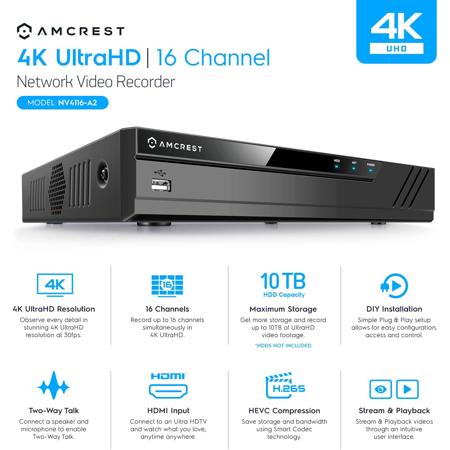
The NVR finally brings 4K UHD quality to an NVR that can be viewed on vivid, crystal-clear 8-Megapixel resolution. Experience true High Definition video unlike any other system as your monitor brings everything to life. Whether you are recording, taking snapshots, or checking Motion Detection alerts, no detail will make it past you even if it tried.
16-Channel NVR
Connect up to 16 cameras at once that you can control at the same time through the NVRs on-screen display! You can record up to 16-Channels @ 1080p/3MP/4MP/5MP/6MP/8MP & Playback 8-Channel @1080p(30fps)/4-Channel @4MP(30fps)/2-Channel @4K(30fps) onto any hard drive size up to 10TB (Hard drive NOT Included), Max 80Mbps Incoming Bandwidth, supports max 7 cameras @ 4K. Utilize motion detection and scheduled recordings to record for a lot longer than continuous recording would allow.
Supports AI Cameras
Supports AI Features from AI IP Cameras, AI features available depend on the camera model being used. Only Supports 2CH AI Cameras at 4K@30fps. No built-in AI Features on NVR. Connects to and manages all the POE IP cameras on your network directly through their ethernet cables for ultimate ease and convenience in a home security system.
Real-Time, No Latency Viewing
The HD NVR's closed-circuit design allows you to watch things happen as they happen. With a high-speed, dedicated, dual-core embedded processor, you can be ensured that your recorded footage will have virtually no latency which allows for real-time, highly reliable video security streams without loss or delay. You may as well be standing right there! 8CH Recording & Live View in Up to 8MP/4K Resolution @ Real-Time 30fps. Playback 8-Channel @1080p(30fps)/4-Channel @4MP(30fps)/2-Channel @4K(30fps).
Remote Viewing and Storage
When you bring your NVR online, you can tap into your system and check on all your cameras at any time from anywhere in the world! You can do this through the Amcrest View smartphone/tablet app as well as through the web interface once it has been set up for remote viewing. This allows you to always keep in touch with what's going on no matter where you are and even features alert notifications on the go!
Amcrest View App for iOS or Android
Free yourself from having to sit at a computer to check on your cameras! Now, you can take them with you on the go by pulling up live feeds with the new Amcrest View app. It is free to download and available on the App Store and Play Store. The NVR comes with a QR-code for a quick and painless plug-and-play setup for remote viewing on your smartphone. Just scan it into the app and start viewing right away!
More Secure Than IP
Instead of having multiple devices independently accessible through the network, with the 4K NVR, you only have one device. This NVR will be the hub for all your cameras at once. It's not only easier to set-up, but easier to manage, troubleshoot, access and control. And because you only have one device online, as opposed to multiple, you can also feel more secure.
Intelligent Timeline Playback
Amcrest NVR's come equipped with an intelligent timeline playback feature that allows you to view all of your recordings on a beautiful, intuitive interface. Scroll seamlessly through different days, hours, or minutes and stream your recorded videos easily.
Plug-and-Play Set-up with Intuitive On Screen Display
No confusing configuration necessary. With the HD NVR, you just connect your Ethernet cable and enjoy your vibrant HD stream. At last, no more messy computer software downloading or configuration is necessary. No need to worry about IP configuration, subnetting, or port forwarding for each and every single camera independently. Instead, configure all your IP cameras into one location, the NVR, to gain access to all of your cameras at once! Enjoy viewing, controlling, and managing all your cameras on the NVR's built-in OSD. You can even use your own mouse!
USB for Data Transfers and HDMI or VGA Output
10 full Terabytes of storage space, not enough? You don't have to delete old recordings to make room. Now you can pop in a USB drive or cable and backup your most important videos to an external storage device! And you can choose between standard and high definition output to any monitor or TV of your choice. Imagine showing off your cameras on the big screen!







