
Orders placed during Passover Holiday (Wed 4/1 after 4PM ET – Thurs 4/9) will ship Fri 4/10. View our holiday shipping schedule.

Autocue Pioneer Teleprompting 1-Year Software License, USB

SKU: AQP70170011

This item is no longer available.

Overview
Compare
Specs
Protection

Reviews about this item

Review Summary

Select a plan in the Add Protection section above and purchase with this product by clicking “Add to Cart”.

image-protection

TRUSTED PROTECTION PLANS, EXCEPTIONAL SERVICE.

Invest In Your Gear and Peace Of Mind!

Accidents happen where life happens. Protect your favorite Adorama products and purchase a protection plan to stay covered from accidental damage, mechanical or electrical failure, and more.

Repair or Replacement

Repair or Replacement

If we can’t fix it, we’ll replace it at no additional cost.

Accidental Damage

Accidental Damage

Protect your product from drops, spills, and more.

Peace of Mind

Peace of Mind

Enjoy your gear without fear. We have you covered!

Malfunction Protection

Malfunction Protection

When regular use of your product over time results in mechanical or electrical failure.

Zero Deductible

Zero Deductible

We will never charge you a deductible after the purchase of a plan.

Customer-Focused Support

Customer-Focused Support

Our claims process is simple & easy and our customer service team is happy to help.

Adorama Protect powered by Extend is available for purchase to customers in the United States. Not available for purchase Internationally or in U.S. Territories.

Autocue Pioneer Software Specifications

  • License Length

    1-Year Subscription

  • Minimum system requirements

    OS: Windows 10, Processor: i5 7th GEN / AMD: Ryzen 3 2200, 8GB RAM, (for added iDevices: IOS 14)

  • License type

    Standard online license requires access to internet minimum once every 7 days.

  • File import

    Word, RTF, PDF, PPT, .awp

  • Languages

    Multi-language support

  • Multi-script editing

    Yes

  • Live editing

    Yes

  • Editor options

    Font type, font size, font format, font color, background color, cut and paste, paragraph alignment, bullet points, set indentation, single story mode, find/replace

  • Global format settings

    Story title, story text, instruction, break, sound on tape

  • Run order options

    Add story, remove story, cloak story, drop story, track live story, drag and drop story, bookmarks, story run time, notes

  • Printing

    Scripts, run order

  • Prompt output options

    Cue timer/countdown, presenter message module, clock, powerpoint current/next slide

  • Cue marker options

    Position, icon, color, offset

  • Virtual scroll control

    Scroll, blank screen, invert video, top, next story, previous story, next marker, previous marker

  • Prompter connection options

    Local, NDI, IP/iPad

  • Prompter connections

    Multiple

  • Image flip option

    Yes

  • Controller connections

    Multiple

  • Controller settings

    Sensitivity, programme function buttons

  • Newsroom integration

    MOS, shared directory

  • UPC Code

    5060896406657

About Autocue Pioneer Software

Pioneer-Software
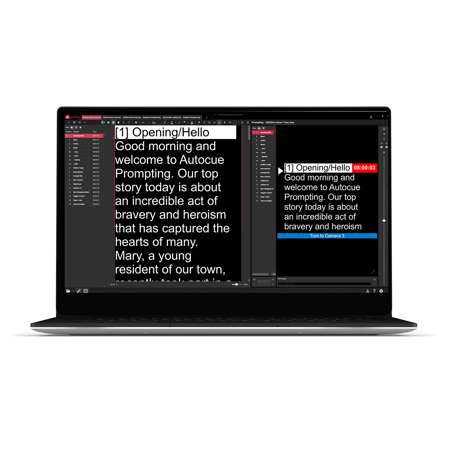
Autocue Pioneer is a fully featured video prompting software application, designed to support everything from live events to local news.

Simple and modern
The modern design of Autocue Pioneer includes familiar icons found in other software to help inexperienced users operate with ease. Manually importing, writing and saving files is intuitive and edits such as font and color changes couldn't be easier. Multiple files can be uploaded, with a tab system for switching between the different scripts.

Unlimited connections
With Autocue Pioneer your outputs are unlimited. There are three prompter connection options: HDMI, NDI, and an IP connection option for iPads and IP convertors. You can configure each connection with key settings and invert the image if you're using through the lens monitors without in-built image flip. Autocue Pioneer will also accept unlimited controllers so that operators can switch between any connected hand and foot controllers simply by starting to scroll.

Unique PowerPoint prompting
Autocue Pioneer has unique PowerPoint integration, developed for first-class presentations. The software automatically creates a script from the slide notes and gives the option to show slide previews to the presenter alongside the text. Allocate the slideshow to a second output and relax as each slide is triggered when the presenter reaches the matching section of their notes.

Meeting every demand
Autocue Pioneer is ready for the most demanding productions and customized for the need of professional operators. Shortcuts, bookmarks, and a run order manager are a given and you'll find lots more, from settings for SOTs (Sound on Tape) and Presenter Instructions, to on-screen cue timer and message modules. Everything can be done while prompting continues because live editing is included as standard.

Newsroom compatible
MOS and shared directory Newsroom systems are both supported as standard in Autocue Pioneer. As prompting experts with decades of experience in every environment including live broadcast, we understand the need for smooth integration. Connect and receive live script edits from systems including ENPS, Octopus, Dalet, TinkerList and OpenMedia - we've probably come across every option over the years so please get in touch if you want to check your specific installation.


Autocue Pioneer Software Features

  • Upload and Edit Scripts for Broadcast
  • Manage Run Order, Shortcuts, Bookmarks
  • Screen Timer and Message Modules
  • Unlimited Controllers, Output Selection
  • MOS and Directory Systems Supported
  • For Windows and iPadOS

Key Features

  • Upload and Edit Scripts for Broadcast
  • Manage Run Order, Shortcuts, Bookmarks
  • Screen Timer and Message Modules
  • Unlimited Controllers, Output Selection
  • MOS and Directory Systems Supported
  • For Windows and iPadOS

What's in the box:

  • Autocue USB Stick with Software




