
Orders placed during Passover Holiday (Wed 4/1 after 4PM ET – Thurs 4/9) will ship Fri 4/10. View our holiday shipping schedule.
This item is no longer available.
The ASUS RP-AC51 is designed to extend the range of your existing Wi-Fi network, eliminate dead zones, and improve coverage, providing seamless internet access for all your devices.
The dual-band feature of the ASUS RP-AC51 supports both 2.4GHz and 5GHz frequency bands, providing faster and more stable internet connectivity.
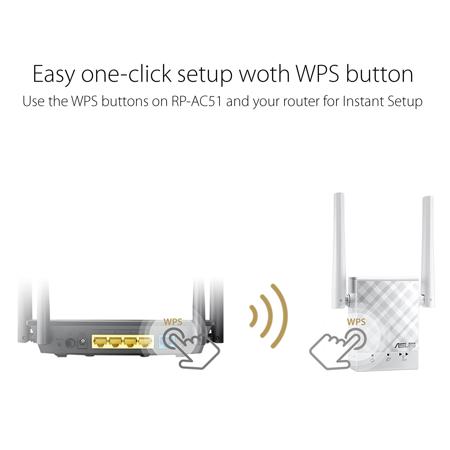
You can set up the ASUS RP-AC51 using the one-click WPS button for an instant automatic setup, or connect it to a PC via an Ethernet cable for advanced settings. The ASUS Extender App also provides an intuitive setup process.
Yes, the ASUS RP-AC51 is a versatile device that can function as a repeater, an access point, or a media bridge.
The ASUS RP-AC51 comes with handy positioning LEDs to guide you to the perfect spot. The ASUS Extender App also provides instructions to help you find the ideal location.
Review Summary
2020-11-04T09:11:08
Compact and powerful. Easy to set up. Gave me an extra hop upstairs and down the hall. Works great.
Richard W.
Accidents happen where life happens. Protect your favorite Adorama products and purchase a protection plan to stay covered from accidental damage, mechanical or electrical failure, and more.
If we can’t fix it, we’ll replace it at no additional cost.
Protect your product from drops, spills, and more.
Enjoy your gear without fear. We have you covered!
When regular use of your product over time results in mechanical or electrical failure.
We will never charge you a deductible after the purchase of a plan.
Our claims process is simple & easy and our customer service team is happy to help.
Adorama Protect powered by Extend is available for purchase to customers in the United States. Not available for purchase Internationally or in U.S. Territories.
Browse our FAQ
White
IEEE 802.11a, IEEE 802.11b, IEEE 802.11g, IEEE 802.11n, IEEE 802.11ac
AC750 complete AC performance : 300+433 Mbps
Medium homes
802.11a : 6,9,12,18,24,36,48,54 Mbps
802.11b : 1, 2, 5.5, 11 Mbps
802.11g : 6,9,12,18,24,36,48,54 Mbps
802.11n : up to 300 Mbps
802.11ac : up to 433 Mbps
2x External antenna
2.4 GHz / 5 GHz
WPA2-PSK, WPA-PSK
1x RJ45 for 10/100Mbps BaseT for LAN
WPS Button, Reset Button, Power Switch
Power x 1
Wi-Fi x 2
Windows 10, Windows 8.1, Windows 8, Windows 7
Mac OS X 10.7, Mac OS X 10.8, Mac OS X 10.9, Mac OS X 10.10, Mac OS X 10.11, Mac OS X 10.12 or higher
Range extender mode
Access point mode
Media bridge mode
Without Bezel: 3.19 x 2.16 x 1.34" (81 x 55 x 34mm)
5.36 oz (152g)
192876307250
Pushes the signal.
By Richard W.
Compact and powerful. Easy to set up. Gave me an extra hop upstairs and down the hall. Works great.
Great Wi-Fi coverage for multi-devices
ASUS RP-AC51 is an 802.11ac Wi-Fi repeater that works with any router to boost range, improve coverage and help eliminate dead zones. It's an ideal addition to your existing 802.11ac network that extends Wi-Fi to every corner of the home for all your devices.
Experience Ultra-Fast Wireless
Powered by the new 802.11ac chipset, RP-AC51 delivers ultra-fast wireless-AC speeds up to 433Mbps on the 5GHz band - that's about 1.5 times faster than standard Wireless-N! This high-performance wireless lets you enjoy ultra-smooth online gaming, snappier web surfing and other bandwidth-hungry tasks without a wired connection.
Easy one-click setup with WPS button
You can use the WPS buttons on RP-AC51 and your router for instant automatic setup. Optimized performance is assured for a seamless and smooth internet experience. For advanced settings, you can connect RP-AC51 to a PC via an Ethernet cable and access the web-based configuration menu directly.
Easy setup with ASUS Extender App
Now It's much easier and more intuitive to set up your ASUS repeater. With just a few taps, you can easily transfer your router's login information to the repeater, and there are easy instructions to help you find the ideal location for RP-AC51. It's all PC-free and right in your hand!
Find the best location for your ASUS Repeater
Your ASUS RP-AC51 repeater works in any size or shape of house.
Distance from router
For best results, ASUS Repeater needs to be within range of a strong and stable router signal, and should be placed between the router and the location where you need better wireless coverage.
Place in stairwell
A modern house with two stories, Wi-Fi should cover wide on each floor. In a two-story house, the best location is often in the stairwell, so it can receive a good signal on both floors.
In open space
Square or L-shape home with only one story. In a single-story house, the best place is in an open area with as few nearby obstacles as possible.
Find the Best Spot with ease
Handy positioning LEDs make installation simple!
3-in-1 modes for ASUS repeater
The versatile RP-AC51 can be also be used as an access point (AP) or as a media bridge. In AP mode, it adds Wi-Fi hotspot to a wired network, allowing wireless devices to connect to the internet. In Media Bridge mode, it adds Wi-Fi capability to any device with a network port






