
This item is no longer available.
Great features in an economical design
This is a superb motherboard. Though this board is intended for over clockers I use it for ordinary business purposes: remote teaching and law practice. I put in the video card from my prior build (an ASUS P7P55D E Deluxe) that has served me well for 13 years. Still working fine. I bought this board for the ASUS quality. I'm glad I did.
Prime
The ASUS Prime Z590-A is expertly engineered to unleash the full potential of 11th Gen Intel Core processors. Boasting a robust power design, comprehensive cooling solutions and intelligent tuning options, the ASUS Prime Z590-A provides daily users and DIY PC builders a range of performance tuning options via intuitive software and firmware features. ASUS Prime Z590-A is perfect for those seeking to create a sleek, futuristic-looking build, thanks to its black and white finish and iridescent metallic nameplate and PCB cover.
Tune It Your Way
Comprehensive controls form the foundation of the ASUS Prime series. The Prime Z590 motherboard packs flexible tools to tune every aspect of your system, enabling performance tweaks to perfectly match the way you work to maximize productivity.
5-Way Optimization
ASUS 5-Way Optimization makes your PC smart, taking care of complex tuning with just one click. It dynamically optimizes essential aspects of your system, providing overclocking and cooling profiles that are tailored for your rig.
• 5-Way Optimization is an automated tuning utility that enhances overclocking and cooling profiles for your unique system configuration
• Fans stay whisper-quiet for everyday computing, and deliver optimal airflow when the system is crunching through CPU- or GPU-intensive tasks
• A stress test feature allows you to optimize and overclock for CPU- or memory-centric workloads.
ASUS AI Overclocking
ASUS AI Overclocking is an intelligent utility that helps you get the most out of your build by automatically profiling your CPU and cooling system to predict optimal voltage and frequency settings.
Accessible via the AI Suite software in Windows or directly through the UEFI, the intuitive AI Overclocking user interface enables users of all levels. A range of customizable settings are available for seasoned overclockers, and an auto-tuning option is available for beginners.
AI Overclocking at a Glance
Designed by Experts
At the heart of AI Overclocking is a proprietary algorithm developed by ROG R&D engineers who worked with world-renowned overclockers to create a tool for users of all levels.
Predictive Edge
The algorithm analyzes your CPU and cooling system, and based on what it finds, predicts optimal settings. The software then uses these settings to automatically guide the clocking process, balancing frequency and voltage.
Real-time Adjustments
The software monitors workload, system temperature, fan speed and power draw every minute and it makes real-time adjustments to ensure ongoing optimal performance.
AI Cooling
ASUS AI Cooling function will automatically manage and control motherboard-connected fans to ensure optimal settings based on current system load and temperature.
Self-Adaptive Fan Tuning
CPU Temperature Detection
AI Cooling detects CPU temperatures and uses a proprietary algorithm to calculate the lowest fan speed required to effectively cool the system and keep fan noise down.
Automated Optimization
Under stable system loads, the software then automatically lowers fan speed to the optimal setting, decreasing fan noise without compromising performance.
Ongoing Monitoring
AI Cooling continues to monitor the system and adjust fan speed based on current load.
UEFI BIOS
The renowned ASUS UEFI BIOS provides everything you need to configure, tweak and tune your system. It offers intelligently simplified options for PC DIY beginners, as well as comprehensive features for seasoned veterans.
Advance Mode
Advanced Tuning for Serious Tweakers
An intuitive Advanced mode offered via the UEFI lets you take complete control. A built-in search feature makes it easy to find options, and various advanced functions let you intelligently make nuanced adjustments so you can dial in performance just the way you want.
MemTest 86
This memory testing software is pre-installed into the UEFI BIOS and lets you pinpoint memory issues with just one click, without the need for a USB stick or going into the OS. It stores the memory report in the BIOS archives for reference.
Prediction
AI Overclocking monitors system vitals such as temperature, fan speed, and power draw to estimate overclocking performance.
AI Overclocking Guide
Refer to the guide offered in the UEFI BIOS for step-by-step instructions detailing how to use AI Overclocking.
Search Function
Quickly and easily find the option or setting you need.
ASUS User Profile
Port configuration settings between different BIOS versions or share them with friends.
FlexKey
Remap the reset button on the chassis to toggle Aura lighting, activate the DirectKey to go straight to the UEFI BIOS, or reset the system.
EZ Mode
Quick and Simple Setup
EZ mode displays vital settings and stats and also offers guided wizards, drag-and-drop functionality, and one-click application of important settings - all to help you get your rig up and running in no time.
Cool to the Core
Prime Z590 series is engineered with multiple onboard heatsinks and an array of hybrid fan headers to ensure your rig stays cool and stable under intense workloads.
M.2 Heatsink
Two M.2 heatsinks take care of the three M.2 slots, warding off throttling that can occur with M.2 storage during sustained transfers. The heatsinks are held in place by captive screws and can be moved to other M.2 slots.
VRM Heatsink and Thermal Pads
Two massive VRM heatsinks and thermal pads improve heat transfer from the MOSFETs and chokes for better cooling performance. A bundled fan holder provides additional cooling options.
Stack Cool 3+
2-ounce copper layers draw heat away from critical components to keep them at their optimal operating temperatures.
Cooler by Design
Prime Z590 series features comprehensive cooling controls that are configurable via Fan Xpert 4 software or via the UEFI BIOS.
Multiple Temperature Sources
Each header can dynamically reference three thermal sensors. Fan Xpert 4 allows you to map the temperature of supported ASUS graphics cards to optimize cooling for GPU- and CPU-intensive tasks.
Dual-Pump Headers
A dedicated header supplies over 3 amps for high-performance PWM or DC water pumps, plus a second dedicated header for AiOs.
Smart Protection
A dedicated integrated circuit protects each fan header from overheating and overcurrent.
4-Pin PWM/DC Fan
Each onboard header supports auto-detection of PWM or DC fans.
Build on a Solid Foundation
Prime Z590 series is built to handle the additional cores and increased bandwidth of 11th Generation Intel Core processors. ASUS Z590 motherboards provide all the fundamentals to boost daily productivity, so your system will be ready for action with stable power, intuitive cooling and flexible transfer options.
Power Design
Robust Power Design
Stable power is essential to extract every last bit of performance out of 11th Generation Intel Core processors. Prime Z590-A is geared to cater to the demands of these high-core count CPUs.
ProCool Connectors
Proprietary connectors augment the motherboard's link to the PSU with 8+4 pin connectors that pass 12 volts of power directly to the processors. Each jack features solid pins that can handle more current than hollow-pin connectors.
14+2 Power Stages
A VRM with 14+2 power stages delivers the power and efficiency that the latest Intel processors demand.
Memory
ASUS OptiMem II
Revisions to the motherboard's trace routing provide the latest Intel processors with unrestricted access to memory bandwidth. ASUS OptiMem II technology carefully maps memory signal pathways across different PCB layers to reduce vias and adds shielding zones that significantly reduce crosstalk.
Storage
Three M.2 slots (up to 64 Gbps)
Prime Z590-A offers a total of three M.2 slots, with one slot supporting data-transfer speeds of up to 64 Gbps via PCI Express 4.0, enabling quicker boot-up and app load times with OS or application drives.
Small Details Make a Big Difference
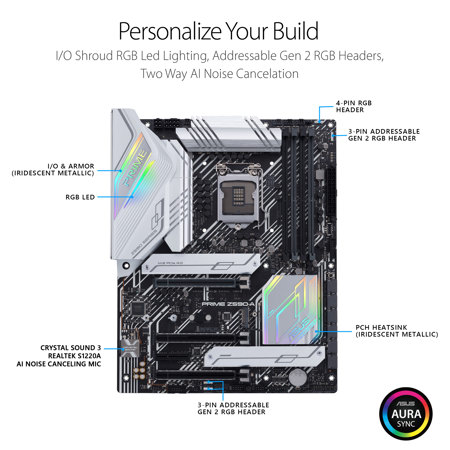
Prime Z590 series adds the nuanced details that improve every experience, from exclusive codecs that provide pristine audio quality to intuitive RGB lighting controls that let you customize your system to create a uniquely personal look.
Audio
Two-Way AI Noise Cancelation
This utility leverages a massive deep-learning database to reduce background noise from the microphone and incoming audio, while preserving vocals at the same time. This removes distracting keyboard clatter, mouse clicks and other ambient noises so you can hear and be heard with crystal clarity while gaming or in calls.
Crystal Sound 3
Power Pre-Regulator
Reduces power-input noise to ensure consistent performance.