


+6
more
more

See Options
Need help? Ask our experts.
4K HDR Professional Monitor Exceptional Color Precision within Reach
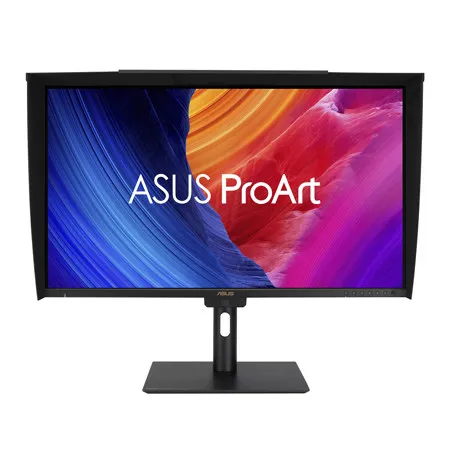
ASUS ProArt Display PA32UCE is 31.5-inch 4K HDR monitors designed for video editors and colorists seeking professional-grade color accuracy. With 600 nits brightness, 98% DCI-P3 gamut, Delta E<1 color accuracy, and ASUS Light Sync for consistent backlight performance, they deliver stunning visuals in any environment. Features like a built-in motorized colorimeter, self-calibration, and LuxPixel technology ensure reliable, distraction-free use. Supporting multiple HDR formats (HLG, HDR-10) and offering extensive connectivity, including USB-C with 96W power delivery, making PA32UCE displays ideal for creative workflows.
Empowering Content Creators
Colorists
Factory calibrated to Delta E<1 color accuracy for industry-leading color fidelity. It also offers hardware calibration support for consistent color performance.
Filmmakers & Video Editors
A high-resolution monitor with wide color gamut performance, and ultrahigh contrast is a must-have tool when producing 4K HDR content.
Designers & Photographers
Precise color reproduction brings out the details in photographs or digital artwork. PA32UCE delivers ultrahigh-quality visuals and ensures that creative details aren't lost on the journey from click to print or production.
Exquisite 4K HDR Visuals
The 4K HDR (3840 x 2160) panel - up to 300% more onscreen space compared to similarly-sized 4K UHD displays. This increased pixel density results in sharper text and better readability, while offering enhanced visual clarity that's ideal for creators working on detailed design projects.
Deeper Blacks, Brighter Whites
A peak brightness of 600 nits allow for outstanding contrast between the deepest blacks and gleaming whites.
Unleash Creativity with AI
The rise of generative AI enables creators to spark inspiration more quickly, bringing infinite creative possibilities to professional creators. The wide color gamut, high resolution, and professional color accuracy of ProArt Displays provide the best visual experience, enjoy a smooth creative experience, and speed up the overall workflow.
Turn Imagination into Reality Fast (Photoshop)
Discover the power of generative AI with tools for Text to Image and Generative Fill. Simplify the creative process, effortlessly create, adjust, and enhance visuals.
Seamless Perfection, Quick Video Edits (Premiere Pro)
Generative AI tools streamline complex tasks and boost editing speed. Use features like Object Add/Remove and Generative Extend for quick, precise adjustments.
Bring Your World into 3D (Substance 3D Sampler & Stager)
Image-to-Texture transforms generative AI for 3D artists, allowing fast creation of photorealistic textures from image. It enhances creativity while integrating smoothly into workflows.
Precise, Clear Imagery with LuxPixel
LuxPixel technology is an anti-glare, low-reflection (AGLR) coating that provides a paper-like screen effect. Unlike traditional matte panels which often soften imagery, LuxPixel technology minimizes reflections to ensure the user sees accurate colors and sharp details.
Photorealistic Colors
ProArt monitor is equipped with ASUS Light Sync technology, featuring two sensors designed to ensure remarkable color accuracy and precise color temperature, right on startup.
Backlight Sensor
A backlight sensor automatically detects backlight brightness to compensate for deviations at startup, eliminating warm-up time and ensuring accurate color performance, so you can dive straight in to work.
Ambient Light Sensor
An ambient light sensor automatically adjusts display brightness and color temperature based on changes in environmental lighting, ensuring true colors every time.
Intuitive and Intelligent Calibration
Self Calibration
ProArt displays include a built-in colorimeter with an innovative self-calibration feature. This standalone solution is compatible with any operating system and doesn't require additional calibration software. Users may run the calibration process at any time, or schedule it during off hours through the OSD menu.
ProArt Hardware Calibration
ASUS ProArt Hardware Calibration software works in both SDR and HDR modes. It saves all color parameter profiles directly on the ProArt monitor's internal scaler IC chip instead of the PC. Users can also use ProArt Calibration to schedule regular calibration intervals.
• Mac Compatible
• Windows Compatible
ProArt Color Center
ProArt Color Center is an online tool designed to help administrators manage the color accuracy of multiple ProArt displays that feature hardware calibration support. Users can check when the monitors were last calibrated, next recommended calibration date, and schedule calibration times for multiple monitors-even if they're using different color parameters and/or situated in different locations.
Seamless Calibration
ProArt Display works seamlessly with third-party Calman and Light Illusion ColorSpace CMS professional hardware calibration software. It can also write back color parameters into our ProArt displays, making calibration faster and easier.
True-to-Life Color
PA32UCE exceeds industry color reproduction standards with its 98% DCI-P3 gamuts, making it ideal for video editing and other post-production tasks. 10-bit IPS panel is able to showcase more than 1.07 billion colors to give content creators a vast color spectrum to work with.
Class-Leading Color Fidelity
Each ProArt display is factory calibrated using a new, three-scale process to guarantee industry-leading color fidelity. The display then undergoes stringent testing using ASUS advanced grayscale tracking technology to ensure smoother color gradations, better uniformity and high color accuracy with a Delta E < 1 color difference value. Each grayscale level is also carefully measured and set to ensure compliance with the precise DICOM standard for medical image check.
Create in Ultra-Vivid HDR
ASUS Smart HDR Technology
Exclusive ASUS Smart HDR technology enables ProArt Display to support multiple HDR formats, including HLG and HDR10. HLG allows users to view and create material for broadcast and satellite TV platforms such as BBC iPlayer, Japan NHK TV, and DirecTV. HDR10 support ensures compatibility with existing streaming video services and a growing list of HDR-enabled games.
Multiple PQ Curves
ASUS ProArt Displays support multiple HDR10 curves, including PQ Hard Clip, PQ Optimized and PQ Basic, which can cover all content creation needs.
• PQ Hard Clip: This setting preserves the PQ curve until it displays maximum luminance. Anything brighter will be mapped to the maximum luminance of the display
• PQ Optimized: This PQ curve setting reproduces accurate gradations that correspond to the maximum brightness of the monitor to deliver optimized HDR performance
• PQ Basic: This setting offers general HDR performance
HDR Preview
HDR Preview enables a direct camera-to-monitor connection to view captured HDR content with its full tonal range. It also works within most video editing software platforms, providing accurate simulations of the final output for an easier, more streamlined editing experience.
Note: Raw data/camera imagery must support HDR mode and the PQ curve
Seamless Multitasking Across Two Devices
Built-in Auto KVM allows for effortless switching and control between two connected laptops or PCs with a single keyboard and mouse, enabling easier multitasking.
The USB-C That Does it All
The included USB-C port enables superfast data transfers, DisplayPort connectivity, and 96-watt power delivery to charge laptops and other devices-all via a single cable. Also serves as a USB hub: any device connected to the monitor's USB ports gains access to other connected peripherals.
USB-C Connection
• Power Supply
• Display Signal
• Data Transfer
• Audio
Expansive Connectivity
In addition to USB-C, ProArt display offers a myriad of connectivity options including HDMI, DisplayPort with daisy-chaining, USB Type-A and additional USB-C downstream port for compatibility with a wide range of devices, also includes a passthrough port for headphones.
Streamlined, Efficient Workflows
ASUS DisplayWidget Center
ASUS DisplayWidget Center is an app that allows you to tweak monitor settings with a mouse instead of using the buttons on the monitor.
• Customizable monitor settings
• App Tweaker
• KB & Hotkey Setting
• Multiscreen
• Automatic notifications
• Color Sync
• Monitor settings saved in the OSD menu
• Customized Ul
Diverse Viewing Options
Picture-by-Picture (PbP)
View content from up to four input sources simultaneously. Each window's color mode can be configured to sRGB, Adobe RGB, DCI-P3, BT.2020, User Mode 1, User Mode 2, or User Mode 3.
Picture-in-Picture (PiP)
This mode places content from a second input source in a smaller window that can be placed in any corner of the display.
Ergonomic Design
The ergonomic stand of ProArt Displays offers tilt, swivel, pivot, and height adjustments for the perfect viewing position. Being able to pivot the screen 90 Degree clockwise or anticlockwise to portrait orientation comes in handy when working with posters, playbills, and other large-format projects. A quick-release feature allows users to VESA mount the monitor to a wall t







