Orders placed during Passover Holiday (Wed 4/1 after 4PM ET – Thurs 4/9) will ship Fri 4/10. View our holiday shipping schedule.
This item is no longer available.
Review Summary
Accidents happen where life happens. Protect your favorite Adorama products and purchase a protection plan to stay covered from accidental damage, mechanical or electrical failure, and more.
If we can’t fix it, we’ll replace it at no additional cost.
Protect your product from drops, spills, and more.
Enjoy your gear without fear. We have you covered!
When regular use of your product over time results in mechanical or electrical failure.
We will never charge you a deductible after the purchase of a plan.
Our claims process is simple & easy and our customer service team is happy to help.
Adorama Protect powered by Extend is available for purchase to customers in the United States. Not available for purchase Internationally or in U.S. Territories.
Browse our FAQ
Intel Xeon E-2224
64x 64-bit
Quad-Core 3.4GHz up to 4.6GHz
8GB DDR4 ECC SO-DIMM
8GB (1x 8GB)
2
64GB (2x 32GB)
Support mixed capacity
8GB USB DOM
10x SATA3 6Gb/s; 3.5"/2.5" HDD/SSD
2x M.2 PCIe (NVMe) / SATA
M.2 2280, 2260, 2242
180 TB (18 TB HDD X 10, Capacity may vary by RAID types)
With Expansion Unit: 22
With Expansion Units: 396 TB (18 TB HDD X 22, Capacity may vary by RAID types)
Front USB 3.2 Gen 1 x 1; Rear USB 3.2 Gen 2 x 2
10 Gigabit Ethernet x 1(10G/5G/2.5G/1G/100M); 2.5 Gigabit Ethernet x 3 (2.5G/1G/100M)
120mm x 2
Yes
350W x1
100V to 240V AC
FCC, CE, VCCI, BSMI, C-TICK
78.7W (Operation)
40.1W (Disk Hibernation)
5.8 W (Sleep Mode)
22dB (HDD idle)
32 Degree F-104 Degree F (0 Degree C-40 Degree C)
5% to 95% RH
8.4 x 11.5 x 9" (215.5 x 293 x 230mm)
15.62 lbs (7.1kg)
Windows XP, Vista, 7, 8, 10, Server 2003, Server 2008, Server 2012, Server 2016, Server 2019
macOS
UNIX, Linux, and BSD
Firefox
Chrome
Safari
Microsoft Edge
CIFS / SMB, SMB 2.0 / 3.0, AFP, NFS, FTP (Unicode Supported), TFTP, WebDAV, Rsync, SSH, SFTP, iSCSI/IP-SAN, HTTP, HTTPS, Proxy, SNMP, Syslog
TCP/IP (IPv4 & IPv6)
Link Aggregation: Supports 802.3ad and Six Other Modes for Load Balancing and/or Network Failover
Jumbo Frame (MTU)
VLAN
EZ Connect
Wireless Network
DDNS and EZ-Router
Supports Wake-on-LAN (WOL)
Internal Disk: EXT4 ,Btrfs
External Disk: FAT32, NTFS, EXT3, EXT4, HFS+, exFAT ,Btrfs
Web-based File Management
ISO File Mounting
Share Links
Task Monitor
Browse Files on Local PC
Thumbnail Previews
Data Access via External Optical Drive
Supports video playback
Share folder-based
Maintains original directory structure and file permission
On-click restore
Supports scheduled emptying
Filtering rules:
File size
File extension
Deletion Settings:
File size
File date
Support Multiple Volumes with Spare Disks
Volume Type: Single, JBOD, RAID 0, RAID 1, RAID 5, RAID 6, RAID 10
Support for Online RAID Level Migration
Hot swappable design enables easy transfer or exchange of high amounts of data
Works on any empty bay on an ASUSTOR NAS
File system support: EXT4, NTFS, HFS+, Btrfs and exFAT
Supports AES 256-bit encryption on EXT4 and Btrfs
Supports Btrfs snapshots
Supports decryption with a USB key
Maximum Targets: 256
Maximum LUNs: 256
Maximum Snapshot Versions of a Single LUN: 256
Target Masking
LUN Mapping
ISO File Mounting
Supports MPIO
Persistent (SCSI-3) Reservations
Scheduled Bad Block Scans
Scheduled S.M.A.R.T Scans
Maximum Number of Users: 16384
Maximum Number of Groups: 512
Maximum Number of Shared Folders: 512
Maximum Number of Concurrent Connections: 2048
Supports Windows Active Directory
Supports Windows Active Directory / LDAP
Provides both Windows ACL and Linux ACL permission configuration methods
Can enable Windows ACL for specific shared folders
Comprehensive support for Windows' 13 types of advanced permission settings
Can view Windows ACL permission settings from within ADM
Supports local users and groups
Exclusive permission reset function allows users to quickly restore default permissions
SSD-like performance with traditional hard drives
Supports read-only access and read-write cache mode
2.5" SSD supported Models: AS31/32/50/51/52/53/61/62/63/64/65/66/70/71 series
M.2 SSD supported Models: AS65XXT/66/71 series
Log Type: System Log, Connection Log, File Access Log
Real-time Online User Monitor
Real-time System Monitor
User Quota
Virtual Drive (ISO Mounting, Maximum 16)
UPS Support
AES 256-Bit Encryption
Firewall: Prevent Unauthorized Access
Alert Notifications: E-mail, SMS
Encrypted Connections: HTTPS, FTP over SSL/TLS, SSH, SFTP, Rsync over SSH
Built-in Hardware Encryption Engine: AS10/11/31/32/33/40/52/53/6/61/62/63/64/65/66/70/71 Series
RAID Scrubbing: detects the integrity and consistency of RAID 5 and RAID 6 drive data.
Auto black list
Trusted list
Black/White list:
Supports IP/IP range/geolocation
Rsync (Remote Sync) Backup
Cloud Backup
FTP Backup
External Backup
One Touch Backup
EZ Sync
Btrfs Snapshots
256 snapshots
iSCSI LUNs
Support model: AS31/32/40/50/51/52/53/61/62/63/64/65/66/70/71. Snapshot Center will not display Volume snapshots information in other models.
System Migration
EZ Connect
Dr.ASUSTOR
2-way Backup
Task Monitor
Auto-Standby for Both Internal and External Disks
Auto Fan Control
LED Night Mode
Power Schedule: On, Off, Restart
Configurable Disk Hibernation Wait Time
Scheduled Scans
Automatic Virus Definition Updates
Quarantine Infected Files
Virtual Machines are Able to run the Following Operating Systems: Windows, Linux, Solaris, macOS
Virtual Machine Import Format: OVF
Virtual Machine Export Format: OVF 0.9, OVF 1.0, OVF 2.0
Virtual Machine Snapshots
Physical NAS Network Port can be Designated for use by Specific Virtual Machine
Integrating NAS operating system with Linux
Easy installation with just one click
Supports BT(Torrent & Magnet Link), HTTP and FTP Downloads
Torrent Search
Choose Files Before a BT Task Starts
Customizable Download Schedule
Bandwidth Control
RSS Subscription and Automatic Downloading (Broadcatching)
ASUSTOR Download Assistant for Windows & Mac
AiDownload for Android with Push Notification
Smart Download Function
Support Amazon S3, Backblaze B2, Microsoft Azure Blob Storage, Alibaba Cloud, Baidu Cloud, IBM Cloud and Rackspace Cloud Files
Immediate or scheduled backup
Perform multiple backup tasks and back up multiple accounts
Support OneDrive, OneDrive Business, Google Drive, Dropbox, and Baidu Wangpan
Supports file filter and bandwidth limitation
Supported backup methods:
Sync
Directly upload files to Cloud from NAS
Directly download files from Cloud to NAS
Directory Structure View with Drag & Drop Transfers
Task Monitor
Stopping of Transmission Task & Resumption of Connection
Encrypted Connections: Explicit over TLS, Implicit over TLS
FTP Site Manager
Bandwidth Control
Maximum Simultaneous Transfer Control
Each ADM Account is Able to Individually Log in to One HiDrive Account
Supported Backup Methods:
Directly Upload Files to HiDrive from NAS
Directly Download Files from HiDrive to NAS
Supported Protocols:
Rsync
FTP
FTPS
SFTP
Rsync + SSH
Each ADM Account is Able to Individually Log in to One Yandex Account
Supported Backup Methods:
Sync
Directly Upload Files to Yandex from NAS
Directly Download Files from Yandex to NAS
Built-in three main video library categories; movies, TV shows, home movies and smart video sorting management
Efficient global search function allows for searches by keywords followed by the execution of more detailed searches for the purpose of finding categories of movies, TV shows, home movies and parameters such as actors, director, year, genre, writer and title
Attractive poster wall and thumbnail display
Automatic production of video poster thumbnails
Centralized management and ability to configure order of favorites and playlist history
System administrator is able to configure video library and editing permissions according to user preferences
Can configure access permissions to share with friends and family
Multimedia conversion feature
Self-defined smart folder for video conversions
Supports digital TV recordings via digital TV dongles
Supports playback of videos in Apple TV via AiVideos tvOS version.
Each ADM Account can Become an Independent Email Account
Email Activity Monitor (Over 1 Week, 1/3/6 Months)
Provides SMTP, IMAP and POP3 Mail Protocols
Supports SMTP Relay and Verification
SMTP-SSL Secure Connections
Spam Filter and Black List Settings
Antivirus Scanning for Emails
Email Alias Creation and Mapping
Monitoring of Mail Queue
Mail Service Activity Log
Exclusive Email Backup Mechanism
Auto-Forwarding and Auto-Response Protocols
Quickly find and view photos from a specific date in Photo Gallery 3's timeline.
Photo Gallery 3 sorts your photos in a smarter way. Smart albums found in Photo Gallery 3 include places, videos, recently added and favorites.
Supports two methods to share photos, share links to other NAS users or to friends and family. All shared albums have optional encryption to protect sensitive information.
Easily understand photo metadata as well as edit photo descriptions to make photo identification easier.
Easily find photos by keyword search.
Up to 100 channels in 720p on single live view display
On-screen camera controls including camera PTZ, manual recordings, take snapshots, configure camera settings and open Maps
Up to 4 channels of synchronous and non-synchronous playback with audio
Intelligent video analytics including motion detection and foreign object detection
Supported Browsers: Microsoft Edge, Firefox, Chrome
Event notification supports SMS, E-mail, and mobile push notification
Automated event action rules
Role-based access control
RTSP streaming server (video and audio)
AiSecure mobile app for iOS and Android with Push notification
ONVIF Profile S, T supported
CMS Lite supports connect up to 128 IP Cameras from 32 NAS
Two different camera license packages are offered: single channel and 4 channels.
Maximum IP Cam (4 Free Licenses; Additional Licenses to be Purchased)
Minimum PC Client Requirements
CPU: i5/i7 or above
RAM: DDR3 4G or above
Operating system Windows 7 and onward
Windows browsers: Microsoft Edge, Chrome, FireFox
Display resolution: 1280x800 pixels or higher for best user experience
Network interface: Gigabit x1
Independent graphics card is highly recommend
Import Personal/Public Music Collection
Personal/Public Music Collection Permission Control
Playlist Editor
ID3 Tag Editor
Local Speaker Support: USB
Supported Audio Formats for Browser: MP3, WAV, Ogg
Supported Audio Formats for Transcoding Through Browser: AIFF, Flac
Supported Audio Formats for Local Speaker: MP3, WAV, Ogg, AIFF, Flac
ASUS DAC Support
Download from YouTube, Vimeo, Twitch and More
Selectable Video Type and Quality
Automatic Downloads with YouTube or Twitch Subscriptions
Preview Downloads in Progress
Online Playback
Supports PS3 and other Digital Media Player Capable Devices
Supports On-The-Fly Transcoding for Most RAW Images and Audio(OGG, FLAC)
Supported Image Formats: BMP, GIF, ICO, JPG, PNG, PSD, TIF, RAW Image (3FR, ARW, CR2, CRW, DCR, DNG, ERF, KDC, MEF, MOS, MRW, NEF, NRW, ORF, PEF, RAF, RAW, RW2, SR2, X3F)
Supported VPN Protocols: PPTP, OpenVPN
Transmission Package Monitor
PPTP Authentication: PAP, CHAP, MS CHAP, MS CHAP2
PPTP Encryption: No MPPE, MPPE (40, 128 bit), Maximum MPPE (128 bit)
OpenVPN Port Control
OpenVPN Link Compression
Supported VPN Protocols: PPTP, OpenVPN, and L2TP/IPsec
View Current Connections & Ability to Disconnect Suspicious Connections
Comprehensive Connection Log
Centralized management of wireless network certification
Using WPA-Enterprise or WPA2-Enterprise encryption
Must be combined with a wireless router that supports RADIUS authentication
Supports SNMP v1, v2c, v3 and trap
ASUSTOR NAS MIB provided
Supports standard syslog protocol
Graphical log monitoring by time and device
Supports TCP and UDP
Auto log archiving
User-defined email notification
4710474831234
Full Xeon Speed Ahead!
Extremely efficient and stable - Your next enterprise virtualization and storage solution
Intel Xeon CPU+10GbE
Powerful Hardware and Top flight performance
360 Degree Backup solution and enterprise virtualization application
Intel Xeon Quad-Core CPU
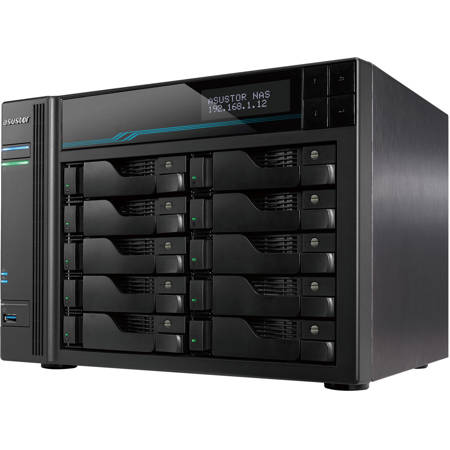
The Lockerstor 10 Pro features a powerful Intel 9th generation Xeon with four cores. Not only is the Xeon extremely fast in both read and write speeds, but also lends incredible performance to virtual machines and Docker apps.
Powerful Hardware and Top flight performance
Intel Xeon 9th generation Quad-Core CPU
Supports DDR4-2666 ECC RAM
Dual M.2 NVMe SSD ports for fast caching
Brings the smoothest work experience with 10-Gigabit Ethernet, triple 2.5-Gigabit ports and USB 3.2 Gen2 ports
Supports Wake on LAN on 2.5-Gigabit Ethernet ports
360 Degree Backup solution and enterprise virtualization application
MyArchive cold storage backups
Snapshot Center, Cloud Backup Center, DataSync Center
Complete iSCSI/IP-SAN and NFS support
VMware, Citrix and Hyper-V ready
Supports virtualization and Docker apps
10-Gigabit and Triple 2.5-Gigabit ports. Extreme speeds.
The all new Lockerstor 10 Pro NAS features a powerful Aquantia 10-Gigabit Ethernet port as well as triple Aquantia 2.5-Gigabit Ethernet ports. With a managed switch that supports multiple speeds, take advantage of up to 10 Gbps of speed on the 10-Gigabit port or up to 7.5 Gbps on all 2.5-Gigabit ports.
Note: One Cat 6a and three Cat 5e cables included.
10-Gigabit and Triple 2.5-Gigabit ports. Extreme speeds.
Windows sequential read and write (RAID 5)
10 GbE x 1
1,181 MB/S Read
1,178 MB/S Write
2.5 GbE x 3
848 MB/S Read
847 MB/S Write
Server-grade ECC memory
ECC memory is memory usually used in servers for detection and correction of the most common kinds of data corruption. This can help prevent data loss due to electromagnetic interference or crashes, making the Lockerstor 10 Pro our most stable NAS ever.
Thumbscrews for easy M.2 SSD installation
Regular screws are difficult to handle
Thumbscrews are easier to manipulate
Two M.2 2280, 2260 or 2242 slots supporting NVMe and AHCI SSDs
Ten Bays with Two M.2 SSD Slots for Flexible Cached Storage
The Lockerstor 10 Pro is a cost-effective high capacity NAS designed for enterprise environments. The Lockerstor 10 Pro is flexible, supporting online capacity expansion and replacement. Online capacity expansion enables you to replace hard drives inside the NAS without downtime. If your budget and/or storage requirements are small, the Lockerstor 10 Pro enables your NAS to grow alongside your needs by first purchasing smaller drives and then add more drives as you need. Additional drives can be purchased as your storage requirements grow and all drives can be fully replaced while continuing to use your NAS. Combining this with ASUSTOR's MyArchive cold storage technology enables you to store a virtually unlimited amount of information.
SSD Cache
SSD caching on the Lockerstor 10 Pro brings SSD-like speeds to regular hard drives. Turbocharge your NAS by adding one or two SSDs to the M.2 slots inside your Lockerstor 10 Pro. Read and write files at speeds of over 1100 MB/s and watch as even big files are transferred over in seconds.
24/7 Reliability and Durability
All ASUSTOR NAS are designed for and are suitable for 24/7 use. ASUSTOR NAS devices have also undergone rigorous tests, such as drop tests and burn tests to test durability in extreme conditions. Heatsinks were added to sensitive components to dissipate heat, helping to maintain the longevity of the device.
Protected From the Inside and Out
Protect your data from loss, damage and attacks with the Lockerstor 10 Pro. ASUSTOR is better protected by running the Linux-based ADM, employing a built-in firewall, ClamAV Antivirus, MyArchive and ADM's various backup tools help protect your data from loss or damage.
Network Attack Protection
Firewall
ADM Defender
Secure Data Transmission
VPN connection
SSL certificate connection
Automatic logout
Internal Data
MyArchive offline backup
AES-256 folder encryption
Antivirus software - ClamAV
Access Control
File/folder/app isolation
2-Step Verification
Wake-on-LAN (WOL)
Protected From the Inside and Out
Protected From Ransomware
The Lockerstor comes with the most up-to-date version of ADM to help protect against ransomware attacks. Snapshot Center and Btrfs provide the ability to efficiently create snapshots to protect and easily restore lost data. Other security features found on the Lockerstor are the ability to create one or more replacement administrator accounts, a firewall by ADM Defender that features blacklists and whitelists, the ability to change default ports, disable SSH and Terminal to prevent remote attacks. MyArchive cold storage hard drive security can also be increased by implementing AES 256bit encryption.
Comprehensive Backup Solutions
ASUSTOR's comprehensive backup solution provides more than twelve backup options, including, but not limited to Amazon S3, Dropbox, Google Drive, and OneDrive. ASUSTOR Backup Plan for Windows as well as Time Machine for macOS provide easy backups for desktop and laptops while MyArchive removable hard drives provide long term storage. Btrfs is now supported and with Snapshot Center, can take snapshots of your information in the event of unintentional modification. Restore previous versions easily with Snapshot Center.
Exclusive MyArchive Cold Backup Technology
Unlimited Capacity Expansion
MyArchive cold storage technology turns NAS hard drives into removable storage archive drives. Directly insert a MyArchive hard drive into a free bay inside your NAS to easily access, backup and share terabytes of content.
Virtual Storage
The Lockerstor 10 Pro provides enterprise-class hardware and software and is compatible with VMware, Citrix, Hyper-V virtual storage environments. iSCSI/IP-SAN and NFS support allow it to seamless integrate with existing IT environments, providing an optimal and cost-effective storage solution.
Virtual Applications with Virtualbox
Deploy all kinds of operating systems to your NAS
ADM 3.5 brings a newer Linux Kernel, providing better system security and stability
Portainer - Easy Docker Deployments
Even more possibilities for ADM with Portainer for Docker images. With thousands of images, Portainer can download and deploy more types of programs than ever before. Portainer is incredibly user friendly and employs a graphical interface to make docker images easier to deploy than ever.
Snapshot Center
Snapshot Center is a new feature for ASUSTOR NAS devices to utilize Btrfs and iSCSI volumes to take snapshots of the information inside a NAS. Snapshot Center supports up to 256 snapshots of a volume and can be done every five minutes, creating a backup that can be restored easily if data is damaged or lost.
MyArchive now supports Btrfs and snapshots. Btrfs for MyArchive supports snapshots and version history to help protect against accidental deletions or modifications.
DataSync Center
DataSync Center combines multiple cloud services into a single app. DataSync Center includes, but is not limited to Google Drive, Dropbox and OneDrive and supports multitasking as well as multiple accounts. Control your data with instant and scheduled backups as well as using Cloud Backup Center to create a hybrid cloud that keeps your data online and offline, keeping your data protected.
Cloud Backup Center
Cloud Backup Center brings support for various business cloud services including, but not limited to Backblaze B2, Baidu Cloud, IBM Cloud, Rackspace Cloud Files, Microsoft Azure Blob Storage and Alibaba Cloud. Control your data with instant and scheduled backups as well as using Cloud Backup Center to create a hybrid cloud that keeps your data online and offline, keeping your data protected.
ASUSTOR EZ Sync
All new UI. Simpler and easier to operate. View NAS information quickly
More complete settings - offering detailed folder lists. Easily select folders and files not in a folder
Notifications for abnormal status
Support 2-step verification increase account safety
Improve NAS connecting and file sync system stability for better user experience
ASUSTOR EZ Sync
Cross-Platform Multi-User Access
ASUSTOR NAS devices provide seamless cross-platform and multi-user access, allowing you to easily connect to your NAS from Windows, macOS or almost any device with a web browser no matter if it is a desktop, notebook, tablet or smartphone.
16384 Accounts
512 Groups
512 Shared Folders
2048 Concurrent Connections
Custom Off-peak hours
Your time is important, so ADM provides a feature to ensure that your NAS performs at top speed when you want it to. Peak times enable your NAS to turn off certain background processes and maintenance at certain times of the day and are customizable while off-peak hours will return background processes to their normal state. Enable off-peak hours when the NAS is not actively being used, for example, when sleeping to ensure an optimal experience.