


+8
more
more

Need help? Ask our experts.
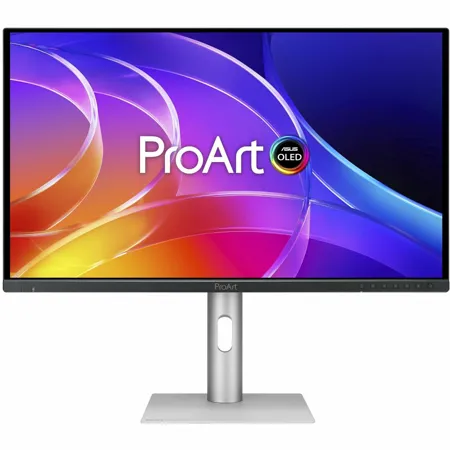
ProArt Display OLED PA279CDV is a 26.5-inch 4K UHD QD-OLED professional monitor designed for content creators, video editors, and color-critical workflows. It features 1000-nit peak brightness, 99% DCI-P3 color gamut, Delta E <1.5 factory calibrated, ensuring highly-accurate colors and exceptionally-detailed visuals. Its 120Hz refresh rate enables creators to develop fast-rendering games and perform artwork quality checks on a single display. The monitor also features an anti-scratch film that provides up to 2.5x better protection compared to previous-gen OLED panels.
Empowering Content Creators
Filmmakers & Video Editors
It boasts high-resolution visuals, a wide color gamut, true blacks, and ultrahigh contrast, making it a must-have tool for 4K HDR content creation.
Game Developers
The high resolution, wide color gamut, and 120Hz refresh rate enable game developers to design and review game artwork on a single display.
3D/VFX Artists
The 120Hz refresh rate and 4K resolution provide 3D/VFX artists with ultra-smooth, highly detailed visuals. Higher refresh rates generally reduce flicker, making motion appear more fluid and providing a more comfortable viewing experience.
Designers & Photographers
The ultra-high-quality visuals ensure that creative details aren't lost in the journey from click to print or production.
Amazing QD-OLED Experiences
True Professional-Grade Colors
The studio-grade 99% DCI-P3 gamut ensures richer, more vivid colors, making it the ideal monitor for both color-intensive projects and other creative pursuits.
Ultra-Accurate Color
ProArt displays are factory calibrated to guarantee industry-leading color accuracy. Each monitor undergoes stringent testing to ensure smooth color gradation.
Deeper Blacks, Brighter Whites
A peak brightness of 1000 nits (3% area) allows for outstanding contrast between the deepest black and gleaming white hues.
Advanced Panel Design
A graphene film behind the QD-OLED panel helps reduce operating temperature. Graphene is the thinnest and strongest nanomaterial in the world and has high thermal conductivity to help effectively dissipate heat.
Anti-Scratch Film
An added film increases the panel's hardness to offer 2.5x better scratch resistance versus previous-gen QD-OLED panels. This innovative layer provides peace of mind, ensuring the display remains protected from accidental abrasions during cleaning or handling, extending the monitor's lifespan.
Ideal for Game Development and Video Editing
Experience ultra-smooth performance with a 120Hz refresh rate and Variable Refresh Rate (VRR) technology, empowering creators to work seamlessly with fast-rendering visuals and perform precise quality checks-all on a single display. Equipped with HDMI 2.1 and 4K@120Hz support, it delivers exceptionally fluid motion and stunning detail for an immersive creative experience.
True Color-Right Out of the Box
Color professionals rely on color-accurate displays to ensure that their creations look exactly as intended. Each ProArt display is calibrated in the factory to meet Calman Verified standards and to achieve Delta E<1.5 color accuracy.
The Perfect Monitor for Your Mac
ProArt Display combines professional-grade performance and Mac-tested compatibility. Offering vibrant colors and versatile connectivity, ProArt Display is ideal for Mac users seeking exceptional color accuracy and unmatched productivity.
Instant Display Adjustment
Enjoy intuitive controls with ASUS DisplayWidget Center for macOS.
Seamless MacBook Controls
Use the MacBook brightness buttons to control the monitor's brightness with ASUS DisplayWidget Center installed.
M Model P3 Color
M Model P3 color settings perfectly match ProArt Display colors with your macOS devices.
Sharp Details and Accurate Colors
The high pixel density ensures crisp visuals and an expansive workspace, while Delta E < 1.5 accuracy and a wide color gamut keep colors consistent and accurate.
Supersmooth Viewing
A variable refresh rate of up to 120Hz ensures compatibility with Macs featuring Apple ProMotion technology.
Convenient Connectivity
The USB-C port caters to all creative needs.
Trusted Compatibility
Tested by trusted third-party labs to ensure compatibility.
Seamless Monitor Management
ASUS DisplayWidget Center is software that provides an intuitive interface to adjust monitor settings, including brightness, contrast, and color temperature. Whether a monitor is used for everyday viewing or for professional creative work, users can effortlessly find the optimal display settings for enhanced viewing experiences.
Effortless Multi-Display Consistency
ColorSync allows users to synchronize display settings across monitors of the same model through ASUS DisplayWidget Center software. This feature makes it easy to apply consistent settings-such as color mode and brightness-across multiple displays without manual adjustment on each unit.
ASUS OLED Care
ProArt OLED series monitors include ASUS OLED Care features that are proven to safeguard the display against image burn-in.
Panel Protection
Provides Sensing Protection, Pixel Shift, Screen Saver, ISP (Global), and Off Sensing to prevent static images from being displayed continuously on your screen. This feature offers two levels of adjustment to choose from.
Image Protection
Dynamically detects and identifies the task bar, logos, and video edges, reducing the brightness around them to minimize the risk of burn-in. This feature offers three adjustable levels to choose from.
Proximity Sensor
Automatically decreases brightness gradually when it detects no user in front of the monitor. There are three adjustable detection ranges available.
Uniform Brightness Setting
OLED displays feature an Auto Brightness Limiter (ABL) to maximize power use. When displaying a white (or bright) image in a particular window, the display automatically dims the image as the window size increases.
The optional Uniform Brightness function in the OSD menu is particularly useful when switching between, or changing the size of windows with vastly different contrast levels as it keeps brightness levels consistent with up to 250 nits for comfortable viewing and more accurate colors, even after hours of use.
Expansive Connectivity
In addition to a USB-C port, PA279CDV offers a wide range of connectivity options, including HDMI 2.1, DisplayPort 1.4 DSC (in and out), USB Type-A, and an additional downstream USB-C port for compatibility with various devices. It also features a headphone passthrough port.
Seamless Multitasking Across Two Devices
Built-in Auto KVM allows for effortless switching and control between two connected laptops or PCs with a single keyboard and mouse, enabling easier multitasking.
Easily Connect Devices
A built-in USB 3.2 hub along the bottom bezel of PA279CDV includes one USB Type-A port and USB-C, allowing for easy connections to a variety of devices and peripherals, as well as charge compatible devices.
ProArt Calibration
ProArt Calibration is a free calibration software that allows users to generate ICC profiles for consistent and reliable color performance. This feature offers greater convenience for color-critical workflows across a wide range of monitors and laptop displays.
Streamline Your Workflow with ProArt CaliContrO
The versatile ProArt CaliContrO MCA02 three-in-one colorimeter works with ASUS-exclusive apps for hardware and software calibration. It also supports the generation of ICC profiles for conventional monitors and laptop screens, enabling comprehensive color management across a wide range of devices. On-Screen Display (OSD) control via MCA02 enables quick adjustments when connected to a compatible monitor, with vibration feedback for enhanced usability. Built-in ASUS Dial features offers instant and precise control for Adobe apps and other applications by enabling customized shortcuts.
