


+5
more
more

See Options
Need help? Ask our experts.
Professional OLED Monitor for Every Creator
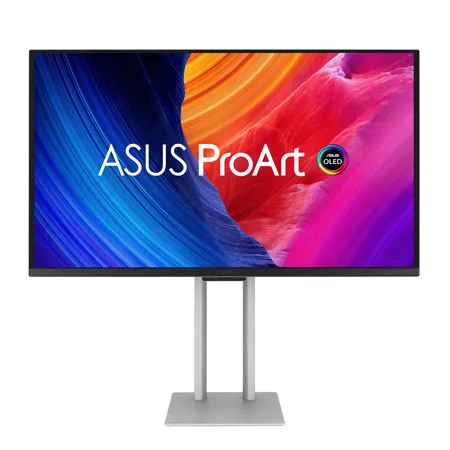
ProArt Display OLED PA27UCDMR is a professional monitor designed for professional content creators. This 26.5-inch 4K HDR display boasts a cutting-edge 1000-nits QD-OLED panel with 99% DCI-P3 gamut, ensuring highly-accurate colors and exceptionally-detailed visuals. Its up to 240Hz refresh rate enables creators to develop fast-rendering games and perform artwork quality checks on a single display. Additionally, support for multiple HDR format makes PA27UCDMR the perfect monitor for working on fast-moving HDR content.
Empowering Content Creators
Filmmakers & Video Editors
A high-resolution monitor with wide color gamut, true black performance, and ultrahigh contrast is a must-have tool when producing 4K HDR content.
Colorists
PA27UCDMR is factory calibrated for industry-leading color fidelity and Delta E<1 accuracy. It also offers hardware calibration support for consistent color performance.
Game Developers
A high-resolution monitor with wide color gamut and a 240Hz refresh rate for smooth rendering allows game developers to design and review game artwork on a single display.
3D/VFX Artists
The 240Hz refresh rate and 4K visuals provide 3D/VFX artists with supersmooth, detailed visuals. Higher refresh rates generally reduce flicker so moving visuals appear more fluid, allowing for more comfortable viewing experiences.
Designers & Photographers
PA27UCDMR delivers ultra-high-quality visuals and ensures that creative details aren't lost on the journey from click to print or production.
Amazing QD-OLED Experiences
True Professional-Grade Colors
The studio-grade 99% DCI-P3 gamut offered by PA27UCDMR ensures richer, more vivid colors, making it the ideal monitor for both color-intensive projects and other creative pursuits.
Ultra-Accurate Color
ProArt displays are factory calibrated to guarantee industry-leading color accuracy. Each monitor undergoes stringent testing to ensure smooth color gradation.
Deeper Blacks, Brighter Whites
A peak brightness of 1000 nits (3% area) allows for outstanding contrast between the deepest black and gleaming white hues.
Advanced Panel Design
A graphene film behind the QD-OLED panel helps reduce operating temperature. Graphene is the thinnest and strongest nanomaterial in the world and has high thermal conductivity to help effectively dissipate heat.
Ideal for Game Development and Video Editing
PA27UCDMR offers up to a 240Hz refresh rate and features variable-refresh-rate (VRR) technology to allow creators to work on fast-rendering visuals and conduct quality checks-all on a single display. HDMI 2.1 with 4K@240Hz support results in supersmooth visuals with exceptional levels of detail.
Intuitive and Intelligent Calibration
ProArt Hardware Calibration
ASUS ProArt Hardware Calibration software works in both SDR and HDR modes. It saves all color parameter profiles directly on the ProArt monitor's internal scaler IC chip instead of the PC. Users can also use ProArt Calibration to schedule regular calibration intervals.
ProArt Color Center
ProArt Color Center is an online tool designed to help administrators manage the color accuracy of multiple ProArt displays that feature hardware calibration support. Users can check when the monitors were last calibrated, next recommended calibration date, and schedule calibration times for multiple monitors-even if they're using different color parameters and/or situated in different locations.
Seamless Calibration
ProArt Display seamlessly integrates with third-party professional hardware calibration software, including Calman and Light Illusion ColorSpace CMS. It also supports writing color parameters back into the ProArt displays, making the calibration process faster and easier.
ASUS OLED Care
ProArt Display OLED series monitors include ASUS OLED Care features that are proven to safeguard the display by minimizing the likelihood of image burn-in.
Panel Protection
Provides Sensing Protection, Pixel Shift, Screen Saver, ISP (Global), and Off Sensing to prevent static images from being displayed continuously on your screen. This feature offers two levels of adjustment to choose from.
Image Protection
Dynamically detects and identifies the task bar, logos, and video edges, reducing the brightness around them to minimize the risk of burn-in. This feature offers three adjustable levels to choose from.
Proximity Sensor
Automatically decreases brightness gradually when it detects no user in front of the monitor. There are three adjustable detection ranges available.
Uniform Brightness Setting
OLED displays feature an Auto Brightness Limiter (ABL) to maximize power use. When displaying a white (or bright) image in a particular window, the display automatically dims the image as the window size increases. The optional Uniform Brightness function in the OSD menu is particularly useful when switching between, or changing the size of windows with vastly different contrast levels as it keeps brightness levels consistent with up to 250 nits for comfortable viewing and more accurate colors, even after hours of use.
The Perfect Monitor for Your Mac
ProArt Display combines professional-grade performance with sleek design and Mac-tested compatibility. Offering vibrant colors and versatile connectivity, ProArt Display is ideal for Mac users seeking exceptional color accuracy and unmatched productivity.
Instant Display Adjustments
Enjoy intuitive display control with ASUS DisplayWidget Center for macOS.
Seamless MacBook Controls
Use the MacBook brightness buttons to control the monitor's brightness with ASUS DisplayWidget Center installed.
Supersmooth Viewing
A variable refresh rate of 240Hz ensures compatibility with Macs featuring Apple ProMotion technology.
Convenient Connectivity
A single Thunderbolt 4 port caters to all creative needs.
Trusted Compatibility
Tested by trusted third-party labs to ensure compatibility.
Create In Ultra-Vivid HDR
ASUS Smart HDR Technology
Exclusive ASUS Smart HDR technology enables this monitor to support multiple HDR formats, including Dolby Vision, HLG and HDR10.
Dolby Vison
Transforms the viewing experience with unparalleled brightness, contrast, and colors. The ProArt Display is the world's first computer monitor with Dolby Vision support, making it ideal for professional image production, color grading, and mastering
HLG
Allows users to view and create material for broadcast and satellite TV platforms such as BBC iPlayer, Japan NHK TV, and DirecTV
HDR10
Support ensures compatibility with existing streaming video services and a growing list of HDR-enabled games
Multiple PQ Curves
ASUS ProArt Displays support multiple HDR10 curves, including PQ Hard Clip, PQ Optimized and PQ Basic, which can cover all content creation needs.
PQ Hard Clip
This setting preserves the PQ curve until it displays maximum luminance. Anything brighter will be mapped to the maximum luminance of the display.
PQ Optimized
This PQ curve setting reproduces accurate gradations that correspond to the maximum brightness of the monitor to deliver optimized HDR performance.
PQ Basic
This setting offers general HDR performance.
HDR Preview
HDR Preview enables a direct camera-to-monitor connection to view captured HDR content with its full tonal range. It also works within most video editing software platforms, providing accurate simulations of the final output for an easier, more streamlined editing experience.
Expansive Connectivity
ProArt Display offers dual Thunderbolt 4 ports, DisplayPort1.4 DSC and HDMI(v2.1) port for compatibility with current and future displays and peripherals. One of the Thunderbolt 4 ports offers up to 96W Power Delivery to charge devices as well as the ability to daisy-chain several displays though a single port, without the need for a hub or switch. A built-in USB 3.2 hub includes one USB Type-A port and Type-C, allowing for easy connections to a variety of devices and peripherals, as well as charge compatible devices.
Seamless Monitor Management
ASUS DisplayWidget Center is software that provides an intuitive interface to adjust monitor settings, including brightness, contrast, and color temperature. Whether a monitor is used for everyday viewing or for professional creative work, users can effortlessly find the optimal display settings for enhanced viewing experiences.
Effortless Multi-Display Consistency
ColorSync allows you to synchronize display settings across monitors of the same model through ASUS DisplayWidget Center software. This feature makes it easy to apply consistent settings-such as color mode and brightness-across multiple displays without manual adjustment on each unit.
Streamline Your Workflow with ProArt CaliContrO
The versatile ProArt CaliContrO MCA02 three-in-one colorimeter works with ASUS-exclusive apps for hardware and software calibration. It also supports the generation of ICC profiles for conventional monitors and laptop screens, enabling comprehensive color management across a wide range of devices. On-Screen Display (OSD) control via MCA02 enables quick adjustments when connected to a compatible monitor, with vibration feedback for enhanced usability. Built-in ASUS Dial features offers instant and precise control for Adobe apps and other applications by enabling customized shortcuts.







