


+7
more
more

See Options
Need help? Ask our experts.
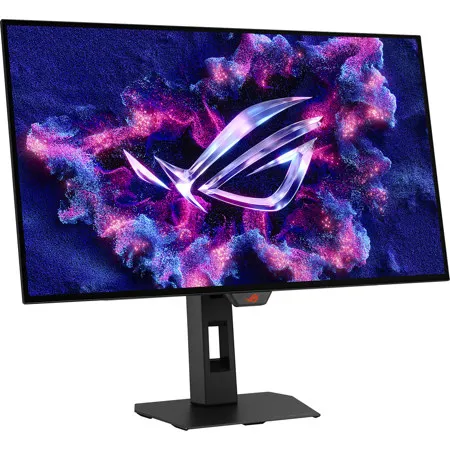
The ROG Strix OLED XG27AQDMGR is a 27-inch True Black Glossy WOLED gaming monitor that offers 1440p with a 240 Hz refresh rate. Featuring the new Neo Proximity Sensor within the ASUS OLED Care Pro suite, the monitor is able to detect when the user is away and automatically transition to a black screen to guard against panel burn-in. Thanks to a compact stand, the XG27AQDMGR takes up minimal desktop space. Plus, it offers users an extensive array of connectivity options, including DisplayPort 1.4 (DSC), two HDMI 2.1, and USB usb.
Supersharp and clear imagery
Exclusive True Black Glossy OLED
The ROG Strix OLED XG27AQDMGR features a new True Black Glossy OLED panel with a zero-haze optical layer that presents deep blacks under any lighting. Its advanced anti-reflective coating reduces ambient reflections by 38% compared to previous-gen glossy WOLEDs, ensuring distraction-free gaming even in brightly lit rooms.
Third-Generation WOLED Technology
Clear Pixel Edge
The Clear Pixel Edge algorithm reduces green and red fringing on text and lines for improved reading experiences.
Improved motion clarity
Extreme Low Motion Blur
Exclusive ASUS Extreme Low Motion Blur technology reduces ghosting and motion blur.
OLED Advantages
The extremely high contrast ratio offered by the OLED panel results in the deepest black hues and vivid colors. Plus, an astounding 0.03ms gray-to-gray response time ensures supersmooth, low-latency gameplay.
• 1.5M:1 contrast ratio
• 0.03 ms response time
• 99% DCI-P3 gamut
• Delta E < 2
Screen Protection
ASUS OLED Care Pro
New ASUS OLED Care Pro technology provides a full set of customizable monitor settings to protect and ensure the longevity of the OLED panel. Plus, it includes the new Neo Proximity Sensor designed to guard against panel burn-in. All settings can be easily managed via DisplayWidget Center.
Neo Proximity Sensor
The built-in Neo Proximity Sensor precisely detects the user's distance from the monitor. When the user steps away, the monitor transitions to a black image to protect against panel burn-in; when the user returns, content is instantly restored onscreen. Detection distance can be customized to suit personal preference, ensuring maximum convenience and protection.
Pixel cleaning
Recalibrates the screen when the monitor has been active for several hours-a process that takes just a few minutes and activates automatically when the monitor is turned off.
Screen Move
Pixel locations are slightly shifted periodically to help prevent burn-in, and users can choose between several movement levels.
Screen Saver
Automatically dims the screen after two minutes of inactivity.
Logo brightness adjustment
Automatically detects static onscreen logos and reduces their brightness to correct for potential picture-quality issue.
Outer dimming control
Automatically identifies and adjusts the brightest areas of the screen to reduce the risk of burn-in.
Target mode
Dims the entire screen, except for a selected pinned window, which maintains its current brightness setting.
Built to Last
Worry-free OLED Monitor
ROG OLED monitors are engineered to deliver stunning visuals for years to come. An innovative custom heatsink and a unique internal airflow design improve cooling and reduce the risk of burn-in.
ROG OLED Anti-Flicker
ROG-exclusive OLED Anti-Flicker technology offers three refresh rate ranges - High, Mid, Off - to reduce flicker during frame rate fluctuations and maintain an immersive gaming experience.
Compact and Ergonomic Design
The new ROG Strix OLED series monitors feature a new compact stand that's 30% smaller than those found on previous-generation XG monitors, freeing up valuable desk space for a keyboard and mouse. The stand offers tilt, swivel, pivot and height adjustments for the ideal viewing position. The display is also VESA wall-mount-compatible.
Aspect Ratio Control
For competitive gamers who are more familiar with smaller 1080p monitors, the XG27AQDMGR can be set to replicate a 24.5-inch (esports mode) display, as well as other visual modes.
DisplayWidget Center
DisplayWidget Center is a powerful monitor management software designed to help users optimize, personalize, and fully utilize their display via a mouse - so there's no need to access the OSD menu. Additionally, DisplayWidget Center offers firmware update notifications and includes a direct update option. Users can also import or export display configurations for sharing.
Play Smarter with AI Assistant
The AI Assistant in XG27AQDMGR includes AI Visual, Dynamic Crosshair, and Dynamic Shadow Boost. These features leverage AI technology to help gamers practice more effectively to improve their skills.
Dynamic Crosshair
Automatically changes the crosshair to a color that contrasts with the background, so it stands out for more accurate aim.
Dynamic Shadow Boost
Automatically enhances dark areas of the scene to make it easier to spot enemies hiding in dim areas of the map.
Al Visual
Automatically detects what's onscreen and adjusts to provide the best default or user-preset monitor settings through DisplayWidget Center.
Uniform brightness
When activated, the ROG-exclusive Uniform Brightness setting within the OSD menu decreases peak brightness to keep levels consistent for better viewing-even when changing the size of bright white windows. It also makes marathon gaming sessions much more comfortable on the eyes.
In-game enhancements
Smooth and Responsive
The XG27AQDMGR features AMD FreeSync Premium Pro technology and NVIDIA G-SYNC compatibility, ensuring super-smooth, tear-free visuals with low latency.
Game plus
The ASUS-exclusive integrated Game Plus hotkey offers in-game enhancements. Co-developed with input from pro gamers, Game Plus enables gamers to practice and improve their gaming skills with the ROG Gaming Al technology-enhanced Dynamic Crosshair.
Game visual
ASUS Game Visual technology offers seven pre-set display modes to optimize visuals for different types of content. This unique feature can be easily accessed using a hotkey or via the OSD settings menu.
Flicker-Free Technology
TUV Rheinland-certified ASUS Flicker-Free technology eliminates flicker, ensuring comfortable viewing experiences. This technology helps minimize eyestrain and other potential issues typically associated with extended hours of viewing.
Low Blue Light Technology
The new hardware-based ASUS Low Blue Light technology reduces potentially harmful high-energy blue-light emissions while offering color performance that's better than monitors with software-based filtering solutions.
Extensive Connectivity
Extensive connectivity options such as DisplayPort 1.4 with Display Stream Compression (DSC), two HDMI 2.1, for a wide array of multimedia devices.







